This thread has been locked.

If you have a related question, please click the "Ask a related question" button in the top right corner. The newly created question will be automatically linked to this question.

CCS5.2.1.00018 questions

Other Parts Discussed in Thread: SYSBIOS

I've got a few questions regarding building C6746 projects in CCS5.

XDCtools 3.23.3.53, SYS/BIOS 6.33.5.46 and 6.33.6.50

I've seen similar behavior with CGT 7.3.6, 7.3.7, and 7.4.1.

1)  I've got a main project, a SYS/Bios project, and a number of library projects in my workspace.


The main project depends on the SYS/Bios project and the library projects, and the library projects depend on the SYS/Bios project.

If I do a build clean on the entire workspace and then build the main project, it builds some of the library projects before building the SYS/Bios project, leading to a large number of compilation errors (such as "could not open source file "ti/sysbios/bios.h").

2) How do I set the Performance Advice option to generate an output file when I have more than one file being compiled in a project.  It outputs to the build console by default; if I sent the Performance Advisor / Specified File option it keeps overwriting that file so I only get the results for the last file.  If I set the Performance Advisor / Specified Directory option it just ignores it unless I have a filename specified, then it just overwrites it with the last file built.

3) The build logging setting does not seem to be kept with the project files; instead it is in the CCS5 workspace metadata.  How can I set this in my projects so that it is stored with the project and is portable between different developers?

4) Every time I switch between different workspaces I encounter a long pause; looking at the details it is migrating legacy projects.  Why does it continue to try and migrate projects that are already current and in the workspace?

5) Sometimes when I have build errors in a project the red X marker on the Project Explorer and the list of problems in the problems window are not cleared after I fix the problems and rebuild.  I need to go into the problems window and delete the lines manually.

Thanks,

  Peter Steinberg

  • peter steinberg said:

    1)  I've got a main project, a SYS/Bios project, and a number of library projects in my workspace.


    The main project depends on the SYS/Bios project and the library projects, and the library projects depend on the SYS/Bios project.

    If I do a build clean on the entire workspace and then build the main project, it builds some of the library projects before building the SYS/Bios project, leading to a large number of compilation errors (such as "could not open source file "ti/sysbios/bios.h").

    I will get someone to look at this one.

    peter steinberg said:
    2) How do I set the Performance Advice option to generate an output file when I have more than one file being compiled in a project.  It outputs to the build console by default; if I sent the Performance Advisor / Specified File option it keeps overwriting that file so I only get the results for the last file.  If I set the Performance Advisor / Specified Directory option it just ignores it unless I have a filename specified, then it just overwrites it with the last file built.

    I will get someone from the compiler forum to reply to this.

    peter steinberg said:
    3) The build logging setting does not seem to be kept with the project files; instead it is in the CCS5 workspace metadata.  How can I set this in my projects so that it is stored with the project and is portable between different developers?

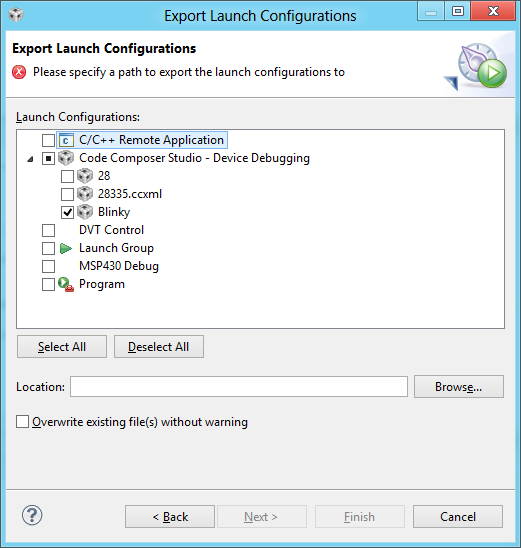
    Do you mean the option to output console output to file?  (i.e. right click on your session in the debug view and go to common and select to log to file)  If so that option is stored in something called the launch (or debug) configuration.  You can export your launch and import it on another machine.  From the file menu select export.  Select Launch configuration.  You will get a dialog asking what to export.  Here is what I select to export the launch configuration from my project called blinky.

    peter steinberg said:
    4) Every time I switch between different workspaces I encounter a long pause; looking at the details it is migrating legacy projects.  Why does it continue to try and migrate projects that are already current and in the workspace?

    Odd.  I wouldn't expect switching a workspace to cause a import since the project is already imported into the workspace.  Maybe the workspaces were created with different versions of CCS?  I will see if anyone has ideas on this.

    peter steinberg said:
    5) Sometimes when I have build errors in a project the red X marker on the Project Explorer and the list of problems in the problems window are not cleared after I fix the problems and rebuild.  I need to go into the problems window and delete the lines manually.

    This one happens to me.  Fortunately most of the projects that I work with are small so I just do a clean and they go away.  In CCSv5.2.0 I would get this for compiler and linker errors.  In 5.2.1 there was a fix put in place but I still see the problem for linker errors.  Is that what you see?

    John

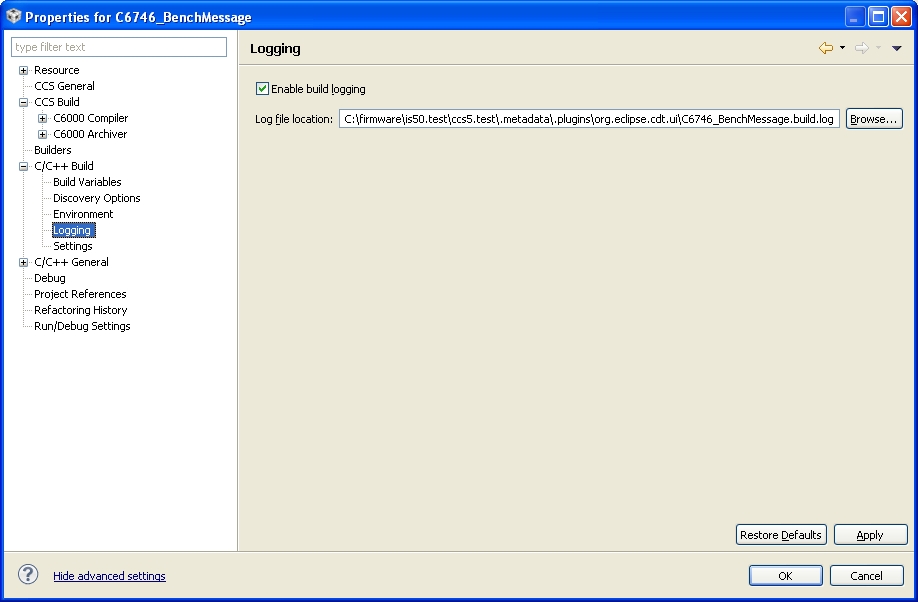
  • 3) No, I mean the build output:


    4) The workspace & projects were creating in CCS5

    5) It might just be for linker errors; I haven't checked that carefully.

    Peter

  • 3) You can change the path where the log file is going.  By default it places it within the metadata of your workspace but you can change that.  I have tried putting in a variable there but haven't had any luck.  Also tried just a filename but the log doesn't seem to get created then.  Thus to make it somewhat portable you would have to specify a pretty generic location like C:\logs\project.log

    john

  • peter steinberg said:
    2) How do I set the Performance Advice option to generate an output file when I have more than one file being compiled in a project.  It outputs to the build console by default; if I sent the Performance Advisor / Specified File option it keeps overwriting that file so I only get the results for the last file.  If I set the Performance Advisor / Specified Directory option it just ignores it unless I have a filename specified, then it just overwrites it with the last file built.

    I filed SDSCM00045207 in the SDOWP system to have this addressed.  Feel free to follow it with the SDOWP link below in my signature.  I'm sorry, but I can't think of a workaround right now.  

    Thanks and regards,

    -George

  • Georgem said:
    I'm sorry, but I can't think of a workaround right now.

    Well, I thought of one.  In the text box for the option --advice:performance_file enter: $<.adv .  For the source file my_code.c, this will cause the advice to be written to the file my_advice.c.adv in the same directory.  I use the extension "adv", but any extension will do.  

    Hope this helps ...

    -George

  • Thanks, the $< solution works well enough for the moment.

    Peter