A related question is a question created from another question. When the related question is created, it will be automatically linked to the original question.
If you have a related question, please click the "Ask a related question" button in the top right corner. The newly created question will be automatically linked to this question.
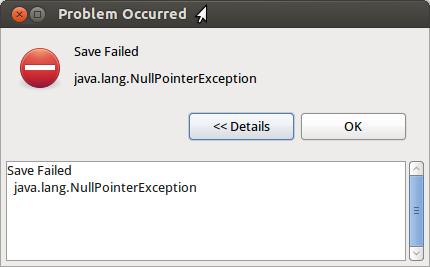
Java Null Pointer Exception when saving SYS/BIOS config file
what Linux version are you running? Do you have full permissions? Do you launch with the same settings as you installed? (Ie install and launch as sudo or as user) Did you install over an exisiting version? This can be problematic. Do you have other working versions? Have you checked all dependencies?
I'm using Ubuntu 12.04 x64 linux version, running CCS as user. The same user as CCS was installed.
Before I used CCS version 5.2 self updated up to 5.2.1, which works without such error.
I have main installation root directory /home/ti.
When installing CCS 5.3 first I tried to install it into separate directory. The result didn't not satisfied me as there is no way to set CCS root directory name, e.g. it always install under ccs5 directory (/home/ti/ccs5.3/ccs5 in my case) and it can't locate other tools and libraries installed before.
After that I tried to uninstall this 5.3 installation with provided application. Uninstallation process hanged showing "Clearing registry" message or something like that (there is no any registry in linux, doesn't matter).
In order to cleanup installation, I simply deleted CCS 5.3 directory, as well as previous CCS version directory. I deleted also /home/ti/ti and /home/ti/.TI directories. I hope those are the only directories, used by CCS to store settings, as in my system user doesn't have permissions to create or write files in any directories except it's own home.
After that I installed CCS 5.3 again, now into /home/ti, so it created /home/ti/ccs5 directory and unpacked contents inside. During the first launch it automatically detected all other products and libraries installed before.
Seems except this error, which really doesn't affect anything as despite this message configuration file always saved, and some problem with update, which I reported here, everything else works fine.