This thread has been locked.

If you have a related question, please click the "Ask a related question" button in the top right corner. The newly created question will be automatically linked to this question.

java.lang.NullPointerException

Other Parts Discussed in Thread: OMAPL138

I'm having a weird problem with:     java.lang.NullPointerException

I followed the trouble-shooting steps conveniently given in TI webpage:  Troubleshooting CCSv5

  1. I cleaned my system:
    1. Reset perspective
    2. Deleted project from workspace
    3. Deleted .metadata file
    4. Started CCS with option: -clean
  2. Imported an existing CCS Eclipse project:    USB_dev_mouse   evmomapl138
  3. Built project
  4. Received error popup saying: 

'Built project' has encountered a problem
Errors occurred during the build.
Details:  Error running builder 'CDT Builder' on project
'usb_dev_mouse_armv5_omapl138_evmOMAPL138'.   
java.lang.NullPointerException

I assume it's a java install problem?  I don't know how to fix it.

CCS Version: 5.4.0.00091

******

 FootNote:  I looked for the install.log.  After un-hiding the directory, there are many files in that directory, but no .log files.  

CCSv5: 'ccs_setup_5.x.x.xxxxx_install.log' located in C:\Program Files (x86)\InstallJammer Registry\ccsv5\<install_random_number>\


    • UPDATE: 

      I un-installed CCS, then did a clean re-install.  Yet I still get exactly the same error message.


      I'm baffled.


      -- Walter


    • Hello,

      Walter Snafu said:
      I assume it's a java install problem?  I don't know how to fix it.

      Actually, it can mean almost anything. But I doubt it is a java install problem.

      What would be useful are the Eclipse logs. Could you attach that to this thread?

      http://processors.wiki.ti.com/index.php/Troubleshooting_CCSv5#CCS_Diagnostic_Logs

      Thanks

      ki

    • Ki-Soo Lee,

      Attached is the Eclipse Log.

      And Thank you for your help.

      -- Walter


    • Hi Walter,

      I think the log was not attached.

      Does this error stops you from doing something?

      I get those kind of errors sometimes and just ignore them. Generally I can keep doing what I'm doing and sometimes I have to restart CCS. But nothing too serious.

      BR

    • I try again.  The eclipse log should be attached.


      FYI:  When I tried to send the eclipse log the first time, it failed.  Here's the reason.  A pop-up window appears, and I am to browse down to locate the file, then click "Save".  At that point the file gets uploaded, while the computer visibly clicks off the time remaining.  Then when it's done uploading, it says in red letters "UPLOADED".  So, I figured it was uploaded, because: (1) it looked like it uploaded, and (2) it positively SAID it uploaded.  The only thing remaining is to get rid of the popup window.  So, I clicked out of the pop-up window, that is, I cancelled out the window.  Unknown to me, that cancelled the upload. 

      Apparently, I was supposed to click the "Save" button A SECOND TIME, which I was reluctant to do, because I didn't want to save the file twice, or have naming conflicts over trying to save a file with the same name.  So I cancelled out the pop-up, rather than click "Save" a second time. 

      I'm explaining this, because I figure other people have run across that too. 

      ******

      Johannes, Yes the Java error causes the build to fail, so I can't do anything till it's solved. 


      TI_Eclipse_Log.zip
    • Hi Walter,

      Could you please also attach the .cproject file from the root of your project?

      Thanks,

      - Baltasar

    • Baltasar,

      Attached is the .cproject file. The uploader forced me to change the file extension. So I changed it to .bmp. 

      Thanks for your help.

      -- Walter

    • Hi Walter,

      Unfortunately, i still cannot reproduce the problem.  Would you be able to attach the complete project?  If not, then maybe the screenshot of the project contents - i think one of the source files has a problematic file extension.

      Thanks,

      - Baltasar

    • Baltazar,

      Attached is a screenshot of the project contents.  The project is the usb_dev_mouse from the Starterware package.  TI instructed me to not copy the files into my workspace, so most of the project is kept in the Starterware directory, rather than my workspace. Windows explorer shows only the following files in my workspace:  .csettings, .ccsproject, .cproject, .project, usb_dev_mouse.cmd   That all looks normal to me. 

      -- Walter


    • Walter,

      I've downloaded Starterware for OMAPL138, and I still can't reproduce the problem - the exact same project imports and builds without problems for me on CCS v5.4.0.00091.  I did have to install ARM v4.6.4 compiler in order to build the project though.  Which version of the ARM compiler are you using to build the project?

      - Baltasar

    • Baltasar,

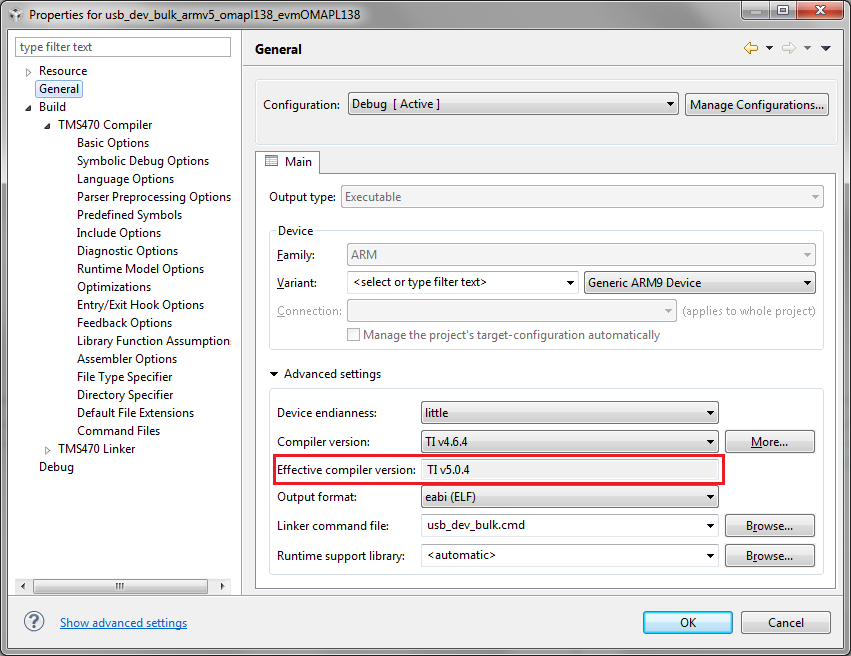
      I'm using ARM compiler TI v5.0.4

      -- Walter


    • Have you tried building with 4.6.4?  The project was created with ARM 4.6.4, and for me it fails to build (with compile errors) with 5.0.4.

      Also, could you attach the <workspace>/.metadata/ directory (zipped)?

      Thanks,

      - Baltasar

    • Baltasar,

      Attached is the .metadata.zip file.

      I do not have ARM compiler v4.6.4.  The 'packing' ability of the v5 compilers is necessary for building any USB projects (and unavailable in v4.x.x).  I doubt the compiler version is the source of my problem. 

      -- Walter

      .metadata.zip
    • Hi Walter,

      Based on your workspace metadata, it seems that you have a partial (custom) install of CCS v5.4.0.  To help me reproduce the problem, could you let me know which components you've selected in the wizard when installing CCS (if you remember)?

      Also, could you try installing a complete CCS v5.4 install and verify if this issue goes away?

      Thanks,

      - Baltasar

    • Hi Walter,

      I was able to reproduce this problem.  I've opened this CQ to track it: SDSCM00047639 NPE during project build after upgrading the project's compiler version.  I will look into fixing this for the upcoming CCS v5.5.0.

      Until the fix is available, just avoid upgrading the project's compiler version - when you import an existing project, if its original compiler is not registered with CCS, then the latest compiler available in CCS will be used to build the project - in your case it's ARM v5.0.4.  If you open the Properties view, you would see that the original compiler version for your project is 4.6.4, but the effective version is 5.0.4.  So you do not need to explicitly upgrade the project to v5.0.4 of the compiler.

      In your case, since you've imported the project without copying it into workspace, once you've upgraded the compiler version, the master copy of the project was modified.  So, you would have to reinstall Starterware to roll all the edited example projects back to their original state.

      Let me know if you have any questions.

      Thanks,

      - Baltasar

    • Baltasar Belyavsky said:

       effective version is 5.0.4.  So you do not need to explicitly upgrade the project to v5.0.4 of the compiler.

      In your case, since you've imported the project without copying it into workspace, once you've upgraded the compiler version, the master copy of the project was modified.  So, you would have to reinstall Starterware to roll all the edited example projects back to their original state.

      Let me know if you have any questions.

      Thanks,

      - Baltasar


      I have a similar problem with C55 project. The original compiler version is TI v4.3.9. The effective compiler version is TI v4.4.1, which is installed with CCS 5.4.0.00091. I do not understand you said in the quote. What have to reinstall? How can I get v4.3.9 installed?

      Thanks,

    • I use CCS v5.4 on a Windows 7 PC. This CCS has installed TI 4.4.1 compiler. How can I have TI 4.3.9 installed? I do not know whether a fresh CCS v.5.4 installation has the option to install TI 4.3.9 installed.

      ezdsp 5535 EVM comes with a CCS v4.2. Does that help to install TI 4.3.9 with CCS v5.4?

      Or, I can install both CCS v4.2 and v5.4 on the same PC?

      thanks,

    • Hi Robert,

      When you import your project into CCS v5.4, your project should build without problems with the v4.4.1 compiler without changing any of the project's properties.  But if you need to use the older compiler for a particular reason, you can download it here: https://www-a.ti.com/downloads/sds_support/TICodegenerationTools/download.htm , and then add it to the list of compilers in your CCS through the Preferences > CCS > Build > Compilers page.

      - Baltasar

    • Hi Baltasar,

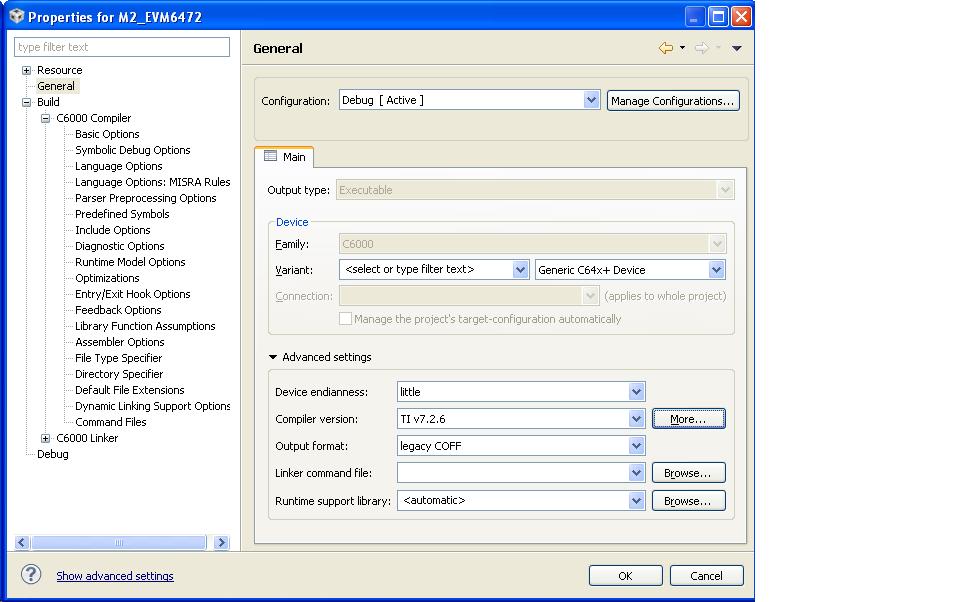
      I am running into the same problem with CCS v5.4.  But I am compiling with the old TI v7.2.6 code gen tool for C64x+ DSP project, instead of the latest TI v7.4.4 compiler.

      I did what Walter mentioned, delete project, removed .meta file from workspace, import project again, etc.  I also did what you suggested there to install the right compiler from the Preferences > CCS > Build > Compilers page already.  Any hints?

      The only thing left I may need to do is to reinstall CCS v5.4, which I am trying to avoid.

      Thanks,

      -- Louis

      Here is the screen shot:

    • Baltasar,

      This happened to me this afternoon as well.  My project built fine this morning under ARM CGT 5.0.6. 

      Then I updated the compiler to 5.1.1.  The 4 libraries in my project build fine.  But the main project gets that java null pointer exception. 

      It does it if I point back to 5.0.6 as well. 

      How can I get out of this, and continue my product development?

      CCS 5.4.0.00091 on Windows XP

      Gerry Belanger

    • I was getting this error in my MSP430 project. Turns out it was some sort of issue with a linked file in my project. If I excluded the file from the build, I would no longer get the error, but of course the compile failed because the excluded file is needed. I then deleted the linked file from the project and the reinstalled the link. The problem then went away. The project was originally compiled on CCS 4.2. I started having problems when I upgraded to CCS 5.

    • Timothy,

      I have no linked files in my workspace/projects. 

      I found a workaround for the problem.  Fortunately, before I upgraded the compiler, I archived my project to source control, and checkpointed it.   The solution was to restore  the main project's .cproject and .ccsproject from the archive.  I was then able to rebuild my project.  Now I can uninstall 5.1.1 and continue development under 5.0.6.

      From the TI CCS road map, 5.5 was originally scheduled for August. Good thing it's late.  Hopefully they can get this fixed in there. Silver lining and all that.

      Gerry Belanger

    • FYI - this issue has been fixed in CCS v5.5.0, which is currently available for download.  The issue is tracked as: SDSCM00047639 NPE during project build after upgrading the project's compiler version.

      The problem appears when user changes the compiler version on certain types of projects in CCS v5.4.0 and earlier.  Thus, please avoid changing the compiler version on your projects until you upgrade to CCS v5.5.0.

      If you already have changed the version, and are experiencing this NPE, you will need to restore your project.  I would recommend, in general, to use some type of a source-control mechanism - either a source-control utility, like CVS (which has a very good Eclipse integration), or even just backing up your projects periodically.

      Thanks, and I apologize for this very crippling bug.

      - Baltasar