This thread has been locked.

If you have a related question, please click the "Ask a related question" button in the top right corner. The newly created question will be automatically linked to this question.

Linkscript section allocation


Hello again,

I have a question about how the Linker uses the Linker Command file.

Say that I have the following sections ( in this order)

1) Section A
2) Section B
3) Section C

Now after linking my program and checking the addresses I notice that the section have been allocated.

1) Section B
2) Section C
3) Section A

Why does the linker change the order of the sections specified in the linker command file?

The GROUP command will not work here as the RUN address are different.

Here is an example problem. I would like to run the sin function out of RAM  but leave the rest of library in FLASH to do this I have instrumented code similar to the following.

.sectionA: RUN = RAM PAGE = 1 LOAD = FLASH PAGE = 0
{
 rts2800_fpu32.lib <sin.obj> (.text)
}

.sectionB LOAD = FLASH PAGE = 0
{
 *(.text)
}

If the linker followed this order SectionA (.text) would have sin.obj allocated in it and then SectionB would contain the remaining .text sections from the other objects.

Instead the Linker is allocating SectionB (.text) first which mean that when SectionA is allowed there is no matching .text section as it has been pulled in by sectionB.

Can someone please help me understand where my mistake is?

Thanks,
Paul

  • I want to repeat your problem back to you, just to make sure I understand it.  All of the .text input sections are being allocated to sectionB, including the sin function.  But you want to the sin function in sectionA.  Is that right?  For now, I presume so.

    I'm not sure why the linker is doing that.  It doesn't make sense.  Unfortunately, we need to be able to reproduce this behavior ourselves before we can offer any help.  Reproducing linker issues is usually tricky business.  A few pointers ...  We don't need source code.  Object files and a linker command file are usually enough.  The resulting .out file does not have to run.  You can often see the problem by inspecting the map file.  Please try to put that together, zip it up, and attach it to your next post.

    Thanks and regards,

    -George

  • George,

    Thank you for the reply.

    I have attached a sample project to this post. 

    I have tried to keep with the sectionA and sectionB theme in the linker command file as in the above example.

    I am using CCS Version: 4.1.2.00027

    Thanks for the help.

    Paul

    TILinkerWorkspace.zip
  • You need to change the order in which the linker sees its input.  Right now, I'm not sure why.  I'll find out and get back to you on that.  For now, I want to show you how to get going again.

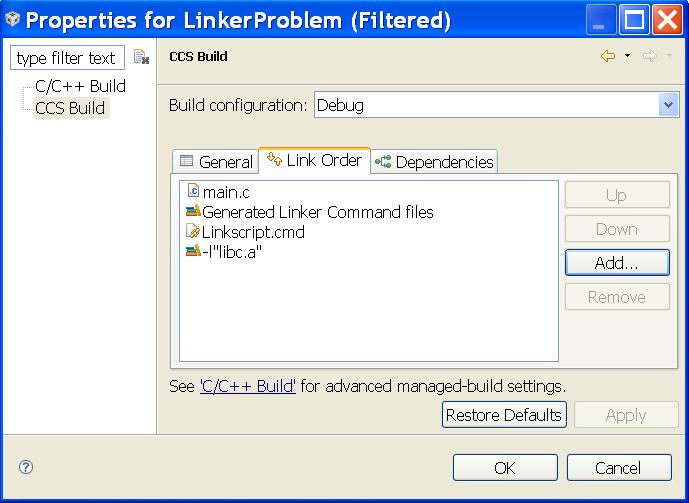
    Bring up the project Build Properties.  Highlight CCS Build in the left panel.  Then click the Link Order tab.  Click Add, then Select All.  Click OK.  Then use the Up and Down buttons to make your file order look the same as the screen shot below.  The key is that the last two files are Linkscript.cmd and -l"libc.a". 

    Thanks and regards,

    -George

  • George,

    Thanks for the reply...I have tried your advice above and the code links as expected. 

    However with over 200 files in the software build hitting the Up/Down button that many times will cause users to go crazy.  I know that you are looking into this further and I am hopeful that you will a easier alternative.  We use the command line interface to generate the workspace and project, so hopefully a solution can be found to dictate order during workspace/project creation.

    Thanks

    Paul

  • I found another workaround that should be easier.  Even after discussion with an expert, we still don't understand why these workarounds avoid the problem.

    The improved workaround ...  Remove the reference to libc.a from the build.   Bring up the Build Properties.  Navigate to C2000 Linker / File Search Path.  Under Include library file or command file as input (--library, -l) select libc.a, then click the delete icon (the one with a small red x).  Click OK, then rebuild.

    I'll file an entry in the SDOWP system to have this situation investigated in yet more detail.  Something is wrong here, and it needs to be understood.

    Thanks and regards,

    -George

  • I filed SDSCM00043174 in the SDOWP system to have this issue investigated and explained.  Feel free to follow it with the SDOWP link below in my signature.

    Thanks and regards,

    -George

  • Thanks for the continued support on this


    Thanks,

    Paul