• Join
  • Sign In with my.TI Login
Texas Instruments
  • Products
  • Applications
  • Tools & Software
  • Support & Community
  • Sample & Buy
  • About TI
Sample & Purchase Cart Sample & Purchase Cart
  • Search
  • Advanced
TI E2E™ Community
  • Support Forums
  • Blogs
  • Groups
  • Videos
  • 简体中文
  • More ...
TI Home » TI E2E Community » Support Forums » DLP & MEMS » DLP LightCrafter Development Platform » changing optics on DLP LightCrafter
Share
DLP & MEMS
  • Forums
Options
  • Subscribe via RSS

changing optics on DLP LightCrafter

changing optics on DLP LightCrafter

This question is answered
Daniel Hochbaum
Posted by Daniel Hochbaum
on Aug 21 2012 15:23 PM
Prodigy120 points

Hi,

I'd like to replace the LEDs and lenses of the lightcrafter with custom optics based around a low-power laser.  Is it possible to remove these components without having to mechanically break anything?  I am comfortable with the optical and electrical design, but I am concerned whether there are interlocks or pieces of plastic welded in place that will make this tricky. Thanks!

Daniel

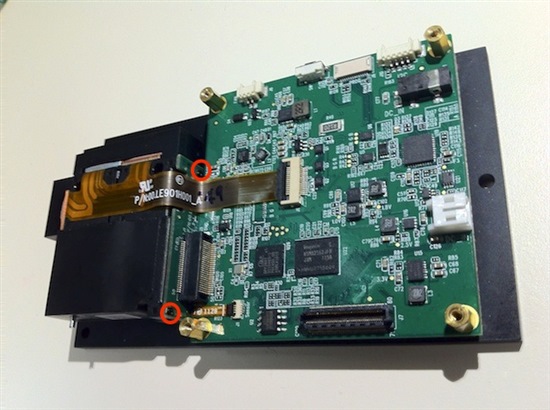
LightCrafter Light Engine Disassembly
Report Abuse
  • Reply
You have posted to a forum that requires a moderator to approve posts before they are publicly available.
All Replies
  • Divya
    Posted by Divya
    on Jan 26 2012 00:09 AM
    Expert3680 points

    Hi Daniel,

    The optics of the LightCrafter can be replaced. I will upload an image of the LightCrafter with these components removed, and highlight the mechanical parts to be taken care of ASAP. Can you please mention the wavelength of the low-power laser you intend to use. Also, it would be helpful to know the end application.

    Thanks & Regards,

    Divya

    www.ti.com/mems

    Report Abuse
    • Reply
    You have posted to a forum that requires a moderator to approve posts before they are publicly available.
  • Daniel Hochbaum
    Posted by Daniel Hochbaum
    on Jan 26 2012 13:55 PM
    Prodigy120 points

    Hi Divya,

    I plan on using a 488 nm diode laser which will reflect off the DMD and be imaged at the sample plane of an inverted fluorescence microscope for dynamic patterned illumination. How do you overcome the interlock after removing the LEDs? I assume you need to tie some pin from the MSP430 to high voltage/ground? Is there a schematic available? Thanks

    Daniel

    Report Abuse
    • Reply
    You have posted to a forum that requires a moderator to approve posts before they are publicly available.
  • PedroGelabert
    Posted by PedroGelabert
    on Jan 30 2012 16:58 PM
    Verified Answer
    Verified by Daniel Hochbaum
    Intellectual1980 points

    Daniel,

    The light engine can be removed. Be careful, damage to the engine is not covered by warranty. Disconnecting the LED ribbon cable will power down the LED driver and the system will still work fine. We are in the process to upload the schematics and will take a few extra days.

    To remove the light engine follow this procedure:

    • remove the system board (top board) by removing the four screws in the corner posts.
       
    • remove the three screws from the top of the light engine, you will need a Phillips P00 screwdriver
       
    • remove the four screws on the bottom thermal plate holding the LED heat sinks
       
    • remove the ribbon cables from the driver board (bottom board). Just pull-up the plastic tab and pull-up the ribbon cable. Be careful, these ribbons are fragile and easy to break while pulling.
       
    • remove the two little back screws on the board holding the DMD to the light engine. This is the vertical standing board connected to the driver board


    • Gently pull out the light engine. The light engine lies on the support posts, so it needs to be raised a little and gently pulled. The connector of the DMD is in the socket.
       
    • Remove the DMD by removing the two P00 screws on the light Engine
    • Remove the metal plate and carefully remove the DMD. You can mount the DMD on the socket back on the board. Note the notches on the DMD for proper orientation when placing it back on the connector. The large square notch on the package is on the left, while the triangular notch is on the right.
    I have re-arranged the boards around to have the DMD without the thermal plate sticking out. 
     
    Best regards,
      Pedro

    Report Abuse
    • Reply
    You have posted to a forum that requires a moderator to approve posts before they are publicly available.
  • Daniel Hochbaum
    Posted by Daniel Hochbaum
    on Jan 30 2012 19:58 PM
    Prodigy120 points

    Thanks!

    Report Abuse
    • Reply
    You have posted to a forum that requires a moderator to approve posts before they are publicly available.
  • PedroGelabert
    Posted by PedroGelabert
    on Jan 31 2012 09:04 AM
    Intellectual1980 points

    It might be easier for some to remove the post on the driver board before disconnecting the light engine. With the post removed, you can lift the driver board and light engine. Then disconnect the light engine from the driver board.

    Report Abuse
    • Reply
    You have posted to a forum that requires a moderator to approve posts before they are publicly available.
  • Joel Kubby
    Posted by Joel Kubby
    on Aug 21 2012 15:23 PM
    Prodigy10 points

    Hi Daniel,

    We are trying to do what you have done for structured illumination. How did this work out for you? What source did you use for the 488 nm light? We looked for LED's but could only find 470 nm. Thanks for any information you can provide.

    Best,

    Joel

    Report Abuse
    • Reply
    You have posted to a forum that requires a moderator to approve posts before they are publicly available.
TI E2E™ Community
  • Support Forums
  • Blogs
  • Videos
  • Groups
  • Site Support & Feedback
  • Settings
TI E2E™ Community Groups
  • TI University Program
  • Make the Switch
  • Microcontroller Projects
  • Motor Drive & Control
Other Communities
  • Deyisupport
  • Designsomething.org
  • beagleboard.org
  • TI on Element 14
  • TI on TechXchangeSM
Other Technical & Support Resources
  • WEBENCH® Design Center
  • Product Information Centers
  • Technical Documents
  • TI Design Network
  • TI Technical Articles
  • TI Training

All content and materials on this site are provided "as is". TI and its respective suppliers and providers of content make no representations about the suitability of these materials for any purpose and disclaim all warranties and conditions with regard to these materials, including but not limited to all implied warranties and conditions of merchantability, fitness for a particular purpose, title and non-infringement of any third party intellectual property right. TI and its respective suppliers and providers of content make no representations about the suitability of these materials for any purpose and disclaim all warranties and conditions with respect to these materials. No license, either express or implied, by estoppel or otherwise, is granted by TI. Use of the information on this site may require a license from a third party, or a license from TI.

Content on this site may contain or be subject to specific guidelines or limitations on use. All postings and use of the content on this site are subject to the Terms of Use of the site; third parties using this content agree to abide by any limitations or guidelines and to comply with the Terms of Use of this site. TI, its suppliers and providers of content reserve the right to make corrections, deletions, modifications, enhancements, improvements and other changes to the content and materials, its products, programs and services at any time or to move or discontinue any content, products, programs, or services without notice.

Follow Us Texas Instruments on Facebook Texas Instruments on Twitter Texas Instruments on LinkedIn Texas Instruments on Google+
TI Worldwide | Contact Us | my.TI Login | Site Map | Corporate Citizenship | mobile m.ti.com (Mobile Version)

TI is a global semiconductor design and manufacturing company. Innovate with 100,000+ analog ICs and
embedded processors, along with software, tools and the industry’s largest sales/support staff.

© Copyright 1995-2013 Texas Instruments Incorporated. All rights reserved.
Trademarks | Privacy Policy | Terms of Use