how to test 28335, am trying adc code in tms320f28335 bord,but it showing ramdom vaules, even am giving 1v dc also why.
This thread has been locked.
If you have a related question, please click the "Ask a related question" button in the top right corner. The newly created question will be automatically linked to this question.
how to test 28335, am trying adc code in tms320f28335 bord,but it showing ramdom vaules, even am giving 1v dc also why.
Hi,
How are you making the SOC?
Are you sure that your 1V isn't floating? (The power source that you are using to make 1V must have the GND common with the GND of DSP).
Are you using the eZdsp320F28335? if YES you can use a signal from the board, for example 3.3V.
How are you doing to see the result of your conversion?
Best regards!
hi ,
am using code is given below,
my kit is TMS320F28335
how to is see the result?
where i want see the result?
example : i want give 1V dc to adc , how to give and which pins numbers to give?
please to replay with all steps.....
/
// For 150 MHz devices (default)
// divides SYSCLKOUT by six to reach a 25.0Mhz HSPCLK
// (assuming a 30Mhz XCLKIN).
//
// For 100 MHz devices:
// divides SYSCLKOUT by four to reach a 25.0Mhz HSPCLK
// (assuming a 20Mhz XCLKIN).
//
// Interrupts are enabled and the ePWM1 is setup to generate a periodic
// ADC SOC on SEQ1. Two channels are converted, ADCINA3 and ADCINA2.
//
// Watch Variables:
//
// Voltage1[10] Last 10 ADCRESULT0 values
// Voltage2[10] Last 10 ADCRESULT1 values
// ConversionCount Current result number 0-9
// LoopCount Idle loop counter
//
//
//###########################################################################
//
// Original Author: D.F.
//
// $TI Release: DSP2833x/DSP2823x Header Files V1.20 $
// $Release Date: August 1, 2008 $
//###########################################################################
#include "DSP28x_Project.h" // Device Headerfile and Examples Include File
// Prototype statements for functions found within this file.
interrupt void adc_isr(void);
// Global variables used in this example:
Uint16 LoopCount;
Uint16 ConversionCount;
Uint16 Voltage1[10];
Uint16 Voltage2[10];
main()
{
// Step 1. Initialize System Control:
// PLL, WatchDog, enable Peripheral Clocks
// This example function is found in the DSP2833x_SysCtrl.c file.
InitSysCtrl();
EALLOW;
#if (CPU_FRQ_150MHZ) // Default - 150 MHz SYSCLKOUT
#define ADC_MODCLK 0x3 // HSPCLK = SYSCLKOUT/2*ADC_MODCLK2 = 150/(2*3) = 25.0 MHz
#endif
#if (CPU_FRQ_100MHZ)
#define ADC_MODCLK 0x2 // HSPCLK = SYSCLKOUT/2*ADC_MODCLK2 = 100/(2*2) = 25.0 MHz
#endif
EDIS;
// Step 2. Initialize GPIO:
// This example function is found in the DSP2833x_Gpio.c file and
// illustrates how to set the GPIO to it's default state.
// InitGpio(); // Skipped for this example
// Step 3. Clear all interrupts and initialize PIE vector table:
// Disable CPU interrupts
DINT;
// Initialize the PIE control registers to their default state.
// The default state is all PIE interrupts disabled and flags
// are cleared.
// This function is found in the DSP2833x_PieCtrl.c file.
InitPieCtrl();
// Disable CPU interrupts and clear all CPU interrupt flags:
IER = 0x0000;
IFR = 0x0000;
// Initialize the PIE vector table with pointers to the shell Interrupt
// Service Routines (ISR).
// This will populate the entire table, even if the interrupt
// is not used in this example. This is useful for debug purposes.
// The shell ISR routines are found in DSP2833x_DefaultIsr.c.
// This function is found in DSP2833x_PieVect.c.
InitPieVectTable();
// Interrupts that are used in this example are re-mapped to
// ISR functions found within this file.
EALLOW; // This is needed to write to EALLOW protected register
PieVectTable.ADCINT = &adc_isr;
EDIS; // This is needed to disable write to EALLOW protected registers
// Step 4. Initialize all the Device Peripherals:
// This function is found in DSP2833x_InitPeripherals.c
// InitPeripherals(); // Not required for this example
InitAdc(); // For this example, init the ADC
// Step 5. User specific code, enable interrupts:
// Enable ADCINT in PIE
PieCtrlRegs.PIEIER1.bit.INTx6 = 1;
IER |= M_INT1; // Enable CPU Interrupt 1
EINT; // Enable Global interrupt INTM
ERTM; // Enable Global realtime interrupt DBGM
LoopCount = 0;
ConversionCount = 0;
// Configure ADC
AdcRegs.ADCMAXCONV.all = 0x0001; // Setup 2 conv's on SEQ1
AdcRegs.ADCCHSELSEQ1.bit.CONV00 = 0x3; // Setup ADCINA3 as 1st SEQ1 conv.
AdcRegs.ADCCHSELSEQ1.bit.CONV01 = 0x2; // Setup ADCINA2 as 2nd SEQ1 conv.
AdcRegs.ADCTRL2.bit.EPWM_SOCA_SEQ1 = 1;// Enable SOCA from ePWM to start SEQ1
AdcRegs.ADCTRL2.bit.INT_ENA_SEQ1 = 1; // Enable SEQ1 interrupt (every EOS)
// Assumes ePWM1 clock is already enabled in InitSysCtrl();
EPwm1Regs.ETSEL.bit.SOCAEN = 1; // Enable SOC on A group
EPwm1Regs.ETSEL.bit.SOCASEL = 4; // Select SOC from from CPMA on upcount
EPwm1Regs.ETPS.bit.SOCAPRD = 1; // Generate pulse on 1st event
EPwm1Regs.CMPA.half.CMPA = 0x0080; // Set compare A value
EPwm1Regs.TBPRD = 0xFFFF; // Set period for ePWM1
EPwm1Regs.TBCTL.bit.CTRMODE = 0; // count up and start
// Wait for ADC interrupt
for(;;)
{
LoopCount++;
}
}
interrupt void adc_isr(void)
{
Voltage1[ConversionCount] = AdcRegs.ADCRESULT0 >>4;
Voltage2[ConversionCount] = AdcRegs.ADCRESULT1 >>4;
// If 40 conversions have been logged, start over
if(ConversionCount == 9)
{
ConversionCount = 0;
}
else ConversionCount++;
// Reinitialize for next ADC sequence
AdcRegs.ADCTRL2.bit.RST_SEQ1 = 1; // Reset SEQ1
AdcRegs.ADCST.bit.INT_SEQ1_CLR = 1; // Clear INT SEQ1 bit
PieCtrlRegs.PIEACK.all = PIEACK_GROUP1; // Acknowledge interrupt to PIE
return;
}
Hi Ananda,
I propose you to use a GRAPH to see the result of your ADconversion.
First of all:
I'm using the Code Composer Studio 4 version Microcontroller, you can make download gratuit
http://processors.wiki.ti.com/index.php/Code_Composer_Studio_v4
Let's begin:
1) New-Project and configure your project to use the Delfino Microcontroller 32bits
2) Go to: Project->Properties->C/C++ Build->Include Options and add the directories DSP2833x_headers\include
and the DSP2833x_common\include.
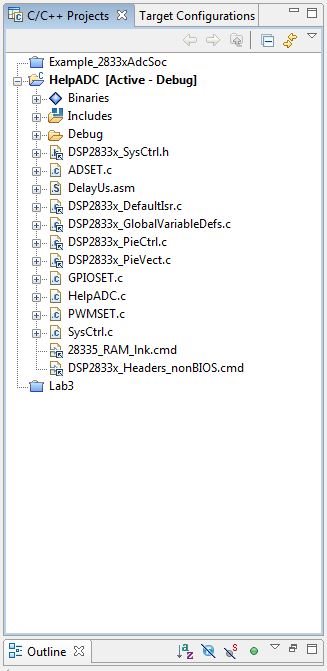
3) In the IDE CCS4 at left side you will find the C/C++ Projects, make a right click in your project ->New->file
choose for name: HelpADC.c or something like that (or not :P).
4)make a right click in your project -> link files to project, find and link the files:
DSP2833x_DefaultIsr.c, DSP2833x_PieCtrl.c, DSP2833x_PieVect.c, DSP2833x_GlobalVariableDefs.c,
28335_RAM_Ink.cmd, DSP2833x_Headers_nonBIOS.cmd, DSP2833x_SysCtrl.h
5) Write on the HelpADC.c file:
//#####################################################################
// VMG - Engenharia
// Vanderley Maia Gomes - Embedded Systems Engineer
// Date: 16/10/2010
// UFCG-CAMPINA GRANDE-PARAIBA-NORDESTE-BRAZIL
//#####################################################################
#include "DSP28x_Project.h"
#define LED GpioDataRegs.GPBDAT.bit.GPIO32 //To make easy access
extern void DelayUs(Uint16);//Function defined in another file
extern void PWMSET(void);//Function defined in another file
extern void GPIOSET(void);//Function defined in another file
extern void ADSET(void);//Function defined in another file
//--- Variáveis Globais
Uint16 AdcBuf[48]; // Buffer que vai guardar os ultimos ADC_BUF_LEN valores resultantes das conversões A/D
Uint16 ContadorLED = 0;
Uint16 *PonteiroBUF = AdcBuf;
main()
{
//CPU Initialization
InitSysCtrl(); // Initialize the CPU
GPIOSET(); // Configure GPIOs
PWMSET(); // Configure PWM
ADSET(); // Configure AD
DINT;
// Initialize the PIE control registers to their default state.
// The default state is all PIE interrupts disabled and flags
// are cleared.
// This function is found in the DSP2833x_PieCtrl.c file.
InitPieCtrl();
// Disable CPU interrupts and clear all CPU interrupt flags:
IER = 0x0000;
IFR = 0x0000;
// Initialize the PIE vector table with pointers to the shell Interrupt
// Service Routines (ISR).
// This will populate the entire table, even if the interrupt
// is not used in this example. This is useful for debug purposes.
// The shell ISR routines are found in DSP2833x_DefaultIsr.c.
// This function is found in DSP2833x_PieVect.c.
InitPieVectTable();
// Enable ADCINT in PIE
PieCtrlRegs.PIEIER1.bit.INTx6 = 1;
IER |= M_INT1; // Enable CPU Interrupt 1
EINT; // Enable Global interrupt INTM
ERTM; // Enable Global realtime interrupt DBGM
while(1)//loop infinite
{
DelayUs(1);
}
}
6) Create a file.c in your project named: ADSET.c, and write:
//##################################################################### // VMG - Engenharia // Vanderley Maia Gomes - Embedded Systems Engineer // Date: 16/10/2010 // UFCG-CAMPINA GRANDE-PARAIBA-NORDESTE-BRAZIL //##################################################################### #include "DSP28x_Project.h" extern void DelayUs(Uint16); //--------------------------------------------------------------------------- // Macros // #define ADC_cal_func_ptr (void (*)(void))0x380080 void ADSET(void) { // Reset the ADC AdcRegs.ADCTRL1.bit.RESET = 1; //To reset the ADC module we need to wait a bit of time //exactly 2 ADCCLK, assuming that the ADCCLK was configured to 10Mhz //We need 150/10 = 15 CPU clocks, than we will give him 30 clocks! to reset the ADC. asm(" RPT #30 || NOP"); // Must wait for ADC reset to take effect //--- Call the ADC_cal() function located in the Boot ROM. // ADC_cal_func_ptr is a macro defined in the file example_nonBios.h or // example_BIOS.h (as may be the case for the example being used). This // macro simply defines ADC_cal_func_ptr to be a function pointer to // the correct address in the boot ROM. (*ADC_cal_func_ptr)(); // 0=internal, 1=external AdcRegs.ADCREFSEL.bit.REF_SEL = 0; // Power-up reference and main ADC AdcRegs.ADCTRL3.bit.ADCBGRFDN = 0x3;//11b = Power on reference. AdcRegs.ADCTRL3.bit.ADCPWDN = 1; //1b = Power On ADC Module AdcRegs.ADCTRL3.bit.ADCCLKPS = 0x4; //Fclk = HSPCLK/(8(ADCTRL1[7]+1)); AdcRegs.ADCTRL3.bit.SMODE_SEL = 0; //0=sequencial mode; DelayUs(5000); // Wait 5ms before using the ADC //---Configure the other ADC register AdcRegs.ADCMAXCONV.all = 0x0000; // no autoconvertions AdcRegs.ADCCHSELSEQ1.bit.CONV00 = 0; // Selecting the ADCINA0 Channel //Configuring ADCCTRL1, here we can chose the Acquisition window size and set the pre-scalers AdcRegs.ADCTRL1.bit.SUSMOD = 0;//Emulation suspend is ignored AdcRegs.ADCTRL1.bit.ACQ_PS = 0x7; //The Acqusition windows size is 7+1 times ADCLK períod = 42,667uS = 23.437kHz, remind ADCCLK = 150Mhz/8 AdcRegs.ADCTRL1.bit.CPS = 0;// To make the ADCCLK = 150Mhz/8. AdcRegs.ADCTRL1.bit.CONT_RUN = 0;//We dont wanna that the ADC runs continuously, we will use the SOC from the ePWM module. AdcRegs.ADCTRL1.bit.SEQ_OVRD = 0; AdcRegs.ADCTRL1.bit.SEQ_CASC =1;//We are using the modules in cascate mode, but this isn't important in this example because we use just one chanel. //Configuring ADCTRL2, here we can chose how the SOC will be made. AdcRegs.ADCTRL2.bit.EPWM_SOCB_SEQ = 0; AdcRegs.ADCTRL2.bit.RST_SEQ1 = 0; AdcRegs.ADCTRL2.bit.SOC_SEQ1 = 0; //bit 12 reserved AdcRegs.ADCTRL2.bit.INT_ENA_SEQ1 = 1;//Interrupt request by INT_SEQ1 is enabled AdcRegs.ADCTRL2.bit.INT_MOD_SEQ1 = 0; //bit 9 reserved AdcRegs.ADCTRL2.bit.EPWM_SOCA_SEQ1 = 1;//Allow SEQ1/SEQ to be started by ePWMx SOCA trigger. AdcRegs.ADCTRL2.bit.EXT_SOC_SEQ1 = 0; AdcRegs.ADCTRL2.bit.RST_SEQ2 = 0; AdcRegs.ADCTRL2.bit.SOC_SEQ2 = 0; //bit4 reserved AdcRegs.ADCTRL2.bit.INT_ENA_SEQ2 = 0; AdcRegs.ADCTRL2.bit.INT_MOD_SEQ2 = 0; //bit1 reserved AdcRegs.ADCTRL2.bit.EPWM_SOCB_SEQ2 = 0; }
7) create a file.c named: GPIOSET.c and write:
#include "DSP28x_Project.h" void GPIOSET(void) { //Configure pin GPIO32: I/O pin and Output. EALLOW; GpioCtrlRegs.GPBMUX1.bit.GPIO32 = 0; //Configure I/O PIN GpioCtrlRegs.GPBDIR.bit.GPIO32 = 1; //Configure Output GpioCtrlRegs.GPAMUX1.bit.GPIO0 = 1; //Setting GPIO0 1=EPWM1A GpioCtrlRegs.GPBMUX1.bit.GPIO42 = 0; //to use the ADC we need to configure I/O EDIS; }
10) Well, you create a complete project that uses two PWM, ePWM1 to give a PWM signal with 4.8kHz rate and 50% duty-cycle and ePWM2 to trigger the SOC of your ADC and is configurable to 48kHz rate. Your ePWM1 signal is avaiable in GPIO0 and your ADC signal must to be inserted in the GPIO42, ATTENTION AVOID MORE THAN 3V!
11) Conect your GPIO0 to your GPIO42 ATTENTION, TURN OFF YOUR eZdsp KIT before conect GPIOs
12) Build your project and Debug Launch
13) After Debug Launch Create a GRAPH to see your conversion:
13.1) Tools -> Graph -> Single Time
13.2) Acquisiton Buffer Size = 48, Dsp Data Type = 16 Bits Unsigned Integer, Sampling Rate = 48000Hz, Display Data Size = 48, Time Display Unit = uS.
14) Click in Enable Silicon Real Time Mode, and choose YES if the IDE ask you something.
15) In your graph search and click in ENABLE CONTINUOUS REFRESH
16) GO to VIEW->Memory and Write AdcBuf, find and click in ENABLE CONTINUOUS REFRESH.
17) Now click in RUN!!! That is all, if everythin is gonna be alright you will see the PWM signal in your graph.
Best regards!
You are welcome,
Another thing, after Debug Launc and Run, if all gonna be alright the LED will be blinking
bye!
-Vanderley
Actually i have the similar problem on 28335, 28035 or 2812. for 28035 or 2812, it can collect some data and convert result but it has big offset when the voltage is close to 3V. I use standard power supply as calibration signal source. for 28335. The example code that I ran is from controlSUITE. It is supposed to be used in very straightforward way. I don't think it needs some VEROFL pin connected, something like that. But what is the problem? Any suggestion?
I think customer won't like to do complicated calibration over on-chip ADC every time.
thanks
-Yu Cai
Dear Vanderley Maia,
we made your program but it is not building why please give reply, i given cc4 figure also.
Normal 0 false false false EN-US X-NONE X-NONE MicrosoftInternetExplorer4
One more help ,
How to work on DMA with ADC,
AAK


Hi Ananda,
Well I didn't get why isn't building?
You made your Target Configuration?
Here My Project:
Take my project in: http://www.4shared.com/file/96uMTYEL/HelpADC.html
About DMA with ADC, I have no experience but I will read about and if I understand
I will reply you.
Best regards!
Hi Yu Cai,
First of all, sorry for the delay, I have not seen your question before.
Well I'm using in my circuit a LM6132 Operational Amplifier for make a OFFSET signal.
But I don't know if you have the same needs than I.
I need to use a offset circuit because I have a sensor that gives me negative signals, than I have to ensure that the
A/D port signal (ADCINA0 pin) will be greater than 0V.
I set my OFFSET 1.5V and I dont have problems when my A/D port signal is close to 3V.
I'm using the 3.3V pin from eZdsp board for power supplying the LM6132.
Best regards