This thread has been locked.

If you have a related question, please click the "Ask a related question" button in the top right corner. The newly created question will be automatically linked to this question.

SW-DK-TM4C129X: **ERROR**: Unable to initialize target - 0!

Part Number: SW-DK-TM4C129X
Other Parts Discussed in Thread: EK-TM4C1294XL, EK-TM4C123GXL

Using the TI board above to initialise a second board. I have gone through and programmed multiple of the second board using a JTAG link but on the 5th board I'm being shown this error message after unplugging the JTAG from the TI board. With a spare second TI board, attempted to retry but still getting the same error. I have tried unlocking the TI boards and updating the ICDI Firmware and still nothing. Sometimes after unlocking the board, I'll be shown the error "1" instead but will quickly go back to the "0" error. All of this is on the flash programmer build 1613.

Also worth adding, the connectors are all correct and LEDs for power, 3.5V and 5V are illuminated as well as LCD screen. Using the Smart Programmer 2 software just as a test, the TI board is picked up and read leading me to believe its either the connector or cable.

Additional context, I am very new to using TI for board programming as the previous person in my workplace in charge of this left recently. I'm not entirely sure what it could be but I feel it may just be very simple since it only became an issue after unplugging the JTAG cable. 

  • Using the TI board above to initialise a second board. I have gone through and programmed multiple of the second board using a JTAG link but on the 5th board I'm being shown this error message after unplugging the JTAG from the TI board.

    Hi Ashley,

      I'm unclear with your problem description. Can you show a picture of your setup? You started with 'Using the TI board above'. What is this TI board? Is this the DK-TM4C129X EVM? You then said ' to initiate a second board'. What is this second board? is the second board another DK-TM4C129X EVM? If not, what is it? You continued your problem description with a 5th board. What is the 5th board? Perhaps please clarify what are the 2nd, 3rd and 4th boards too. 

      What is your debug probe? I think a picture of your setup (e.g. the debug probe, the TI board, the second board and the 5th board and etc) will clarify a lot of things. 

  • Apologies let me clarify.

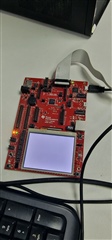
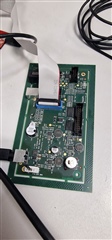
    The Tiva board I'm using is a TIVA C series TM4C129X and I have attached images of the Tiva and secondary board. The green, secondary boards are all identical and were being flashed by the Tiva board and then removing the flash from it (to then finally be reprogrammed one last time on a separate system but that detail isn't important as it doesn't have anything to do with the Tiva). 

    To try fully explain best I can, The Tiva board is connected to a laptop running the LM Flash Programmer Build 1613 through the USB-MicroUSB supplied with the Tiva board. It is then connected to the green board through a 20-Pin cable. The only other thing connected to the green board is its power supply input.

    Also worth mentioning, the LCD Screen on the Tiva Board has always displayed nothing but the white backlight and i own a second Tiva board exactly the same. And just to reiterate one more time, the setup was working perfectly fine and nothing has changed but the 20-pin cable was removed at one point.

  • Hi,

      Thanks for the clarification. There is a on board ICDI debug probe on the DK-TM4C129x EVM. From your picture, you are using that EVM's on-board ICDI to debug out your green boards. From your initial post you are saying the 2nd, 3rd, 4th green boards are ok but the 5th green board fails to program after you unplug the JTAG cable suddenly perhaps in the middle. Is that correct? You have used another DK-TM4C129x to program the 5th green board but it does not succeed either. Correct me if my understanding is wrong.

     From your description, it seem to be a problem with your 5th green board. When you unplug the JTAG cable, I'm not sure if you have created some event (e.g ESD or voltage spike) that may have damaged components on the 5th board. 

    Do you have a non-ICDI debug probe (e.g. XDS110 or XDS200 which are low-cost debug probes) that you can try to program your 5th green board again? This is to rule out if any issue with the DK-TM4C129x board. If another debug probe will not program your 5th board then I think you might want to try replacing the MCU on it with a known good MCU. From the picture, I can't tell what is on your green board. Do you have a TI MCU on the green board? Swapping out the MCU on your green board will tell us if the MCU is bad/damage due to sudden unplugging of the cable. Please bear in mind the unlocking operation is only for a TM4C MCU on a target board. If you have another MCU that is not TM4C on the 5th green board then the unlock operation will not work. Your best alternative, as I suggested,  is to swap out the MCU with a new one. 

  • Yes the 2nd, 3rd and 4th boards were all the secondary green boards and programmed completely fine. The JTAG was unplugged between changing the 4th and 5th green board rather than midway through the process and now seems to not be recognised when now connected. Also checking with a 6th and 7th green board and there's still the error - 0 message. 

    From being able to test with 2 of the same TI DK-TM4C129X boards and a few cables, including an in-house made 20-way JTAG, I'm starting to believe it is the TI boards themselves that may have an issue rather than the green secondary boards. I do have access some form of non-ICDI debug probe (as well as a few Olimex ICDIs that I'm solely experimenting with the exhaust all options).

    On the green boards there is a TI on there. It being labelled as "TM4C129 XNCZAD13 79A46YW" however since no green boards are currently working in the setup, I am not sure whether changing them would be any help either; leading me back to believing it may have something to do with the TI boards (despite the 2 I have both not cooperating). 

    The only other thought I had is, on the TI boards, would it be possible in any way to reprogram another 20-pin slot to work instead- in the case that the current 20-pin I am using for the JTAG is fried somehow? 

    Thanks for all the help so far, I do really appreciate it.

    -Ash

  • Hi Ashley,

      Please first disconnect the JTAG cable to your green board. Next, simply run a example program on your DK-TM4C129x board. The DK-TM4C129x is a EVM board that contains a TM4C129 target device. You can load a simple program such as a hello example. When it runs, it will display a 'hello' message on the LCD screen. If you can successfully load the program and see it run then there is no issue with the DK-TM4C129x board itself - meaning its onboard ICDI is working. What is not working per your current isue could be the connector, the JTAG cable or the green board itself. 

      The hello example can be found in C:\ti\TivaWare_C_Series-2.2.0.295\examples\boards\dk-tm4c129x\hello. I suppose you have downloaded the TivaWare SDK already. If not, download from https://www.ti.com/tool/SW-TM4C

      You are currently in a debug-out mode where you connect the JTAG cable to the J3 connector. When you want to debug the target device on the EVM itself, you must restore all the jumpers on J3. Refer to the user's guide section  2.1.4 for details. https://www.ti.com/lit/pdf/spmu360

  • Hi Charles,

    I've been off work for a little while and just got back to it.

    So a small update. A third TI board was purchased and has been used and the same error message continues. So being able to test the issue with 3 TI boards, 3 sets of cables and a practically unlimited amount of green boards too.

    However, despite still getting the error message, i have been able to program 3 of the green boards through the TI. There has been no change whatsoever apart from hardware, and even then the same issues showed so how 3 of the green boards were programmed at all is also a very confusing issue.

    I was able to test with a Hello Example project and that worked, so I am back to where I was in the beginning but slightly more confused.

    Thanks again.

  • I was able to test with a Hello Example project and that worked, so I am back to where I was in the beginning but slightly more confused.

    Hi Ashley,

      This confirms that DK board is in good condition. If the on board ICDI is bad, you wouldn't be able to program the hello example to the target device. As you are able to see the hello displayed on the LCD screen, it also indicates the target device as well as the LCD screen are in good shape. However, I have a hard time to diagnose what the problem is when you use the DK board as a debug probe to debug out your green boards especially when you said you are now able to program 3 other green boards despite the error message. 

      Just a side note. I will really suggest you purchase a standalone debug probe such as XDS110 or XDS200.

    https://www.ti.com/tool/TMDSEMU110-U

    https://www.ti.com/tool/TMDSEMU200-U

    These are really low cost debug probes, $135 for XDS110. They are cheaper than the DK board. They are also small form factor compared to the DK board. I'm not sure where you purchased the DK board as they are out of stock and they will not be restocked on TI store anymore. 

    For whatever reason you must use ICDI to debug out your green board, you can refer to section 4.5 of this app note using a EK-TM4C123GXL or a EK-TM4C1294XL LaunchPad to debug out another target board. These LaunchPads are way cheaper than the DK board if it can still be purchased. The EK-TM4C123GXL LP is only $17. 

    https://www.ti.com/tool/EK-TM4C123GXL

    https://www.ti.com/tool/EK-TM4C1294XL