This thread has been locked.

If you have a related question, please click the "Ask a related question" button in the top right corner. The newly created question will be automatically linked to this question.

CCSTUDIO: Switch chip in sdk example project

Part Number: CCSTUDIO
Other Parts Discussed in Thread: SYSCONFIG, CC1354P10, Z-STACK

Tool/software:

Hi TI, 

Thanks very much!

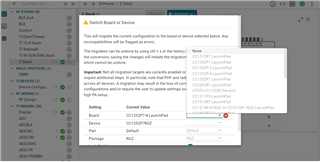
I do not have the option to select another chip (CC1354xxx) available in my CCS. Can you suggest me how to enable it?

Thanks ver much.

  • Hello,

    Is the issue only specific to this project (and other sysconfig projects do not have this issue)?

    Also provide the CCS version, sysconfig version, and SDK version being used.

    Thanks

    ki

  • Also specify the SDK example you are working with.

    Thanks

    ki

  • Hi Ki, Thanks very much!!!

    Thanks Very much.

    In general it happens to me with all other projects of the same sdk and previous sdks.

    CCS: 12.6.0

    Sysconfig: 1.16

    SDK: simplelink_cc13xx_cc26xx_sdk_7_10_02_23

    Example proyect: C:\ti\simplelink_cc13xx_cc26xx_sdk_7_10_02_23\examples\rtos\LP_EM_CC1354P10_1\zstack\znp

  • Thanks, I see the same with the zstack examples but not the generic ones. This is likely intentional by the SDK. I will bring this thread to their attention for further comment.

  • Hi albgarc,

    The SysConfig Device Switch feature is not fully utilized on Z-Stack projects given the depth of project-level changes that are also required to convert to a separate device.  Instead, you will need to import a new LP-EM-CC1354P10-6 Z-Stack znp example and migrate your stack configurations accordingly.  There should be minimal to no application code changes for the ZNP project.  

    Regards,
    Ryan

  • Hi Ryan, thank you very much,
    Is there any document showing the steps to migrate the znp to the 48 pin CC1354P?

  • Once you have a LP-EM-CC1354P10-6 znp example then you will be able to use the SysConfig Device Switch to select the CC2674P10RGZ, but not the CC1354P10RGZ. 

    The reason this device is supported is because although only CC1354P10 LaunchPads are available, the CC2674X10 devices are preferred for Zigbee development.  Is there a specific reason you need the CC1354P for Sub-1 GHz purposes or are you willing to adopt the CC2674 variant instead?  Here also is the Migration Guide I forgot to mention previously.  

    Another option is riskier:

    1. Add the following to getRfDesignOptions in <sdk_directory>\source\ti\zstack\.meta\rf\zstack_rf.syscfg.js:
          else if(deviceId === "CC1354P10RGZ")
          {
              newRfDesignOptions = [{name: "LP_CC1354P10_1_RGZ"}];
          }
    2. Import the projectspec file from <sdk_directory>\examples\rtos\LP_EM_CC1354P10_1\zstack\znp\tirtos7\ticlang\ into CCS.
    3. Open znp.syscfg inside the Text Editor, change LP_EM_CC1354P10_1 to LP_CC1354P10_1_RGZ, save and close.
    4. Open znp.syscfg inside the SysConfig Editor and accept the current value inside Z-Stack -> Radio module to dismiss the error.
    5. Change RF Design -> "Assign High PA To Frequency Band" as 2.4 GHz
    6. Modify Stack/Config/mac_user_config.c to add the LP_CC1354P10_1_RGZ definition
      /* CC1352R1/CC1352P1/CC1352P_2 Configuration */
      #if defined(LAUNCHXL_CC1352R1) || defined(LAUNCHXL_CC1352P1) \
          || defined(LAUNCHXL_CC1352P_2) || defined (LP_CC1352P7_1) \
          || defined (LP_CC1354R10_RGZ) || defined (LP_EM_CC1354P10_1) \
          || defined (LP_EM_CC1354P10_6) || defined (LP_CC1354P10_1_RGZ)
    7. Build the project.

    This built successfully for me, however I do not actually have a CC1354P10RGZ device to test with so you will have to evaluate independently.

    Regards,
    Ryan

  • Hi Ryan, sincerely thank you very much.

    Yes, for zegbee I can use CC2674 configuration.

    Let me ask you a question please.
    Is it possible to create a new project for the CC1354P106RGZ in which the zeegbee znp module is added?

    Thanks very much. Best rgards. 

  • The deficit you've listed has already been raised internally.  I am not aware of a timeline for resolving the behavior you've encountered.  Until then, I have provided instructions for creating a CC1354P106RGZ Z-Stack ZNP project.

    Regards,
    Ryan