This thread has been locked.

If you have a related question, please click the "Ask a related question" button in the top right corner. The newly created question will be automatically linked to this question.

CC2340R5: Correctly setting up Log Framework with LogSinkUART and visualizing the log output

Part Number: CC2340R5
Other Parts Discussed in Thread: SYSCONFIG

Dear TI Team

I am trying to use the Log Framework with LogSinkUART.
What I would like to ask is what configuration and tooling I can use to get a valid log visualization.

My setup

  • LP-EM-CC2340R5 LaunchPad connected to the XDS110 Debug Probe.
  • The debug probe is connected to my Linux Host via USB.
  • Log Example project from SIMPLELINK-LOWPOWER-F3-SDK V7.40.00.64 modified to use the LogSinkUART in LogModule_App1

Modifications to the sample project

  1. Edited the LogModule_App1 to use /ti/log/LogSinkUART:

  2. Changed Baud Rate to 115200 and set Use Hardware to XDS110 UART.

  3. Added to log.c:
    #include <ti/log/LogSinkUART.h>
  4. Removed from log.c:
    #include <ti/log/LogSinkITM.h>

Read Log output

I read the log output from the terminal on my linux host using the following settings:

  • Baud Rate 115200
  • Data length 8 bits
  • Parity None
  • Stop bits 1 bit
  • Flow Control None

The output is not what I am expecting from the project code:
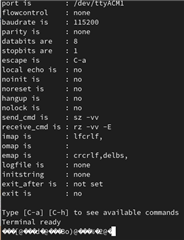
In the LogSinkUART.h File Reference I read that the data must be decoded by the host and I suspect, this is why I am seeing no readable output, is this correct?

I saw that you have a TI Log Tool User's Guide where the tilogger UART description mentions that is intended for the UART LogSink module.


The user guide also states:

Am I correct in assuming, that I must use this tool in order to decode the log output from UART? And if this is the case, do you know if there is/will be an option to read the log from UART using a Linux system?

If there is anything I did wrong in the setup of the log project or the visualization of the log I would be very thankful if you could point me into the right direction.

  • Hi,

    That FAQ is for non-UART based logging.

    For UART based logging, this can be achieved in a number of ways.

    The Display module (in the SysConfig view, this can be found in "TI DRIVERS" --> "Display").

    UARTEcho to print out characters: https://dev.ti.com/tirex/explore/node?node=A__AKdlpPkvwtCAe6soBzKbpQ__com.ti.SIMPLELINK_LOWPOWER_F3_SDK__58mgN04__LATEST 

    Since the output is sent over UART, you should be able to see the correct output in any Serial Terminal (I believe PuTTY is supported in Linux).

    Thanks,
    Toby

  • Hello Toby

    Thank you for your quick answer.

    Sorry, my question might have been a bit unclear.

    What I am trying to do is make use of the new log sink "LogSinkUART" in the Log Framework.

    I agree that the log sink "LogSinkUART" is not mentioned in the FAQ. I assumed, it did not exist as an option, when the FAQ was written. The reason I marked my question as related to the FAQ was that it also concerns debug logging on the CC23xx family using the log framework, only with another log sink. My apologies if this was incorrect.

    As you wrote, I could also use writing to UART via the Display driver or directly by using the UART2 driver from the syscfg. This works fine but the log framework provides additional functionality like debug levels, modules etc. which are interesting to me. This is why I am looking into the "LogSinkUART".

    Best regards,
    Stefan

  • Hi Stefan,

    Thanks for further explaining.

    You are correct, there needs to be a host-side tool for parsing the log output into a readable format.

    This is then passed to Wireshark to be viewed (the UART output is raw data).

    Currently this host-side tool is not yet available for Linux. 

    Thanks,
    Toby

  • Hello Toby

    Thank you for your answers.
    In this case I will try to find a Windows Host to verify the implementation.

    Best regards,
    Stefan