This thread has been locked.

If you have a related question, please click the "Ask a related question" button in the top right corner. The newly created question will be automatically linked to this question.

CC2530: CC2530 and CC2531 hard to find part to start developing - what should be a valid alternative to build a ZigBee Home Automation coordinator?

Part Number: CC2530
Other Parts Discussed in Thread: CC2531, CC2531EMK, Z-STACK, CC2538, CC2652R, LAUNCHXL-CC26X2R1, SIMPLELINK-CC13X2-26X2-SDK, AES-128, UNIFLASH

As asked in a my previous thread https://e2e.ti.com/support/wireless-connectivity/zigbee-and-thread/f/158/t/807873 

I'm try to search an alternative to the well know and widely used CC2530 chip to implement a ZigBee gateway for Home Automation application.

Some point me to the CC2531 solution but also this one, as USB stick, seems hard to found, so at this point the main request is to know what should be the best alternative today to use as replacement of CC2530 / CC2531 in order to implement a ZigBee coordinator or substantially a Home Automation Gateway able to work with different end device from many different manufacturer.

Thank for your time!

Fabio

  • You can click order now on CC2531EMK to buy it.
  • Thank you YK Chen,
    I know that i can buy it, but for my future hardware a CC2531 is like the CC2530 with USB that is not necessary for my design because I'll think to drive directly the microcontroller from my main microcontroller.
    So the starting question about the availability of some demo board to start in developing directly is returned because for CC2530 nothing is available (may be obsolete) then the last alternative seems you suggest to use the USB stick with the beaglebone or RPi equipped with the Z-Stack™ Linux Gateway in order to interfacing with the chip, hence when all will be tested, to go in production, we will have to avoid to use the CC2531 and make necessary firmware change to use the CC2530 chip and then drive it directly through the USART of our main microcontroller.
    In my perspective the CC2531/CC2530 will be used mainly to build the network and perform pairing, from my main processor I'll manage these info to store the ZigBee object database and perform action on every device by passing istruction to the CC2530/CC2531.
    Make sense from your perpective?
    Thank!
    Fabio
  • If you want to use UART pins on CC2530/CC2531 directly, you can refer to sunmaysky.blogspot.com/.../how-to-run-ti-z-stack-linux-home.html
  • Thank,
    nice to see.
    Concerning the first step about the CC2530 programming here I've the CC2531 but i think is the same, so I've installed the "Z-Stack_Home_1.2.2a.exe" lib, selected the first choice for CC2530/CC2531 and CC2538.
    Into the default insallation folder
    C:\Texas Instruments\Z-Stack Home 1.2.2a.44539
    I can see many folder with documents and example, following the note on the blog, point 1 to found the file to change I've did a text search string and I'm landed on this file:

    C:\Texas Instruments\Z-Stack Home 1.2.2a.44539\Projects\zstack\ZMain\TI2530DB\OnBoard.c

    inside the InitBoard() function I can see the string and may be I've to drive it from the compiler option inside the IAR compiler by forcing CC2531ZNP inside the C/C++ Compiler option -> Prepocessor tag -> Defined symbols ?

    For step 2, following the note under the path:

    C:\Texas Instruments\Z-Stack Home 1.2.2a.44539\Projects\zstack\ZNP\CC253x

    there is no \dev folder and the bin files are inside a \bin folder, to download this I've signed the agreement and the download button will be enabled becase was approved.

    Is this the correct file?

    Thank!
    Best regards
    Fabio
  • Another question arise from previous answer from @YK Chen

    > If you are new to develop Zigbee application, I would suggest you to use CC2652R instead of CC253x. For CC2652R Zigbee SDK examples, you can find them at dev.ti.com/.../node

    this stimulate me to find more information on the subject and I've found it inside the TI Z-Stack User Guide

    dev.ti.com/.../migration_guide.html

    the migration chapter CC253x to CC26x2 devices, from this I've landed on this page:

    www.ti.com/.../LAUNCHXL-CC26X2R1

    and from what I can see this demo board seems to me the evolution of the other one in order to support the latest ZigBee specification and then I hope also the old ones. I'm correct?

    Question #1

    Now the question is if tthis device and the stack proposed can be used to make a controller for Home Automation application like in the CC2530/CC2531.

    Question #2

    Another is about available example that can be used to speed the developing so briefly if there are design examples like the TI2530ZNP but already ported for the CC2652R or if we have to perform the porting from this two microcontroller.

    Some help?

    Thank!

    Best regards.

    Fabio

  • Fabio,

    The SENSOR-TO-CLOUD solution contains LAUNCHXL-CC26X2R1 ZNP firmware images and Zigbee 3.0 networks can allow HA devices to join its network, this is once again the recommended path.  No migration should be required.

    Regards,
    Ryan

  • In step 1 of the blog, ENABLE_MT_SYS_RESET_SHUTDOWN should be added to C/C++ Compiler option -> Prepocessor tag -> Defined symbols and "znpCfg1 = ZNP_CFG1_UART" should be modified in InitBoard() directly.

    For step 2, you need to build the CC2530ZNP-Prod successfully to get CC2530ZNP-Prod.hex under \Projects\zstack\ZNP\CC253x\dev

  • Hi @Ryan Brown1, thank for the hint!

    So as I don't need the Cloud approach now I can install and use the ZNP as standalone right?

    Best regards

    Fabio

  • What do you mean “install and use the ZNP as standalone?”

  • Hi @YK Chen,

    I mean that i don't need to get connected to any cloud to use it.

    If I've correctly understan the ZNP is the ZigBee Network Management part, so by driving this section of the stack from my application I should be able to drive the pairing process and then recover the device information to build my network right?

    From your knowledge in this LAUNCHXL-CC26X2R1 platform, as software examples there are also example able to manage also the binding, discovery and other task automatically in order to speed up the work?

    Thank!

    Best regards

    Fabio

  • 1. Yes, there is no need to get connected to any cloud to use ZNP.

    2. Yes, there are CC2652R examples able to manage binding, discovery and other task automatically.

  • Dear @YK Chen,

    so in order to stay with the top of the technology I'm going to buy the development board LAUNCHXL-CC26x2R1, with this I shpuld be able to work directly with the ZigBee spec.

    Thank for now! I'll go back for question :-)

    [EDITED]

    Just to be sure about the software to use with this developing board, currently, I've downloded the "simplelink_cc13x2_26x2_sdk_3_10_01_11.exe"  (SimpleLink™ CC13x2 and CC26x2 software development kit - SIMPLELINK-CC13X2-26X2-SDK_3.10.01.11), this should be a full environment so I've not to subscrive other agreement I'm right?

    Thank!

    Best regards

    Fabio

  • Dear all,

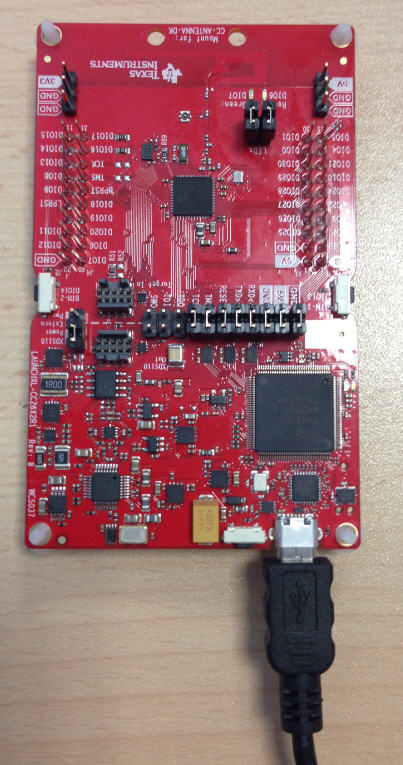
    finally I've got the LAUNCHPAD, now I'm try to follow the first ZigBee demo zc_light.

    By looking at the manual I can read:

    Build and Download Project -> Build the zc_light project.

        - Set the zc_light project as the active project. Make sure the Debug project configuration is used.
        - Select Project → Rebuild to build the project.

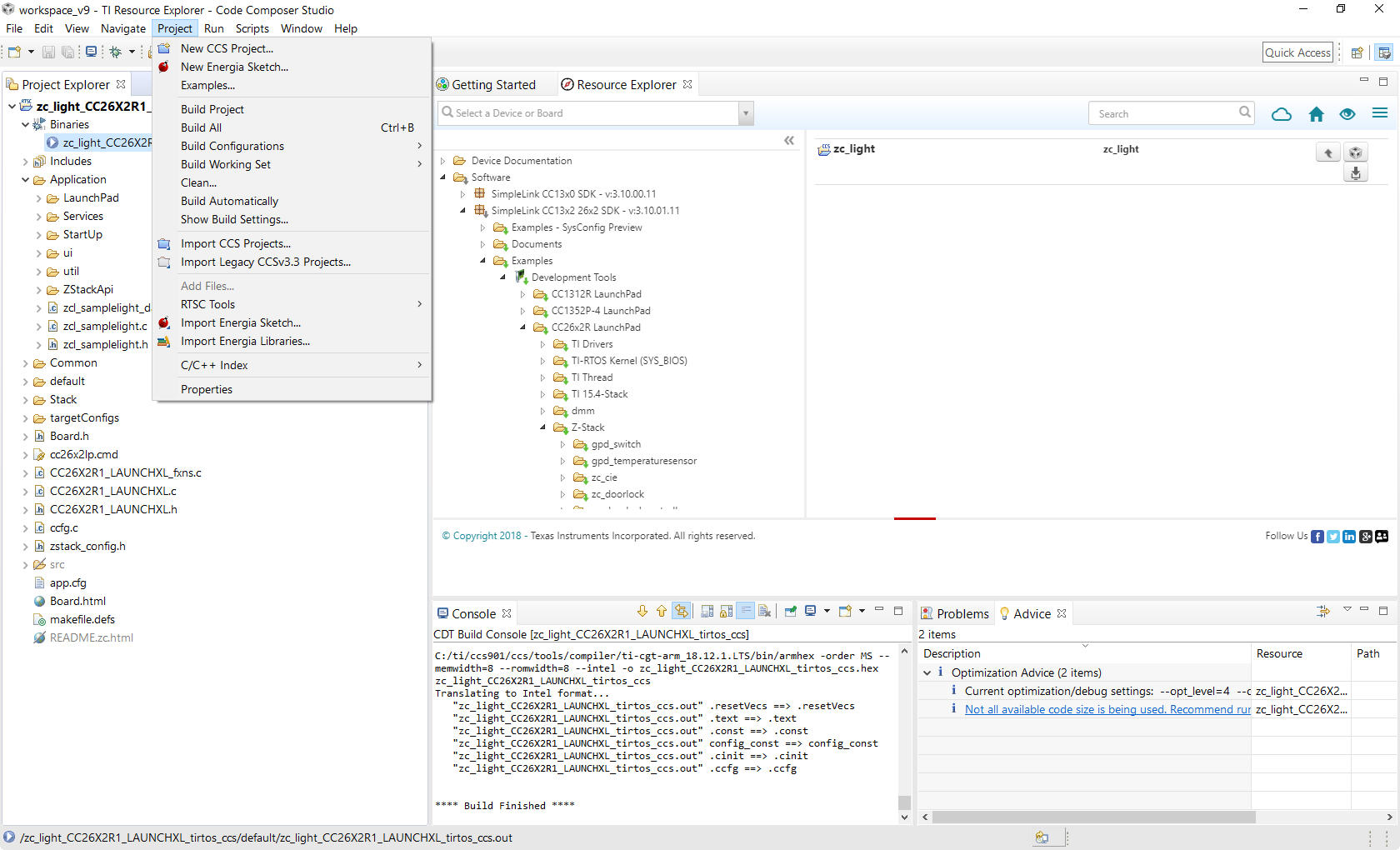
    the doubt is how set the correct configuration, seems that I've to set the debug configuration but I've found this option only at the path Project->Properties->General and then select the panel Products, on the bottom of the page there is a Build-profile text box and I can choose from release and debug so I think to have to set the debug option. I'm right?

    Also there is no menù Make under the Project menu entry so I think to use Build All and at  least I', unable to find the Download option as per manual...

  • You don’t have to change anything in zc_light project property. Just build and download it to your LaunchPad and it should work.

  • Thank,

    but how to download, there is no button or menu entry for download....

    [EDIT]

    Ok ,my be I've found the way, on the manual I can see:

    Build and Download Project

        Build the zc_light project.

                Set the zc_light project as the active project. Make sure the Debug project configuration is used.
                Select Project → Rebuild to build the project.

        Set to erase all Flash memory

                Navigate to Project → Properties → Debug → Flash Settings and select All Unprotected Sectors under Erase Settings during Program Load
                This will ensure the NV memory from previous project builds is reset.

        Load the zc_light project onto the device

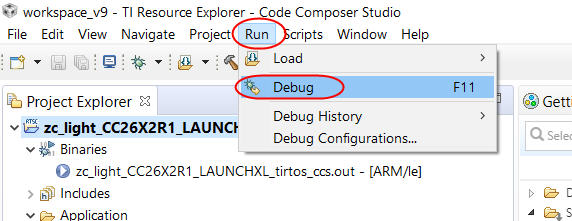
                Select Run → Debug to download the zc_light application.
                Once the debugging session starts, click the red stop button

    Then to perform the flashing of the board I've to go into the Run->Debug or use the F11 key, right?

    Also the manual say that we have to change some flashing option, is necessary or I've to leave it untouched?

    Thank!

  • Yes, you can  go into the Run->Debug or use the F11 key to download it into your LaunchPad. You can leave Flash option untouched.

  • Thank you!

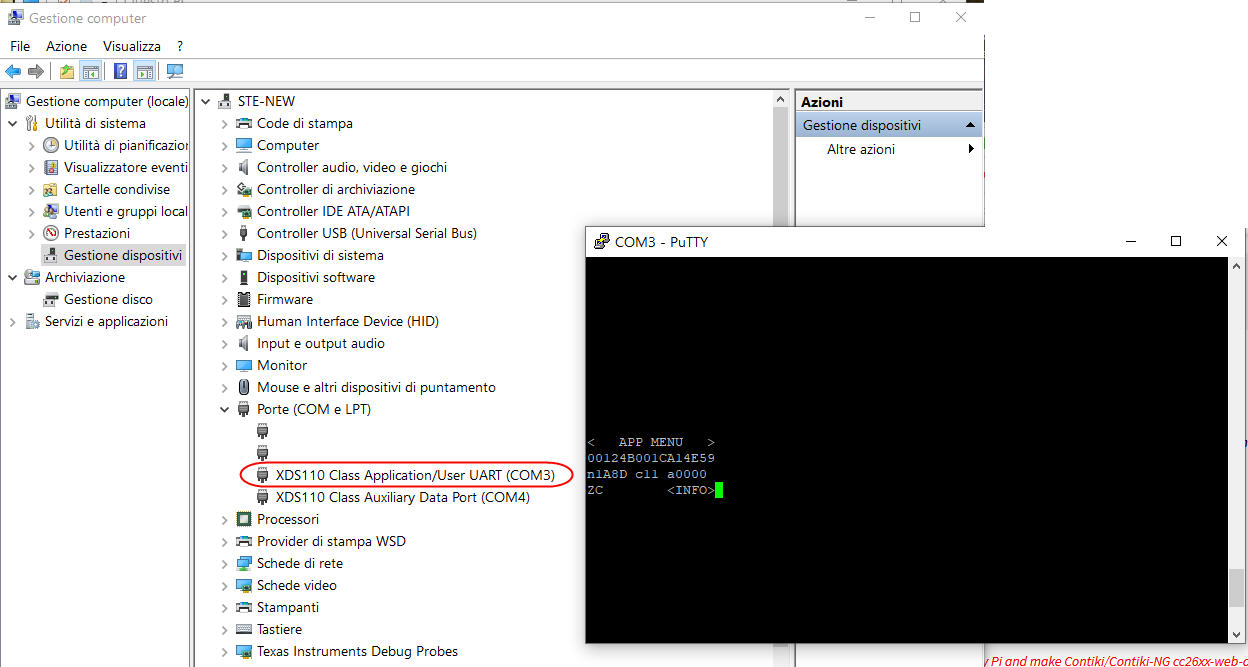
    Well actually I was able to run the application and see the user interface through PuTTY.

    Now what I'm try to understand is how to use the zc-link example to perform the pairing with a commercial light bulb so the board should act as a coordinator.

    There are some note around here or into the TI that are able to point in this direction?

    The aim of this design is to use the processor as coordinator and the form a ZigBee network with some commercial devices like light bulb, thermometer and so on...

    Thank!

    Best regards!

  • Your CC2652R coordinator needs to form the network and enable permit join, then your ZR/ZED devices should perform network steering to join the network: http://dev.ti.com/tirex/content/simplelink_cc13x2_26x2_sdk_3_10_01_11/docs/zigbee/html/zigbee/z-stack-overview.html#commissioning

    You will have to determine how to start this process on your third-party devices, packet sniffing will be very useful at this time: https://e2e.ti.com/support/wireless-connectivity/zigbee-and-thread/f/158/t/699648 

    You may want to consider using the ZNP project with Z-Tool or SENSOR-TO-CLOUD Linux gateway since you plan to connect multiple end device types:

    http://dev.ti.com/tirex/content/simplelink_cc13x2_26x2_sdk_3_10_01_11/docs/zigbee/html/zigbee/znp_interface.html
    http://dev.ti.com/tirex/explore/node?node=AD86J5EtUKXcvz0SahPrBA__pTTHBmu__LATEST

    Regards,

    Ryan

  • Hi @Ryan Brown1,

    thank for the hint.

    Actually to perform the sniffing I'm using a NORTEK HUSBZ-1 key (Z-Wave and ZigBee, configured to acquire the ZigBee packet) and Wireshark.

    To drive data into Wireshark I'm using the ZigBeeSniffer.jar tool (from com.zsmartsystems.zigbee.sniffer), my first attempt was to work under Linux environment with the open source Bellows library, (to drive the radio inside the key) based on the open zigpy ZigBee framework (to manage the ZigBee stack). Of course I've already added to Wireshark ZigBee packet dissector the ZigBee Default Global Trust Center Link Key (AES-128, 32 bit, key, 5A:69:67:...)

    By means of this setup I was able to make the network and joining the lamp bulb and also send command to perform various action depeding the supported cluters on the specific ZED. Now the goal is implement my solution with the CC2652R chip.

    The first step then will be start the commissioning procedure (paring) to add a simple light bulb on the network.

    To perform the pairing the procedure, with the lamp bulb in my hand, I've to start the commissioning and the power up the bulb (to be sure about the bulb I've resetted it, in this case I've to power on-off it 6 times).

    After having reset the light bulb the LAUNCHXL-CC26X2R1 board, programmed with the zc-light example application through CCS, was powered.

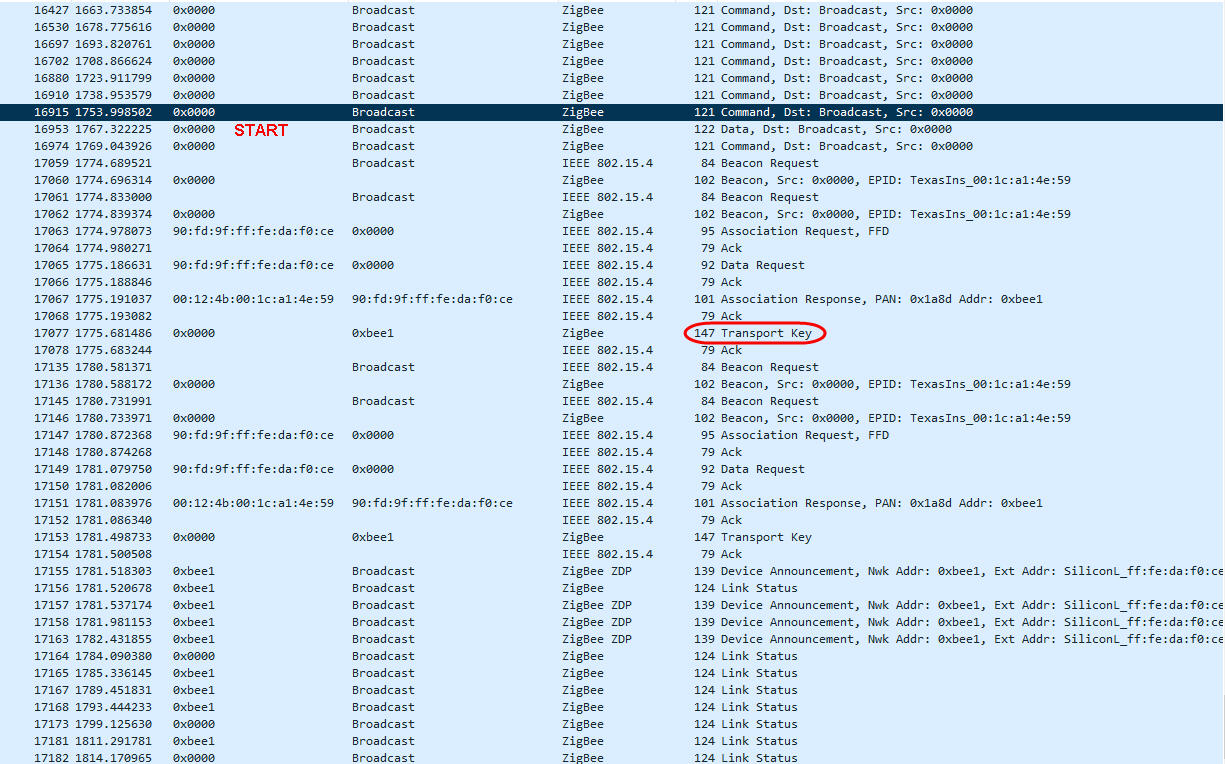
    In Wireshark I can see, every 15 ", the Broadcast command issued from the board:

    Next step is switch the btn1 board button to start the commissioning process and after some second switch on the light bulb.

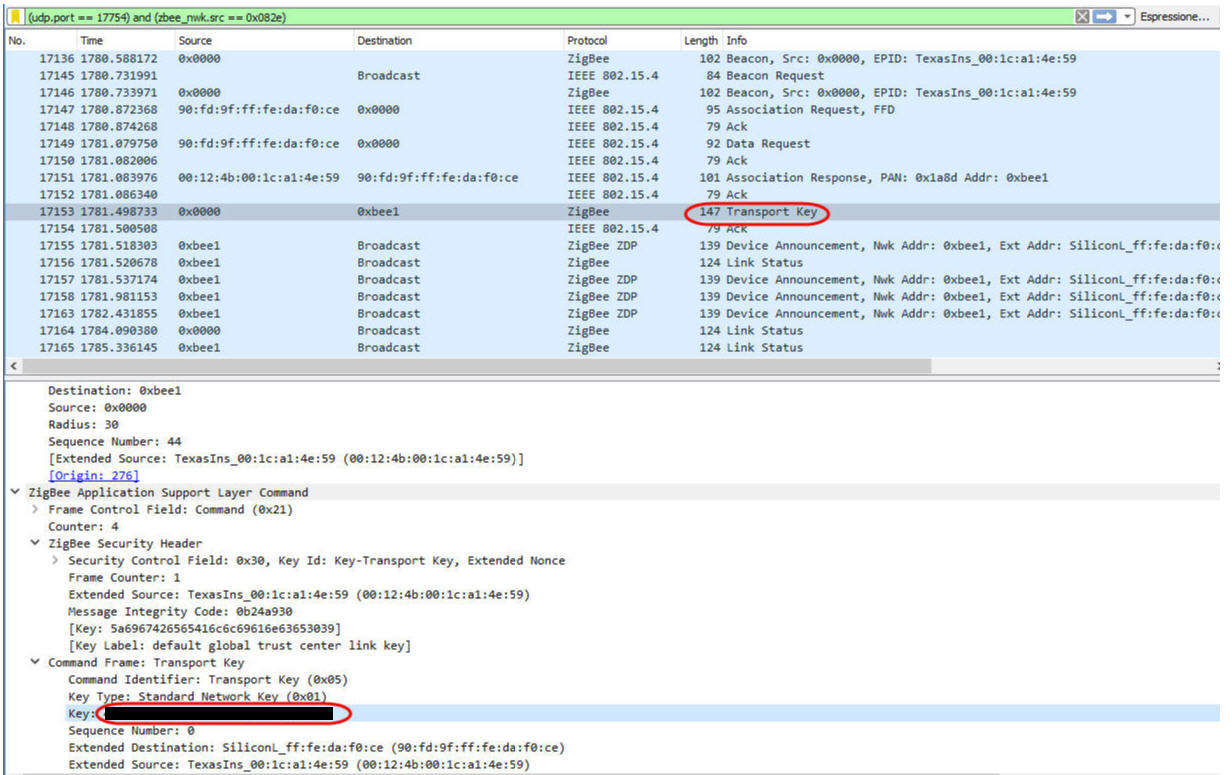
    after that I've added the Trasport Key to Wireshark in order to decipher subsequent communications between the ZC and the ZED.

    the 90:fd:9f:ff:fe:da:f0:ce is effectively my light bulb so I think it was discovered and the example have also distributed the global key to encrypt the future communications between theLAUNCHXL-CC26X2R1 board (that act as ZC - ZigBee Coordinator) and the ligh-bulb (that act as ZED - ZigBee End Device).

    The coordinator set the address of the ligh-bulb equal to 0xBEE1, so for every communication, instead the generic address 90:fd:9f:ff:fe:da:f0:ce we have the network address 0XBEE1.

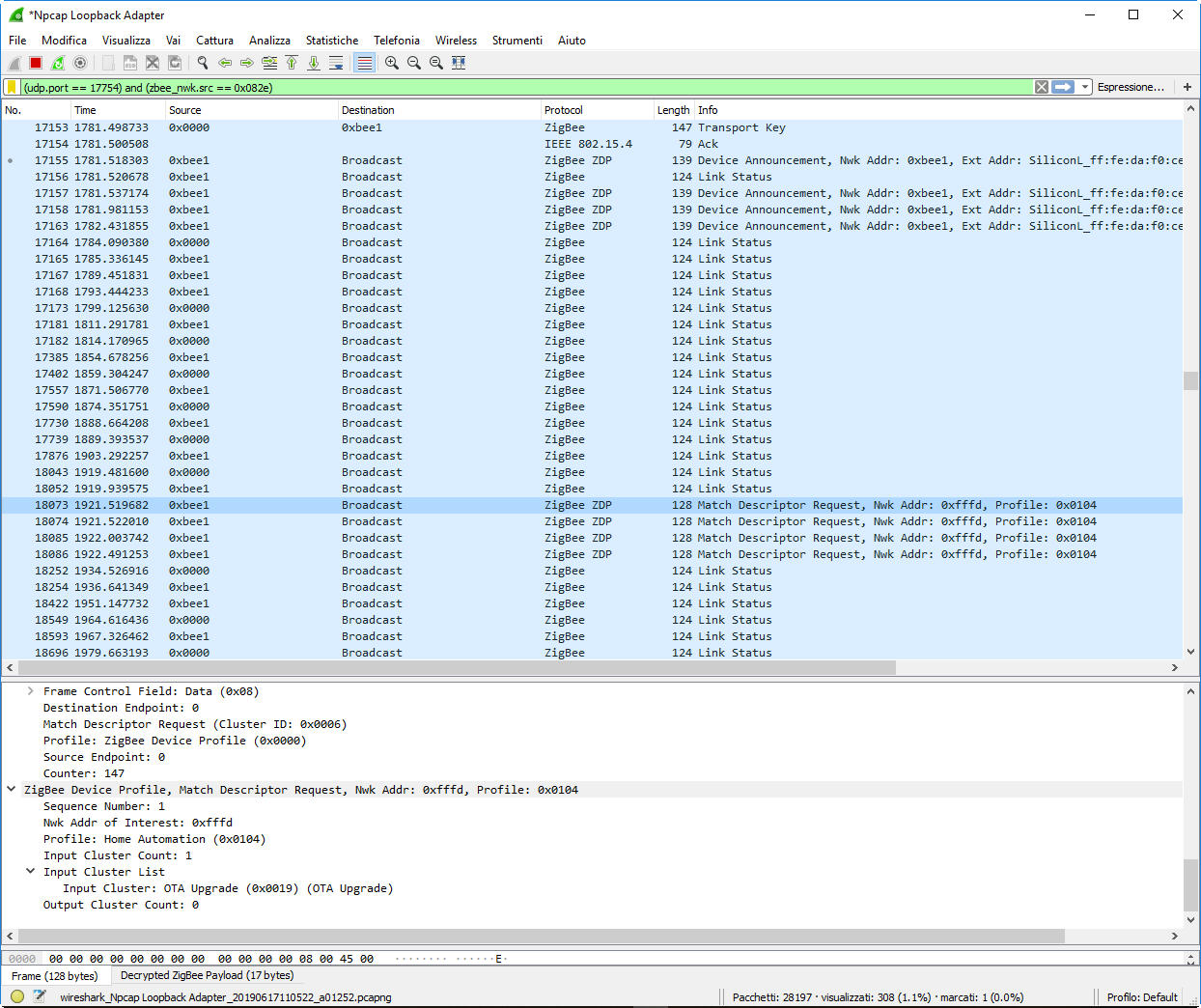
    After the pairing process the search for endpoints and clusters for each endpoint supported by the device should be followed, here below the last significat log rows captured inside wireshark.

    So I think that the discovering process is not carried and I've to make necessary change to support the clusters type of the light bulb I'm right?

    Thank for your time!

    Best regards.

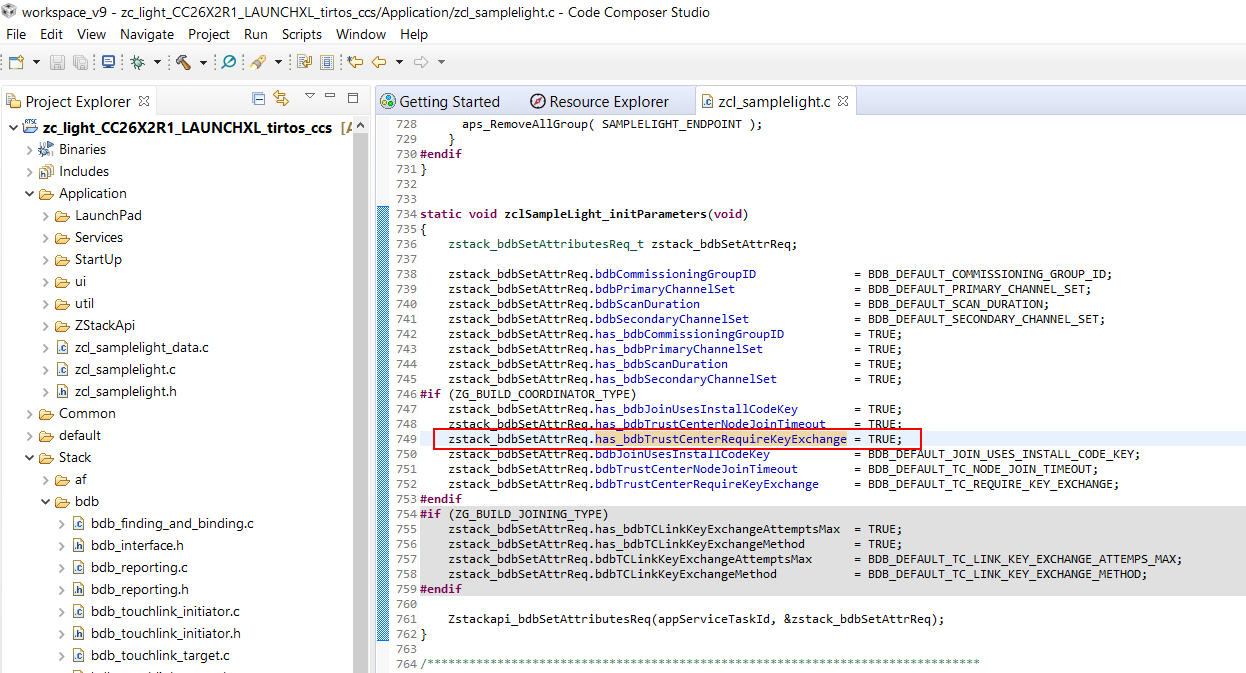
  • Try to set bdbTrustCenterRequireKeyExchange to false on ZC to test again.

  • Hi,

    there is a way to perform a search of this key in a fast way inside CCS? I found difficult in finding references inside the design, the search function seems able to work only inside a file, not on the whole design...

    After some search using Notepad++ inside the folder at the CCS default workspace I think to have found the flag inside the file zcl_samplelight.c, function static void zclSampleLight_initParameters(void).

    Is it the right place?

    Anyway recompilation with this flag set to FALSE give me same result, the communication stop after the Match Descriptor Request...

    There is some detailed instruction how the example is organised? The Readme file is not too detailed in that sense...

    Thank!

  • Try to refer to

  • Thank,

    I read this document at the first stage to choose this framework as my build one, now I will attempt a more deeping read in order to discover the function to use.

    The difficult I've at this stage is about where to found the entry point where I can start in developing my application basing on the selected example, to be more clear, commissioning include several step to get a ZCD able to work on some network and from my reading this process follow some logical steps, here what I'm looking for is find the entry point inside the example application to perform this logical steps to start from the init of the commissioning and ending to the ZED binded and included into the network, like a logic flow diagram to follow.

    To start simple I'll implement a star network with one node act as coordinator and many ZCD like light bulb and similar devices.

    So at the start I've a bounch of ZCD and a coordinator (my LAUNCHXL-CC26X2R1 board), then the first step that I've to accomplish is:

    - reset the ZCD that I've to add (this can be do in many way depending the ZCD itself, for my ligh bulb I've to toggle power 6 times to get the device into the factory native state), of course this is external to the board and is ZCD depending.

    - set the board as coordinator: notes tell about two define to set ZDO_COORDINATOR and RTR_NWK (because from ZigBee spec a coordinator is also a router). In order to set these options I've to do it as preprocessor compilation directive inside CCS or there are some other include file into the design that I've to use? Inside the manual there are no guidance about this specific point, so it make to me difficult understand where are the right application points to change in order to fit my need. Also the board actually I think that work as coordinator because perform the key exchange and other stuff, then these option should be already set inside the code but searching through these text search give me no result...

    Thank!

    Best regards

  • Since you are beginner, I would suggest you to study Z-Stack SimpleLink Academy at first.

  • Thank,

    I've read and make the step for the coordinator, I'm able to setup the program and make it working ando also perform sniffing, but the problem is where is the define that make the application act as coordinator?

    If into the manual is written to set ZDO_COORDINATOR and RTR_NWK why I'm unable to find these declaration inside the design?

    If I've to use this application as base for my developing I'm try to keep a solid understand how the flag are organised, but there are really  a lot of documentation and make jump from several documents and is difficult to keep a logical trace of them when it is not possible to find evidence of what has been written... of course this may be my trouble, but finding difficult at this stage malke very hard to step further...

    Thank.

    Bye

  • BDB_DEFAULT_TC_REQUIRE_KEY_EXCHANGE should be set to FALSE by default in the SIMPLELINK-CC13X2-26X2-SDK v3.10, and from the screenshots it appears that the ZC does not time out of the TCLK exchange process and ask the ZED to leave the network.  ZDO_COORDINATOR and RTR_NWK are defined in Stack/Config/f8wcoord.opts but this should not be altered.  Can you provide an actual sniffer log file instead of screenshots?

    Regards,
    Ryan

  • Hi Ryan,

    thank for ytour help, here attached the Wireshark Log.

    Concerning the zc_light sample application, from my understanding, correct me if I'm doing wrong, the application work as a coordinator, so able to from the network and bind ZCD device, also as coordinator it can be a ZigBee device and in this example the coordinator can behave also as a light, I've correctly understand?

    Also to start from scratch I've checked the behavior of my ligh-bulb at startup and at now behave correctly by doing three scan attemps as specified inside the "ZIGBEE HOME AUTOMATION PUBLIC APPLICATION PROFILE", so the process is going straight but what I can see is the endopoint discovering process, may be I've to write it inside the sample application? This type of info I'm looking for inside the demo design but is not simple to find...

    Thank

    Best regards.

    17-06-2019_Wireshark-Log.zip

  • After you set BDB_DEFAULT_TC_REQUIRE_KEY_EXCHANGE to FALSE, you should rebuild your zc_light and erase flash on your LAUNCHXL-CC26X2R1 board to download zc_light firmware to test again.

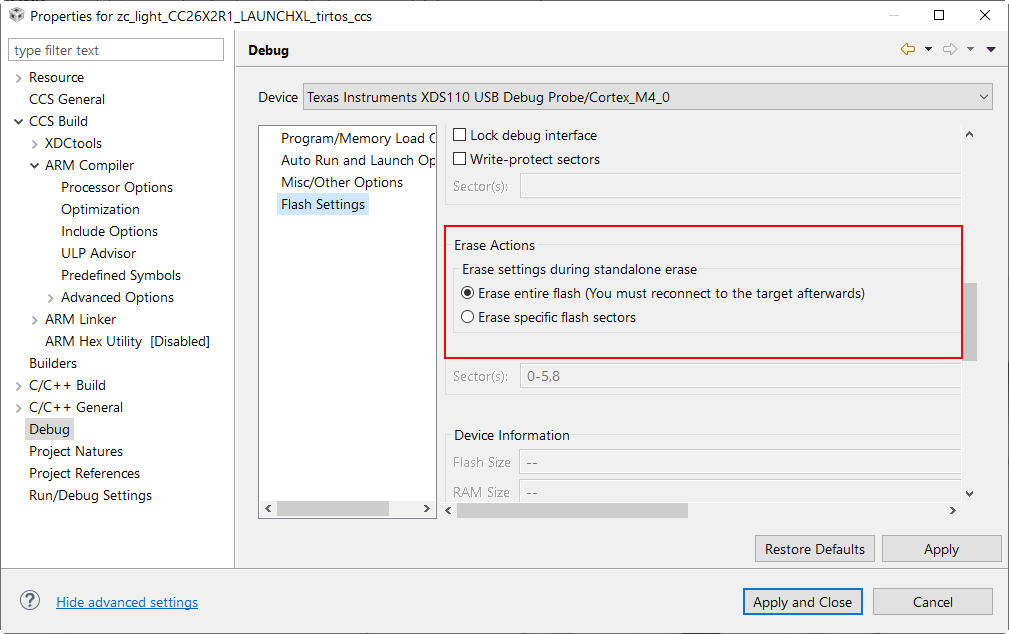
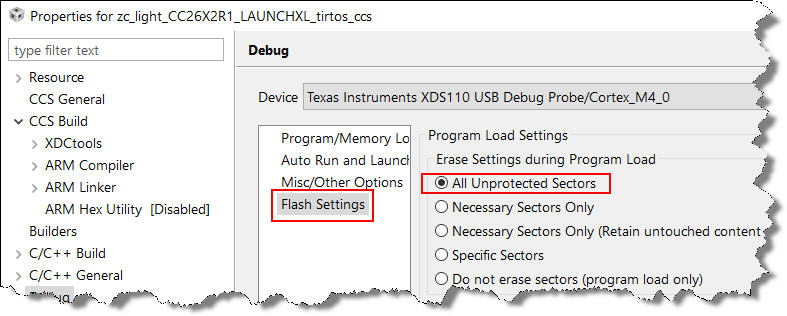
  • Under the Properties window of the design, inside the Debug section on the Flash Settings there are several points where the flash erase is specified, at the top, into the "Program Load Settings":

    I've to change this option to "All Unprotected Sectors" ?

    and at the bottom, into the "Erase Actions", panels is already set the "Erase entire flash" radio button, so I've to change other option to performs a full flash memory erase?

    What is the difference in flash erasing between these two panels?

    Thank!

    Best regards

  • Yes, I suggest you to use "All Unprotected Sectors". By the way, which Zigbee bulb do you use to test this?

  • Hi,

    actually, for my experiments, I'm using a IKEA-TRADFRI light bulb model LED 1545G12.

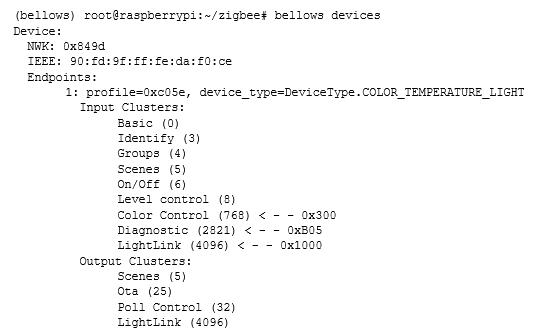
    The ZED description obtained through my first test with the Bellows library was reported below:

    and this is the physical object:

    Of course when I've succesfully do the binding I've to build the binding table to store into the coordinator (ZC) the data of the device included into the network and then know what I can drive from my external application that will be interfaced to the LAUCHXL-CC26X2R1 board, but now the first step is know in detail how the example application work (I know about the callback usage, but some lack of documentation specifically to the example make some difficult in finding the right part where I've to add my code or change things...), next step will be how to perform the discovery task for the endpoint and related supported clusters to know the details of the ZCD that I've to add to the network, so I kindly ask some help from experience user to help me in speed the work. Of course this thread will also be a useful reference for other people who will have to work on this topic.

    Thank for your time!

  • After you set BDB_DEFAULT_TC_REQUIRE_KEY_EXCHANGE to false and erase chip to download to test again, does the bulb still cannot join zc_light?

  • Hi @YK Chen,

    I've changed the Flash settings inside the "Program Load Settings" panel as your suggest:

    then I've programmed the board by pressing F11 inside CCS.

    I've did the light bulb reset (6x on-off), after the bulb reset (it will lamp once) I've powered off the light bulb.

    then I started the commissioning process by pressing the btn1 button on the board.

    Then I've powered the light bulb to start the device announce task.

    Here attached the Wireshark log.

    18-06-2019_IKEA-LIGHT-BULB-LOG.zip

    The light bulb get the NWK address from the coordinator but after the "Match Descriptor Request" command from the light bulb there are no other communications, so I think that from the ZC point of view (the LAUNCHXL-CC26X2R1) I've to communicate ad the light bulb that I've someType 1 clusters able to match the light bulb cluster, at least the On/Off cluster to light on and off the bulb, this seems to me from the ZigBee specifications.

    Also I kindly ask if this example implement a ZC (coordinator) with light embedded facility so it appear to others ZigBee devices also as a light device (I think yes because this can be paired to the ZED switch that have the ability to turn on or off light so inside the ZC there should exist a On/Off cluster...), so I kindly ask to more skilled people with these examples if my thinking are correct or no.

    Thank!

  • Can you try to use zc_sw as coordinator to test this again?

  • I believe the ZR light joins the ZC's network properly but no binds are created as the in/out clusters of your endpoints do not properly match.  This is why YK is suggesting that you experiment with the ZC switch project instead.  As for further learning Z-Stack you can reference the User's Guide and SLA Labs:

    http://dev.ti.com/tirex/explore/node?node=ANbR0LtTwkMnDCiEhygF7A__pTTHBmu__LATEST
    http://dev.ti.com/tirex/explore/node?node=AGJ1w770NgmECHXAzhAYMw__pTTHBmu__LATEST

    Regards,
    Ryan

  • ok, I will do it now then I will edit this post with the results.

    [EDIT]

    here the procedure followed:

    1. reset the light bulb and load the zc_switch sample application in CCS:

    2. recompiled the zc_switch example design (F11)

    3. Perform the commissioning process on the LAUNCHXL-CC26X2R1 board by press the button BTN1

    4. Switch on the light bulb

    5. Log the ZigBee packets through Wireshark

    Here attached the Wireshark sniffing.

    18-06-2019_IKEA-LIGHT-BULB-ZC-SW-LOG.zip

    Thanks for your help!

  • So that we do not have to parse through the sniffer log, can you please summarize the behavior you observed?  Has behavior changed and is your issue resolved?

    Regards,
    Ryan

  • Hi @Ryan Brown 1,

    no, the issue is still present, but I think is related to another deep question, I'll try to explain from the knowledge gained until now.

    I think that the problem should be the one you addressed but it's seems to me that the ZC (then the sample application running in CCS) don't perform the discovery of the available endpoints on the last added ZED (ZigBee End Device, in this case the light bulb) and then know what are the related cluster so there is no way for the ZC to understand what type of ZED have joined the network, I'm right?

    Thank!

  • I cannot open and parse your sniffer log with my Wireshark.

  • Hi @YK Chen,

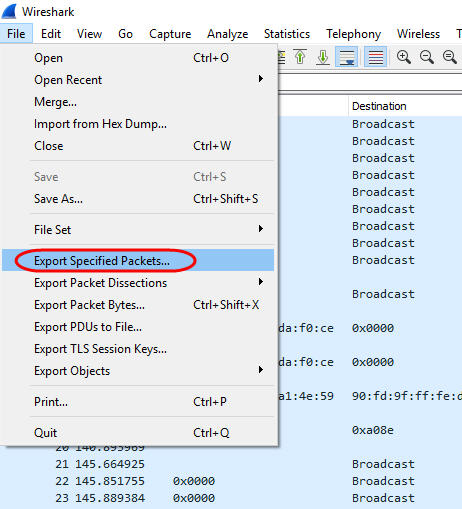
    I'm currently using the Wireshark version 3.0.2 and I've saved the packets capture by means of the File->Save As... and option pcapng that is the default one...

    Attached a new export that I've made by means of the Export option (not Save As...) let me know if you can open it.

    18-06-2019_IKEA-LIGHT-BULB-ZC-SW-LOG-1.zip

    Thank!

    Best regards.

  • I've a question related the different example available into the Simplelink cc13x2 26x2 sdk (3.10.01.11) and the ZigBee specification, so it may appear as side question but I think is important to better understand the way that I've to follow.

    I also ask for patience if at some point it may seem verbose, but I write this so that it can be a valid help for others who wish to undertake the study and implementation of the ZigBee standard starting from scratch.

    There are some example with suffix zc_ and other with zed_ from my understand the first ones should implement a ZigBee Coordinator (ZC) device instead the latest a ZigBee End Devices (ZED).

    What drive me in confusion is what is reported in each one README.zc example file, considering the zc_light the read me document stated:

     - Base Device Behavior attribute configuration.
     - Light device that acts as Target of Finding and Binding.
     - Optional cluster implementations such as _Level Control_ Cluster

    So in my thinking it define a ZigBee Coordinator (ZC) device that have inside the ability of a light type device, in short with this example I can implement a light bulb (that can be managed from an external ZigBee appliance) able also to act as coordinator. This is my first question, hope someone is able to clarify me this point.

    The next point is what should be done in order to drive an external light bulb; so the scenario will be composed by one coordinator (the LAUNCHXL-CC26X2R1 board) and one external ZED (ZigBee End Device) that is a light bulb.
    As written above, for this example, the LAUNCHXL-CC26X2R1 board will act as ZigBee Coordinator and must be able, to start simple, to send an On or Off command to the ZED  that is physically a light bulb (e.g. the one that I have reported inside one of my previous post).

    From the ZigBee specification, as my understanding, I've to match the cluster inside my coordinator to the cluster that are inside the ZED in order to make a correct association, from this perspective the coordinator should act as a Initiator endpoint so a Client Cluster of Type 1 and inside the ZED I've the target endpoint that act as server in order to execute the On and Off command sent by the coordinator to the ZED on the related cluster. Also I kindly ask some confirmation to more skilled people on the subject if my reasoning is correct.

    @YK Chen, suggest to use instead the zc_switch sample application, from the read me:

    - Base Device Behavior attribute configuration.
    - Switch device that acts as Initator of Finding and Binding.
    - Bind table usage to send messages.

    now I can see that the applicatgion act as initiator so it should be able to send On and Off command to other ZigBee End Device that support this specific cluster like a light bulb so this should be the right example to start with.

    A further analysis inside the source code, with the aid of the ZigBee Cluster Library (R6) and the Z-Stack ZCL API (swra197) give me some idea, the zc_sw is configured to act as coordinator but is also configured to act as ZED switch, definition are reported below (derived from the zcl_samplesw_data.c files):

    Endpoints: 8 Profile ID: 0x104 (Home Automation), Device ID: 0x103 (On/Off light switch specified inside the "ZigBee Home Automation Public Application Profile" Table 5.1)

    Input Cluster (Server Cluster)
     (0) Basic
     (3) Identify
    Output Cluster (Client Cluster)
     (3) Identify
     (6) On/Off
     (4) Group
     (25) Ota

    Then this example should be able to work as On/Off Light Switch as ZigBee End Device, so changing the switch state on the evaluation board through the BTN-2 button should perform a report attribute to another device that is binded with the board itself, the other device can be a light bulb that have the cluster 6 (On/Off) as I've reported inside my previosu post about the IKEA light bulb, the things then is how I can check if the zc_switch sample application is able to send to the paired ZCD bulb the command to On or Off the ligh (where I can find the binding table and then send the command to the right NWK joined devices?).

    Another doubt is about the BTN2 behavior because inside the README.zc help file is written:

    BTN-2: Toggles the Light devices binded during the commissioning process.

    but sound strange to me the part "during the commissioning process", in fact after doing the commissioning and added the new ZED to the network why I've to perform again the commissioning to report back attribute to other devices?

    Thank!

  • Hello,

    Thank you for the latest sniffer log, by looking at it I was able to determine that your ZR light is not responding to the ZC switch's Identify Query, this is what the switch would use to send a Simple Descriptor Request to the light's endpoint to see if there were any application input clusters which could be bound.  Please reference the Zigbee 3.0 sniffer log detailing the correct process between a ZR light and ZC switch.  You must either find out why the IKEA product is not responding to the Identify Query or manually bind the devices using Device Announce Callbacks Active Endpoint Requests/Callbacks, and Simple Descriptor Requests/Callbacks, and ZDO Bind Requests.  The following is an SLA to walk you through the process: http://dev.ti.com/tirex/explore/node?node=AJeGnyIqlkquNAYMtLtovQ__pTTHBmu__LATEST 

    For your questions regarding Zigbee Cluster types and initiator/taget roles, please refer to Section 6.2 of SWRA615: http://www.ti.com/lit/swra615

    You misunderstood the ZC README, commissioning does not have to be performed after network steering.  Binding, attribute reporting, and sending ZCL commands can all occur after permit join is disabled and commissioning has ended.

    https://e2e.ti.com/cfs-file/__key/communityserver-discussions-components-files/158/Zigbere_5F00_3.0_5F00_zc_5F00_sw_5F00_bind_5F00_zr_5F00_light.pcapng

    Regards,
    Ryan

  • I would also suggest you to study Zigbee 3.0 Base Device Behavior Specification.

  • Thank you Ryan,

    I think that IKEA light Bulb is not following the standard because into the original thinking of the designer this ZED was only for the IKEA proprietary gateway but this is just a my supposition (also is strange if the light bulb have gained the compliance to the standard, of course may be that the compliance was not for the latest ZigBee 3.0 spec?), anyway I'll try the manual binding way.

    Concerning the sniffing Log you post, I've opened it (with two different PC) but there are only IEEE packets addressed and all the packet are marked as Bad FCS ...

    For your reference I've carried out another test with the IKEA Light Bulb and the Bellows-Zigpy python packages (bellows 0.7.0 and Zigpy 0.2.0) on a RPi3 model B+ and then registered the full Wireshark Log from the joining until after sending a toggle command (that work properly), hope this can make things more clear. There are also text log files taken directly from Bellows.

    20-06-2019_BELLOWS-IKEA-BULB-LOG.zip

    Bellows-logs.zip

    Here below the used hardware (the GPIO two flying wires are only for testing, not used in this work, connected to a simple led).

    Thank!

    [EDIT]

    I've succed into the light bulb driving, into another post I will put all the details.

    Best regards!

  • Hi all,

    at the end I've got the success in driving the IKEA light bulb from the LAUNCHXL-CC26X2R1 development board.

    Software setup is the CCS suite (version 9.0.1.00004) with the SimpleLink CC13x2 26x2 SDK v.3.10.01.11.

    At first a big thank you to @Ryan Brown 1 and @YK Chen for all the suggestions provided and the time spent on this thread. 

    I'll try to explain in details all my steps so that can be useful also for other peoples involved in these arguments.

    The goal of this discussion is:

    - build a ZigBee device able to act as ZigBee Coordinator (ZC), hence a device that must be able to build up the network and permit the joining to other ZigBee End Devices (ZED) like the IKEA light bulb (for the exact model used please refer to my previous post).

    - the coordinator also should be able to drive the joined light bulb into the On and Off state through the button on the evaluation board.

    Because we have to use substantially a switch to drive the light bulb the selected starting project was the zc_switch demo design.

    The most useful part of this work came from the "ZigBee Fundamental Project Development" tutorial inside the TI Resource Explorer guide. This tutorial was build around the zc_light example, but most of the concept are general and can be easily adapted to other design like this one.

    The zc_switch design will implement a ZC with the basic behavior of a switch, to drive a light bulb we need to send command from the switch side (client) to the light bulb side (server), to perform this task, after the ligh bulb have joined the network, we have to do a binding between the On/Off cluster inside the zc_switch design (that act as client cluster) to the destination cluster that act as server cluster inside the light bulb. The zc_switch design will act as Initiator device and the light bulb is the target device. The referenced tutorial act slighty different because the light bulb is used as Initiator and configured to send at the switch the light bulb state (if the light is On or Off)  through reporting attribute a mechanism that perform automatic sending of information (reports) to another device without need that the other device require it explicitly (like the temperature value of a temperature sensor). A more detailed information on this subject is written into the swra615 document paragraph 6.2 Zigbee Cluster or inside the official ZigBee documentation 07-5123-06 "ZigBee Cluster Library Specification". Instead attribute reporting in this case we have to send some command from the switch to the light bulb.

    The basic zc_switch application, by means of the console or the on board BTN1 button is able to perform the commissionig task, so build up the network and permit joining of new devices, but don't perform (as I can understand) the binding on the associated On/Off cluster between the client (the switch) and the server (the light bulb) so we have to do it manually.

    Starting from the init of the tutorial perform a full Erase of the flash memory with the UniFlash tool. About this point it may be not mandatory if the settings inside CCS (Project->Properties->Debug->Flash Settings) are set in order to perform the erase of All Unprotected Sectors (option under the Program Load Settings panel).

    Load inside CCS the zc_switch demo design.

    From ttutorial Task 1 step 3 define the following global variables inside the zcl_samplesw.c source file (of course the file name is different because now we are working with the zc_switch example and not with the zc_light example described into the tutorial):

    zstack_LongAddr_t bindAddr;
    zstack_ZStatusValues status;
    uint16_t shortAddr = 0;
    uint8_t EP = 0;
    uint8_t transID = 0;

    no need about the last variable for our purpose.

    Now, to allow the manual bind task we have to remove the commissioning option related the FINDING and BINDING, so locate the function zclSampleSw_processKey and remove the BDB_COMMISSIONING_MODE_FINDING_BINDING flag then:

    static void zclSampleSw_processKey(uint8 keysPressed)
    {
        //Button 1
        if(keysPressed == KEY_LEFT)
        {
            zstack_bdbStartCommissioningReq_t zstack_bdbStartCommissioningReq;
    
            if(ZG_BUILD_COORDINATOR_TYPE && ZG_DEVICE_COORDINATOR_TYPE)
            {
                //zstack_bdbStartCommissioningReq.commissioning_mode = BDB_COMMISSIONING_MODE_NWK_FORMATION | BDB_COMMISSIONING_MODE_NWK_STEERING | BDB_COMMISSIONING_MODE_FINDING_BINDING;
                zstack_bdbStartCommissioningReq.commissioning_mode = BDB_COMMISSIONING_MODE_NWK_FORMATION | BDB_COMMISSIONING_MODE_NWK_STEERING;
                Zstackapi_bdbStartCommissioningReq(appServiceTaskId,&zstack_bdbStartCommissioningReq);
            }
            else if (ZG_BUILD_JOINING_TYPE && ZG_DEVICE_JOINING_TYPE)
            {
                zstack_bdbStartCommissioningReq.commissioning_mode = BDB_COMMISSIONING_MODE_NWK_STEERING | BDB_COMMISSIONING_MODE_FINDING_BINDING;
                Zstackapi_bdbStartCommissioningReq(appServiceTaskId,&zstack_bdbStartCommissioningReq);
            }
        }
        //Button 2
        if(keysPressed == KEY_RIGHT)
        {
            zstack_bdbGetZCLFrameCounterRsp_t Rsp;
    
            Zstackapi_bdbGetZCLFrameCounterReq(appServiceTaskId, &Rsp);
            zclGeneral_SendOnOff_CmdToggle( SAMPLESW_ENDPOINT, &zclSampleSw_DstAddr, FALSE, Rsp.zclFrameCounter );
        }
    
    }

    The step 4 is the most important to better understand how the things works, to summarize we have to do:

    - Parsing incoming Device Announce messages

    - Perform an active Endpoint Request

    - Perform a Simple Descriptor Request

    - Perform the binding

    Due to the nature of the RTOS all these operation will be performed through events managing by means of a suitable callback function, events are generated from stack and can also be configured so that not all the events triggered by the stack are necessary sent to our main application, but only the events that have been configured to be passed to our application. Of course when an event is triggered we may or not to perform some operation on it and this is the central concepts of the step 4 (Task 1) described into the tutorial.

    To define which events will be passed to our application we have to work inside the SetupZStackCallbacks() function on the zcl_samplesw.c file, here below the whole function code:

    static void SetupZStackCallbacks(void)
    {
        zstack_devZDOCBReq_t zdoCBReq = {0};
    
        // Register for Callbacks, turn on:
        //  Device State Change,
        //  ZDO Match Descriptor Response,
        zdoCBReq.has_devStateChange = true;
        zdoCBReq.devStateChange = true;
    
        // START --> ADDED FOR MANUAL BINDING
        zdoCBReq.has_deviceAnnounce = true;
        zdoCBReq.deviceAnnounce = true;
        zdoCBReq.has_activeEndpointRsp = true;
        zdoCBReq.activeEndpointRsp = true;
        zdoCBReq.has_simpleDescRsp = true;
        zdoCBReq.simpleDescRsp = true;
        // <-- END ADDED FOR MANUAL BINDING
    
    #ifdef USE_DMM
        zdoCBReq.has_activeEndpointRsp = true;
        zdoCBReq.activeEndpointRsp = true;
        zdoCBReq.has_simpleDescRsp = true;
        zdoCBReq.simpleDescRsp = true;
    #endif
    #if defined(OTA_CLIENT_CC26XX)
        zdoCBReq.has_matchDescRsp = true;
        zdoCBReq.matchDescRsp = true;
        zdoCBReq.has_ieeeAddrRsp = true;
        zdoCBReq.ieeeAddrRsp = true;
    #endif
        (void)Zstackapi_DevZDOCBReq(appServiceTaskId, &zdoCBReq);
    }

    as written every event should be managed to perform specific operation, this is done inside the zclSampleSw_processZStackMsgs() function, inside the zcl_samplesw.c file, here below the full function code:

    static void zclSampleSw_processZStackMsgs(zstackmsg_genericReq_t *pMsg)
    {
          switch(pMsg->hdr.event)
          {
              case zstackmsg_CmdIDs_BDB_NOTIFICATION:
                  {
                      zstackmsg_bdbNotificationInd_t *pInd;
                      pInd = (zstackmsg_bdbNotificationInd_t*)pMsg;
                      zclSampleSw_ProcessCommissioningStatus(&(pInd->Req));
                  }
                  break;
    
              case zstackmsg_CmdIDs_BDB_IDENTIFY_TIME_CB:
                  {
                      zstackmsg_bdbIdentifyTimeoutInd_t *pInd;
                      pInd = (zstackmsg_bdbIdentifyTimeoutInd_t*) pMsg;
                      uiProcessIdentifyTimeChange(&(pInd->EndPoint));
                  }
                  break;
    
              case zstackmsg_CmdIDs_BDB_BIND_NOTIFICATION_CB:
                  {
                      zstackmsg_bdbBindNotificationInd_t *pInd;
                      pInd = (zstackmsg_bdbBindNotificationInd_t*) pMsg;
                      uiProcessBindNotification(&(pInd->Req));
    #if defined (Z_POWER_TEST)
    #if defined (POWER_TEST_DATA_ACK)
                    // we have created a bind w/ the light now, so we can disable polling
                    // set poll rate to 0 so we do not poll and receive data for this test
                    zstack_sysConfigWriteReq_t writeReq = { 0 };
                    writeReq.has_pollRate = true;
                    writeReq.pollRate = 0;
                    // disable response and queued poll rates
                    writeReq.has_queuedPollRate = true;
                    writeReq.queuedPollRate = 0;
                    writeReq.has_responsePollRate = true;
                    writeReq.responsePollRate = 0;
    
                    // stop bdb f&b so we don't send out additional identify queries
                    Zstackapi_bdbStopInitiatorFindingBindingReq(appServiceTaskId);
    
                    Zstackapi_sysConfigWriteReq(appServiceTaskId, &writeReq);
    
                    // start 5 second periodic timer for sending zcl on/off toggle to parent
                    OsalPortTimers_startReloadTimer(appServiceTaskId, SAMPLEAPP_POWER_TEST_TOGGLE_EVT, 5000);
    #endif
    #endif // Z_POWER_TEST
                  }
                  break;
    
              case zstackmsg_CmdIDs_AF_INCOMING_MSG_IND:
                  {
                      // Process incoming data messages
                      zstackmsg_afIncomingMsgInd_t *pInd;
                      pInd = (zstackmsg_afIncomingMsgInd_t *)pMsg;
                      zclSampleSw_processAfIncomingMsgInd( &(pInd->req) );
                  }
                  break;
    
              case zstackmsg_CmdIDs_DEV_PERMIT_JOIN_IND:
                  {
                      zstackmsg_devPermitJoinInd_t *pInd;
                      pInd = (zstackmsg_devPermitJoinInd_t*)pMsg;
                      uiProcessPermitJoin(&(pInd->Req));
                  }
                  break;
    
    
    #if (ZG_BUILD_JOINING_TYPE)
              case zstackmsg_CmdIDs_BDB_CBKE_TC_LINK_KEY_EXCHANGE_IND:
              {
                zstack_bdbCBKETCLinkKeyExchangeAttemptReq_t zstack_bdbCBKETCLinkKeyExchangeAttemptReq;
                /* Z3.0 has not defined CBKE yet, so lets attempt default TC Link Key exchange procedure
                 * by reporting CBKE failure.
                 */
    
                zstack_bdbCBKETCLinkKeyExchangeAttemptReq.didSuccess = FALSE;
    
                Zstackapi_bdbCBKETCLinkKeyExchangeAttemptReq(appServiceTaskId,
                                                             &zstack_bdbCBKETCLinkKeyExchangeAttemptReq);
              }
              break;
    
              case zstackmsg_CmdIDs_BDB_FILTER_NWK_DESCRIPTOR_IND:
    
               /*   User logic to remove networks that do not want to join
                *   Networks to be removed can be released with Zstackapi_bdbNwkDescFreeReq
                */
    
                Zstackapi_bdbFilterNwkDescComplete(appServiceTaskId);
              break;
    
    #endif
              case zstackmsg_CmdIDs_DEV_STATE_CHANGE_IND:
              {
                  // The ZStack Thread is indicating a State change
                  zstackmsg_devStateChangeInd_t *pInd =
                      (zstackmsg_devStateChangeInd_t *)pMsg;
                        UI_DeviceStateUpdated(&(pInd->req));
    #ifdef USE_DMM
                  provState = pInd->req.state;
    
                  if ((provState == zstack_DevState_DEV_END_DEVICE) ||
                     (provState == zstack_DevState_DEV_ROUTER)) {
                      /* Obtain parent address */
                      nwkInfo = zclport_getDeviceInfo(appServiceTaskId);
                  }
                  RemoteDisplay_updateJoinState(provState);
    #endif
              }
              break;
    
              /*
               * These are messages/indications from ZStack that this
               * application doesn't process.  These message can be
               * processed by your application, remove from this list and
               * process them here in this switch statement.
               */
    
    #if !defined (DISABLE_GREENPOWER_BASIC_PROXY) && (ZG_BUILD_RTR_TYPE)
              case zstackmsg_CmdIDs_GP_DATA_IND:
              {
                  zstackmsg_gpDataInd_t *pInd;
                  pInd = (zstackmsg_gpDataInd_t*)pMsg;
                  gp_processDataIndMsg( &(pInd->Req) );
              }
              break;
    
              case zstackmsg_CmdIDs_GP_SECURITY_REQ:
              {
                  zstackmsg_gpSecReq_t *pInd;
                  pInd = (zstackmsg_gpSecReq_t*)pMsg;
                  gp_processSecRecMsg( &(pInd->Req) );
              }
              break;
    
              case zstackmsg_CmdIDs_GP_CHECK_ANNCE:
              {
                  zstackmsg_gpCheckAnnounce_t *pInd;
                  pInd = (zstackmsg_gpCheckAnnounce_t*)pMsg;
                  gp_processCheckAnnceMsg( &(pInd->Req) );
              }
              break;
    
    #ifdef BOARD_DISPLAY_USE_UART
              case zstackmsg_CmdIDs_GP_COMMISSIONING_MODE_IND:
              {
                zstackmsg_gpCommissioningModeInd_t *pInd;
                pInd = (zstackmsg_gpCommissioningModeInd_t*)pMsg;
                UI_SetGPPCommissioningMode( &(pInd->Req) );
              }
              break;
    #endif
    #endif
    
    #ifdef BDB_TL_TARGET
              case zstackmsg_CmdIDs_BDB_TOUCHLINK_TARGET_ENABLE_IND:
              {
                zstackmsg_bdbTouchLinkTargetEnableInd_t *pInd =
                  (zstackmsg_bdbTouchLinkTargetEnableInd_t*)pMsg;
    
                uiProcessTouchlinkTargetEnable(pInd->Enable);
              }
              break;
    #endif
    
    #if defined (OTA_CLIENT_CC26XX)
              case zstackmsg_CmdIDs_ZDO_MATCH_DESC_RSP:
              {
                zstackmsg_zdoMatchDescRspInd_t  *pInd =
                   (zstackmsg_zdoMatchDescRspInd_t *) pMsg;
    
                ZDO_MatchDescRsp_t              *pRsp;
    
                /*
                 * Parse the Match Descriptor Response and give it
                 * to the ZCL EZMode module t+o process
                 */
                pRsp = (ZDO_MatchDescRsp_t *) OsalPort_msgAllocate(
        		       sizeof(ZDO_MatchDescRsp_t) + pInd->rsp.n_matchList);
                if(pRsp)
                {
                  pRsp->status = pInd->rsp.status;
                  pRsp->nwkAddr = pInd->rsp.nwkAddrOfInterest;
                  pRsp->cnt = pInd->rsp.n_matchList;
                  memcpy(pRsp->epList, pInd->rsp.pMatchList, pInd->rsp.n_matchList);
    
                  OTA_ProcessMatchDescRsp ( pRsp );
                  OsalPort_msgDeallocate((uint8_t *)pRsp);
                }
              }
              break;
    #endif
              case zstackmsg_CmdIDs_ZDO_SIMPLE_DESC_RSP:
    #ifdef USE_DMM
              {
                  uint8_t i;
                  zstackmsg_zdoSimpleDescRspInd_t *pInd;
                  pInd = (zstackmsg_zdoSimpleDescRspInd_t*)pMsg;
                  // Set endpoint if not set by user
                  if (zclSampleSw_DstAddr.endPoint == 0x00) {
                      for (i = 0; i < pInd->rsp.simpleDesc.n_inputClusters; i++) {
                          if (pInd->rsp.simpleDesc.pInputClusters[i] == ZCL_CLUSTER_ID_GEN_ON_OFF)
                          {
                              zclSampleSw_DstAddr.endPoint = pInd->rsp.simpleDesc.endpoint;
                              // Notify BLE application of change
                              RemoteDisplay_updateLightProfData();
                          }
                      }
                  }
              }
              break;
    #else
              {
                  // START --> MANUAL BINDING
                  zstackmsg_zdoSimpleDescRspInd_t *pInd;
                  pInd = (zstackmsg_zdoSimpleDescRspInd_t*)pMsg;
    
                  zstack_sysNwkInfoReadRsp_t pRsp;
                  Zstackapi_sysNwkInfoReadReq(appServiceTaskId, &pRsp);
    
                  zstack_zdoBindReq_t pReq;
                  pReq.nwkAddr = pRsp.nwkAddr;
                  pReq.bindInfo.clusterID = ZCL_CLUSTER_ID_GEN_ON_OFF;
                  pReq.bindInfo.srcEndpoint = SAMPLESW_ENDPOINT;
                  pReq.bindInfo.dstAddr.addrMode = (zstack_AFAddrMode)Addr64Bit;
                  pReq.bindInfo.dstAddr.endpoint = pInd->rsp.simpleDesc.endpoint;
                  EP = pInd->rsp.simpleDesc.endpoint;
                  memcpy(pReq.bindInfo.dstAddr.addr.extAddr, &bindAddr, 8);
                  memcpy(pReq.bindInfo.srcAddr, &(pRsp.ieeeAddr), 8);
    
                  status = Zstackapi_ZdoBindReq(appServiceTaskId, &pReq);
                  // <-- END MANUAL BINDING
              }
              break;
    #endif
    
              case zstackmsg_CmdIDs_ZDO_ACTIVE_EP_RSP:
    #ifdef USE_DMM
              {
                  uint8_t i;
                  zstackmsg_zdoActiveEndpointsRspInd_t *pInd;
                  pInd = (zstackmsg_zdoActiveEndpointsRspInd_t*)pMsg;
    
                  zstack_zdoSimpleDescReq_t pReq;
                  pReq.dstAddr = pInd->rsp.srcAddr;
                  pReq.nwkAddrOfInterest = pInd->rsp.nwkAddrOfInterest;
                  // Send a simple descriptor request for each endpoint found
                  for(i = 0; i < pInd->rsp.n_activeEPList; i++) {
                      pReq.endpoint = pInd->rsp.pActiveEPList[i];
                      Zstackapi_ZdoSimpleDescReq(appServiceTaskId, &pReq);
                  }
              }
              break;
    #else
              {
                  // START --> MANUAL BINDING
                  zstackmsg_zdoActiveEndpointsRspInd_t *pInd;
                  pInd = (zstackmsg_zdoActiveEndpointsRspInd_t*)pMsg;
    
                  zstack_zdoSimpleDescReq_t pReq;
                  pReq.dstAddr = pInd->rsp.srcAddr;
                  pReq.nwkAddrOfInterest = pInd->rsp.nwkAddrOfInterest;
                  pReq.endpoint = pInd->rsp.pActiveEPList[0];
    
                  Zstackapi_ZdoSimpleDescReq(appServiceTaskId, &pReq);
                  // <-- END MANUAL BINDING
              }
              break;
    #endif
              case zstackmsg_CmdIDs_BDB_TC_LINK_KEY_EXCHANGE_NOTIFICATION_IND:
              case zstackmsg_CmdIDs_AF_DATA_CONFIRM_IND:
              case zstackmsg_CmdIDs_ZDO_DEVICE_ANNOUNCE:
                  // START --> MANUAL BINDING
    #if defined (Z_POWER_TEST)
    #if defined (POWER_TEST_POLL_DATA)
                    {
                      zstackmsg_zdoDeviceAnnounceInd_t *pInd;
                      pInd = (zstackmsg_zdoDeviceAnnounceInd_t*)pMsg;
    
                      // save the short address of the ZED to send ZCL test data
                      powerTestZEDAddr = pInd->req.srcAddr;
    
                      // start periodic timer for sending ZCL data to ZED
                      OsalPortTimers_startReloadTimer(appServiceTaskId, SAMPLEAPP_POWER_TEST_ZCL_DATA_EVT, 5000);
                    }
    #endif
    #else
                    {
                        zstackmsg_zdoDeviceAnnounceInd_t *pInd;
                        pInd = (zstackmsg_zdoDeviceAnnounceInd_t*)pMsg;
    
                        zstack_zdoActiveEndpointReq_t pReq;
                        pReq.dstAddr = pInd->req.srcAddr;
                        pReq.nwkAddrOfInterest = pInd->req.devAddr;
    
                        shortAddr = pInd->req.srcAddr;
                        memcpy(bindAddr, &(pInd->req.devExtAddr), 8);
    
                        Zstackapi_ZdoActiveEndpointReq(appServiceTaskId, &pReq);
                    }
    #endif
                    // END --> MANUAL BINDING
                    break;
              case zstackmsg_CmdIDs_ZDO_NWK_ADDR_RSP:
              case zstackmsg_CmdIDs_ZDO_IEEE_ADDR_RSP:
              case zstackmsg_CmdIDs_ZDO_NODE_DESC_RSP:
              case zstackmsg_CmdIDs_ZDO_POWER_DESC_RSP:
              case zstackmsg_CmdIDs_ZDO_COMPLEX_DESC_RSP:
              case zstackmsg_CmdIDs_ZDO_USER_DESC_RSP:
              case zstackmsg_CmdIDs_ZDO_USER_DESC_SET_RSP:
              case zstackmsg_CmdIDs_ZDO_SERVER_DISC_RSP:
              case zstackmsg_CmdIDs_ZDO_END_DEVICE_BIND_RSP:
              case zstackmsg_CmdIDs_ZDO_BIND_RSP:
              case zstackmsg_CmdIDs_ZDO_UNBIND_RSP:
              case zstackmsg_CmdIDs_ZDO_MGMT_NWK_DISC_RSP:
              case zstackmsg_CmdIDs_ZDO_MGMT_LQI_RSP:
              case zstackmsg_CmdIDs_ZDO_MGMT_RTG_RSP:
              case zstackmsg_CmdIDs_ZDO_MGMT_BIND_RSP:
              case zstackmsg_CmdIDs_ZDO_MGMT_LEAVE_RSP:
              case zstackmsg_CmdIDs_ZDO_MGMT_DIRECT_JOIN_RSP:
              case zstackmsg_CmdIDs_ZDO_MGMT_PERMIT_JOIN_RSP:
              case zstackmsg_CmdIDs_ZDO_MGMT_NWK_UPDATE_NOTIFY:
              case zstackmsg_CmdIDs_ZDO_SRC_RTG_IND:
              case zstackmsg_CmdIDs_ZDO_CONCENTRATOR_IND:
              case zstackmsg_CmdIDs_ZDO_LEAVE_CNF:
              case zstackmsg_CmdIDs_ZDO_LEAVE_IND:
              case zstackmsg_CmdIDs_SYS_RESET_IND:
              case zstackmsg_CmdIDs_AF_REFLECT_ERROR_IND:
              case zstackmsg_CmdIDs_ZDO_TC_DEVICE_IND:
                  break;
    
              default:
                  break;
          }
    }

    We are at the end of the story, the tutorial Task 2 point and all the subsequent points are not relevant for our purpose now because we don't have to configure any attribute reporting.

    After doing all the changes reported above is time to compile and run the design so:

    - Project -> Build All
    - Run -> Debug

    Now, before run the example perform a light bulb reset (6x power On and Off cycle until the lamp perform a blink).

    Power off the light bulb.

    Run the demo application.

    Press the BTN1 button on the LAUNCHXL-CC26X2R1 board.

    Wait some seconds and apply power to the light bulb.

    After a little the light bulb will be paired and through the BTN2 on the LAUNCHXL-CC26X2R1 board the light bulb will be On or Off (the BTN2 issue a toggle command, see the zclSampleSw_processKey() function where the KEY_RIGHT is processed).

    Here below the full Wireshark packets log from the start until some toggle commands and the modified file zcl_samplesw.c for your reference.

    As usual precisations/comments are welcome, I'm still in learning stage!

    Thank!

    20-06-2019_IKEA-BULB-WORKING-LOG.zip

    zcl_samplesw.zip

  • Dear all,

    next task I wish to accomplish is:

    - carry out the joining of several lamps
    - allow the user to choose which lamp to toggle

    so I think that more work will be on the ui interface and also that I've to manage the BindingTable, any suggest are welcome!

    Thank!

  • Glad to hear that you are making progress with help of the SLA Labs.  The binding table will be managed by Z-Stack but with multiple active endpoints connected you will definitely have to rely on more than a button press and indirect destination addresses to determine which device endpoint to send a toggle command to.  If you are considering using groups then the following Lab may be of use as well: http://dev.ti.com/tirex/explore/node?node=AECfF3L5Mxn7z1WGqXZjYQ__pTTHBmu__LATEST

    Regards,
    Ryan

  • Hi Ryan,

    my thinking is to change the ui interface in order to add a menu option able to show the binding table and then let the user choose the target device to send the command.

    To do that I need to retrieve and show the binding table.

    The subsequent step will try to join and bind different type of ZigBee End Device (ZED), but I think that to perform this type of action we have to way, one is work outside the chip so use it as a simple ZNP and then manage the other things externally, I'll check another way is try to manage differents ZED inside the chip, so build all the application inside the LAUNCHXL-CC26X2R1 board, following this idea I think to have to discover and identify different cluster type then I've to perform a classification of the devices upon the different standard device ID (e.g. a COLOR_TEMPERATURE_LIGHT, or a IAS_ZONE or another different ), then one device may be a simple light hence by knowing it I will start to discover for cluster On/Off, but may have a thermometer, so I've to discover a different type of cluster the 1026 or the 1029 if this is also able to measure the Humidity and so on for other devices type.

    Then, as initial idea, I'm thinking to build some structure inside my ZC (a sort of template or device class for each common ZED) that I've to explore at every DeviceAnnounce messages in order to perform a match and then know what is the device feature, the supported cluster and so on...

    Make sense? Do you have some suggest in order to drive me on the right road?

    Of course the microcontroller resource isn't infinite, hence I'll try to implement a common set of ZED like light bulb, thermometer and door switch, with the aim to build up a very minimal Home Automation system for educational finality.

    After this, the final step, will be make a very simple web page able to manage the connected device to the PAN, then query the board, retrieve the device list, show it on display e let the user perform specific task, so a minimal interface between a web server and the LAUNCHXL-CC26X2R1 board (this bridge can be easily written in Python and should be able to interface the board through the serial port and exchange data with the web page by means of websockets for example with Tornado and keep the whole web site pages running under Apache with the aid of few lines of Javascript code inside the page to manage the websocket connection with the Python script).

    Thank!

  • It still sounds like you should be leveraging the SENSOR-TO-CLOUD gateway WebApp demo.

    Regards,
    Ryan

  • Hi Ryan,

    these testing bring me to another very basical question concerning the binding concept.

    As shown into the previous example, based on the zc_switch design example I've performed a manual bind between the switch On/Off cluster (which act as client cluster)  and the light-bulb On/Off cluster (which act as server cluster). So the binding act like a cable interconnecting two clusters of same type, one acting as client and one as server.

    Now I'll try to link at my ZC also a temperature humidity sensor, the cluster id for these ZED devices, from the ZigBee Cluster Library documentation are respectively 0x402 and 0x405

    After launch the commissioning task on the LAUNCHXL-CC26X2R1 board and then pressed the button on the sensor cover, from Wireshark I can see this log:

    Frame 727: 156 bytes on wire (1248 bits), 156 bytes captured (1248 bits) on interface 0
    Ethernet II, Src: 00:00:00_00:00:00 (00:00:00:00:00:00), Dst: 00:00:00_00:00:00 (00:00:00:00:00:00)
    Internet Protocol Version 4, Src: 127.0.0.1, Dst: 127.0.0.1
    User Datagram Protocol, Src Port: 17754, Dst Port: 17754
    ZigBee Encapsulation Protocol, Channel: 11, Length: 82
    IEEE 802.15.4 Data, Dst: 0x0000, Src: 0x8bd7
        Frame Control Field: 0x8861, Frame Type: Data, Acknowledge Request, PAN ID Compression, Destination Addressing Mode: Short/16-bit, Frame Version: IEEE Std 802.15.4-2003, Source Addressing Mode: Short/16-bit
        Sequence Number: 99
        Destination PAN: 0xbc18
        Destination: 0x0000
        Source: 0x8bd7
        [Extended Source: Jennic_00:02:b5:40:20 (00:15:8d:00:02:b5:40:20)]
        [Origin: 645]
        TI CC24xx-format metadata: FCS OK
            FCS Valid: True
            RSSI: 0dB
            LQI Correlation Value: 0
    ZigBee Network Layer Data, Dst: 0x0000, Src: 0x8bd7
    ZigBee Application Support Layer Data, Dst Endpt: 0, Src Endpt: 0
        Frame Control Field: Data (0x40)
        Destination Endpoint: 0
        Simple Descriptor Response (Cluster ID: 0x8004)
        Profile: ZigBee Device Profile (0x0000)
        Source Endpoint: 0
        Counter: 108
    ZigBee Device Profile, Simple Descriptor Response, Nwk Addr: 0x8bd7, Status: Success
        Sequence Number: 4
        Status: Success (0)
        Nwk Addr of Interest: 0x8bd7
        Simple Descriptor Length: 32
        Simple Descriptor
            Endpoint: 1
            Profile: Home Automation (0x0104)
            Application Device: Unknown (0x5f01)
            Application Version: 0x0001
            Input Cluster Count: 5
            Input Cluster List
                Input Cluster: Basic (0x0000)
                Input Cluster: Identify (0x0003)
                Input Cluster: OTA Upgrade (0x0019)
                Input Cluster: Manufacturer Specific (0xffff)
                Input Cluster: Multistate Input (Basic) (0x0012)
            Output Cluster Count: 7
            Output Cluster List
                Output Cluster: Basic (0x0000)
                Output Cluster: Groups (0x0004)
                Output Cluster: Identify (0x0003)
                Output Cluster: Scenes (0x0005)
                Output Cluster: OTA Upgrade (0x0019)
                Output Cluster: Manufacturer Specific (0xffff)
                Output Cluster: Multistate Input (Basic) (0x0012)
    

    This is about a Mijia temperature and humidity sensor, the 0x5F01 is the device ID, pressing one time the button located on the sensor cover give us these packets:

    Frame 9940: 127 bytes on wire (1016 bits), 127 bytes captured (1016 bits) on interface 0
    Ethernet II, Src: 00:00:00_00:00:00 (00:00:00:00:00:00), Dst: 00:00:00_00:00:00 (00:00:00:00:00:00)
    Internet Protocol Version 4, Src: 127.0.0.1, Dst: 127.0.0.1
    User Datagram Protocol, Src Port: 17754, Dst Port: 17754
    ZigBee Encapsulation Protocol, Channel: 11, Length: 53
    IEEE 802.15.4 Data, Dst: 0x0000, Src: 0x8bd7
        Frame Control Field: 0x8861, Frame Type: Data, Acknowledge Request, PAN ID Compression, Destination Addressing Mode: Short/16-bit, Frame Version: IEEE Std 802.15.4-2003, Source Addressing Mode: Short/16-bit
        Sequence Number: 114
        Destination PAN: 0xbc18
        Destination: 0x0000
        Source: 0x8bd7
        [Extended Source: Jennic_00:02:b5:40:20 (00:15:8d:00:02:b5:40:20)]
        [Origin: 645]
        TI CC24xx-format metadata: FCS OK
            FCS Valid: True
            RSSI: 0dB
            LQI Correlation Value: 0
    ZigBee Network Layer Data, Dst: 0x0000, Src: 0x8bd7
    ZigBee Application Support Layer Data, Dst Endpt: 1, Src Endpt: 1
        Frame Control Field: Data (0x00)
            .... ..00 = Frame Type: Data (0x0)
            .... 00.. = Delivery Mode: Unicast (0x0)
            ..0. .... = Security: False
            .0.. .... = Acknowledgement Request: False
            0... .... = Extended Header: False
        Destination Endpoint: 1
        Cluster: Temperature Measurement (0x0402)
        Profile: Home Automation (0x0104)
        Source Endpoint: 1
        Counter: 253
    ZigBee Cluster Library Frame, Command: Report Attributes, Seq: 16
        Frame Control Field: Profile-wide (0x18)
            .... ..00 = Frame Type: Profile-wide (0x0)
            .... .0.. = Manufacturer Specific: False
            .... 1... = Direction: Server to Client
            ...1 .... = Disable Default Response: True
        Sequence Number: 16
        Command: Report Attributes (0x0a)
        Attribute Field
            Attribute: Measured Value (0x0000)
            Data Type: 16-Bit Signed Integer (0x29)
            Measured Value: 29.46 [°C]
    
    And also:
    
    Frame 9942: 127 bytes on wire (1016 bits), 127 bytes captured (1016 bits) on interface 0
    Ethernet II, Src: 00:00:00_00:00:00 (00:00:00:00:00:00), Dst: 00:00:00_00:00:00 (00:00:00:00:00:00)
    Internet Protocol Version 4, Src: 127.0.0.1, Dst: 127.0.0.1
    User Datagram Protocol, Src Port: 17754, Dst Port: 17754
    ZigBee Encapsulation Protocol, Channel: 11, Length: 53
    IEEE 802.15.4 Data, Dst: 0x0000, Src: 0x8bd7
        Frame Control Field: 0x8861, Frame Type: Data, Acknowledge Request, PAN ID Compression, Destination Addressing Mode: Short/16-bit, Frame Version: IEEE Std 802.15.4-2003, Source Addressing Mode: Short/16-bit
        Sequence Number: 115
        Destination PAN: 0xbc18
        Destination: 0x0000
        Source: 0x8bd7
        [Extended Source: Jennic_00:02:b5:40:20 (00:15:8d:00:02:b5:40:20)]
        [Origin: 645]
        TI CC24xx-format metadata: FCS OK
            FCS Valid: True
            RSSI: 0dB
            LQI Correlation Value: 0
    ZigBee Network Layer Data, Dst: 0x0000, Src: 0x8bd7
    ZigBee Application Support Layer Data, Dst Endpt: 1, Src Endpt: 1
        Frame Control Field: Data (0x00)
            .... ..00 = Frame Type: Data (0x0)
            .... 00.. = Delivery Mode: Unicast (0x0)
            ..0. .... = Security: False
            .0.. .... = Acknowledgement Request: False
            0... .... = Extended Header: False
        Destination Endpoint: 1
        Cluster: Relative Humidity Measurement (0x0405)
        Profile: Home Automation (0x0104)
        Source Endpoint: 1
        Counter: 254
    ZigBee Cluster Library Frame, Command: Report Attributes, Seq: 17
        Frame Control Field: Profile-wide (0x18)
            .... ..00 = Frame Type: Profile-wide (0x0)
            .... .0.. = Manufacturer Specific: False
            .... 1... = Direction: Server to Client
            ...1 .... = Disable Default Response: True
        Sequence Number: 17
        Command: Report Attributes (0x0a)
        Attribute Field
            Attribute: Measured Value (0x0000)
            Data Type: 16-Bit Unsigned Integer (0x21)
            Measured Value: 43.10 [%]

    so effectively the sensor transmit the temperature and the humidity data.

    Now the question is what should be the way to follow in order to perform the temperature and humidity reading of this sensor inside the zc_switch application. It seems to me that binding is not possible due to the cluster mismatch, but may be I can try with a direct communication when I know the short NWK address by means I suppose the  AF_DataRequest() API with unicast data transmission may be useful... could you please let me know your thinking about? There are some example that can be useful in that sense?

    Thank!