This thread has been locked.

If you have a related question, please click the "Ask a related question" button in the top right corner. The newly created question will be automatically linked to this question.

PROCESSOR-SDK-TDAX: TiDL Model Import tool issues with Tensorflow

Part Number: PROCESSOR-SDK-TDAX

Wrote a simple CNN in tensorflow that involves 4 modules : Conv2D, Batch Norm, Relu and MaxPool which Ti deep learning (0.08) Datasheet mention's the support for these, but there are issues with the Ti conversion tool . The following is the CNN model:

Input: [1, 416, 416, 3]
Conv2D_1: [1, 416, 416, 16] 
MaxPool_1: [1, 208, 208, 16]
Conv2D_2: [1, 208, 208, 32]
MaxPool_2: [1, 104, 104, 32]
Conv2D_3: [1, 104, 104, 64]
MaxPool_3: [1, 52, 52, 64]
Conv2D_4: [1, 52, 52, 128]
MaxPool_4: [1, 26, 26, 128]
Conv2D_5: [1, 26, 26, 256]
MaxPool_5: [1, 13, 13, 256]
Conv2D_6: [1, 13, 13, 512]
MaxPool_6: [1, 13, 13, 512]
Conv2D_7: [1, 13, 13, 1024]
Conv2D_8: [1, 13, 13, 1024]
Conv2D_9[1, 13, 13, 125]

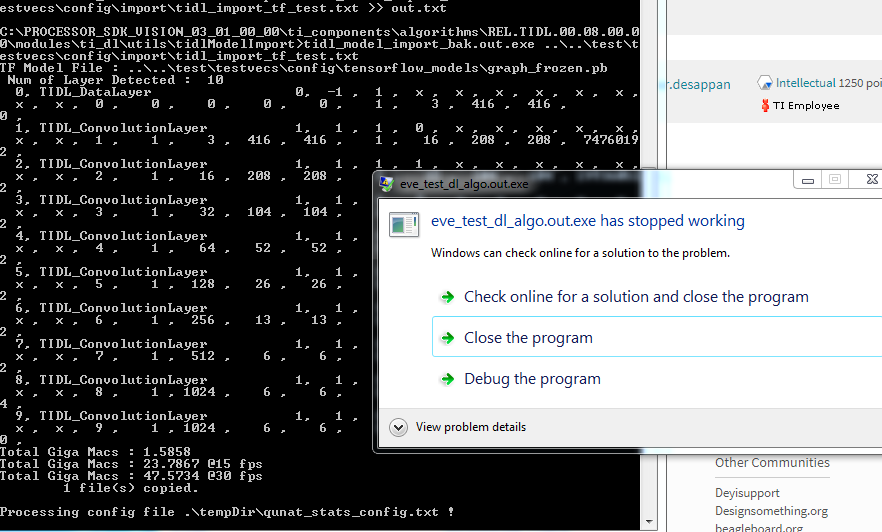
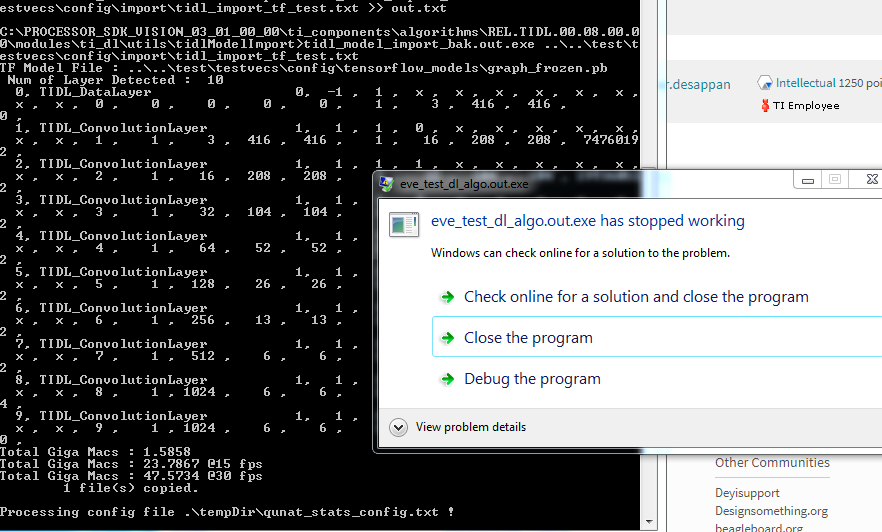
I implemented the above using tensorflow slim (tf.layers and tf.nn behaved much worse) and all the conv2d layers has batch norm and Relu enabled. When i used the tool to convert the graph, the tool crashed after the first step.
The output of the first step is given below :

Num of Layer Detected : 10
0, TIDL_DataLayer 0, -1 , 1 , x , x , x , x , x , x , x , x , 0 , 0 , 0 , 0 , 0 , 1 , 3 , 416 , 416 , 0 ,
1, TIDL_ConvolutionLayer 1, 1 , 1 , 0 , x , x , x , x , x , x , x , 1 , 1 , 3 , 416 , 416 , 1 , 16 , 208 , 208 , 74760192 ,
2, TIDL_ConvolutionLayer 1, 1 , 1 , 1 , x , x , x , x , x , x , x , 2 , 1 , 16 , 208 , 208 , 1 , 32 , 104 , 104 , 199360512 ,
3, TIDL_ConvolutionLayer 1, 1 , 1 , 2 , x , x , x , x , x , x , x , 3 , 1 , 32 , 104 , 104 , 1 , 64 , 52 , 52 , 199360512 ,
4, TIDL_ConvolutionLayer 1, 1 , 1 , 3 , x , x , x , x , x , x , x , 4 , 1 , 64 , 52 , 52 , 1 , 128 , 26 , 26 , 199360512 ,
5, TIDL_ConvolutionLayer 1, 1 , 1 , 4 , x , x , x , x , x , x , x , 5 , 1 , 128 , 26 , 26 , 1 , 256 , 13 , 13 , 199360512 ,
6, TIDL_ConvolutionLayer 1, 1 , 1 , 5 , x , x , x , x , x , x , x , 6 , 1 , 256 , 13 , 13 , 1 , 512 , 6 , 6 , 199360512 ,
7, TIDL_ConvolutionLayer 1, 1 , 1 , 6 , x , x , x , x , x , x , x , 7 , 1 , 512 , 6 , 6 , 1 , 1024 , 6 , 6 , 169869312 ,
8, TIDL_ConvolutionLayer 1, 1 , 1 , 7 , x , x , x , x , x , x , x , 8 , 1 , 1024 , 6 , 6 , 1 , 1024 , 6 , 6 , 339738624 ,
9, TIDL_ConvolutionLayer 1, 1 , 1 , 8 , x , x , x , x , x , x , x , 9 , 1 , 1024 , 6 , 6 , 1 , 125 , 6 , 6 , 4608000 ,
Total Giga Macs : 1.5858
Total Giga Macs : 23.7867 @15 fps
Total Giga Macs : 47.5734 @30 fps

Apart from the crash, the above shows the batch norm/ maxpooling layers were not detected?  and the output resolution is also wrong. (after 6th layer)

Other issue when using leaky_relu gives an error saying its not supported (even though its actually PReLU). How do we address this problem?

Do you guys have  example code of all the supported Layers in tensorflow?. 

I have attached the necessary files to recreate the problem.

https://drive.google.com/file/d/1Z7aaNRqtV7Bu6hqobMu52hUQiBef2NUw/view?usp=sharing


  • The batch norm, maxpooling and relU layers are merged with convolution layer to speed up the execution.
    We have validated PReLu layer using a caffe test case. We have not tested the "leaky_relu" from tensorflow. We will check and get back on this. meanwhile, please use networks with relU layer.
    We have validated inceptionNetV1 and mobilenet_1.0 fro below github (Refer user guide and datasheet for more information)
    github.com/.../slim
  • Kumar, the problem reported was with relu only. There are two issues: 1/ The tidl conversion didnt happen, it crashed midway after the initial step. 2/Even the initial step the network output was not proper. The shape of the output tensor was wrong (may be the reason of the crash).
  • I could not notice any crash message in the log. Could you please help me on this.

    Conv2D_6: [1, 13, 13, 512]
    MaxPool_6: [1, 13, 13, 512]

    After 6th layer, the expecte shape is "512 , 6 , 6" which tool is printing. Max pool on [1, 13, 13, 512] would be [1, 6, 6, 512] . Correct me If I am wrong
  • Kumar, The above shows the crash after the initial step. The last max pool layer is of STRIDE=1 and padding=SAME. So it should be of 13x13. This is the tiny_yolo_v2 model configuration. I have attached all the necessary files and tensorflow code to generate this issue is my first message, in case you want to try to reproduce.

  • Crash is observed during the quantization stats collection step of import tool. can you share the import config file and imput image used in the import tool to re-reporduce the issue.
    We will check regarding the maxpool with stride 1.
  • The config file is attached.7571.config.zip

  • The crash is observed because of un suported pre-process type. We have standard pre process types for CIFAR-10 and imageNet data set. The image resolution that you are providing is not suported with "preProcType =2" Please generate a RAW image ( RGB planar image) and use it for importing by mentioning it as "rawSampleInData=1" to avoid crash.
  • config1.zipKumar, tried the changes, the issue is still present. The files are attached.

  • Tool is crashing because insufficient memory for model. Crash can be avoided by setting numParamBits as 8, still we will not able to run this model as network needs high external memory to run, which is not suported in the device. Please train a model with lesser memory requirement to run on the device.
    Please the nets in the below path for refernce models (With Small memory foot print requirement)
    github.com/.../caffe-jacinto-models


    For Max Pool 2x2 with stride, We have identified a bug in the tensorflow model inmprot. It will be fixed in the next release.

    Thanks and Rgerds,
    Kumar.D
  • Thanks Kumar for the prompt response and efforts you have put to debug this issue. When I reduced the number of layers i was able to generate the binaries. 

    I have calculated the memory of the network as shown below:

    The total memory with float32 is 94MB, this whole thing has to fit in 512 MB RAM (with only EVE running most of it should be available) right?. Is there anything iam missing?

    regards

    vijay

  • Hi Vijay,
    The current standalone test bench uses some limited memory allocation and can be increased by changing the MMU configuration. Also memory allocation is not as simple as the calculation that you have described. Algorithm has to handle padding, some states for optimisation. BTW, Algorithm request the memory size based on the network, through algAlloc call.
    If the total memory required is less than 512 MB, then we can run on the device.
    Thanks and regards
    Kumar.D
  • Thanks Kumar, we will check the MMU configuration and will let you know. thanks
  • Hi Kumar,

    We worked around the stride=1 issue for now by setting the stride = 2 in MaxPool_6. With this the tf import tool creates the TIDL models successfully and the stats tool also generates output binary during the import process.
    We also verified that the newly genreated TF model is actually larger than the older model.

    What we observe with this new model is that when we run host emulation on a test input, the output is generated as expected and there is no crash observed. This is with the default MMU configuration.

    Why does this even larger model not crash without the MMU changes that you suggested above? Is it possible that the crash had nothing to do with the model size in this case?

    Thanks,
    Bhargav
  • Please refer the error code (In interface file) returned by the Algorithm to understand the exact issue. Earlier, I have explained one probable case (Insufficient memory) based on the observation.

    Rgerads,

    Kumar.D

  • Hi Kumar,

    We tried to test stride=1 in maxpool 2x2 to see if the bug is fixed with the new release. But we encountered the same error with the new release (released on 6th Arpil) as well.

    Can you please check this on your end?

    Thanks,
    Bhargav
  • Bhargav,

    We will try to re-produce the issue and get back on this.

    Regrads,
    Kumar.D
  • Hi Bhargav,

    Could you please try with below fix in "tidl_tfImport.cpp" file,

    at line #1010, replace this if condition…

    if(TIDL_isInputConv2D( pOrgTIDLNetStructure, layerIndex, tfGraphDef.node(i).input(0).c_str()) &&
    (tfGraphDef.node(i).attr().at(std::string("ksize")).list().i(1) == 2) &&
    (tfGraphDef.node(i).attr().at(std::string("ksize")).list().i(2) == 2))


    with this below if condition..

    if(TIDL_isInputConv2D( pOrgTIDLNetStructure, layerIndex, tfGraphDef.node(i).input(0).c_str()) &&
    (tfGraphDef.node(i).attr().at(std::string("ksize")).list().i(1) == 2) &&
    (tfGraphDef.node(i).attr().at(std::string("ksize")).list().i(2) == 2) &&
    (tfGraphDef.node(i).attr().at(std::string("strides")).list().i(1) == 2) &&
    (tfGraphDef.node(i).attr().at(std::string("strides")).list().i(2) == 2))

    Thanks,
    Praveen
  • Hi Praveen,

    Thanks for looking into this!

    I'm currently facing some issues in compiling the tidl model import tool. While I sort that out, would it be possible for you to share the windows binary for the tool so that I can quickly check if the fix works?

    Thanks,
    Bhargav
  • Hi Praveen,

    I was able to compile the model conversion tool with your fix. I'm still seeing an issue although this time a different one.

    When an activation map of 13x13x512 is input to the max pooling layer with stride=1, the output is 12x12x512.
    The expected output should be 13x13x512.

    Can you please look into this?
  • Hi Bhargav,

    We fixed some issue in "tidl_tfImport.cpp" file, Could you please try below fix..

    at line #1134, replace this below code…
    -------------------------------------------------------------------------------------------------------------------------------------------------------
    if(padType == 0)
    {
    int32_t pad = (pOrgTIDLNetStructure->TIDLPCLayers[layerIndex].layerParams.poolParams.kernelW-1)/2;
    pOrgTIDLNetStructure->TIDLPCLayers[layerIndex].layerParams.poolParams.padW = pad;
    pad = (pOrgTIDLNetStructure->TIDLPCLayers[layerIndex].layerParams.poolParams.kernelH-1)/2;
    pOrgTIDLNetStructure->TIDLPCLayers[layerIndex].layerParams.poolParams.padH = pad;
    }
    else if(padType == 1)
    {
    pOrgTIDLNetStructure->TIDLPCLayers[layerIndex].layerParams.poolParams.padW = 0;
    pOrgTIDLNetStructure->TIDLPCLayers[layerIndex].layerParams.poolParams.padH = 0;
    }

    pOrgTIDLNetStructure->TIDLPCLayers[layerIndex].outData[0].numDim = pOrgTIDLNetStructure->TIDLPCLayers[layerIndex].inData[0].numDim;
    pOrgTIDLNetStructure->TIDLPCLayers[layerIndex].outData[0].dimValues[0] = pOrgTIDLNetStructure->TIDLPCLayers[layerIndex].inData[0].dimValues[0];

    pOrgTIDLNetStructure->TIDLPCLayers[layerIndex].outData[0].dimValues[1] = pOrgTIDLNetStructure->TIDLPCLayers[layerIndex].inData[0].dimValues[1];
    pOrgTIDLNetStructure->TIDLPCLayers[layerIndex].outData[0].dimValues[2] = (((pOrgTIDLNetStructure->TIDLPCLayers[layerIndex].inData[0].dimValues[2] +
    pOrgTIDLNetStructure->TIDLPCLayers[layerIndex].layerParams.poolParams.padH*2.0) -
    (pOrgTIDLNetStructure->TIDLPCLayers[layerIndex].layerParams.poolParams.kernelH))/
    pOrgTIDLNetStructure->TIDLPCLayers[layerIndex].layerParams.poolParams.strideH) + 1;
    pOrgTIDLNetStructure->TIDLPCLayers[layerIndex].outData[0].dimValues[3] = (((pOrgTIDLNetStructure->TIDLPCLayers[layerIndex].inData[0].dimValues[3] +
    pOrgTIDLNetStructure->TIDLPCLayers[layerIndex].layerParams.poolParams.padW*2.0) -
    (pOrgTIDLNetStructure->TIDLPCLayers[layerIndex].layerParams.poolParams.kernelW))/
    pOrgTIDLNetStructure->TIDLPCLayers[layerIndex].layerParams.poolParams.strideW) + 1;

    pOrgTIDLNetStructure->TIDLPCLayers[layerIndex].layerParams.poolParams.numChannels = pOrgTIDLNetStructure->TIDLPCLayers[layerIndex].outData[0].dimValues[1];
    -----------------------------------------------------------------------------------------------------------------------------------------------------------------

    with this below if condition..
    ----------------------------------------------------------------------------------------------------------------------------------------------------------------
    if(padType == 0)
    {
    int stride, kernel, in_size, out_size;
    kernel = pOrgTIDLNetStructure->TIDLPCLayers[layerIndex].layerParams.poolParams.kernelH;
    stride = pOrgTIDLNetStructure->TIDLPCLayers[layerIndex].layerParams.poolParams.strideH;
    in_size = pOrgTIDLNetStructure->TIDLPCLayers[layerIndex].inData[0].dimValues[2];
    pOrgTIDLNetStructure->TIDLPCLayers[layerIndex].outData[0].dimValues[2] = out_size =
    (in_size + stride - 1) / stride;
    pOrgTIDLNetStructure->TIDLPCLayers[layerIndex].layerParams.poolParams.padH =
    ((out_size - 1) * stride + ((kernel - 1) + 1) - in_size)/2;

    kernel = pOrgTIDLNetStructure->TIDLPCLayers[layerIndex].layerParams.poolParams.kernelW;
    stride = pOrgTIDLNetStructure->TIDLPCLayers[layerIndex].layerParams.poolParams.strideW;
    in_size = pOrgTIDLNetStructure->TIDLPCLayers[layerIndex].inData[0].dimValues[3];
    pOrgTIDLNetStructure->TIDLPCLayers[layerIndex].outData[0].dimValues[3] = out_size =
    (in_size + stride - 1) / stride;
    pOrgTIDLNetStructure->TIDLPCLayers[layerIndex].layerParams.poolParams.padW =
    ((out_size - 1) * stride + ((kernel - 1) + 1) - in_size)/2;
    }
    else if(padType == 1)
    {
    int stride, in_size, kernel;
    kernel = pOrgTIDLNetStructure->TIDLPCLayers[layerIndex].layerParams.poolParams.kernelH;
    stride = pOrgTIDLNetStructure->TIDLPCLayers[layerIndex].layerParams.poolParams.strideH;
    in_size = pOrgTIDLNetStructure->TIDLPCLayers[layerIndex].inData[0].dimValues[2];
    pOrgTIDLNetStructure->TIDLPCLayers[layerIndex].outData[0].dimValues[2] =
    (in_size + ((kernel - 1) + 1) + stride) / stride;
    pOrgTIDLNetStructure->TIDLPCLayers[layerIndex].layerParams.poolParams.padH = 0;

    kernel = pOrgTIDLNetStructure->TIDLPCLayers[layerIndex].layerParams.poolParams.kernelW;
    stride = pOrgTIDLNetStructure->TIDLPCLayers[layerIndex].layerParams.poolParams.strideW;
    in_size = pOrgTIDLNetStructure->TIDLPCLayers[layerIndex].inData[0].dimValues[3];
    pOrgTIDLNetStructure->TIDLPCLayers[layerIndex].outData[0].dimValues[3] =
    (in_size + ((kernel - 1) + 1) + stride) / stride;
    pOrgTIDLNetStructure->TIDLPCLayers[layerIndex].layerParams.poolParams.padW = 0;
    }

    pOrgTIDLNetStructure->TIDLPCLayers[layerIndex].outData[0].numDim = pOrgTIDLNetStructure->TIDLPCLayers[layerIndex].inData[0].numDim;
    pOrgTIDLNetStructure->TIDLPCLayers[layerIndex].outData[0].dimValues[0] = pOrgTIDLNetStructure->TIDLPCLayers[layerIndex].inData[0].dimValues[0];
    pOrgTIDLNetStructure->TIDLPCLayers[layerIndex].outData[0].dimValues[1] = pOrgTIDLNetStructure->TIDLPCLayers[layerIndex].inData[0].dimValues[1];
    pOrgTIDLNetStructure->TIDLPCLayers[layerIndex].layerParams.poolParams.numChannels = pOrgTIDLNetStructure->TIDLPCLayers[layerIndex].outData[0].dimValues[1];
    -----------------------------------------------------------------------------------------------------------------------------------------------------------------

    Thanks,
    Praveen
  • With this fix, the output of max pool has the expected size i.e. 13x13x512.

    However, when I run host emulation with generated model bin files, I get floating point exception in tidl_tb.c at line #660.
    Apparently, conv2dPrms->numGroups is 0.
    Can you please look into this?
  • We are not getting this exception at our end . Can you please share the generated model bin files to replicate the issue.

    Btw, do you have access to source code and did you increase the allocated memory to run on host emulation ?
    We were getting an exception as the current allocated memory is not enough to run on EVE host emulation , so after increasing the memory this exception is resolved and could able to run this test case.
  • You can find the model bin files here: drive.google.com/.../view

    I do have access to the source code and I increased the tempIOBuf memory to run on host emulation. I was also getting the memory not enough exception without this fix.

    Can you try with attached models and let me know?
  • Can you try increasing "EXTMEMNONCACHEIO" buffer instead of tempIOBuf buffer?
    Change this below at line# 248 in "tidl_tb.c"
    #define EXTMEMNONCACHEIO_SIZE (4*1024*1024*MAX_ROI_SUPPORT)
    to below..
    #define EXTMEMNONCACHEIO_SIZE (8*1024*1024*MAX_ROI_SUPPORT)

    Thanks,
    Praveen
  • I increased EXTMEMNONCACHEIO and reverted tempIOBuf. I still get the same error.

    I doubt that numGroups has anything to do with memory settings. Can you please try with the model bins I gave you and see if you get the same error?
  • I tried to run with model bins given by you, looks like the models were not generated properly.

    Can you please try below steps:

    1. Re-build the TIDL reference executable (eve_test_dl_algo.out.exe) by increasing the EXTMEMNONCACHEIO buffer. Please refer to section 3.6.3 in the user guide for build steps. Copy the generated executable to "{TIDL_install_path}\utils\quantStatsTool" folder

    2. Re-build the import tool with two fixes given in this thread and try to import new models and run.

    3. I assume you are using the same NetFile (graph_frozen.pb) and input attached in first post of this thread. If I use them, I got tidl_net.bin of size 473 KB and tidl_param.bin of size 30,696 KB. Please check.

    Thanks,
    Praveen
  • Hi Praveen,


    Does quantStatsTool have anything to do with the generation of models itself? After generating these models, the quantStatsTool did not run successfully but I thought that this does not hinder model generation itself in any way. Is this assumption incorrect?

    i have followed step 2 for generating this model.

    I am using a different graph_frozen.pb and hence the output TIDL model sizes are different. The one I'm using can be found here: https://drive.google.com/open?id=1EpuHYSlY_lbugA2YutRBDs2_tR58gKNR

    Bhargav

  • No, quantStatsTool also should run properly as this will update quantization parameters in model files.

    Can you please try step1 also and check?

    Thnaks,
    Praveen
  • Thanks for the insight Praveen.

    The problem with my setup was this:
    I was using windows to generated model and linux to run host emulation (on two separate machines).

    I have moved to windows for doing everything and the output is getting generated properly.
    Just curious to know of the state of linux support for TIDL.

    Thanks for fixing the bug at short notice and being patient with me while I sort out the setup issues.

    Thanks,
    Bhargav
  • Hi Bhargav,

    Thanks for the update.

    As of now, TIDL does not build and run in Linux. We are working on the plan to support it.

    Regards,
    Praveen
  • Okay.

    Just out of curiosity, what do the FAIL messages below mean when the quantStatsTool runs? Please note that there are no errors/crashes and the output model is generated.

    Processing Frame Number : 0

    Layer    1 : Max PASS :        0 :    81600 Out Q :        1 ,        0, TIDL_ConvolutionLayer, PASSED  #MMACs =    74.76,    73.72,    95.53, Sparsity : -27.78,   1.39

    Layer    2 : Max FAIL :        0 :      256 Out Q :        1 ,        0, TIDL_ConvolutionLayer, PASSED  #MMACs =   199.36,   193.17,   198.84, Sparsity :   0.26,   3.10

    Layer    3 : Max FAIL :        0 :      256 Out Q :        1 ,        0, TIDL_ConvolutionLayer, PASSED  #MMACs =   199.36,   190.86,   197.07, Sparsity :   1.15,   4.26

    Layer    4 : Max FAIL :        0 :      256 Out Q :        1 ,        0, TIDL_ConvolutionLayer, PASSED  #MMACs =   199.36,   192.13,   197.85, Sparsity :   0.76,   3.63

    Layer    5 : Max FAIL :        0 :      256 Out Q :        1 ,        0, TIDL_ConvolutionLayer, PASSED  #MMACs =   199.36,   191.87,   196.01, Sparsity :   1.68,   3.76

    Layer    6 : Max FAIL :        0 :      256 Out Q :        1 ,        0, TIDL_ConvolutionLayer, PASSED  #MMACs =   199.36,   191.93,   196.07, Sparsity :   1.65,   3.73

    Layer    7 :TIDL_PoolingLayer,     PASSED  #MMACs =     0.09,     0.00,     0.09, Sparsity :   0.00, 100.00

    Layer    8 : Max FAIL :        0 :      256 Out Q :        1 ,        0, TIDL_ConvolutionLayer, PASSED  #MMACs =   797.44,   786.47,   796.49, Sparsity :   0.12,   1.38

    Layer    9 : Max FAIL :        0 :      256 Out Q :        1 ,        0, TIDL_ConvolutionLayer, PASSED  #MMACs =   797.44,   785.82,   796.15, Sparsity :   0.16,   1.46

    Layer   10 : Max FAIL :        0 :      512 Out Q :        1 ,        0, TIDL_ConvolutionLayer, PASSED  #MMACs =    36.77,    35.31,    37.35, Sparsity :  -1.58,   3.97

    End of config list found !

  • You can ignore "Max PASS/FAIL" values while import, you will get proper values for Max PASS while actual TIDL execution.

    Thanks,
    Praveen
  • Hi Praveen,

    I generated the net and param binary files for the model and it turns out the net.bin is mostly zeros.

    This causes the output of quantStatsTool to be all zeros. In fact, the activation outputs of all layers are all zeros!
    Can you please try to reproduce this on your end and look into this?

    Bhargav
  • Hi Bhargav,

    I am not able to reproduce the reported issue. Can you please share your import config file.

    I am hoping your import config look like this..

    # Default - 0
    randParams = 0

    # 0: Caffe, 1: TensorFlow, Default - 0
    modelType = 1

    # 0: Fixed quantization By tarininng Framework, 1: Dyanamic quantization by TIDL, Default - 1
    quantizationStyle = 1

    # quantRoundAdd/100 will be added while rounding to integer, Default - 50
    quantRoundAdd = 50

    numParamBits = 10

    inputNetFile = "..\..\test\testvecs\config\tensorflow_models\graph_frozen.pb"
    inputParamsFile = "NA"
    outputNetFile = "..\..\test\testvecs\config\tidl_models\tidl_net.bin"
    outputParamsFile = "..\..\test\testvecs\config\tidl_models\tidl_param.bin"

    preProcType = 4
    sampleInData = "..\..\test\testvecs\input\car_416x416.jpg"
    tidlStatsTool = "..\quantStatsTool\eve_test_dl_algo.out.exe"

    inWidth = 416
    inHeight = 416
    inNumChannels = 3

    If not, please try with this import config file and check the outputs of quantStatsTool.

    Thanks,
    Praveen
  • Hi Praveen,

    this is my import config file:

    # Default - 0
    randParams = 0

    # 0: Caffe, 1: TensorFlow, Default - 0
    modelType = 1

    # 0: Fixed quantization By tarininng Framework, 1: Dyanamic quantization by TIDL, Default - 1
    quantizationStyle = 1

    # quantRoundAdd/100 will be added while rounding to integer, Default - 50
    quantRoundAdd = 50

    numParamBits = 8

    inputNetFile = "graph_frozen.pb"
    inputParamsFile = "NA"
    outputNetFile = "tidl_net_tiny_yolo.bin"
    outputParamsFile = "tidl_param_tiny_yolo.bin"

    preProcType = 2
    sampleInData = "car_416x416_p.rgb"
    tidlStatsTool = "..\quantStatsTool\eve_test_dl_algo.out.exe"

    inWidth = 416
    inHeight = 416
    inNumChannels = 3
    rawSampleInData = 1


    Is this correct? I tried with your config file but I get "Image reading is Not Supported. OpenCV not Enabled" error. I would like to ideally work with the rgb file. Is that not okay?

    Bhargav
  • Hi Praveen,

    I installed opencv and ran the tidl model import with your config file. I still get all zeros!

    The only thing different here is that I don't have source code for the latest TIDL release (no CDDS account) so I'm using the "algo" folder from TIDL release 0.08.
    I need the source code for the fixes you provided above in this thread for maxpool with stride = 1.

    To confirm this, can you please share your eve_test_dl_algo.out.exe with me?

    Thanks,
    Bhargav
  • Hi Bhargav,

    We can not share the executables on the forum. Please work with your local TI representative to get access to the latest source code release version TIDL.SRC.01.01.00.00

    Thanks,
    Praveen