This thread has been locked.

If you have a related question, please click the "Ask a related question" button in the top right corner. The newly created question will be automatically linked to this question.

How to access eMMC on Ti AM437x GP EVM


Hi experts,

I'm using TI AM437x GP EVM Rev 1.2A board, there is an eMMC chip MTFC4GLDDQ-4M IT on board, however, I can not access it from U-BOOT, it report following error message,

U-Boot SPL 2014.07-g7e537bf (Apr 10 2015 - 14:57:18)
SPL: Please implement spl_start_uboot() for your board
SPL: Direct Linux boot not active!
reading u-boot.img
reading u-boot.img


U-Boot 2014.07-g7e537bf (Apr 10 2015 - 14:57:18)

I2C: ready
DRAM: 1 GiB
NAND: 512 MiB
MMC: OMAP SD/MMC: 0, OMAP SD/MMC: 1
reading uboot.env

** Unable to read "uboot.env" from mmc0:1 **
Using default environment

Net: <ethaddr> not set. Validating first E-fuse MAC
cpsw, usb_ether
Hit any key to stop autoboot: 0
U-Boot# mmc list
OMAP SD/MMC: 0
OMAP SD/MMC: 1
U-Boot# mmc dev 1
Card did not respond to voltage select!
U-Boot#

Anyone know how to access this eMMC chip under U-BOOT or Linux?

  • Hi,

    You are using U-Boot 2014.07-g7e537bf (Apr 10 2015 - 14:57:18), so I guess you run SDK8.0 on your board, right? 
    Can you try the commands in the following guide:
    processors.wiki.ti.com/.../Linux_Core_U-Boot_User's_Guide#Updating_an_SD_card_or_eMMC_with_RAW_writes

    U-Boot # mmc dev 0
    U-Boot # mmc rescan
    U-Boot # mmc dev 1

    Best Regards,
    Yordan

  • Hi Yordan,

    Thanks for your update. I tried to run mmc rescan but still got the same error,

    U-Boot SPL 2014.07-g7e537bf (Apr 10 2015 - 14:57:18)
    SPL: Please implement spl_start_uboot() for your board
    SPL: Direct Linux boot not active!
    reading u-boot.img
    reading u-boot.img


    U-Boot 2014.07-g7e537bf (Apr 10 2015 - 14:57:18)

    I2C: ready
    DRAM: 1 GiB
    NAND: 512 MiB
    MMC: OMAP SD/MMC: 0, OMAP SD/MMC: 1
    reading uboot.env
    Net: cpsw, usb_ether
    Hit any key to stop autoboot: 0
    U-Boot#
    U-Boot#
    U-Boot#
    U-Boot#
    U-Boot# mmc dev 0
    switch to partitions #0, OK
    mmc0 is current device
    U-Boot# mmc rescan
    U-Boot# mmc dev 1
    Card did not respond to voltage select!
    U-Boot#
  • Hi, is there anyone has accessed this eMMC chip? Thanks.

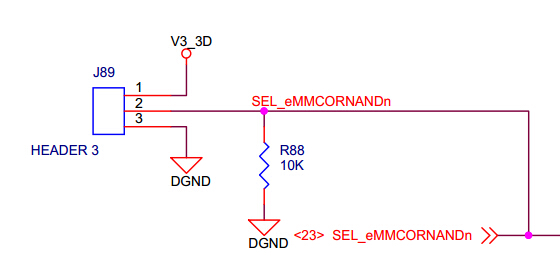
  • I believe you need to jumper pins 1-2 of header J2 to enable the eMMC. The NAND is enabled by default. Or, you could could set GPIO24, ball T23 to high to accomplish the same thing.

    This may depend on the version of the board that you have.

    Sorry I can't try it right now as I don't have a jumper handy.

  • Hi RonB,

    Thank you very much for your help!

    I did following test but all failed,

    >I believe you need to jumper pins 1-2 of header J2 to enable the eMMC 

    I'm using TI AM437x GP EVM Rev 1.2A, I also found the mathing sch for Install jumper to 1-2 of J89, However, it still report 'Card did not respond to voltage select!'

    Then I tried to add following pinmux setting for mmc1 in file mux.c, same error message,

    static struct module_pin_mux mmc1_pin_mux[] = {
    	{OFFSET(gpmc_csn1), (MODE(2) | PULLUDDIS | RXACTIVE)},/* MMC1_CLK */
    	{OFFSET(gpmc_csn2), (MODE(2) | PULLUP_EN | RXACTIVE)},/* MMC1_CMD */
    	{OFFSET(gpmc_ad0), (MODE(1) | PULLUP_EN | RXACTIVE)}, /* AD0 */
    	{OFFSET(gpmc_ad1), (MODE(1) | PULLUP_EN | RXACTIVE)}, /* AD1 */
    	{OFFSET(gpmc_ad2), (MODE(1) | PULLUP_EN | RXACTIVE)}, /* AD2 */
    	{OFFSET(gpmc_ad3), (MODE(1) | PULLUP_EN | RXACTIVE)}, /* AD3 */
    	{OFFSET(gpmc_ad4), (MODE(1) | PULLUP_EN | RXACTIVE)}, /* AD4 */
    	{OFFSET(gpmc_ad5), (MODE(1) | PULLUP_EN | RXACTIVE)}, /* AD5 */
    	{OFFSET(gpmc_ad6), (MODE(1) | PULLUP_EN | RXACTIVE)}, /* AD6 */
    	{OFFSET(gpmc_ad7), (MODE(1) | PULLUP_EN | RXACTIVE)}, /* AD7 */
    	{-1},
    };

    Add configure_module_pin_mux(mmc1_pin_mux) in enable_board_pin_mux()

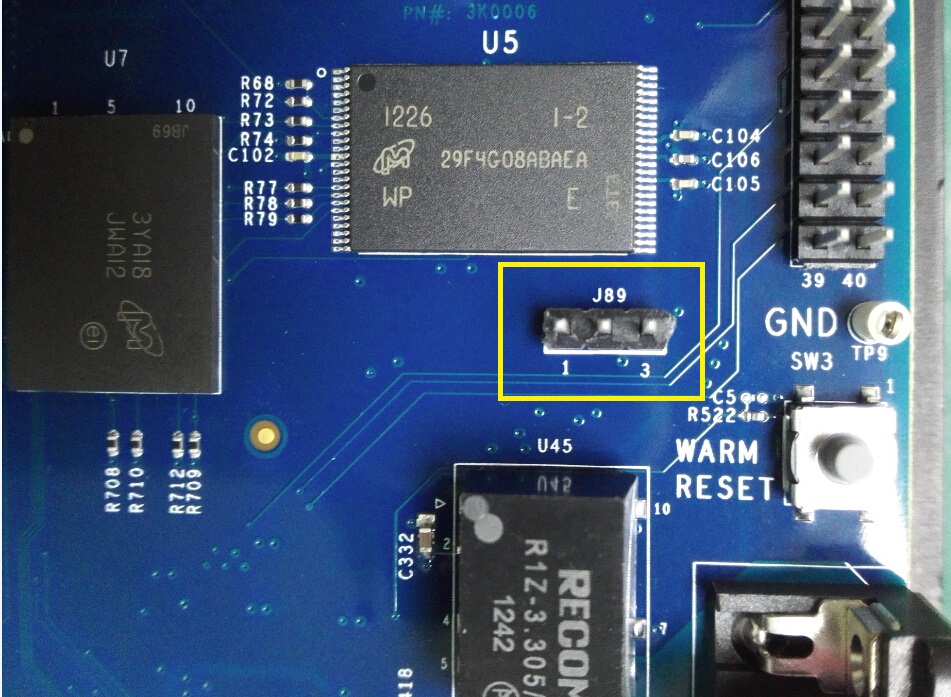
    Below is my board's picture,

    Or could you please let me know if the eMMC has ever working under uboot or Linux?

  • When you added mmc1 pin mux, did you remove NAND pin mux?Steve K.
  • Hi Steve Kipisz, thank you for your feed back, I gave it up to access eMMC via U-BOOT. I will using VxWorks to implement the eMMC accessing.
  • Hi wu shengjiang

    I am also trying to copy MLO,uboot.img and file system to eMMC partitions were I am using am437x EVM board I tried seeing the partitions of eMMC from U-Boot but no success . As per the link here , I see you tried in VxWorks method ?? if it worked can you help me with the steps to make my EVM board boot from eMMC ???

    Thanks in advance.

  • Hi Nagaraju Gadhiraju,

      I tired use eMMC in VxWorks, I can access eMMC under VxWorks OS including format/read/write, however it doesn't support booting from eMMC, please refer to following link,

    e2e.ti.com/.../1378982

    If you found the way to enable booting from eMMC, would you mind to post your method here? Thanks.

  • Hi wu shengjiang

    Thanks for the reply.Link provided helped me getting the clarity am437x GP EVM of Rev1.4A has no boot mode from eMMC.

    By any chance if you are aware of process to boot from NAND please help me.

    Now I have to shift to boot from NAND but this version only supports UBIFS only or JFFS also.

    Thanks in advance.