This thread has been locked.

If you have a related question, please click the "Ask a related question" button in the top right corner. The newly created question will be automatically linked to this question.

CCS/AM5716: Can't run RTOS SBL project in CCS

Part Number: AM5716


Tool/software: Code Composer Studio

Hi

I'm trying to run SDK SBL Project in CCS. Build and link run without warnings and errors (MLO is only 77kB instead of 268kB which was builded with "gmake sbl"). But, when ein launch the project I receive the following output: No source available for "0x3808c".

Following the console outputs:

Cortex_M4_IPU1_C0: GEL Output: --->>> AM571x Cortex M4 Startup Sequence In Progress... <<<---
Cortex_M4_IPU1_C0: GEL Output: --->>> AM571x Cortex M4 Startup Sequence DONE! <<<---
Cortex_M4_IPU1_C1: GEL Output: --->>> AM571x Cortex M4 Startup Sequence In Progress... <<<---
Cortex_M4_IPU1_C1: GEL Output: --->>> AM571x Cortex M4 Startup Sequence DONE! <<<---
C66xx_DSP: GEL Output: --->>> AM571x C66x DSP Startup Sequence In Progress... <<<---
C66xx_DSP: GEL Output: --->>> AM571x C66x DSP Startup Sequence DONE! <<<---
CortexA15_0: GEL Output: --->>> AM571x Cortex A15 Startup Sequence In Progress... <<<---
CortexA15_0: GEL Output: --->>> AM571x Cortex A15 Startup Sequence DONE! <<<---
IcePick_D: GEL Output: Ipu RTOS is released from Wait-In-Reset.
IcePick_D: GEL Output: Ipu SIMCOP is released from Wait-In-Reset.
IcePick_D: GEL Output: IVAHD C66 is released from Wait-In-Reset.
IcePick_D: GEL Output: IVAHD ICONT1 is released from Wait-In-Reset.
IcePick_D: GEL Output: IVAHD ICONT2 is released from Wait-In-Reset.
CS_DAP_DebugSS: GEL Output: --->>> CONFIGURE DEBUG DPLL settings to 1.9 GHZs  <<<---
CS_DAP_DebugSS: GEL Output: > Setup DebugSS 1.9GHz in progress...
CS_DAP_DebugSS: GEL Output: < Done with Setup DebugSS Trace export clock (TPIU) to 97MHz
CS_DAP_DebugSS: GEL Output: < Done with Setup DebugSS PLL Clocking 1.9GHz
CS_DAP_DebugSS: GEL Output: < Done with Setup DebugSS ATB Clocking 380MHz
CS_DAP_DebugSS: GEL Output: < Done with Setup DebugSS Trace export clock (TPIU) to 97MHz
CS_DAP_DebugSS: GEL Output: --->>> TURNING ON L3_INSTR and L3_3 clocks required for debug instrumention <<<<<<----
CS_DAP_DebugSS: GEL Output: ---<<< L3 instrumentation clocks are enabled >>>> ---
CS_DAP_DebugSS: GEL Output: --->>> Mapping TIMER supsend sources to default cores <<<<<<----
CS_DAP_PC: GEL Output: Cortex-A15 1 is not in WIR mode so nothing to do.
CortexA15_0: GEL Output: --->>> AM571x Target Connect Sequence Begins ... <<<---
CortexA15_0: GEL Output:     --->>> AM571x PG2.0 GP device <<<---
CortexA15_0: GEL Output: --->>> PRCM Clock Configuration for OPPNOM in progress... <<<---
CortexA15_0: GEL Output:     Cortex A15 DPLL OPP 0 clock config is in progress...
CortexA15_0: GEL Output:     Cortex A15 DPLL is already locked, now unlocking...  
CortexA15_0: GEL Output:     Cortex A15 DPLL OPP 0 is DONE!
CortexA15_0: GEL Output:     IVA DPLL OPP 0 clock config is in progress...
CortexA15_0: GEL Output:     IVA DPLL OPP 0 is DONE!
CortexA15_0: GEL Output:     PER DPLL OPP 0 clock config in progress...
CortexA15_0: GEL Output:     PER DPLL already locked, now unlocking  
CortexA15_0: GEL Output:     PER DPLL OPP 0 is DONE!
CortexA15_0: GEL Output:     CORE DPLL OPP 0 clock config is in progress...
CortexA15_0: GEL Output:     CORE DPLL OPP  already locked, now unlocking....  
CortexA15_0: GEL Output:     CORE DPLL OPP 0 is DONE!
CortexA15_0: GEL Output:     ABE DPLL OPP 0 clock config in progress...
CortexA15_0: GEL Output:     ABE DPLL OPP 0 is DONE!
CortexA15_0: GEL Output:     GMAC DPLL OPP 0 clock config is in progress...
CortexA15_0: GEL Output:     GMAC DPLL OPP 0 is DONE!
CortexA15_0: GEL Output:     GPU DPLL OPP 0 clock config is in progress...
CortexA15_0: GEL Output:     GPU DPLL OPP 0 is DONE!
CortexA15_0: GEL Output:     DSP DPLL OPP 0 clock config is in progress...
CortexA15_0: GEL Output:     DSP DPLL OPP 0 is DONE!
CortexA15_0: GEL Output:     PCIE_REF DPLL OPP 0 clock config is in progress...
CortexA15_0: GEL Output:     PCIE_REF DPLL OPP 0 is DONE!
CortexA15_0: GEL Output: --->>> PRCM Clock Configuration for OPP 0 is DONE! <<<---
CortexA15_0: GEL Output: --->>> PRCM Configuration for all modules in progress... <<<---
CortexA15_0: GEL Output: --->>> PRCM Configuration for all modules is DONE! <<<---
CortexA15_0: GEL Output: --->>> DDR3 Initialization is in progress ... <<<---
CortexA15_0: GEL Output:     DDR DPLL clock config for 666MHz is in progress...
CortexA15_0: GEL Output:     DDR DPLL clock config for 666MHz is in DONE!
CortexA15_0: GEL Output:        Launch full leveling
CortexA15_0: GEL Output:        Updating slave ratios in PHY_STATUSx registers
CortexA15_0: GEL Output:        as per HW leveling output
CortexA15_0: GEL Output:        HW leveling is now disabled. Using slave ratios from
CortexA15_0: GEL Output:        PHY_STATUSx registers
CortexA15_0: GEL Output: --->>> DDR3 Initialization is DONE! <<<---
CortexA15_0: GEL Output: --->>> Mapping TIMER supsend sources to default cores <<<<<<----
CortexA15_0: GEL Output: --->>> IPU1SS Initialization is in progress ... <<<---
CortexA15_0: GEL Output: --->>> IPU1SS Initialization is DONE! <<<---
CortexA15_0: GEL Output: --->>> IPU2SS Initialization is in progress ... <<<---
CortexA15_0: GEL Output: --->>> IPU2SS Initialization is DONE! <<<---
CortexA15_0: GEL Output: --->>> DSP1SS Initialization is in progress ... <<<---
CortexA15_0: GEL Output: DEBUG: Clock is active ...
CortexA15_0: GEL Output: DEBUG: Checking for data integrity in DSPSS L2RAM ...
CortexA15_0: GEL Output: DEBUG: Data integrity check in GEM L2RAM is sucessful!
CortexA15_0: GEL Output: --->>> DSP1SS Initialization is DONE! <<<---
CortexA15_0: GEL Output: --->>> IVAHD Initialization is in progress ... <<<---
CortexA15_0: GEL Output: DEBUG: Clock is active ...
CortexA15_0: GEL Output: --->>> IVAHD Initialization is DONE! ... <<<---
CortexA15_0: GEL Output: --->>> PRUSS 1 and 2 Initialization is in progress ... <<<---
CortexA15_0: GEL Output: --->>> PRUSS 1 and 2 Initialization is in complete ... <<<---
CortexA15_0: GEL Output: --->>> AM571x Target Connect Sequence DONE !!!!!  <<<---

I'm using SDK RTOS v3.03.00.04, PDK v1.0.6, on Windows, CCS 7.2.0.00013

Thanks in advance for any idea.

Christian

  • The RTOS team have been notified. They will respond here.
  • Christian,

    The size difference indicates that you are missing large chunk of code that is compiled to build the SBL. Are you sure, you have included all the relevant source and libraries ? Can you try to load the .out created by gmake sbl and check if you are seeing the same error.

    The log you have provided is from the GEL file that run when you connect to the target. Can you also provide the full error when the sbl.out is loaded on the A15 core0 ?

    Please zip your project and provide here so that we can reproduce the issue.


    Regards,
    Rahul

  • Hi Rahul

    The makefile under \sbl\board\idkAM571x\build lists the following libraries: ti.board.aa15fg, ti.drv.uart.aa15fg, ti.drv.spi.aa15fg, ti.drv.i2c.aa15fg, ti.drv. mmcsd.aa15fg, ti.fs.fatfs.aa15fg, ti.csl.aa15fg, ti.csl.init.aa15fg and ti.osal.aa15fg. The syscalls.aa15fg library was also required. This I have integrated in the project (-l and -L) and the linker file (INPUT {...}).

    The out file created by gmake sbl and loaded via CCS runs as expected, that means everything OK.

    Output while downloading the sbl.out file (from gmake sbl):

    Cortex_M4_IPU1_C0: GEL Output: --->>> AM571x Cortex M4 Startup Sequence In Progress... <<<---
    Cortex_M4_IPU1_C0: GEL Output: --->>> AM571x Cortex M4 Startup Sequence DONE! <<<---
    Cortex_M4_IPU1_C1: GEL Output: --->>> AM571x Cortex M4 Startup Sequence In Progress... <<<---
    Cortex_M4_IPU1_C1: GEL Output: --->>> AM571x Cortex M4 Startup Sequence DONE! <<<---
    C66xx_DSP: GEL Output: --->>> AM571x C66x DSP Startup Sequence In Progress... <<<---
    C66xx_DSP: GEL Output: --->>> AM571x C66x DSP Startup Sequence DONE! <<<---
    CortexA15_0: GEL Output: --->>> AM571x Cortex A15 Startup Sequence In Progress... <<<---
    CortexA15_0: GEL Output: --->>> AM571x Cortex A15 Startup Sequence DONE! <<<---
    IcePick_D: GEL Output: Ipu RTOS is released from Wait-In-Reset.
    IcePick_D: GEL Output: Ipu SIMCOP is released from Wait-In-Reset.
    IcePick_D: GEL Output: IVAHD C66 is released from Wait-In-Reset.
    IcePick_D: GEL Output: IVAHD ICONT1 is released from Wait-In-Reset.
    IcePick_D: GEL Output: IVAHD ICONT2 is released from Wait-In-Reset.
    CS_DAP_DebugSS: GEL Output: --->>> CONFIGURE DEBUG DPLL settings to 1.9 GHZs  <<<---
    CS_DAP_DebugSS: GEL Output: > Setup DebugSS 1.9GHz in progress...
    CS_DAP_DebugSS: GEL Output: < Done with Setup DebugSS Trace export clock (TPIU) to 97MHz
    CS_DAP_DebugSS: GEL Output: < Done with Setup DebugSS PLL Clocking 1.9GHz
    CS_DAP_DebugSS: GEL Output: < Done with Setup DebugSS ATB Clocking 380MHz
    CS_DAP_DebugSS: GEL Output: < Done with Setup DebugSS Trace export clock (TPIU) to 97MHz
    CS_DAP_DebugSS: GEL Output: --->>> TURNING ON L3_INSTR and L3_3 clocks required for debug instrumention <<<<<<----
    CS_DAP_DebugSS: GEL Output: ---<<< L3 instrumentation clocks are enabled >>>> ---
    CS_DAP_DebugSS: GEL Output: --->>> Mapping TIMER supsend sources to default cores <<<<<<----
    CS_DAP_PC: GEL Output: Cortex-A15 1 is not in WIR mode so nothing to do.
    CortexA15_0: GEL Output: --->>> AM571x Target Connect Sequence Begins ... <<<---
    CortexA15_0: GEL Output:     --->>> AM571x PG2.0 GP device <<<---
    CortexA15_0: GEL Output: --->>> PRCM Clock Configuration for OPPNOM in progress... <<<---
    CortexA15_0: GEL Output:     Cortex A15 DPLL OPP 0 clock config is in progress...
    CortexA15_0: GEL Output:     Cortex A15 DPLL is already locked, now unlocking...  
    CortexA15_0: GEL Output:     Cortex A15 DPLL OPP 0 is DONE!
    CortexA15_0: GEL Output:     IVA DPLL OPP 0 clock config is in progress...
    CortexA15_0: GEL Output:     IVA DPLL already locked, now unlocking...
    CortexA15_0: GEL Output:     IVA DPLL OPP 0 is DONE!
    CortexA15_0: GEL Output:     PER DPLL OPP 0 clock config in progress...
    CortexA15_0: GEL Output:     PER DPLL already locked, now unlocking  
    CortexA15_0: GEL Output:     PER DPLL OPP 0 is DONE!
    CortexA15_0: GEL Output:     CORE DPLL OPP 0 clock config is in progress...
    CortexA15_0: GEL Output:     CORE DPLL OPP  already locked, now unlocking....  
    CortexA15_0: GEL Output:     CORE DPLL OPP 0 is DONE!
    CortexA15_0: GEL Output:     ABE DPLL OPP 0 clock config in progress...
    CortexA15_0: GEL Output:     ABE DPLL OPP 0 is DONE!
    CortexA15_0: GEL Output:     GMAC DPLL OPP 0 clock config is in progress...
    CortexA15_0: GEL Output:     GMAC DPLL already locked, now unlocking....
    CortexA15_0: GEL Output:     GMAC DPLL OPP 0 is DONE!
    CortexA15_0: GEL Output:     GPU DPLL OPP 0 clock config is in progress...
    CortexA15_0: GEL Output:     GPU DPLL already locked, now unlocking...
    CortexA15_0: GEL Output:     GPU DPLL OPP 0 is DONE!
    CortexA15_0: GEL Output:     DSP DPLL OPP 0 clock config is in progress...
    CortexA15_0: GEL Output:     DSP DPLL already locked, now unlocking....
    CortexA15_0: GEL Output:     DSP DPLL OPP 0 is DONE!
    CortexA15_0: GEL Output:     PCIE_REF DPLL OPP 0 clock config is in progress...
    CortexA15_0: GEL Output:     PCIE_REF DPLL already locked, now unlocking....
    CortexA15_0: GEL Output:     PCIE_REF DPLL OPP 0 is DONE!
    CortexA15_0: GEL Output: --->>> PRCM Clock Configuration for OPP 0 is DONE! <<<---
    CortexA15_0: GEL Output: --->>> PRCM Configuration for all modules in progress... <<<---
    CortexA15_0: GEL Output: --->>> PRCM Configuration for all modules is DONE! <<<---
    CortexA15_0: GEL Output: --->>> DDR3 Initialization is in progress ... <<<---
    CortexA15_0: GEL Output:     DDR DPLL clock config for 666MHz is in progress...
    CortexA15_0: GEL Output:     DDR DPLL already locked, now unlocking....
    CortexA15_0: GEL Output:     DDR DPLL clock config for 666MHz is in DONE!
    CortexA15_0: GEL Output:        Launch full leveling
    CortexA15_0: GEL Output:        Updating slave ratios in PHY_STATUSx registers
    CortexA15_0: GEL Output:        as per HW leveling output
    CortexA15_0: GEL Output:        HW leveling is now disabled. Using slave ratios from
    CortexA15_0: GEL Output:        PHY_STATUSx registers
    CortexA15_0: GEL Output: --->>> DDR3 Initialization is DONE! <<<---
    CortexA15_0: GEL Output: --->>> Mapping TIMER supsend sources to default cores <<<<<<----
    CortexA15_0: GEL Output: --->>> IPU1SS Initialization is in progress ... <<<---
    CortexA15_0: GEL Output: --->>> IPU1SS Initialization is DONE! <<<---
    CortexA15_0: GEL Output: --->>> IPU2SS Initialization is in progress ... <<<---
    CortexA15_0: GEL Output: --->>> IPU2SS Initialization is DONE! <<<---
    CortexA15_0: GEL Output: --->>> DSP1SS Initialization is in progress ... <<<---
    CortexA15_0: GEL Output: DEBUG: Clock is active ...
    CortexA15_0: GEL Output: DEBUG: Checking for data integrity in DSPSS L2RAM ...
    CortexA15_0: GEL Output: DEBUG: Data integrity check in GEM L2RAM is sucessful!
    CortexA15_0: GEL Output: --->>> DSP1SS Initialization is DONE! <<<---
    CortexA15_0: GEL Output: --->>> IVAHD Initialization is in progress ... <<<---
    CortexA15_0: GEL Output: DEBUG: Clock is active ...
    CortexA15_0: GEL Output: --->>> IVAHD Initialization is DONE! ... <<<---
    CortexA15_0: GEL Output: --->>> PRUSS 1 and 2 Initialization is in progress ... <<<---
    CortexA15_0: GEL Output: --->>> PRUSS 1 and 2 Initialization is in complete ... <<<---
    CortexA15_0: GEL Output: --->>> AM571x Target Connect Sequence DONE !!!!!  <<<---

    SBL.zip

    Unfortunately it was not possible to attach a zip file. Hope the download works.

    Best Regards,

    Christian

  • Hi Rahul
    Would more information help? If yes, which?
    Best Regards,
    Christian
  • Hi Christian,

    We're going to test the uploaded project on our side and provide an update here.

    Best,
    Sahin
  • Hi Christian,

    I apologize for the delayed response. I wasn't able to get the uploaded project to build so I went ahead and recreated the project and verified it on my end. I've attached it below. 

    idkAM571x_SBL.zip

    These are the steps I took to recreate the project in CCS:

    1. Add include paths:

    ${PDK_INSTALL_PATH}/ti/csl

    ${PDK_INSTALL_PATH}

    ${PDK_INSTALL_PATH}/ti/board

    ${SBL_SRC_DIR}/board/src

    ${SBL_SRC_DIR}/src/rprc

    ${SBL_SRC_DIR}/soc

    2. Add libraries:

    :ti.board.aa15fg
    :ti.drv.uart.aa15fg
    :ti.drv.spi.aa15fg
    :ti.drv.i2c.aa15fg
    :ti.drv.mmcsd.aa15fg
    :ti.fs.fatfs.aa15fg
    :ti.csl.aa15fg
    :ti.csl.init.aa15fg
    :ti.osal.aa15fg
    :pm_hal.aa15fg
    :syscalls.aa15fg

    3. Add library search paths:

    ${PDK_INSTALL_PATH}/ti/board/lib/$(BOARD)/a15/release/
    ${PDK_INSTALL_PATH}/ti/drv/uart/lib/a15/release/
    ${PDK_INSTALL_PATH}/ti/drv/spi/lib/a15/release/
    ${PDK_INSTALL_PATH}/ti/drv/i2c/lib/a15/release/
    ${PDK_INSTALL_PATH}/ti/drv/mmcsd/lib/a15/release/
    ${PDK_INSTALL_PATH}/ti/fs/fatfs/lib/a15/release/
    ${PDK_INSTALL_PATH}/ti/csl/lib/am571x/a15/release/
    ${PDK_INSTALL_PATH}/ti/csl/lib/am571x/a15/release/
    ${PDK_INSTALL_PATH}/ti/osal/lib/nonos/am571x/a15/release/
    ${PDK_INSTALL_PATH}/ti/drv/pm/lib/am571x/a15/release/
    C:\ti\bios_6_46_05_55\packages\gnu\targets\arm\rtsv7A\lib

    4. Add compiler options:

    -mcpu=cortex-a15 -mtune=cortex-a15 -marm -mfloat-abi=hard -mfpu=neon -D${TI_PDK_SYMBOLS} -DAM571x_BUILD -D${COM_TI_SITARA_SYMBOLS} -D${BIOS_SYMBOLS} -D${EDMA3_LLD_SYMBOLS} -DSOC_AM571x -Dam5718 -D__ARMv7 -DidkAM571x -DBOOT_MMCSD -DOPP_NOM -I"${TI_PDK_INCLUDE_PATH}" -I"${SBL_SRC_DIR}/src/mmcsd" -I"${PDK_INSTALL_PATH}" -I"${PDK_INSTALL_PATH}/ti/csl" -I"${PDK_INSTALL_PATH}/ti/board" -I"${SBL_SRC_DIR}/board/src" -I"${SBL_SRC_DIR}/src/rprc" -I"${SBL_SRC_DIR}/soc" -I"${COM_TI_SITARA_INCLUDE_PATH}" -I"${BIOS_INCLUDE_PATH}" -I"${EDMA3_LLD_INCLUDE_PATH}" -I"${PROJECT_ROOT}" -I"${CG_TOOL_INCLUDE_PATH}" -g -gdwarf-3 -gstrict-dwarf -Wall -specs="nosys.specs" 

    5. Add linker options:

    -Wl,-Map,"${ProjName}.map" --entry Entry -nostartfiles -static -Wl,--gc-sections -L"${TI_PDK_LIBRARY_PATH}"-L"${PDK_INSTALL_PATH}/ti/board/lib/idkAM571x/a15/release" -L"${PDK_INSTALL_PATH}/ti/drv/uart/lib/a15/release/" -L"${PDK_INSTALL_PATH}/ti/drv/spi/lib/a15/release/" -L"${PDK_INSTALL_PATH}/ti/drv/i2c/lib/a15/release/" -L"${PDK_INSTALL_PATH}/ti/drv/mmcsd/lib/a15/release/" -L"${PDK_INSTALL_PATH}/ti/fs/fatfs/lib/a15/release/" -L"${PDK_INSTALL_PATH}/ti/csl/lib/am571x/a15/release/" -L"${PDK_INSTALL_PATH}/ti/csl/lib/am571x/a15/release/" -L"${PDK_INSTALL_PATH}/ti/osal/lib/nonos/am571x/a15/release/" -L"${PDK_INSTALL_PATH}/ti/drv/pm/lib/am571x/a15/release/" -L"C:/ti/bios_6_46_05_55/packages/gnu/targets/arm/rtsv7A/lib" -L"${COM_TI_SITARA_LIBRARY_PATH}" -L"${BIOS_LIBRARY_PATH}" -L"${EDMA3_LLD_LIBRARY_PATH}" -Wl,--defsym,STACKSIZE=0x10000 -Wl,--defsym,HEAPSIZE=0x400 -Wl,--undefined,__aeabi_uidiv -Wl,--undefined,__aeabi_idiv 

    I used the linker.cmd file found here: ${SBL_SRC_DIR}/board/idkAM571x/build/linker.cmd

    6. Add source files:

    sbl_main.c 
    sbl_rprc.c 
    sbl_prcm.c 
    sbl_slave_core_boot.c 
    sbl_startup.c 
    sbl_avs_config.c

    UART_soc.c 
    sbl_soc.c

    sbl_mmcsd.c
    MMCSD_soc.c

    Hope this resolves the issue. Let us know if you have anymore questions.

    Best,
    Sahin

  • Hi Sahin,

    Thank you for the attached project.

    I had to add a headerfile, adjust a few path (I have in the meantime updated to SDK RTOS 4.01.00.06 for Windows), then I was able to build your project.

    The resulted MLO is different but not better. Now the MLO is three times greather (960KB) than that one build with gmake and makefile. Unfortunately, it's not possible to boot.

    When I launch the project in debug mode, I have the following console output:

    Cortex_M4_IPU1_C0: GEL Output: --->>> AM571x Cortex M4 Startup Sequence In Progress... <<<---
    Cortex_M4_IPU1_C0: GEL Output: --->>> AM571x Cortex M4 Startup Sequence DONE! <<<---
    Cortex_M4_IPU1_C1: GEL Output: --->>> AM571x Cortex M4 Startup Sequence In Progress... <<<---
    Cortex_M4_IPU1_C1: GEL Output: --->>> AM571x Cortex M4 Startup Sequence DONE! <<<---
    C66xx_DSP: GEL Output: --->>> AM571x C66x DSP Startup Sequence In Progress... <<<---
    C66xx_DSP: GEL Output: --->>> AM571x C66x DSP Startup Sequence DONE! <<<---
    CortexA15_0: GEL Output: --->>> AM571x Cortex A15 Startup Sequence In Progress... <<<---
    CortexA15_0: GEL Output: --->>> AM571x Cortex A15 Startup Sequence DONE! <<<---

    Then the launch stopped.

    If I launch in debug mode the output file (idkAM571x_SBL.out) it seems to be the same, original problem... No source available for "0x3808c".

    Thank you in advance for any assistance.

    Best Regards,

    Christian

  • Christian,

    As an experiment, remove the SD card from the slot, connect to the IDK with GEL files, the clock and DDR should be initialized (check log in CCS console). The GEL puts the A15 core in a clean state so that you can load an .out file. Refer:
    processors.wiki.ti.com/.../TMDXIDK5728_Hardware_Setup

    Then load the idkAM571x_SBL.out (Program ), after you load if the core doesn`t go to main, halt the core Go to View- >Disasssembly and in the search window type main . check to see if it find the symbol. If not there is something wrong with your CCS setup.

    You can some times get no source available messages when the PDK is not in the source search path of the CCS Editor and CCS tries to compare the assembly code to co-relate to source. Under this message if you are seeing browse to source option then browse to sbl_mainc from the editor and CCS will be able to find the remaining paths relative to that file.

    Please report your findings.

    Regards,
    Rahul
  • Hi Christian,

    I double checked and was able to load the .out file from the project I attached and get the following output:

    Please try this: remove the SD card, connect to the A15 core, load the .out file, insert the SD card, and hit 'Resume' (F8). This allows the MLO to be loaded through the emulator. At this point you should see the above image in your terminal window. 

    Please let us know what you see.

    Best,

    Sahin

  • Hi Rahul, hi Sahin,

    Thank you for your help, but I don't get any further...

    I'm not able to download the output posted by Sahin.
    Launching the SBL project (posted by Sahin) ends always in:

    => Launch IDK_AM571X.ccxml

    Cortex_M4_IPU1_C0: GEL Output: --->>> AM571x Cortex M4 Startup Sequence In Progress... <<<---
    Cortex_M4_IPU1_C0: GEL Output: --->>> AM571x Cortex M4 Startup Sequence DONE! <<<---
    Cortex_M4_IPU1_C1: GEL Output: --->>> AM571x Cortex M4 Startup Sequence In Progress... <<<---
    Cortex_M4_IPU1_C1: GEL Output: --->>> AM571x Cortex M4 Startup Sequence DONE! <<<---
    C66xx_DSP: GEL Output: --->>> AM571x C66x DSP Startup Sequence In Progress... <<<---
    C66xx_DSP: GEL Output: --->>> AM571x C66x DSP Startup Sequence DONE! <<<---
    CortexA15_0: GEL Output: --->>> AM571x Cortex A15 Startup Sequence In Progress... <<<---
    CortexA15_0: GEL Output: --->>> AM571x Cortex A15 Startup Sequence DONE! <<<---
    Texas Instruments XDS100v2 USB Debug Probe/CortexA15_0 : Target must be connected before loading program.

    => I connect Cortex A15_0 (Where can I set it so I do not have to act by hand every time? In IDK_AM571X.ccxml?)

    IcePick_D: GEL Output: Ipu RTOS is released from Wait-In-Reset.
    IcePick_D: GEL Output: Ipu SIMCOP is released from Wait-In-Reset.
    IcePick_D: GEL Output: IVAHD C66 is released from Wait-In-Reset.
    IcePick_D: GEL Output: IVAHD ICONT1 is released from Wait-In-Reset.
    IcePick_D: GEL Output: IVAHD ICONT2 is released from Wait-In-Reset.
    CS_DAP_DebugSS: GEL Output: --->>> CONFIGURE DEBUG DPLL settings to 1.9 GHZs  <<<---
    CS_DAP_DebugSS: GEL Output: > Setup DebugSS 1.9GHz in progress...
    CS_DAP_DebugSS: GEL Output: < Done with Setup DebugSS Trace export clock (TPIU) to 97MHz
    CS_DAP_DebugSS: GEL Output: < Done with Setup DebugSS PLL Clocking 1.9GHz
    CS_DAP_DebugSS: GEL Output: < Done with Setup DebugSS ATB Clocking 380MHz
    CS_DAP_DebugSS: GEL Output: < Done with Setup DebugSS Trace export clock (TPIU) to 97MHz
    CS_DAP_DebugSS: GEL Output: --->>> TURNING ON L3_INSTR and L3_3 clocks required for debug instrumention <<<<<<----
    CS_DAP_DebugSS: GEL Output: ---<<< L3 instrumentation clocks are enabled >>>> ---
    CS_DAP_DebugSS: GEL Output: --->>> Mapping TIMER supsend sources to default cores <<<<<<----
    CS_DAP_PC: GEL Output: Cortex-A15 1 is not in WIR mode so nothing to do.
    CortexA15_0: GEL Output: --->>> AM571x Target Connect Sequence Begins ... <<<---
    CortexA15_0: GEL Output:     --->>> AM571x PG2.0 GP device <<<---
    CortexA15_0: GEL Output: --->>> PRCM Clock Configuration for OPPNOM in progress... <<<---
    CortexA15_0: GEL Output:     Cortex A15 DPLL OPP 0 clock config is in progress...
    CortexA15_0: GEL Output:     Cortex A15 DPLL is already locked, now unlocking...  
    CortexA15_0: GEL Output:     Cortex A15 DPLL OPP 0 is DONE!
    CortexA15_0: GEL Output:     IVA DPLL OPP 0 clock config is in progress...
    CortexA15_0: GEL Output:     IVA DPLL OPP 0 is DONE!
    CortexA15_0: GEL Output:     PER DPLL OPP 0 clock config in progress...
    CortexA15_0: GEL Output:     PER DPLL already locked, now unlocking  
    CortexA15_0: GEL Output:     PER DPLL OPP 0 is DONE!
    CortexA15_0: GEL Output:     CORE DPLL OPP 0 clock config is in progress...
    CortexA15_0: GEL Output:     CORE DPLL OPP  already locked, now unlocking....  
    CortexA15_0: GEL Output:     CORE DPLL OPP 0 is DONE!
    CortexA15_0: GEL Output:     ABE DPLL OPP 0 clock config in progress...
    CortexA15_0: GEL Output:     ABE DPLL OPP 0 is DONE!
    CortexA15_0: GEL Output:     GMAC DPLL OPP 0 clock config is in progress...
    CortexA15_0: GEL Output:     GMAC DPLL OPP 0 is DONE!
    CortexA15_0: GEL Output:     GPU DPLL OPP 0 clock config is in progress...
    CortexA15_0: GEL Output:     GPU DPLL OPP 0 is DONE!
    CortexA15_0: GEL Output:     DSP DPLL OPP 0 clock config is in progress...
    CortexA15_0: GEL Output:     DSP DPLL OPP 0 is DONE!
    CortexA15_0: GEL Output:     PCIE_REF DPLL OPP 0 clock config is in progress...
    CortexA15_0: GEL Output:     PCIE_REF DPLL OPP 0 is DONE!
    CortexA15_0: GEL Output: --->>> PRCM Clock Configuration for OPP 0 is DONE! <<<---
    CortexA15_0: GEL Output: --->>> PRCM Configuration for all modules in progress... <<<---
    CortexA15_0: GEL Output: --->>> PRCM Configuration for all modules is DONE! <<<---
    CortexA15_0: GEL Output: --->>> DDR3 Initialization is in progress ... <<<---
    CortexA15_0: GEL Output:     DDR DPLL clock config for 666MHz is in progress...
    CortexA15_0: GEL Output:     DDR DPLL clock config for 666MHz is in DONE!
    CortexA15_0: GEL Output:        Launch full leveling
    CortexA15_0: GEL Output:        Updating slave ratios in PHY_STATUSx registers
    CortexA15_0: GEL Output:        as per HW leveling output
    CortexA15_0: GEL Output:        HW leveling is now disabled. Using slave ratios from
    CortexA15_0: GEL Output:        PHY_STATUSx registers
    CortexA15_0: GEL Output: --->>> DDR3 Initialization is DONE! <<<---
    CortexA15_0: GEL Output: --->>> Mapping TIMER supsend sources to default cores <<<<<<----
    CortexA15_0: GEL Output: --->>> IPU1SS Initialization is in progress ... <<<---
    CortexA15_0: GEL Output: --->>> IPU1SS Initialization is DONE! <<<---
    CortexA15_0: GEL Output: --->>> IPU2SS Initialization is in progress ... <<<---
    CortexA15_0: GEL Output: --->>> IPU2SS Initialization is DONE! <<<---
    CortexA15_0: GEL Output: --->>> DSP1SS Initialization is in progress ... <<<---
    CortexA15_0: GEL Output: DEBUG: Clock is active ...
    CortexA15_0: GEL Output: DEBUG: Checking for data integrity in DSPSS L2RAM ...
    CortexA15_0: GEL Output: DEBUG: Data integrity check in GEM L2RAM is sucessful!
    CortexA15_0: GEL Output: --->>> DSP1SS Initialization is DONE! <<<---
    CortexA15_0: GEL Output: --->>> IVAHD Initialization is in progress ... <<<---
    CortexA15_0: GEL Output: DEBUG: Clock is active ...
    CortexA15_0: GEL Output: --->>> IVAHD Initialization is DONE! ... <<<---
    CortexA15_0: GEL Output: --->>> PRUSS 1 and 2 Initialization is in progress ... <<<---
    CortexA15_0: GEL Output: --->>> PRUSS 1 and 2 Initialization is in complete ... <<<---
    CortexA15_0: GEL Output: --->>> AM571x Target Connect Sequence DONE !!!!!  <<<---

    0x3808c-Tab: No source available for "0x3808c"
    Debug-Tab: 0x0003808C (no symbols are defined)
    Disassembly-Tab: 0003808c: EAFFFFFE b #0x3808c
    Registers-Tab:
    PC 0x0003808C
    SP 0x00000000
    LR 0x0003BCF0
    CPSR 0x0001D7
    R0 0x0C0D0E0F
    R1 0x00000801
    R2 0x4037F040
    R3 0x00000003
    R4 0x4037FD6C
    R5 0x0000007E
    ...

    The main() is never reached, as it lands earlier on address 0x3808c. R2, R4, R6-R8, R11 look plausible.

    The UART_BasicExample could be imported and runs properly. Even without manually connect actions. This encourages me in assuming a correct CCS installation.

    Have you an idea who puts the PC on 0x3808c? It is still the same project (posted by Sahin).

    Best Regards,
    Christian

  • Hi Christian,

    It looks like the program isn't being loaded properly. 

    After connecting to CortexA15_0, click on the CortexA15 and press Ctrl+Alt+L to bring up the Load Program window. Click "Browse Project" and navigate to the .out in the project's Debug folder and press OK. 

    Does the Loading Program dialog window come up or do you still see the "No Source Available" tab?

    Best,

    Sahin

  • Hi Sahin,

    Always "No Source Available". Now with variable address.

    1. Try:

    No Source Available for "0x3808c"

    2. Try:

    No Source Available for "0x40331d98"

    3. Try:

    Debug-Tab: 0x40331BB4 (no symbols are defined)

    Registers-Tab:

    PC 0x40331BB4

    SP 0x40362918

    LR 0x40331CD8

    CPSR 0x60000153

    R0 0xFFFFFFFF

    R1 0x07F

    R2 0x03

    R3 0x0

    R4 0x4037FD6C

    ...

    Best Regards,

    Christian

  • Christian,

    When ever you see the A15 core in 0x3808c, the device is hung in the ROM bootloader as it is unable to find a boot image in the boot media. It is ok for the A15 core to be in this state initially and indicate No source found  but when you load the SBL binary if the A15 core is in 0x40331xxx then it means the core is executing code in the OCMC memory from where the SBL runs. check the linker command file for the SBL 

    pdk_am57xx_1_0_8\packages\ti\boot\sbl\board\idkAM571x\build\linker.cmd 

    The SBL uses SBL_MEM section defined in the file to execute. when it indicates, no source found, this occurs because the source was built using make or outside of your workspace so CCS is not able to correlate the symbols with any source. Here is an example:

    When I connect to the A15_0 core on idkAM572x:

    when I load the sbl.out, here is the screenshot :

    If you notices the ARM core is at locations similar to what you mentioned. When you see this error message, you have the option to browse to the source and locate the sbl_main.c using the Locate File option. 

    If this is not working then this appears to be a CCS Editor issue. Can you confirm that you are using the Run->Load->Load Program option.

    Sahin has tested the binary on the idkAM571x so there is some issue with your setup that is causing this issue.

    Regards,

    Rahul

  • Another way to find out where the A15 core is at, is to look at the sbl.map file found under:
    pdk_am57xx_1_0_8\packages\ti\boot\sbl\binary\idkAM571x\mmcsd\bin

    Look for the address (0x40331xx) in the PC on the ARM core in the map file and find the symbol where the ARM is executing code.
  • Hi Rahul,

    After loading the idkAM571x_SBL.out file (Run->Load->Load), I see a slightly different view.

    Debug-Tab:

    >...>...> 0x40331BB4 (no symbols are defined). ... no other entries like main(), SBL_startBoot(), ...

    A tab appears with the following content: No source available for "0x40331bb4".

    Disassembly-Tab:

    Entry():

    40331bb4: E59F009C ldr r0, [pc, #0x9c]

    When I press the Resume-button, the code runs correctly (many thanks).

    Where and what should I change so that I can run the code with one button (whithout connect, whithout loading the out file, closing the "no source available"-tab, ...)?

    Thanks again for your help.

    Regards,

    Christian

  • Hi Christian,

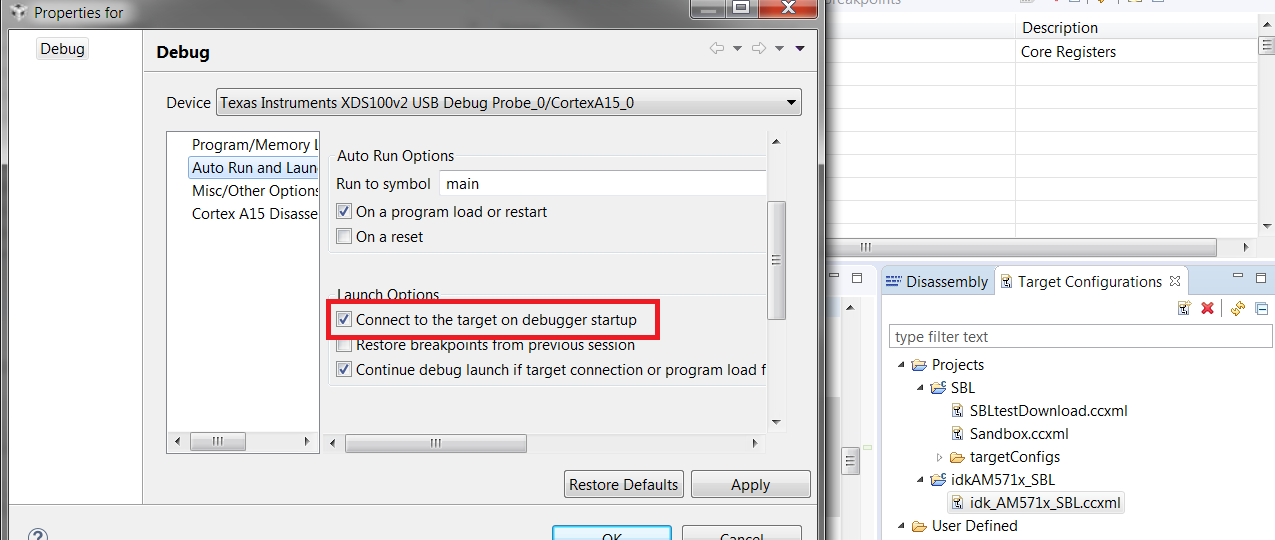
    To automatically run the code, you need to add the target configuration file to your project folder. Once it's in there, navigate to View->Target Configurations and find the target config file, right click on it and go to Properties. In the Properties window, select the CortexA15_0 as the device and under Auto Run and Launch Options check "Connect to the target on debugger startup" as shown below.

    Now you should be able to click the debug button to automatically connect to the core and load the program.

    If you have further CCS related questions, please post them to the CCS forums at the link below so that the CCS experts can provide more guidance.

    https://e2e.ti.com/support/development_tools/code_composer_studio/

    Best,

    Sahin