This thread has been locked.

If you have a related question, please click the "Ask a related question" button in the top right corner. The newly created question will be automatically linked to this question.

Linux/AM3358: CH341 driver installation

Part Number: AM3358


Tool/software: Linux

Hi,

I am using Beagle Bone Black with Wi-Fi cape. I want to connect external peripheral to the BBB in USB port. The external peripheral device converting signal from RS232 to USB. 

Requirement: I want to read the data from USB serial port. But It needs CH341 driver.

How to install CH341 driver in Beagle bone Black?

Note:- Linux version 4.9.28-geed43d1050 (gcc version 6.2.1 20161016  Linaro GCC 6.2-2016.11) )

Thanks & Regards,

Manimekala Rajendran

  • Hello Manimekala,

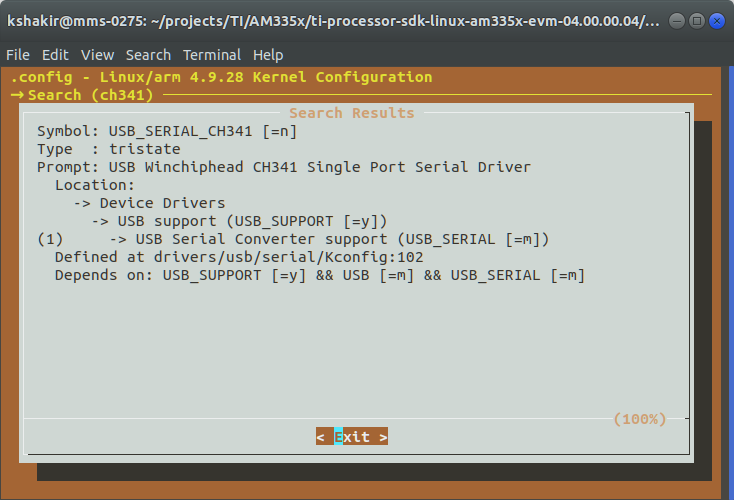
    To install CH341 driver in Beagle bone Black. Please, enable this option in your kernel's menuconfig.


    Best regards,
    Kemal

  • Dear Kemal R. Shakir,

    Thank you very much for your prompt reply. 

    Am I need to rebuild the kernel to apply your solution.

    Can you please provide me the detailed steps?

    Thanks & Regards,

    Manimekala Rajendran.

  • Please, follow the same steps as in this thread. Have you lost your memories? :)

  • Hi Kemal,

    Thank you so much for all you immediate replies.

    I followed same procedure that you mentioned. But When I executed the "make linux" command I am receiving the following error:

    praveen@praveen-VirtualBox:~/ti-processor-sdk-linux-am335x-evm-04.00.00.04/board-support/linux-4.9.28+gitAUTOINC+eed43d1050-geed43d1050$ cp arch/arm/configs/tisdk_am335x-evm_defconfig .config
    praveen@praveen-VirtualBox:~/ti-processor-sdk-linux-am335x-evm-04.00.00.04/board-support/linux-4.9.28+gitAUTOINC+eed43d1050-geed43d1050$ ARCH=arm make menuconfig
    HOSTCC scripts/basic/fixdep
    HOSTCC scripts/kconfig/mconf.o
    SHIPPED scripts/kconfig/zconf.tab.c
    SHIPPED scripts/kconfig/zconf.lex.c
    SHIPPED scripts/kconfig/zconf.hash.c
    HOSTCC scripts/kconfig/zconf.tab.o
    HOSTCC scripts/kconfig/lxdialog/checklist.o
    HOSTCC scripts/kconfig/lxdialog/util.o
    HOSTCC scripts/kconfig/lxdialog/inputbox.o
    HOSTCC scripts/kconfig/lxdialog/textbox.o
    HOSTCC scripts/kconfig/lxdialog/yesno.o
    HOSTCC scripts/kconfig/lxdialog/menubox.o
    HOSTLD scripts/kconfig/mconf
    scripts/kconfig/mconf Kconfig


    *** End of the configuration.
    *** Execute 'make' to start the build or try 'make help'.

    praveen@praveen-VirtualBox:~/ti-processor-sdk-linux-am335x-evm-04.00.00.04/board-support/linux-4.9.28+gitAUTOINC+eed43d1050-geed43d1050$ cp .config arch/arm/configs/tisdk_am335x-evm_defconfig .config
    praveen@praveen-VirtualBox:~/ti-processor-sdk-linux-am335x-evm-04.00.00.04/board-support/linux-4.9.28+gitAUTOINC+eed43d1050-geed43d1050$ cd ../../
    praveen@praveen-VirtualBox:~/ti-processor-sdk-linux-am335x-evm-04.00.00.04$ make linux
    =====================================
    Building the Linux Kernel DTBs
    =====================================
    make -C __SDK__INSTALL_DIR__/board-support/__KERNEL_NAME__ ARCH=arm CROSS_COMPILE=__SDK__INSTALL_DIR__/linux-devkit/sysroots/x86_64-arago-linux/usr/bin/arm-linux-gnueabihf- tisdk_am335x-evm_defconfig
    make[1]: *** __SDK__INSTALL_DIR__/board-support/__KERNEL_NAME__: No such file or directory. Stop.
    Makefile:218: recipe for target 'linux-dtbs' failed
    make: *** [linux-dtbs] Error 2

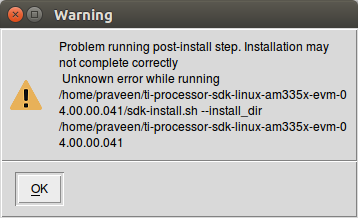
    Also, When I installed Ti's SDK in ubuntu 16.04, it pop up the warning message in the attached pic.

    Can you please guide me "How to solve these errors ?" and install the CH341 driver in BBB successfully?


    Thanks in Advance.

    Regards,

    Manimekala Rajendran

  • Seems the sed command doesn't work on your system. Could you download that https://e2e.ti.com/cfs-file/__key/communityserver-discussions-components-files/791/sdk_2D00_install.sh script, place it to ti-processor-sdk-linux-am335x-evm-04.00.00.04 directory, run it and post the feedback.

    $ cd ti-processor-sdk-linux-am335x-evm-04.00.00.04
    $ chmod +x sdk-install.sh
    $ ./sdk-install.sh

  • Hi Kemal,

    I followed the same procedure that you mentioned. But, I received the following error, when I executed the sdk_install.sh.

    praveen@praveen-VirtualBox:~$ cd ti-processor-sdk-linux-am335x-evm-04.00.00.04/
    praveen@praveen-VirtualBox:~/ti-processor-sdk-linux-am335x-evm-04.00.00.04$ chmod +x sdk-install.sh
    praveen@praveen-VirtualBox:~/ti-processor-sdk-linux-am335x-evm-04.00.00.04$ ./sdk-install.sh
    /home/praveen/ti-processor-sdk-linux-am335x-evm-04.00.00.04
    find: ‘/home/praveen/ti-processor-sdk-linux-am335x-evm-04.00.00.04/__SDK__INSTALL_DIR__/targetNFS/var/cache/ldconfig’: Permission denied
    find: ‘/home/praveen/ti-processor-sdk-linux-am335x-evm-04.00.00.04/__SDK__INSTALL_DIR__/targetNFS/var/lib/nfs/statd/sm’: Permission denied
    find: ‘/home/praveen/ti-processor-sdk-linux-am335x-evm-04.00.00.04/__SDK__INSTALL_DIR__/targetNFS/var/lib/nfs/statd/sm.bak’: Permission denied
    /home/praveen/ti-processor-sdk-linux-am335x-evm-04.00.00.04
    Enter target directory for SDK (default: /usr/local/arago-2017.05): /home/praveen/ti-processor-sdk-linux-am335x-evm-04.00.00.04/linux-devkit
    You are about to install the SDK to "/home/praveen/ti-processor-sdk-linux-am335x-evm-04.00.00.04/linux-devkit". Proceed[Y/n]?Y
    Extracting SDK...done
    Setting it up...sed: can't read /home/praveen/ti-processor-sdk-linux-am335x-evm-04.00.00.04/linux-devkit/sysroots/x86_64-arago-linux/usr/share/cmake-3.6/Help/generator/Visual: No such file or directory
    sed: can't read Studio: No such file or directory
    sed: can't read 6.rst: No such file or directory
    sed: can't read /home/praveen/ti-processor-sdk-linux-am335x-evm-04.00.00.04/linux-devkit/sysroots/x86_64-arago-linux/usr/share/cmake-3.6/Help/generator/NMake: No such file or directory
    sed: can't read Makefiles.rst: No such file or directory
    sed: can't read /home/praveen/ti-processor-sdk-linux-am335x-evm-04.00.00.04/linux-devkit/sysroots/x86_64-arago-linux/usr/share/cmake-3.6/Help/generator/Eclipse: No such file or directory
    sed: can't read CDT4.rst: No such file or directory
    sed: can't read /home/praveen/ti-processor-sdk-linux-am335x-evm-04.00.00.04/linux-devkit/sysroots/x86_64-arago-linux/usr/share/cmake-3.6/Help/generator/Green: No such file or directory
    sed: can't read Hills: No such file or directory
    sed: can't read MULTI.rst: No such file or directory
    sed: can't read /home/praveen/ti-processor-sdk-linux-am335x-evm-04.00.00.04/linux-devkit/sysroots/x86_64-arago-linux/usr/share/cmake-3.6/Help/generator/Visual: No such file or directory
    sed: can't read Studio: No such file or directory
    sed: can't read 10: No such file or directory
    sed: can't read 2010.rst: No such file or directory
    sed: can't read /home/praveen/ti-processor-sdk-linux-am335x-evm-04.00.00.04/linux-devkit/sysroots/x86_64-arago-linux/usr/share/cmake-3.6/Help/generator/Visual: No such file or directory
    sed: can't read Studio: No such file or directory
    sed: can't read 7: No such file or directory
    sed: can't read .NET: No such file or directory
    sed: can't read 2003.rst: No such file or directory
    sed: can't read /home/praveen/ti-processor-sdk-linux-am335x-evm-04.00.00.04/linux-devkit/sysroots/x86_64-arago-linux/usr/share/cmake-3.6/Help/generator/MinGW: No such file or directory
    sed: can't read Makefiles.rst: No such file or directory
    sed: can't read /home/praveen/ti-processor-sdk-linux-am335x-evm-04.00.00.04/linux-devkit/sysroots/x86_64-arago-linux/usr/share/cmake-3.6/Help/generator/Visual: No such file or directory
    sed: can't read Studio: No such file or directory
    sed: can't read 11: No such file or directory
    sed: can't read 2012.rst: No such file or directory
    sed: can't read /home/praveen/ti-processor-sdk-linux-am335x-evm-04.00.00.04/linux-devkit/sysroots/x86_64-arago-linux/usr/share/cmake-3.6/Help/generator/MSYS: No such file or directory
    sed: can't read Makefiles.rst: No such file or directory
    sed: can't read /home/praveen/ti-processor-sdk-linux-am335x-evm-04.00.00.04/linux-devkit/sysroots/x86_64-arago-linux/usr/share/cmake-3.6/Help/generator/Visual: No such file or directory
    sed: can't read Studio: No such file or directory
    sed: can't read 9: No such file or directory
    sed: can't read 2008.rst: No such file or directory
    sed: can't read /home/praveen/ti-processor-sdk-linux-am335x-evm-04.00.00.04/linux-devkit/sysroots/x86_64-arago-linux/usr/share/cmake-3.6/Help/generator/Visual: No such file or directory
    sed: can't read Studio: No such file or directory
    sed: can't read 12: No such file or directory
    sed: can't read 2013.rst: No such file or directory
    sed: can't read /home/praveen/ti-processor-sdk-linux-am335x-evm-04.00.00.04/linux-devkit/sysroots/x86_64-arago-linux/usr/share/cmake-3.6/Help/generator/Visual: No such file or directory
    sed: can't read Studio: No such file or directory
    sed: can't read 8: No such file or directory
    sed: can't read 2005.rst: No such file or directory
    sed: can't read /home/praveen/ti-processor-sdk-linux-am335x-evm-04.00.00.04/linux-devkit/sysroots/x86_64-arago-linux/usr/share/cmake-3.6/Help/generator/Visual: No such file or directory
    sed: can't read Studio: No such file or directory
    sed: can't read 14: No such file or directory
    sed: can't read 2015.rst: No such file or directory
    sed: can't read /home/praveen/ti-processor-sdk-linux-am335x-evm-04.00.00.04/linux-devkit/sysroots/x86_64-arago-linux/usr/share/cmake-3.6/Help/generator/Watcom: No such file or directory
    sed: can't read WMake.rst: No such file or directory
    sed: can't read /home/praveen/ti-processor-sdk-linux-am335x-evm-04.00.00.04/linux-devkit/sysroots/x86_64-arago-linux/usr/share/cmake-3.6/Help/generator/Borland: No such file or directory
    sed: can't read Makefiles.rst: No such file or directory
    sed: can't read /home/praveen/ti-processor-sdk-linux-am335x-evm-04.00.00.04/linux-devkit/sysroots/x86_64-arago-linux/usr/share/cmake-3.6/Help/generator/Visual: No such file or directory
    sed: can't read Studio: No such file or directory
    sed: can't read 7.rst: No such file or directory
    sed: can't read /home/praveen/ti-processor-sdk-linux-am335x-evm-04.00.00.04/linux-devkit/sysroots/x86_64-arago-linux/usr/share/cmake-3.6/Help/generator/NMake: No such file or directory
    sed: can't read Makefiles: No such file or directory
    sed: can't read JOM.rst: No such file or directory
    sed: can't read /home/praveen/ti-processor-sdk-linux-am335x-evm-04.00.00.04/linux-devkit/sysroots/x86_64-arago-linux/usr/share/cmake-3.6/Help/generator/Sublime: No such file or directory
    sed: can't read Text: No such file or directory
    sed: can't read 2.rst: No such file or directory
    sed: can't read /home/praveen/ti-processor-sdk-linux-am335x-evm-04.00.00.04/linux-devkit/sysroots/x86_64-arago-linux/usr/share/cmake-3.6/Help/generator/Unix: No such file or directory
    sed: can't read Makefiles.rst: No such file or directory
    done
    SDK has been successfully set up and is ready to be used.
    Installation completed!


    Then, I executed the command "make linux", the following errors are received during the execution:

    LD vmlinux
    SORTEX vmlinux
    SYSMAP System.map
    OBJCOPY arch/arm/boot/Image
    Kernel: arch/arm/boot/Image is ready
    LDS arch/arm/boot/compressed/vmlinux.lds
    AS arch/arm/boot/compressed/head.o
    LZMA arch/arm/boot/compressed/piggy_data
    lzma: (stdin): Cannot allocate memory
    arch/arm/boot/compressed/Makefile:186: recipe for target 'arch/arm/boot/compressed/piggy_data' failed
    make[3]: *** [arch/arm/boot/compressed/piggy_data] Error 1
    arch/arm/boot/Makefile:53: recipe for target 'arch/arm/boot/compressed/vmlinux' failed
    make[2]: *** [arch/arm/boot/compressed/vmlinux] Error 2
    arch/arm/Makefile:329: recipe for target 'zImage' failed
    make[1]: *** [zImage] Error 2
    make[1]: Leaving directory '/home/praveen/ti-processor-sdk-linux-am335x-evm-04.00.00.04/board-support/linux-4.9.28+gitAUTOINC+eed43d1050-geed43d1050'
    Makefile:10: recipe for target 'linux' failed
    make: *** [linux] Error 2

    Please help me to solve these errors........

    Thanks & Regatds,

    Manimekala Rajendran


  • Now you need to increase your SWAP size.

  • Thank you so much.............