This thread has been locked.

If you have a related question, please click the "Ask a related question" button in the top right corner. The newly created question will be automatically linked to this question.

PP-SALB-EVM (Learning Board 1) Hardware Check Failure: Download Unsuccessful

Hello, 

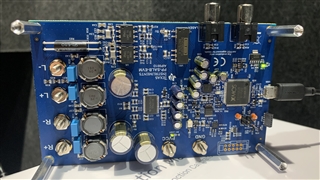
Finally after waiting for year, I have got a Brand New Smart AMP Learning Board PP-SALB-EVM, AIP001D, REV D, with XMOS chip on the board. 

Connected to Windows 10 with the microUSB, both 3.3V LED and Blue LED turns on. And the Windows drivers installation automatically started and finished. 

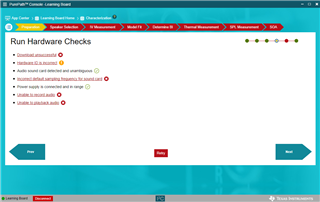
But running the PurePath console 3, updated to 3.2.0 build 302, speaker characterization, the hardware check said

1. Download unsuccessful, x

2. Hardware ID is incorrect, !

3. incorrect default sampling rate, x

4. Unable to record, x

5. Unable to playback, x 

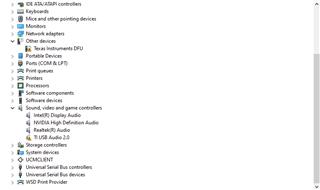
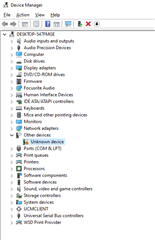
Looking into Device manager, no device has issues.

The sound card "Ti USB Audio 2.0" was installed properly but no sound was coming out. 

I set it to 44.1kHz sample rate in sound card advanced tab on both playback and recording pages but it won't clean up the problems. 

One thing I can recognize is this board has a XMOS chip but I remember on Rev C or earlier was a Ti Chip. 

The Line input has 8 channels 44.1 kHz rather than 2CH 44.1kHz.

Maybe Windows 10 installed the wrong driver for this board. 

Please give me some hints to get this board to work. 
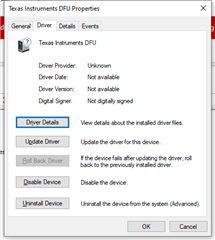
  • after uninstalling the driver from Windows Device Manager, it is now appear as a DFU device in device manager. This happen on more than 1 PC. How to restore the function of this board ????

  • Hi Kenny

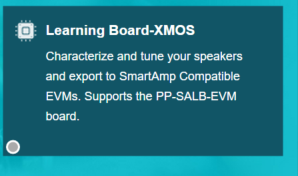
         The newest version of learning board with XMOS device should use a new APP in PPC3, as the picture shows below. I just grant you the access, you will receive e-mail from TI soon. But the newest version of PPC3 should be v3.2.1, Build 306. You'd better update to the newest version, in case other strange problem happens.

  • Hi Shadow, 

       Thank you for your help. The XMOS PPC module can work. Download is successful now. But the sound card was still in DFU mode. I believe is a way to revive this learning board back to normal state. Isn't it ?

  • Hi Kenny

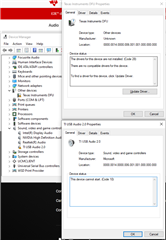
        Can you open the property page of this driver to see what error happens? Usually after you uninstall the driver, it will re-install automatically as soon as you connect the EVM again. You can try uninstall this driver again and restart your computer. Also try using a different USB port, it also helps. Have you already update your PPC3 to v3.2.1 yet? 

  • Hello Shadow, 

    Yes, I was able to updated the PPC3 to V3.2.1. Thank you for the granted permission. 

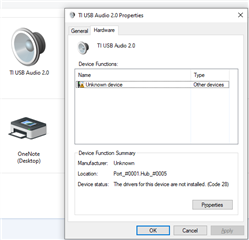
    Here is the screen shoots of error drivers.

    And I tried it on different USB ports, both USB 2.0 and 3.0 port. Also different PC with latest updated Windows10. It has the same issue. The software on learning board might be accidentally corrupted. And I need immediately help to resume its function no matter its online or offline support. 

    Device USB\VID_0451&PID_BB04&MI_00\8&4abd419&2&0000 was configured.

    Driver Name: usbaudio2.inf
    Class Guid: {4d36e96c-e325-11ce-bfc1-08002be10318}
    Driver Date: 12/06/2019
    Driver Version: 10.0.19041.1
    Driver Provider: Microsoft
    Driver Section: usbaudio2_Device.NT
    Driver Rank: 0xFF2000
    Matching Device Id: USB\Class_01&SubClass_00&Prot_20
    Outranked Drivers: wdma_usb.inf:USB\Class_01:00FFFFFF:USB\Class_01&SubClass_00&Prot_20
    Device Updated: false
    Parent Device: USB\VID_0451&PID_BB04\7&1dfd5733&0&1

    Device USB\VID_0451&PID_BB04&MI_00\8&4abd419&2&0000 had a problem starting.

    Driver Name: usbaudio2.inf
    Class Guid: {4d36e96c-e325-11ce-bfc1-08002be10318}
    Service: usbaudio2
    Lower Filters:
    Upper Filters:
    Problem: 0xA
    Problem Status: 0xC0440025

  • Hi Kenny

         Please try this driver file.

    TIAudDriver.zip

  • Hi Shadow, 

    After installing the driver and restarted my computer. The problem still here but a little changed. 

    No Ti Sound card was found in system. And the unknow device still in Device manager. 

    On the board, the Blue Led doesn't turn on. 

    It seems the driver is not design for this learning board with XMOS. 

  • Hi Kenny

         We are still seeking for solutions, but very little progress. Do you have other EVM at your hand? Can you try connect them to your computer? Or can you use a new PC to have a try?

  • Hi Shadow, 

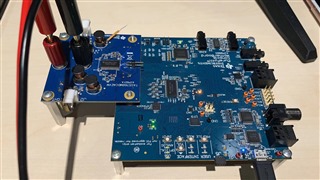
    I have another EVM motherboard works fine without any issue.

    Please contact me with my registered email and I need remedy action to fix this expensive learning board. 

  • Hi Kenny

        Since we are discussing through e-mail, I'm going to close this question here.