This thread has been locked.

If you have a related question, please click the "Ask a related question" button in the top right corner. The newly created question will be automatically linked to this question.

TAS5766MDCAEVM: PPC3 Smartamp Calculation Error

Part Number: TAS5766MDCAEVM

Dear Support,

As I started my SPK tunning processing using TAS5766MDCAEVM app on the PPC3, using the saved characterization file generated by a learning board (attached below), during the characterization file importing process on the EVM app,  it generated a "fail to write coefficient to device" error message, and the TAS5766MDCAEVM app would display "Smartamp Calculation Error" and ask me to change characterization data if I clicked on start tunning, I have no idea what is happening with the characterization file generated by learning board or the importing process.

Tried to import another characterization file from the past generated with a different speaker, it has no issues importing and tunning, so I am thinking there must be something wrong with my saved characterization file, yet I don't really know what is going on there.

More about the characterization data saved from using the ppc3 learning board app:

I have used REW (suggested by a product expert) to generate the SPL measurement with the use of a mic calibration file. I have imported the SPL data into PPC3 and generated a SPK characterzation file using the learning board without any errors.

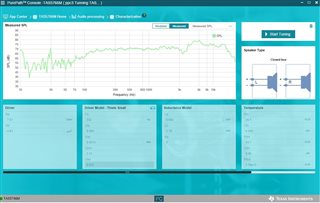
I have included the SPL data measurement and a few screen captures below:  

ppc3 characterization file download link:   SPK characterization ppc3 file

PPC3 SPK REW_ SPL_FreqSPL_cali_EVM_Lv100_-30dbfs.txt

  • Hi Luke

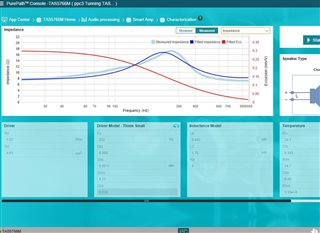
    you model fit seems have problem.

    the fitted impedance has large difference with you measured impedance.

    and the excursion curve usually should have maximum excursion at f0, but the fitted exc seems not right.

    can you perform the model fit again or choose another speaker to take a try.

    BTW, do your speaker have the vent hole? it seems like the Q of your speaker is very small, can you check that is there any leakage at your speaker box?

    thanks.

    Jesse

  • Hi Jesse, thank you for the valuable input.  Turns out that my speaker did have a not-so-adequate sealing around the hole where the wires coming out. Will fix this issue and redo the model fit and see if it works, thank you!

  • Dear Support,

    Unfortrunly after redoing the fitted impedance curve with a fully sealed speaker without any venting hole (with error under 6% to 3KHz), I still run into the same loading/Calculation errors as before with TAS5766 EVM app,  which prevents me from doing any tunning.  The speaker we are using is a 1inch, 3w speaker, it's Not a subwoofer, so it will not perform well at low freq.

     speaker spec sheet attached

    I did try to load another ppc3 characterization file from a different and bigger SPK, and that characterization file loaded correctly for tunning. And by inspecting this successfully loaded characterization file from the past, it has a fitted impedance error of around 9%, yet this file loaded correctly for tunning.

    So I don't know what is going on here with the new characterization files generated from the learning board for this small speaker. The only thing I think is different from the past was that we have imported the measured SPL data from a text file rather than let the learning board app do the SPL measurement.  The imported SPL graph did displays correctly.

    At this point, I am still not sure what is happening here that caused the "fail to write coefficient to device"  error while loading the ppc3 file for tunning.

    I am thinking perhaps if someone has the EVM board, see if it can be successfully loaded into ppc3 either for viewing or tunning at your end? Still need more help.

    Characterization file link: ppc3 characterization

      93126 Nova Loud Spk.pdfPPC3_SPK_REW_SPL_Freq.txt

  • Hi Luke

    several things need to confirm.

    1. the spk unit you attached is just the unit in box. but the characterizing use the unit in box, am i understanding right? i saw your spk f0 is 180hz, but the f0 calculated in ppc3 is over 200hz. seems a little too large difference.

    2.i tried import your spl txt file, seems no problems to import. can you take a try update the ppc3 software and perform the calibration again.

    your impedance curve model fit seem very well, but the excursion model is very strange. it should have a peak around f0.

    thanks.

    Jesse

  • HI Jesse,

    Turns out this error was caused by entering a wrong test voltage value during the ppc3 calibration setup, once we fixed that, and regenerated the characterization files, this importing error issue has been fixed, Thank you for your time!