This thread has been locked.

If you have a related question, please click the "Ask a related question" button in the top right corner. The newly created question will be automatically linked to this question.

TLV320AIC3254EVM-K: Microphone background noise removal for Megaphone implementation

Part Number: TLV320AIC3254EVM-K
Other Parts Discussed in Thread: TLV320AIC3254

Hello Everyone

I recently bougth this evaluation board TLV320AIC3254EVM-K and the idea is to create a tiny digital megaphone.For this I need to do the next :

1.Capture Microphon input (I'm using uni-directional mic)

2.Remove or reduce bacrground noise out of the voice frequency range

3.Control the volume (Already done )

4.reproduce in an analog speaker

The challenger here is that I can't see an example of 1 mic noise reduction or elimination  using the chip TLV320AIC3254. I tried also a couple of blocks but they don't compile or simply don't work.I really need to reduce the background noise to be able to amplify.

The information is too limited , if you can suggest a complete guide of configure blocks like these ( ENC_NL,NoiseGate, NoiseReduction,SS_NR) :
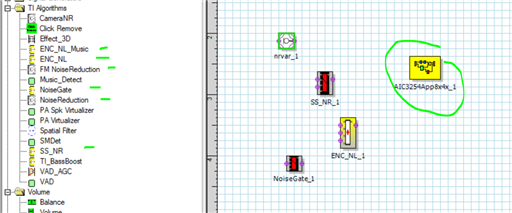
Also if you have some recomendation to reduce the feedback effect  I would be very grateful .Thanks in advance !

  • Hi Andres, 

    Our Codec expert, Peter, is out of office until tomorrow please wait 24 hours for him to comment and continue the thread.

  • Hello Daveon , Thanks for the reply .I'll wait

  • Hi,

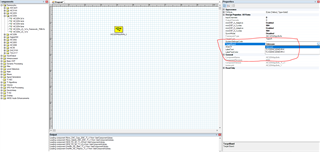
    Using PPS for AIC3254 EVM, the first thing to do is to select the correct EVM in the Target Board as shown below:

    So make sure this is done and to get help or information on any of the components right click on the component and select help.

    We don't have example for each components.

    If you intend to change the device configuration, here is a reference on that.

    https://e2e.ti.com/support/audio-group/audio/f/audio-forum/773140/faq-tlv320aic-codecs-and-adcs-modifying-the-device-configuration-of-a-pps-process-flow

    Regards.

  • Thanks for the reply

    I've checked the help information and the EVM.But the information is too basic.It doesn't take in count the rest of requeriments to use the block.Can you help me providing an example of at least one background noise filter for one microphone.Or instruction/suggestions to create it from scratch.

  • Hi Andres,

    Please wait 12-24 hours for Peter to respond. Thanks for your patience!

  • Hi,

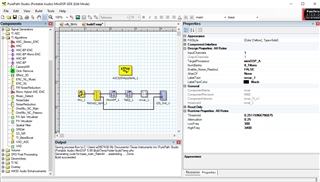
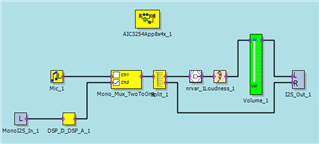
    Here is an example, you can change the filter performance or the NRVar parameter to suit your requirement.

    To change the filter, right click on the component and select the Biquad GUI.

    Use the help menu to get more information on the tuning parameter.

    Regards.

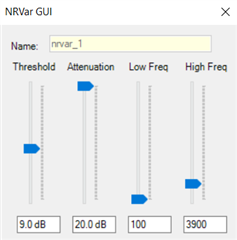
  • Helo thanks for the reply.I'm getting troubles with this block:

    seems to have no effect .I tested and seems like the noise and the signal has the same dB because it attenuate all .But actually when I hear the audio I can cleary notice the noise vs voice intensity diffrence.

  • This is a tuning process as you mentioned changing that does affect the signal as it attenuates all.

    Maybe change the low frequency and set high frequency to Nyquist (half of Fs), the rest are just the 2 tuning parameters.

    This component does what you set so maybe you need to look your overall system and improve there.

  • I'm using an analog microphone ,I tested and seems like the level of noise and signal all are higher than the threshold.I notice it attenautes all.How can I measure or adjust the signal to make this filter works .I already tested with volume control before the filter.I measure the level with a sound meter and I clearly see that the noise is lower than the voice .I think maybe the  input  has to much gaing and amplify noise and voice over the threshold limit .Can you provide how did you test the provide image.Can you share the project file instead ? .Thanks in advance

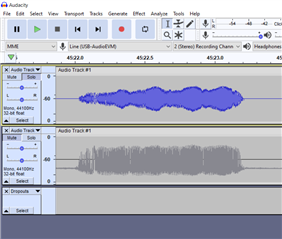
  • You should be able to hear the difference between the recorded left and right channel from the flow above.

    I created a simple project and use the attached input that has added with noise (Danny-4-1 with noise 0.0125.wav) and you can hear the difference between the right (input) and the left (after nrvar) from the recorded wave file. I have not tuned to the best but you can hear the noise is reduced in the left channel.

    NRvar example.pfw

    You need to ensure the MIC input is IN1 per the device configuration. 

  • Hello , Did you use the I2S input for play the audio ?.I tested and it seems to affect all the signal too.Testing with a mic , it reduces the noise but also the voice intensity

  • Debugging with a Tone generator I see that the mic input is too low (negative intesity -dB) .That's why the filter doesn't work well .I use the property Volume_Control_dB and Volume block , trying to increase de dB I cannot reach positive dB.I'm measuring with  Audacity and I2S output.

    1.How can I measure the averge dB with GDE or any other to properly set the gain

    2.Why if I put two volume blocks in cascade  in 6dB the signal goes zero , seems like any kind of limit

    Thanks in advance

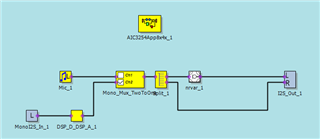
  • You can add I2S_In as shown to test the DAC side, use headphone left channel for nrvar and headphone right channel for original speech.

    I tested below and the speech quality from both side are quite comparable. 

    If you want to increase the volume you can always add volume control or loudness filter.

    Play and try the components for your use case.

  • Thanks for the reply.

    I tested but I continue hearing the noise  with several threshold values.this threshold , correspond of signal intensity right ?.So how can I precisely measure the current signal intensity to properly set the value.

    1.Do you have any suggestion to avoid the feedback at high gain?

    2.nVar support 16khz ? ,I need a good voice quality

    2.Why the R and L from I2S output looks different in Audacity , like it has DC level

    Thanks in advance

  • Maybe your input itself is just too noisy, can be from your board design, environment etc.

    Yes it can support 16KHz.

    I'm not sure why it's recording like that.

  • Thanks for answering but you miss some questions.

    1.Do you know if the DSP as a block or something that can help us to reduce/eliminate the feedback noise
    2.How can I measure the signal intensity(dB) in GDE ? It's difficult to  calibrate or use the block if I don't know what is the current signal level

  • We don't have as this is specific use case, you can find the components that are available there and build to your use case.

    Browse or use the find component tool to see any component that meet your use case.

  • OK.But can you help me to measure the microphone signal level.The most of the blocks talk about dB but I just don't know how to measure.In the case of the block " Noise Reduction with Variable Filter Bands" ,It talks about a Threshold and it's postive 0  to 20dB.How can I know what is the current microphone intensity.Why this value is too high ? 20dB , when I can't even handle that gains in the software .Thanks in advance

  • You should use external calibrated microphone to measure that.

  • But I mean the dB inside of the DSP it depends on many things , but how can I measure tha value to choose the right Threshold  of "Noise Reduction with Variable Filter Bands"

  • But I mean the dB inside of the DSP it depends on many things , but how can I measure tha value to choose the right Threshold  of "Noise Reduction with Variable Filter Bands"

  • There's no component to measure the noise level, if your snr from input is bad then place an amp before sending to the codec input.

    If the noise is large and comparable to the signal then you will not able to reduce this here.

  • I talk about  internal to DSP .How can at least know if I'm using the proper value for "Noise Reduction with Variable Filter Bands".If I not even know what is my signal intensity ?.May I test  thousand values ?

  • Please see the help file for the nrvar which stated:

    "Each sub-band is then subjected to a noise-gate algorithm with variable attenuation and threshold"

    You can read the noise gate component help menu to get an idea of its function, this is based on the estimate noise floor.

  • Thanks for the reply ,but I think  you don't get the point.the threshold is a number from 0dB to 20dB .So How can I know if the microphone input is at least  greater than 0dB?

  • I'm sorry if I don't get your point but as mentioned above the threshold is a "gate point/trigger level" as you tune. It does not measure the input level, you need to measure either at the input with a known microphone or take it out to through the digital interface and measure to know its intensity.

  • again you don't get it.I'm not saying that the parameter threshold  measure the dB.The matter is I need to measure anyway otherway I'm just playing with the threshold  trying to get it works. Measuring with an external tool (not the DSP) make no sense , since the DSP has gain in the middle

  • As mentioned again and again, you have to measure it outside no component to measure here in the tool.

    All the information has been provided I can't help you any further.

  • so , the threshold measure the dB of the signal for working but you say that DSP cannot read it ?

  • I didn't say threshold measured in dB, I said it's like a triggered which unit is in dB.