This thread has been locked.

If you have a related question, please click the "Ask a related question" button in the top right corner. The newly created question will be automatically linked to this question.

TLV320AIC3104EVM-K: How to use MIC onBoard

Part Number: TLV320AIC3104EVM-K
Other Parts Discussed in Thread: TLV320AIC3104

Dear Sir or Madam,

I'm working with the TLV320AIC3104 EVMK in order to know the TLV320AIC3104 better. I'm having some trouble mastering the hardware with the software attached. Iwanted to catch the sound from the onboard mic (going through the ADC then to the DAC) and transmit to headset. Is there any jumper to check in order to do this and what sould I do on the GUI ?

Have a nice day,

Kind regards,

William.

  • Hi,

    There's this quick start guide section 2-3 that might help you with bringing up the part.

    https://www.ti.com/lit/ug/slau855a/slau855a.pdf?ts=1673989111150&ref_url=https%253A%252F%252Fwww.ti.com%252Ftool%252FTLV320AIC3104EVM-K

    Once the EVM is connected and you are able to open the GUI.

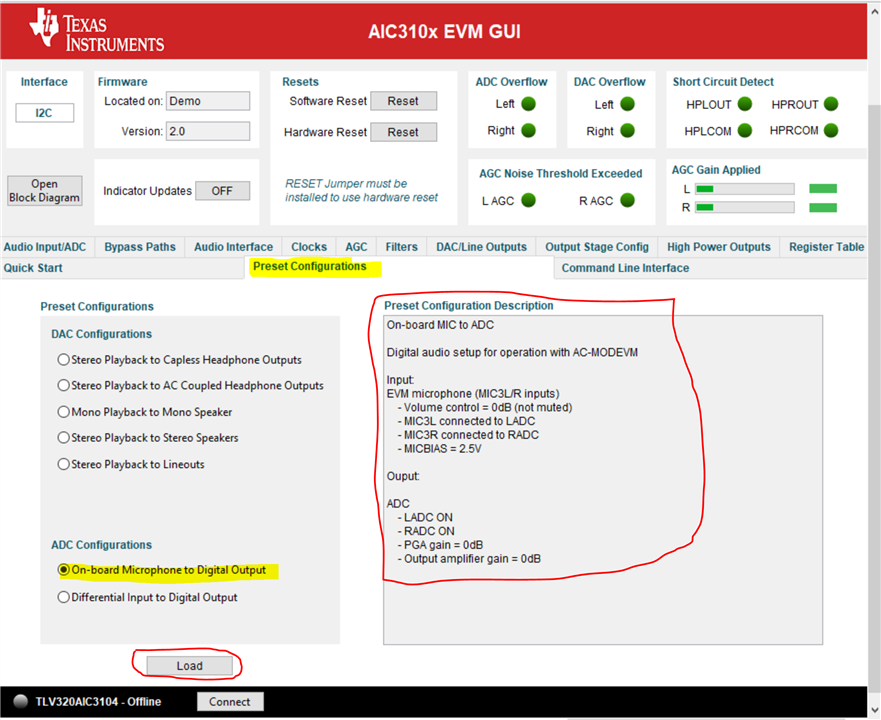
    Click on the Preset Configuration panel and select the on-board MIC to route the MIC ADC signal to digital output.

    You can verify the digital output through audio software like Audacity or GoldWave to record the MIC input.

    This device does not support digital loopback, so you will need to route the DOUT signal back to DIN and configure the DAC path accordingly if you want to use that.

    In the Preset Configuration panel it has the DAC path for you to load as well.

    Regards.

  • Hi,

    Thank you for this explanation !

    If I understood it well, the presets configurations can provide two types of demos ? One can send audio from the computer (through I2S ?) and receive it to the DAC and then the headphone ? The other uses Mic on board or the the Mic In to catch the sound and then provide it to the PC (through I2S ?) ?

    I don't really want to do a loopback it was to ensure my mics and HP work well.

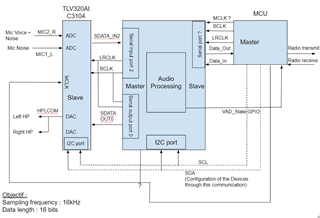
    But what I want to use it for is the following drawing : 

    Would it be appropriate and able to amplify the mics signals ?

    Have a nice day,

    William.

  • Hi,

    Yes that's correct for the preset configuration for ADC and DAC path. 

    The codec has ADC PGA gain settings which allow you to amplify the MIC input.

    Regards.