This thread has been locked.

If you have a related question, please click the "Ask a related question" button in the top right corner. The newly created question will be automatically linked to this question.

TAS2505: Speaker stops output randomly

Part Number: TAS2505

Hello Sir:

We are using TAS2505, but we found our speaker stops output randomly.

Our speaker is 4ohm, 3W.

Please refer our schematic and I2S waveform as below.
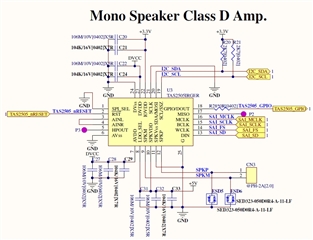
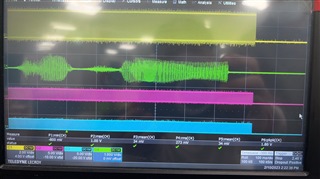
Ch1 is BCLK, Ch2 is speaker current, Ch3 is SAI_SD and Ch4 is WCLK.

Below figure is transfer successes.
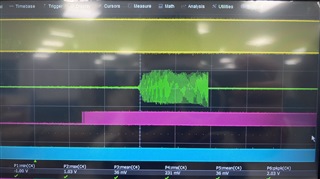
Below figure is transfer failed, you can refer Ch2, that speaker output current was stopped.
These files were our int configurations and register dumps when speaker stopped.

Please refer below files.

  counter += CODEC_IO_Write(DeviceAddr, 0x00, 0x00);
  counter += CODEC_IO_Write(DeviceAddr, 0x01, 0x01);

  counter += CODEC_IO_Write(DeviceAddr, 0x00, 0x01);
  counter += CODEC_IO_Write(DeviceAddr, 0x02, 0x00);
  
  counter += CODEC_IO_Write(DeviceAddr, 0x00, 0x00);
  counter += CODEC_IO_Write(DeviceAddr, 0x04, 0x03);
  counter += CODEC_IO_Write(DeviceAddr, 0x05, 0x91);
  counter += CODEC_IO_Write(DeviceAddr, 0x06, 0x04);
  counter += CODEC_IO_Write(DeviceAddr, 0x07, 0x00);
  counter += CODEC_IO_Write(DeviceAddr, 0x08, 0x00);
  counter += CODEC_IO_Write(DeviceAddr, 0x0B, 0x84);
  counter += CODEC_IO_Write(DeviceAddr, 0x0C, 0x82);
  counter += CODEC_IO_Write(DeviceAddr, 0x0D, 0x00);
  counter += CODEC_IO_Write(DeviceAddr, 0x0E, 0x80);
  counter += CODEC_IO_Write(DeviceAddr, 0x1B, 0x00);
  counter += CODEC_IO_Write(DeviceAddr, 0x1C, 0x00);
  counter += CODEC_IO_Write(DeviceAddr, 0x3C, 0x02);


  counter += CODEC_IO_Write(DeviceAddr, 0x00, 0x01);
  counter += CODEC_IO_Write(DeviceAddr, 0x01, 0x10);
  counter += CODEC_IO_Write(DeviceAddr, 0x0A, 0x00);
  counter += CODEC_IO_Write(DeviceAddr, 0x0C, 0x04);
  counter += CODEC_IO_Write(DeviceAddr, 0x0C, 0x04);
  counter += CODEC_IO_Write(DeviceAddr, 0x16, 0x00);
  counter += CODEC_IO_Write(DeviceAddr, 0x18, 0x00);
  counter += CODEC_IO_Write(DeviceAddr, 0x09, 0x20);
  counter += CODEC_IO_Write(DeviceAddr, 0x10, 0x00);
  counter += CODEC_IO_Write(DeviceAddr, 0x2E, 50);
  counter += CODEC_IO_Write(DeviceAddr, 0x30, 0x50);
  counter += CODEC_IO_Write(DeviceAddr, 0x2D, 0x02);

  
  counter += CODEC_IO_Write(DeviceAddr, 0x00, 0x00);
  counter += CODEC_IO_Write(DeviceAddr, 0x3F, 0x90);
  counter += CODEC_IO_Write(DeviceAddr, 0x41, 0x00);
  counter += CODEC_IO_Write(DeviceAddr, 0x40, 0x04);

dump data.txt

Please kindly provide your recommendations for us and teach us how to solve this issue.

Looking forward your feedback.

Thanks a lot.

  • Hi Statham,

    Can you please check if by reducing the input volume level would you still have output to stop? Or alternatively use a higher impedance load? Or adding a series resistor to limit the current.
    I'd like to double check if this could be related to overcurrent at the output.

    From your scope captures, I assume CH2 and CH4 may be swapped, but for the speaker current, can you specify what is the ratio of V/div to current (A/div)?

    Best regards,
    -Ivan Salazar
    Applications Engineer

  • Hi Ivan:

    Please refer our feedback as below.

    1. we had been reduced the input volume level before, and the results is good, which keeps speaker output, but the output volume is not loud enough.

    2. if stopped output of speaker was by the protection of TAS2505, please let us know which flag that we need to check when stopped output of speaker?

    And how to know the protection threshold? did you have a formula or some guide line?

    3. about register 48, that 32db value is not match your function block of datasheet, did you recommend end customer use that setting? if yes, can you let us know your maximum db recommend?

    4. about register 46, that has -db value, can you explain an example about how to use this -db value?

    Looking forward your feedback.

    Thanks a lot.
  • Hi Statham,

    1. Thanks for trying this out, I understand the volume is reduced but it helps to identify if the problem is actually related to output power level
    2. The only way to know if overcurrent event triggered the protection is to read the Class-D enable bit from Page 1 Register 45 Bit 1. If this bit is back to 0 by itself then an overcurrent event happened.
    3. 32dB should actually be 30dB (it is 6dB step). Although I would suggest to keep the gain as low as possible, 6dB or 12dB should be OK. If using higher gain levels you should make sure your input signal is actually low; the output may clip considerably at a slight increase in input signal.
    4. Negative dB value is just attenuation, this means the resulting signal will be lower amplitude. Since Class-D is a 6dB step increment, you may combine a gain increment in Class-D and then use register 46 to fine adjust the gain in 0.5dB steps.

    A couple more things I'd like to comment/request:

    1. Can you measure the output power into your load? Perhaps you're going higher than what the device is specified for?
    2. Just for debugging purposes, could you test by removing the ESD5 and ESD6 at the outputs? Just want to check if these could be somehow causing the overcurrent in combination with the speaker load.

    Best regards,
    -Ivan Salazar
    Applications Engineer

  • Hi Ivan:

    Thanks your feedback.

    Below questions needs your recommendations.

    1. I update our sound files for you reference.

    Would you please let us know how many db we should to select?

    3in1 voice.zip 

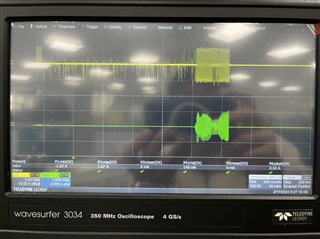
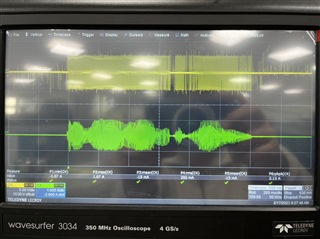
    2. Please refer below figure which are our power measurement results.

    When this moment we were using original sounds files, and reg48 set 32db, reg46 set -10db.

    When this moment we were using modify sounds files, and reg48 set 32db, reg46 set -10db.

    3. Would you please let us know how to judge the protection threshold?

    We need to know it.

    Looking forward your feedback.

    Thanks a lot.
  • Hi Statham,

    Today is a TI Holiday. Your question will be seen by Ivan tomorrow and you should expect a reply within 48 hours from now.

    Please wait to reply unless we have failed to respond to you in a timely manner.

    Thank you for your patience,

    Jeff McPherson

  • Hi Jeff:

    Thanks your feedback.

    We will keep waiting your great support.

    Thanks a lot.

  • Hi Statham,

    I compared one of the original vs modified files, and the difference is ~2.5dB. Perhaps you can keep the original files but adjust  reg46 set -13db instead.

    From your captures, it seems the output has to stay lower than 1Apeak. Perhaps if you measure your speaker impedance it may be considerably low, even lower than 4-ohm.
    Knowing the load impedance, the total analog gain and the input signal amplitude you can estimate the output power/current and readjust the analog gain as needed to prevent the overcurrent protection being triggered.

    Best regards,
    -Ivan Salazar
    Applications Engineer