This thread has been locked.

If you have a related question, please click the "Ask a related question" button in the top right corner. The newly created question will be automatically linked to this question.

PCM2912A: Voltage level shift

Part Number: PCM2912A

Hi Team

For the audio application circuit below, my customer reported noise upon start up.

The waveform shows a small voltage shift(around 0.1V) between the audio codec and the switch during the startup, meaning the voltage was 0.1V above the ground before system startup. This voltage shift was not observed on the PCM2912A EVM.

It seems like the switch was at high impedance while codec was disabled, and after the switch was turned on, the AC coupling caps get charged which caused a voltage dump, before codec voltage starts to ramp up.

Could any please advise on my guess here and let me know if there's any other possible reasons on this?

Regards

  • Hi,

    Has this been verified the cause of noise, what is the sequence of powering up between codec and switch power?

    Is the switch on before codec, do you hear noise with SPKR_ON?

    Regards.

  • Hi pdjuandi,

    Yes, the SW was on 100ms before the PCM2912A, with SPKR_ON.

    I checked the schematic and found the AC coupling and pull down resistors are place after the SW, do you think moving them to before the SW would change the issue?

    Also, as a solution for this, the customer is looking into masking the amplifier mute with the PCM2912A's SSPND pin until the popup noise is over.

    Though the SSPND pin can be removed by USB bus Set Configuration, it was re-asserted when the USB bus is idle for a certain period of time.
    Is there a way to prevent the USB bus from idling, or to prevent the PCM2912A from going to suspend even if it becomes idle?
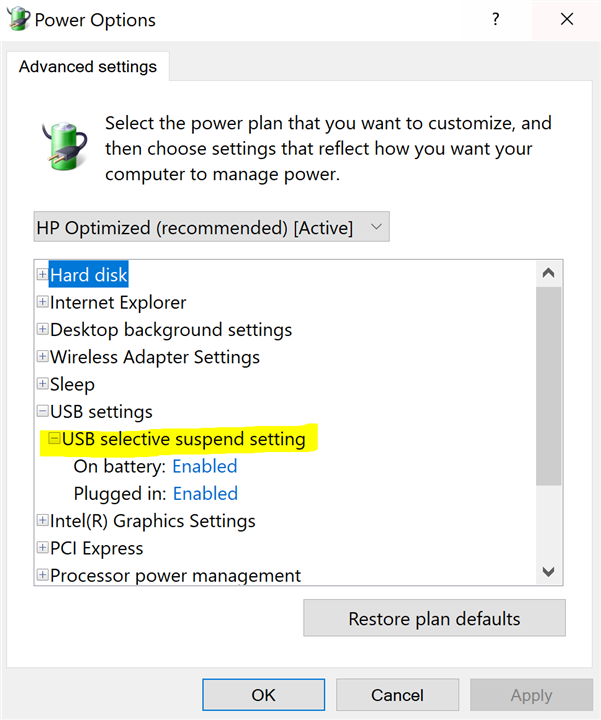
    (Does it have something to do with Window10's USB selective suspend?)

    Regards

  • Hi,

    The suspend is part of USB protocol, the device does not have option to disable that.

    You can try the Windows USB setting.

    Regards.

  • Hi,

    Thanks for the tips.

    Disabling the selective suspend from the power options affects other USB devices as well, is there a way to only disable the suspend of PCM2912A?

    Regards

  • Hi David,

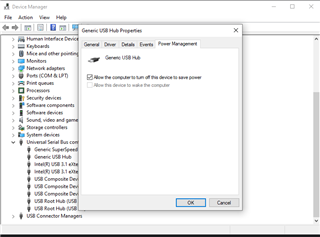
    You can try going into the device manager and selecting the properties of the USB device of interest and disable the ability for the computer to turn off the port to save power:


    Honestly this is a Windows specific question and it may be better to double check with them but I imagine this works.

    Best regards,
    Jeff McPherson