This thread has been locked.

If you have a related question, please click the "Ask a related question" button in the top right corner. The newly created question will be automatically linked to this question.

TAS2781: Can't control volume on TAS2781

Part Number: TAS2781
Other Parts Discussed in Thread: PUREPATHCONSOLE

Hi,

I have Lenovo Yoga with TAS2781 and I was able to make it work with the 6.6 rc5 kernel. Unfortunately the volume control doesn't work for the bass speakers. When I decrease the volume to zero they are also muted.

Here is someone else reporting the same issue - https://forums.lenovo.com/t5/Ubuntu/Ubuntu-and-legion-pro-7-16IRX8H-audio-issues/m-p/5210709?page=18#6129762

Here is what i2c devices show

ls -la /sys/bus/i2c/devices
...
1 lrwxrwxrwx root root 0 Oct 18 15:28 i2c-TIAS2781:00 -> ../../../devices/platform/AMDI0010:03/i2c-3/i2c-TIAS2781:00

sudo i2cdetect -r 3

I will probe file /dev/i2c-3 using receive byte commands.
I will probe address range 0x08-0x77.
Continue? [Y/n]
     0  1  2  3  4  5  6  7  8  9  a  b  c  d  e  f
00:                         -- -- -- -- -- -- -- --
10: -- -- -- -- -- -- -- -- -- -- -- -- -- -- -- --
20: -- -- -- -- -- -- -- -- -- -- -- -- -- -- -- --
30: -- -- -- -- -- -- -- -- 38 39 -- 3b -- UU -- --
40: -- -- -- -- -- -- -- -- -- -- -- -- -- -- -- --
50: -- -- -- -- -- -- -- -- -- -- -- -- UU -- -- --
60: -- -- -- -- -- -- -- -- -- -- -- -- -- -- -- --
70: -- -- -- -- -- -- -- --

And the acpi tables

acpi_tables.zip

  • Here is some more info that may help

    dmesg|grep 2781
    [    5.104068] snd_hda_codec_realtek hdaudioC1D0: bound i2c-TIAS2781:00 (ops tas2781_hda_comp_ops [snd_hda_scodec_tas2781_i2c])
    
    grep 2781 /boot/config-6.6.0-rc5-custom 
    CONFIG_W1_SLAVE_DS2781=m
    CONFIG_BATTERY_DS2781=m
    CONFIG_SND_HDA_SCODEC_TAS2781_I2C=m
    CONFIG_SND_SOC_TAS2781_COMLIB=m
    CONFIG_SND_SOC_TAS2781_FMWLIB=m
    CONFIG_SND_SOC_TAS2781_I2C=m
    
    lsmod|grep 2781
    snd_hda_scodec_tas2781_i2c    28672  0
    snd_soc_tas2781_fmwlib    45056  1 snd_hda_scodec_tas2781_i2c
    snd_soc_tas2781_comlib    20480  2 snd_soc_tas2781_fmwlib,snd_hda_scodec_tas2781_i2c
    snd_soc_core          446464  5 snd_sof,snd_soc_ps_mach,snd_ps_pdm_dma,snd_soc_dmic,snd_hda_scodec_tas2781_i2c
    snd                   143360  46 snd_ctl_led,snd_hda_codec_generic,snd_seq,snd_seq_device,snd_hda_codec_hdmi,snd_hwdep,snd_hda_intel,snd_hda_codec,snd_hda_codec_realtek,snd_sof,snd_timer,snd_compress,snd_soc_core,snd_pcm,snd_hda_scodec_tas2781_i2c,snd_rawmidi
    crc8                   12288  2 snd_soc_tas2781_fmwlib,snd_soc_tas2781_comlib
    

  • Hi Guiy

    Kindly type "amixer" in root mode, and send log with me.

  • This is the output

    amixer -c 1
    
    Simple mixer control 'Master',0
      Capabilities: pvolume pvolume-joined pswitch pswitch-joined
      Playback channels: Mono
      Limits: Playback 0 - 87
      Mono: Playback 87 [100%] [0.00dB] [on]
    Simple mixer control 'Headphone',0
      Capabilities: pvolume pswitch
      Playback channels: Front Left - Front Right
      Limits: Playback 0 - 87
      Mono:
      Front Left: Playback 52 [60%] [-26.25dB] [off]
      Front Right: Playback 52 [60%] [-26.25dB] [off]
    Simple mixer control 'Speaker',0
      Capabilities: pvolume pswitch
      Playback channels: Front Left - Front Right
      Limits: Playback 0 - 87
      Mono:
      Front Left: Playback 14 [16%] [-54.75dB] [on]
      Front Right: Playback 14 [16%] [-54.75dB] [on]
    Simple mixer control 'Bass Speaker',0
      Capabilities: pswitch
      Playback channels: Front Left - Front Right
      Mono:
      Front Left: Playback [on]
      Front Right: Playback [on]
    Simple mixer control 'Mic ACP LED',0
      Capabilities: cswitch cswitch-joined
      Capture channels: Mono
      Mono: Capture [on]
    Simple mixer control 'Mic Boost',0
      Capabilities: volume
      Playback channels: Front Left - Front Right
      Capture channels: Front Left - Front Right
      Limits: 0 - 3
      Front Left: 0 [0%] [0.00dB]
      Front Right: 0 [0%] [0.00dB]
    Simple mixer control 'Capture',0
      Capabilities: cvolume cswitch
      Capture channels: Front Left - Front Right
      Limits: Capture 0 - 63
      Front Left: Capture 38 [60%] [11.25dB] [on]
      Front Right: Capture 38 [60%] [11.25dB] [on]
    Simple mixer control 'Auto-Mute Mode',0
      Capabilities: enum
      Items: 'Disabled' 'Enabled'
      Item0: 'Disabled'
    

  • Here is also all the information that alsa-info generates as root.

    alsa-project.org/.../

  • The driver code already implement the 'Speaker Digital Gain', 'Speaker Analog Gain', you can use amixer to set the gain in command line

    state.Generic_1 {
    	control.1 {
    		iface CARD
    		name 'Speaker Profile Id'
    		value 0
    		comment {
    			access 'read write'
    			type INTEGER
    			count 1
    			range '0 - 1'
    		}
    	}
    	control.2 {
    		iface CARD
    		name 'Speaker Analog Gain'
    		value 13
    		comment {
    			access 'read write'
    			type INTEGER
    			count 1
    			range '0 - 20'
    			dbmin 1100
    			dbmax 2100
    			dbvalue.0 1750
    		}
    	}
    	control.3 {
    		iface CARD
    		name 'Speaker Digital Gain'
    		value 200
    		comment {
    			access 'read write'
    			type INTEGER
    			count 1
    			range '0 - 200'
    			dbmin -10000
    			dbmax 10000
    			dbvalue.0 10000
    		}
    	}
    	control.4 {
    		iface CARD
    		name 'Speaker Force Firmware Load'
    		value false
    		comment {
    			access 'read write'
    			type BOOLEAN
    			count 1
    		}
    	}
    	control.5 {
    		iface CARD
    		name 'Speaker Program Id'
    		value 0
    		comment {
    			access 'read write'
    			type INTEGER
    			count 1
    			range '0 - 0'
    		}
    	}
    	control.6 {
    		iface CARD
    		name 'Speaker Config Id'
    		value 0
    		comment {
    			access 'read write'
    			type INTEGER
    			count 1
    			range '0 - 1'
    		}
    	}
  • I tried changing 'Speaker Digital Gain' and 'Speaker Analog Gain'.

    The Analog Gain has no effect on the volume.

    The Digital Gain shows initially at 200 and decreasing it leads to volume decreasing. By 180 the volume is not audible anymore.

    Is that what you would expect the two controls to do?

    After a few changes the speakers stopped working and this showed up in dmesg

    [ 1448.550754] i2c_designware AMDI0010:03: i2c_dw_handle_tx_abort: lost arbitration
    [ 1449.564662] i2c_designware AMDI0010:03: controller timed out
    [ 1449.564711] tas2781-hda i2c-TIAS2781:00: tasdevice_dev_bulk_write, E=-110
    [ 1449.564721] tas2781-hda i2c-TIAS2781:00: tasdevice_process_block: bulk_write error = -110
    [ 1450.588671] i2c_designware AMDI0010:03: controller timed out
    [ 1450.588725] tas2781-hda i2c-TIAS2781:00: tasdevice_change_chn_book, E=-110
    [ 1450.588734] tas2781-hda i2c-TIAS2781:00: tasdevice_process_block: bulk_write error = -110
    [ 1451.613542] i2c_designware AMDI0010:03: controller timed out
    [ 1451.613589] tas2781-hda i2c-TIAS2781:00: tasdevice_change_chn_book, E=-110
    [ 1451.613595] tas2781-hda i2c-TIAS2781:00: tasdevice_digital_getvol, get digital vol error
    [ 1452.637700] i2c_designware AMDI0010:03: controller timed out
    [ 1452.637762] tas2781-hda i2c-TIAS2781:00: tasdevice_dev_bulk_write, E=-110
    [ 1452.637771] tas2781-hda i2c-TIAS2781:00: tasdevice_process_block: bulk_write error = -110
    [ 1453.661146] i2c_designware AMDI0010:03: controller timed out
    [ 1453.661205] tas2781-hda i2c-TIAS2781:00: tasdevice_change_chn_book, E=-110
    [ 1453.661214] tas2781-hda i2c-TIAS2781:00: tasdevice_process_block: bulk_write error = -110
    [ 1454.684644] i2c_designware AMDI0010:03: controller timed out
    [ 1454.684675] tas2781-hda i2c-TIAS2781:00: tasdevice_change_chn_book, E=-110
    [ 1454.684680] tas2781-hda i2c-TIAS2781:00: tasdevice_amp_getvol, get AMP vol error
    [ 1455.708647] i2c_designware AMDI0010:03: controller timed out
    [ 1455.708682] tas2781-hda i2c-TIAS2781:00: tasdevice_dev_bulk_write, E=-110
    [ 1455.708690] tas2781-hda i2c-TIAS2781:00: tasdevice_process_block: bulk_write error = -110
    [ 1456.733125] i2c_designware AMDI0010:03: controller timed out
    [ 1456.733157] tas2781-hda i2c-TIAS2781:00: tasdevice_change_chn_book, E=-110
    [ 1456.733162] tas2781-hda i2c-TIAS2781:00: tasdevice_process_block: bulk_write error = -110
    [ 1457.756654] i2c_designware AMDI0010:03: controller timed out
    [ 1457.756706] tas2781-hda i2c-TIAS2781:00: tasdevice_change_chn_book, E=-110
    [ 1457.756714] tas2781-hda i2c-TIAS2781:00: tasdevice_digital_getvol, get digital vol error

  • Thanks for your log. As you know, we have returned all of the Lenovo laptops. Fixing this issue will heavily rely on your cooperation and patience.

    When I back to office next Monday, I will dig into this issue. 

  • Thanks Shenghao,

    I'm willing to help with whatever is needed to fix this issue. Just let me know what you want me to do.

  • I have questions on the timed out, is it i2c bus issue?

    How do you run the command? have you run it in root mode?

  • Yes, I did run it in root mode. Here it is one more time:

    [root@fedora ~]# i2cdetect -r 3
    WARNING! This program can confuse your I2C bus, cause data loss and worse!
    I will probe file /dev/i2c-3 using receive byte commands.
    I will probe address range 0x08-0x77.
    Continue? [Y/n] 
         0  1  2  3  4  5  6  7  8  9  a  b  c  d  e  f
    00:                         -- -- -- -- -- -- -- -- 
    10: -- -- -- -- -- -- -- -- -- -- -- -- -- -- -- -- 
    20: -- -- -- -- -- -- -- -- -- -- -- -- -- -- -- -- 
    30: -- -- -- -- -- -- -- -- 38 39 -- 3b -- UU -- -- 
    40: -- -- -- -- -- -- -- -- -- -- -- -- -- -- -- -- 
    50: -- -- -- -- -- -- -- -- -- -- -- -- UU -- -- -- 
    60: -- -- -- -- -- -- -- -- -- -- -- -- -- -- -- -- 
    70: -- -- -- -- -- -- -- -- 

    The timeouts however are not related to the i2cdetect command. The timeouts occur an random times. And once they occur, a reboot of the computer doesn't help. I figured that I need to pull out the power cord, shutdown and then when I start the audio works again.

    I'm also not certain why the Speaker Analog Gain doesn't work. Should this work?

  • Another issue (may be unrelated) is that every time when I play a song the digital gain resets to 200 and the bass starts blasting. When I set it to a lower value, it stays low for the duration of the song and after the song is over. But as soon as I start a new song - the value resets again to 200.

  • Every time, the system will reload the register setting and dsp setting for tas2781. So it will This issue relies on the system calling. 

  • I have checked with our tuning guy. The analog gain has been set to a fixed value in the reg.bin file. Do you want to set a lower value, I can ask them to remove this setting from the reg.bin and offer a new one with you. One more thing, Analog gain should be set before tas2781 power on. So you can set it before playback, then play the music with the new regbin file

  • This doesn't seem how other sounds cards behave and I'm not sure how to fix it in this case. Do you know?

  • Not sure which file is reg.bin. Are you referring to the files in /lib/firmware? Or is this about the CALI_DATA efivar? Is the design such that users should never touch the analog gain and only use the digital one?

  • Analog gain has been removed in the following register bin file, you can override the corresponding bin file in /lib/firmware.

    https://e2e.ti.com/cfs-file/__key/communityserver-discussions-components-files/6/TIAS2781RCA4.bin

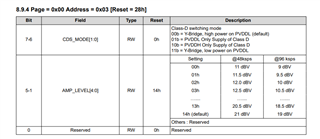
    In previous TIAS2781RC4.bin, all of the tas2781 are set analog gain as 16.5dbV in your laptop. Any higher value than 16.5 will cause voltage supply issue and cause no sound or laptop reboot. As you know, the default is 21dbV at 48kHz, it will cause your laptop reboot under that setting.

    Following setting table is the analog gain, it is in book0page0reg3

    Replace the bin file. reboot laptop. Set it first with amixer command, before playback. Hope this can help you.

  • Hi Shenghao,

    With the new file at maximum digital volume the output is much louder than before. The analog gain still doesn't have any effect. This is not a problem. The ability to control with just digital volume is OK.

    There are however two problems:

    * The first problem is that the digital gain value keep getting reset. I enabled debug messages for `tas2781_hda_i2c.c` and it seems that the settings is lost when the driver goes through runtime suspend/resume as seen here:

    [ 2030.992757] tas2781-hda i2c-TIAS2781:00: Runtime Suspend
    [ 2065.757939] tas2781-hda i2c-TIAS2781:00: tas2781_hda_playback_hook: action = 0
    [ 2065.757950] tas2781-hda i2c-TIAS2781:00: Runtime Resume
    [ 2068.248873] tas2781-hda i2c-TIAS2781:00: tas2781_hda_playback_hook: action = 1
    [ 2068.248884] tas2781-hda i2c-TIAS2781:00: Playback action not supported: 1
    [ 2068.249578] tas2781-hda i2c-TIAS2781:00: tas2781_hda_playback_hook: action = 1
    [ 2068.249583] tas2781-hda i2c-TIAS2781:00: Playback action not supported: 1
    [ 2078.296277] tas2781-hda i2c-TIAS2781:00: tas2781_hda_playback_hook: action = 2
    [ 2078.296288] tas2781-hda i2c-TIAS2781:00: Playback action not supported: 2
    [ 2078.296374] tas2781-hda i2c-TIAS2781:00: tas2781_hda_playback_hook: action = 3
    [ 2081.365165] tas2781-hda i2c-TIAS2781:00: Runtime Suspend
    

    The value that I set before the last Runtime Suspend is lost and the digital gain is again set to 200 when the Runtime Resume happens. Would it be possible to change the 2781 driver to preserve the setting?

    * The second problem is that even with digital gain working, setting the volume is really awkward. Increasing the overall volume will require that I increase the normal speaker's volume and then increase the 2781 digital gain. Decreasing will also require that both are decreased. Is it possible when normal speaker volume changes to also change the 2781 volume? And then have an ALSA control that just tunes the balance between 2781 bass and normal speaker? That would make it work as it works in Windows. Normal operation will just require changing one volume. If the bass needs to be boosted to reduced - that would be the additional control which won't be changed often.

  • Question 1: I'll release a new code to you this Friday. 

    Question 2: As to how override system vol control as tas2781, kindly consult ubuntu, As a Linux  driver guy, I have offer the interface, but I have no idea how to override it. If you know how-to, kindly let me know this.

  • Kindly run the driver + digtial gain control, and share the log with me.

    https://e2e.ti.com/cfs-file/__key/communityserver-discussions-components-files/6/4784.ftc.7z

  • This doesn't fix the issue

    -- The Speaker Digital Gain is set to 201. If audio doesn't play for a couple seconds the amp suspends
    2023-10-28T22:24:03.232664-07:00 yoda kernel: [  123.613187] tas2781-hda i2c-TIAS2781:00: Runtime Suspend
    -- I ran here "amixer cset numid=3 180" to set the Speaker Digital Gain to 180
    2023-10-28T22:24:30.133538-07:00 yoda kernel: [  150.513732] tas2781-hda i2c-TIAS2781:00: tasdevice_digital_putvol 0x001a val=21
    -- I play a sound here - the sound is again loud and the control shows 201
    2023-10-28T22:24:34.120967-07:00 yoda kernel: [  154.500959] snd_hda_intel 0000:c3:00.6: display power enable
    2023-10-28T22:24:34.121000-07:00 yoda kernel: [  154.500973] snd_hda_intel 0000:c3:00.6: Setting ATI snoop: 1
    2023-10-28T22:24:34.121004-07:00 yoda kernel: [  154.504421] snd_hda_intel 0000:c3:00.6: display power disable
    2023-10-28T22:24:34.168688-07:00 yoda kernel: [  154.551650] snd_hda_codec_realtek hdaudioC1D0: ALC287: Apply fix-func for (null)
    2023-10-28T22:24:34.168714-07:00 yoda kernel: [  154.551677] snd_hda_codec_realtek hdaudioC1D0: ALC287: Apply fix-func for (null)
    2023-10-28T22:24:34.168717-07:00 yoda kernel: [  154.551679] snd_hda_codec_realtek hdaudioC1D0: ALC287: Apply fix-func for (null)
    2023-10-28T22:24:34.168721-07:00 yoda kernel: [  154.551794] tas2781-hda i2c-TIAS2781:00: tas2781_hda_playback_hook: action = 0
    2023-10-28T22:24:34.168723-07:00 yoda kernel: [  154.551804] tas2781-hda i2c-TIAS2781:00: Runtime Resume
    2023-10-28T22:24:36.900659-07:00 yoda kernel: [  157.283806] snd_hda_codec_realtek hdaudioC1D0: hda_codec_setup_stream: NID=0x2, stream=0x5, channel=0, format=0x31
    2023-10-28T22:24:36.912766-07:00 yoda kernel: [  157.292911] snd_hda_codec_realtek hdaudioC1D0: hda_codec_setup_stream: NID=0x3, stream=0x5, channel=0, format=0x31
    2023-10-28T22:24:36.924831-07:00 yoda kernel: [  157.305314] snd_hda_codec_realtek hdaudioC1D0: hda_codec_setup_stream: NID=0x6, stream=0x5, channel=0, format=0x31
    2023-10-28T22:24:36.936705-07:00 yoda kernel: [  157.317267] tas2781-hda i2c-TIAS2781:00: tas2781_hda_playback_hook: action = 1
    2023-10-28T22:24:36.936743-07:00 yoda kernel: [  157.317279] tas2781-hda i2c-TIAS2781:00: Playback action not supported: 1
    2023-10-28T22:24:36.936746-07:00 yoda kernel: [  157.317922] snd_hda_codec_realtek hdaudioC1D0: hda_codec_setup_stream: NID=0x2, stream=0x5, channel=0, format=0x31
    2023-10-28T22:24:36.936749-07:00 yoda kernel: [  157.317928] snd_hda_codec_realtek hdaudioC1D0: hda_codec_setup_stream: NID=0x3, stream=0x5, channel=0, format=0x31
    2023-10-28T22:24:36.936752-07:00 yoda kernel: [  157.317932] snd_hda_codec_realtek hdaudioC1D0: hda_codec_setup_stream: NID=0x6, stream=0x5, channel=0, format=0x31
    2023-10-28T22:24:36.936754-07:00 yoda kernel: [  157.317936] tas2781-hda i2c-TIAS2781:00: tas2781_hda_playback_hook: action = 1
    2023-10-28T22:24:36.936756-07:00 yoda kernel: [  157.317939] tas2781-hda i2c-TIAS2781:00: Playback action not supported: 1
    

  • Hi 

    Thanks for your log. Do not set the digital gain, if tas2781 not work.

    During playback, if you set the digital gain, I wonder whether the volume will be change?

  • During playback the change in the digital gain changes the volume fine.

    > Do not set the digital gain, if tas2781 not work.

    If I don't touch the digital gain, it gets reset to 201 immediately after resume. If I set it before resume happens, the resume still resets it to 201.

  • Thanks for your patience, let me try to change the bin file with this Tuesday.

  • Kindly use this bin file. Thanks

    https://e2e.ti.com/cfs-file/__key/communityserver-discussions-components-files/6/6763.TIAS2781RCA4.bin

  • It doesn't help. The digital gain still gets reset.

    Just to clarify. It is the tasdevice_prmg_load(tas_priv, tas_priv->cur_prog) call in tas2781_runtime_resume that resets the value.

    When that gets called, the value at 0x1A (which is the digital gain based on the datasheet) in `/sys/kernel/debug/regmap/i2c-TIAS2781:00/registers` goes from whatever was set before suspend to 0.

  • So in the latest bin file (6763.TIAS2781RCA4.bin), it can work but, the digtial gain still reset. Correct?

  • Hi Shenghao,

    yes, this is correct.The digital gain get reset on runtime resume.

    Thanks,

    Darin

  • Next week, I am implementing the your requirment and will release a new code with you next week. Kindly help to test on your laptop and tell me the result so taht I can upload it the kernel-mailine.

  • Thanks Shenghao for being patient with this.

    Yes, I'll test it once you have it.

  • https://e2e.ti.com/cfs-file/__key/communityserver-discussions-components-files/6/7002.tas2781.7z

  • This fixes the issue. I tried it with 6.6. Here are dbg messages from a resume to suspend:

    2023-11-03T19:55:58.928691-07:00 yoda kernel: [  208.318026] tas2781-hda i2c-TIAS2781:00: tas2781_hda_playback_hook: action = 0
    2023-11-03T19:55:58.928694-07:00 yoda kernel: [  208.318032] tas2781-hda i2c-TIAS2781:00: Runtime Resume
    2023-11-03T19:56:01.515994-07:00 yoda kernel: [  210.904902] tas2781-hda i2c-TIAS2781:00: tasdevice_select_cfg_blk: dev_idx = 1
    2023-11-03T19:56:01.516019-07:00 yoda kernel: [  210.905584] tas2781-hda i2c-TIAS2781:00: tasdevice_select_cfg_blk: dev_idx = 1
    2023-11-03T19:56:01.516021-07:00 yoda kernel: [  210.905586] tas2781-hda i2c-TIAS2781:00: tasdevice_select_cfg_blk: dev_idx = 1
    2023-11-03T19:56:01.516022-07:00 yoda kernel: [  210.906124] tas2781-hda i2c-TIAS2781:00: tasdevice_select_cfg_blk: dev_idx = 1
    2023-11-03T19:56:01.516025-07:00 yoda kernel: [  210.906479] tas2781-hda i2c-TIAS2781:00: tasdevice_select_cfg_blk: dev_idx = 1
    2023-11-03T19:56:01.516026-07:00 yoda kernel: [  210.906830] tas2781-hda i2c-TIAS2781:00: tasdevice_select_cfg_blk: dev_idx = 1
    2023-11-03T19:56:01.516028-07:00 yoda kernel: [  210.906966] tas2781-hda i2c-TIAS2781:00: tasdevice_select_cfg_blk: dev_idx = 1
    2023-11-03T19:56:01.516031-07:00 yoda kernel: [  210.907183] tas2781-hda i2c-TIAS2781:00: tasdevice_select_cfg_blk: dev_idx = 1
    2023-11-03T19:56:01.516033-07:00 yoda kernel: [  210.907540] tas2781-hda i2c-TIAS2781:00: tasdevice_select_cfg_blk: dev_idx = 1
    2023-11-03T19:56:01.516035-07:00 yoda kernel: [  210.907758] tas2781-hda i2c-TIAS2781:00: tasdevice_select_cfg_blk: dev_idx = 1
    2023-11-03T19:56:01.516039-07:00 yoda kernel: [  210.908029] tas2781-hda i2c-TIAS2781:00: tasdevice_select_cfg_blk: dev_idx = 2
    2023-11-03T19:56:01.519964-07:00 yoda kernel: [  210.908718] tas2781-hda i2c-TIAS2781:00: tasdevice_select_cfg_blk: dev_idx = 2
    2023-11-03T19:56:01.519967-07:00 yoda kernel: [  210.908855] tas2781-hda i2c-TIAS2781:00: tasdevice_select_cfg_blk: dev_idx = 2
    2023-11-03T19:56:01.519969-07:00 yoda kernel: [  210.909392] tas2781-hda i2c-TIAS2781:00: tasdevice_select_cfg_blk: dev_idx = 2
    2023-11-03T19:56:01.519970-07:00 yoda kernel: [  210.909744] tas2781-hda i2c-TIAS2781:00: tasdevice_select_cfg_blk: dev_idx = 2
    2023-11-03T19:56:01.519973-07:00 yoda kernel: [  210.910099] tas2781-hda i2c-TIAS2781:00: tasdevice_select_cfg_blk: dev_idx = 2
    2023-11-03T19:56:01.519975-07:00 yoda kernel: [  210.910234] tas2781-hda i2c-TIAS2781:00: tasdevice_select_cfg_blk: dev_idx = 2
    2023-11-03T19:56:01.519976-07:00 yoda kernel: [  210.910453] tas2781-hda i2c-TIAS2781:00: tasdevice_select_cfg_blk: dev_idx = 2
    2023-11-03T19:56:01.519977-07:00 yoda kernel: [  210.910803] tas2781-hda i2c-TIAS2781:00: tasdevice_select_cfg_blk: dev_idx = 2
    2023-11-03T19:56:01.519980-07:00 yoda kernel: [  210.911015] tas2781-hda i2c-TIAS2781:00: tasdevice_select_cfg_blk: dev_idx = 2
    2023-11-03T19:56:01.519982-07:00 yoda kernel: [  210.911285] tas2781-hda i2c-TIAS2781:00: tasdevice_select_cfg_blk: dev_idx = 3
    2023-11-03T19:56:01.519984-07:00 yoda kernel: [  210.911955] tas2781-hda i2c-TIAS2781:00: tasdevice_select_cfg_blk: dev_idx = 3
    2023-11-03T19:56:01.519986-07:00 yoda kernel: [  210.912092] tas2781-hda i2c-TIAS2781:00: tasdevice_select_cfg_blk: dev_idx = 3
    2023-11-03T19:56:01.519990-07:00 yoda kernel: [  210.912625] tas2781-hda i2c-TIAS2781:00: tasdevice_select_cfg_blk: dev_idx = 3
    2023-11-03T19:56:01.523961-07:00 yoda kernel: [  210.912986] tas2781-hda i2c-TIAS2781:00: tasdevice_select_cfg_blk: dev_idx = 3
    2023-11-03T19:56:01.523962-07:00 yoda kernel: [  210.913334] tas2781-hda i2c-TIAS2781:00: tasdevice_select_cfg_blk: dev_idx = 3
    2023-11-03T19:56:01.523964-07:00 yoda kernel: [  210.913474] tas2781-hda i2c-TIAS2781:00: tasdevice_select_cfg_blk: dev_idx = 3
    2023-11-03T19:56:01.523967-07:00 yoda kernel: [  210.913693] tas2781-hda i2c-TIAS2781:00: tasdevice_select_cfg_blk: dev_idx = 3
    2023-11-03T19:56:01.523968-07:00 yoda kernel: [  210.914047] tas2781-hda i2c-TIAS2781:00: tasdevice_select_cfg_blk: dev_idx = 3
    2023-11-03T19:56:01.523970-07:00 yoda kernel: [  210.914264] tas2781-hda i2c-TIAS2781:00: tasdevice_select_cfg_blk: dev_idx = 3
    2023-11-03T19:56:01.523973-07:00 yoda kernel: [  210.914535] tas2781-hda i2c-TIAS2781:00: tasdevice_select_cfg_blk: dev_idx = 4
    2023-11-03T19:56:01.523974-07:00 yoda kernel: [  210.915208] tas2781-hda i2c-TIAS2781:00: tasdevice_select_cfg_blk: dev_idx = 4
    2023-11-03T19:56:01.523976-07:00 yoda kernel: [  210.915345] tas2781-hda i2c-TIAS2781:00: tasdevice_select_cfg_blk: dev_idx = 4
    2023-11-03T19:56:01.523979-07:00 yoda kernel: [  210.915884] tas2781-hda i2c-TIAS2781:00: tasdevice_select_cfg_blk: dev_idx = 4
    2023-11-03T19:56:01.523980-07:00 yoda kernel: [  210.916234] tas2781-hda i2c-TIAS2781:00: tasdevice_select_cfg_blk: dev_idx = 4
    2023-11-03T19:56:01.523982-07:00 yoda kernel: [  210.916592] tas2781-hda i2c-TIAS2781:00: tasdevice_select_cfg_blk: dev_idx = 4
    2023-11-03T19:56:01.529563-07:00 yoda kernel: [  210.916736] tas2781-hda i2c-TIAS2781:00: tasdevice_select_cfg_blk: dev_idx = 4
    2023-11-03T19:56:01.529579-07:00 yoda kernel: [  210.916949] tas2781-hda i2c-TIAS2781:00: tasdevice_select_cfg_blk: dev_idx = 4
    2023-11-03T19:56:01.529582-07:00 yoda kernel: [  210.917296] tas2781-hda i2c-TIAS2781:00: tasdevice_select_cfg_blk: dev_idx = 4
    2023-11-03T19:56:01.529585-07:00 yoda kernel: [  210.917515] tas2781-hda i2c-TIAS2781:00: tasdevice_select_cfg_blk: dev_idx = 4
    2023-11-03T19:56:01.529588-07:00 yoda kernel: [  210.918202] snd_hda_codec_realtek hdaudioC1D0: hda_codec_setup_stream: NID=0x2, stream=0x5, channel=0, format=0x31
    2023-11-03T19:56:01.540382-07:00 yoda kernel: [  210.929308] snd_hda_codec_realtek hdaudioC1D0: hda_codec_setup_stream: NID=0x3, stream=0x5, channel=0, format=0x31
    2023-11-03T19:56:01.552223-07:00 yoda kernel: [  210.941233] snd_hda_codec_realtek hdaudioC1D0: hda_codec_setup_stream: NID=0x6, stream=0x5, channel=0, format=0x31
    2023-11-03T19:56:01.564501-07:00 yoda kernel: [  210.952792] tas2781-hda i2c-TIAS2781:00: tas2781_hda_playback_hook: action = 1
    2023-11-03T19:56:01.564543-07:00 yoda kernel: [  210.952802] tas2781-hda i2c-TIAS2781:00: Playback action not supported: 1
    2023-11-03T19:56:01.564549-07:00 yoda kernel: [  210.953554] snd_hda_codec_realtek hdaudioC1D0: hda_codec_setup_stream: NID=0x2, stream=0x5, channel=0, format=0x31
    2023-11-03T19:56:01.564552-07:00 yoda kernel: [  210.953560] snd_hda_codec_realtek hdaudioC1D0: hda_codec_setup_stream: NID=0x3, stream=0x5, channel=0, format=0x31
    2023-11-03T19:56:01.564557-07:00 yoda kernel: [  210.953564] snd_hda_codec_realtek hdaudioC1D0: hda_codec_setup_stream: NID=0x6, stream=0x5, channel=0, format=0x31
    2023-11-03T19:56:01.564560-07:00 yoda kernel: [  210.953568] tas2781-hda i2c-TIAS2781:00: tas2781_hda_playback_hook: action = 1
    2023-11-03T19:56:01.564563-07:00 yoda kernel: [  210.953571] tas2781-hda i2c-TIAS2781:00: Playback action not supported: 1
    2023-11-03T19:56:08.771987-07:00 yoda kernel: [  218.162780] snd_hda_codec_realtek hdaudioC1D0: hda_codec_cleanup_stream: NID=0x2
    2023-11-03T19:56:08.772011-07:00 yoda kernel: [  218.162793] snd_hda_codec_realtek hdaudioC1D0: hda_codec_cleanup_stream: NID=0x6
    2023-11-03T19:56:08.772013-07:00 yoda kernel: [  218.162798] snd_hda_codec_realtek hdaudioC1D0: hda_codec_cleanup_stream: NID=0x3
    2023-11-03T19:56:08.772015-07:00 yoda kernel: [  218.162806] tas2781-hda i2c-TIAS2781:00: tas2781_hda_playback_hook: action = 2
    2023-11-03T19:56:08.772018-07:00 yoda kernel: [  218.162812] tas2781-hda i2c-TIAS2781:00: Playback action not supported: 2
    2023-11-03T19:56:08.772020-07:00 yoda kernel: [  218.162897] tas2781-hda i2c-TIAS2781:00: tas2781_hda_playback_hook: action = 3
    2023-11-03T19:56:08.772022-07:00 yoda kernel: [  218.162904] tas2781-hda i2c-TIAS2781:00: tasdevice_select_cfg_blk: dev_idx = 1
    2023-11-03T19:56:08.772024-07:00 yoda kernel: [  218.164263] tas2781-hda i2c-TIAS2781:00: tasdevice_select_cfg_blk: dev_idx = 2
    2023-11-03T19:56:08.772031-07:00 yoda kernel: [  218.164615] tas2781-hda i2c-TIAS2781:00: tasdevice_select_cfg_blk: dev_idx = 3
    2023-11-03T19:56:08.777285-07:00 yoda kernel: [  218.164926] tas2781-hda i2c-TIAS2781:00: tasdevice_select_cfg_blk: dev_idx = 4
    2023-11-03T19:56:09.804071-07:00 yoda kernel: [  219.193721] snd_hda_intel 0000:c3:00.6: display power disable
    2023-11-03T19:56:12.524045-07:00 yoda kernel: [  221.915751] tas2781-hda i2c-TIAS2781:00: Runtime Suspend
    

    So there is a different issue. There is a very big latency from the start of resume resume to playing a sound when the amp is in software shutdown. According to the datasheet the turn on time should be either 1.13ms or 6.73ms depending on the volume ramping. If you take a look at the log, you will see that the interval between resume and the next line is 2.6sec. So if you get a bell in a terminal or press key that produces a click sound by the time the sounds gets played there are already few more keys pressed and the sounds get played in burst. Is it possible to eliminate that delay? Isn't it possible to just go to into software shutdown on suspend and exit on resume without anything else happening?

    2023-11-03T19:55:58.928694-07:00 yoda kernel: [  208.318032] tas2781-hda i2c-TIAS2781:00: Runtime Resume
    2023-11-03T19:56:01.515994-07:00 yoda kernel: [  210.904902] tas2781-hda i2c-TIAS2781:00: tasdevice_select_cfg_blk: dev_idx = 1

    Thanks and your help is much appreciated!

  • I will remove the debug log next week.

    According to the datasheet the turn on time should be either 1.13ms or 6.73ms depending on the volume ramping.

    As to the latency issue, the datasheet only offer the chip level data. Suspend will shudown the chip, the fw inside tas2781 will be lost. So resume will download the tas2781 dsp fw.  this will take sometime.

  • The runtime suspend seem to be doing software shutdown (switching MODE[2:0] bits from 010b to 000b and back)  as expected. Why is that causing it to lose any state? The chip is not being powered off. The datasheet seems to indicate that the registers will be preserved and only the analog portions of the amp will shutdown.

    If what you say is true then it isn't a good design to shutdown the chip in just 3-sec after playback stops and then spend another 3-sec to load many kilobytes of data just to play a key press click sound for example. There has to be a way to disable that otherwise it is unusable. The difference in the consumption is substantial for a laptop (more than a watt) but as is right now it doesn't sounds good.

    Another issue that I found is that changing the balance of the speakers (L-R) doesn't affect the balance of the bass speakers driven by the amps. As is right now - the digital gain for both amps can only be set to the same volume level. Can you change the Speaker Digital Gain so it tracks left and right separately?

  • On my laptop the difference in power consumption when the amps are powered down and when they are powered up but muted is ineligible. I can't see a difference.

    So it would help if there was a way to switch off the suspend/resume.

    Setting the power management control to on (from auto) like this

    echo on > /sys/devices/platform/AMDI0010\:03/i2c-3/i2c-TIAS2781\:00/power/control

    makes the driver not do suspend anymore but after 10-15 sec of idle, the amps stop working and don't output sound anymore.

    Is it possible to make the suspend/resume optional?

  • I'm not sure whether this handling can be accepted by Linux community. As you know, TI has public the tas2781 basic driver code to Linux Community, and warmly welcome everyone contribute their strength to improve this driver code. As to the requirments you mentioned in this thread, you may as well contact our marketing guys, maybe we can have the business cooperation on your requirements. Looking forward to your cooperation.

    Your Sincerely,

    Shenghao Ding

  • Yes, I understand.

    Let's focus on the remaining issues then if we can fix or improve:

    1. the big ~3s lag in starting sounds after the amp has been idle for more than 3 seconds. On Windows same is almost imperceptible.

    2. the amps speakers don't have a way to balance left/right

    3. runtime power management from the user (setting on into power/control) stops the amp from outputting sounds

    Let me know and I'll test or provide more info if needed.

    Thanks Shenghao.

  • 1. Pls confirm whether runtime_suspend will hardward shut down the power to tas2781? If so, loading dsp fw is unnecessary, it can be removed. If not, no better solution than current code.

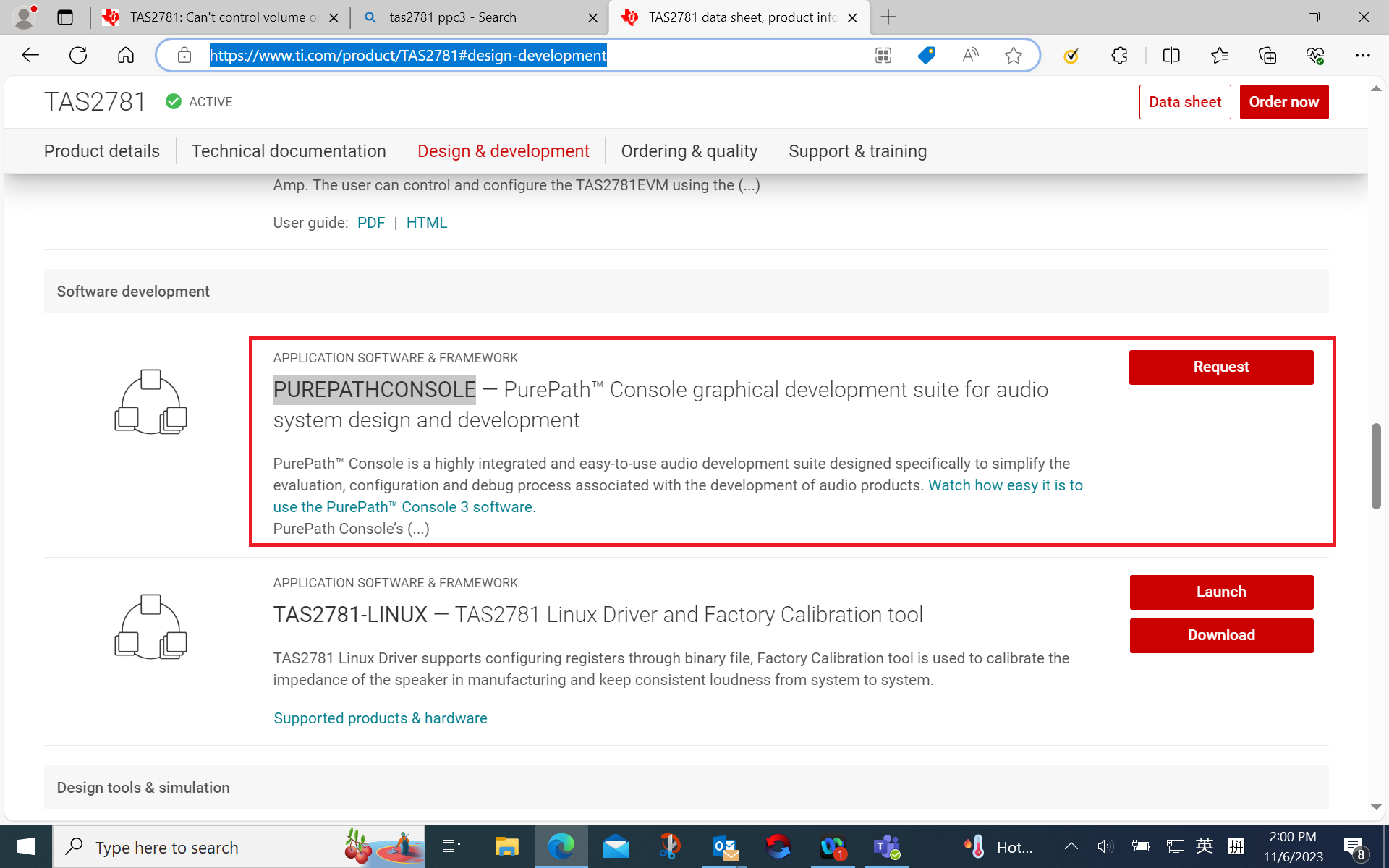
    2. As to balance of the L/R, I suggest you to apply for tas2781 PPC3(TAS2781 data sheet, product information and support | TI.com), an acoustic tuning tool for tas2781, you can tune what you like. I'm not sure whether this can be open to end user.

  • Turned out that runtime_suspend doesn't do a hardware shutdown. Just software shutdown. The DSP doesn't reset and the firmware doesn't need to be reloaded.

    The hardware reset comes from your firmware. The firmware that you have, changes register 5c from 19 to d9. Bit 7 is CLK_PWRUD and setting the register to d9 sets the bit on. After the bit gets set to on and the play stops - the whole amp does hardware shutdown.

    I hacked the code to keep the bit always set to 19.

    Now going from suspend to resume takes only 200ms. The DSP doesn't load the firmware anymore.

    2023-11-06T21:33:25.328752-08:00 yoda kernel: [ 1014.716105] tas2781-hda i2c-TIAS2781:00: Runtime Resume

    2023-11-06T21:33:25.540290-08:00 yoda kernel: [ 1014.927369] snd_hda_codec_realtek hdaudioC1D0: hda_codec_setup_stream: NID=0x2, stream=0x5, channel=0, format=0x31

    Also disabling the pm control with

    echo on > /sys/devices/platform/AMDI0010\:03/i2c-3/i2c-TIAS2781\:00/power/control

    works but is not needed anymore as the amp is very quick to go out of software shutdown.

    So can you please fix the firmware and send a new one? Just firmware that doesn't set CLK_PWRUD bit.

  • For the balance of L/R:

    What you sent me last:

    + for (i = 0; i < tas_priv->ndev; i++) {
    + ret = tasdevice_dev_write(tas_priv, i, TAS2781_DVC_LVL,
    + tas_priv->digital_gain);
    + if (!ret)
    + continue;
    + dev_err(tas_priv->dev, "set digital vol err in dev %d\n", i);
    + }

    changes the volume of both amps so each change shows twice

    [ 1362.873368] tas2781-hda i2c-TIAS2781:00: tasdevice_digital_putvol 0x001a val=12
    [ 1362.874507] tas2781-hda i2c-TIAS2781:00: tasdevice_digital_putvol 0x001a val=12
    [ 1363.930240] tas2781-hda i2c-TIAS2781:00: tasdevice_digital_putvol 0x001a val=16
    [ 1363.931384] tas2781-hda i2c-TIAS2781:00: tasdevice_digital_putvol 0x001a val=16

    Why do I need PUREPATHCONSOLE? Isn't it possible to just updated each amp with different volume?

        ACARD_SINGLE_RANGE_EXT_TLV("Speaker Digital Gain", TAS2781_DVC_LVL,
            0, 0, 200, 1, tas2781_digital_getvol,
            tas2781_digital_putvol, dvc_tlv),

    is currently set as mono. Can you change to be stereo and to allow different values for each amp?

  • Sure, you can set it in the code. You can also change the digtial gain in the dspbin file.

  • Hi Shenghao,

    kindly share how do you create TIAS2781RCA4.bin file?

    Do you compile somehow the TIAS2781RCA4.json file? Can you go from a bin file back to json? There seems to be some regbin tool that can do that. Where is it?

    Can PurePathcConsole do that? How? What are the steps?

    Thanks,

    Darin

  • Sounds good. I sort of made it work by disabling the runtime PM and patching the binary file - so I'll close this.

    In case someone else needs info - I left some here github.com/.../yoga-slim-7