This thread has been locked.

If you have a related question, please click the "Ask a related question" button in the top right corner. The newly created question will be automatically linked to this question.

TAS2780EVM: USB Device Descriptor stopped responding (Windows)

Part Number: TAS2780EVM
Other Parts Discussed in Thread: TAS2780

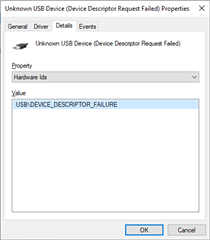
In trying to determine why the TAS2780EVM board would not respond to external I2C communication, I have connected a Saleae Log Pro 16.  I could see the I2C request coming in but no response.  My colleague had the great suggestion to revert the J23 and J24 jumper, leave the Saleae connected to the TP9, TP10, and GND and then sniff the I2C XMOS chatter to compare with what I was sending in externally.  Unfortunately, when I reverted the J23 and J24 jumpers for external USB connection, the device now fails to respond to wit device descriptor values including no VID/PID values.  I have reset power to the TAS2780EVM many times, rebooted my Windows box, and removed all other connections with no success.  If anyone knows of something else to look into please let me know!
Regards,

Tony

  • Hi Tony, 

    you are attempting to use an external I2C/I2S master to communicate with the TAS2780 correct?

    in that case J23,24 should be set to short pin 2-3. if both digital audio and I2C are coming from USB then short these pins to 1-2.

    however if you set them both to be external but do not provide the I2S clocks the device then it will prevent the device from working. 

    if you believe all the jumper settings for Power/I2C/I2S are correct, and think it is a usb issue, you can reinstall the driver. 

    - uninstall the device in device manager, 

    - uninstall PPC3

    -reinstall PPC3 (this will reinstall the audio drivers) 

    Regards,
    Arthur

  • Thank you Arthur for the suggestions!  

    I had tried reverting the J23 and J24 jumpers with no success and I did fail to mention that I had already tried uninstalling the driver using device manager.  I did remember that even with the J23 and J24 jumpers in the "external" signal position, when it was working it would show properly in device manager and   the PurePath Console 3 would still be able connect, just not send I2C configuration data nor I2S sound stream data.   ....but just in case, as it is a new day, I tried all that again and still no USB connection.

    At this point, I think the USB is no longer functional on this board.

    Regards,
    Tony

  • Hi Tony, 

    if both jumpers are set to "EXT" then PPC3 will throw and error when connecting to PPC3, however it shouldn't show an error in device manager, 

    did you uninstall and reinstall PPC3 to reinstall the audio driver? 

    Regards,
    Arthur 

  • Hi Arthur,

    I just retried uninstalling and reinstalling PPC3 just in case, but no change.  Another symptom is that since this problem started, the board's blue LED labeled "USB READY" no longer illuminates.

    In thinking about this a bit more, I think because Windows does not receive the VID/PID USB identifiers from the board during the USB base level handshaking process, it has no way to identify what driver to use.

    Thank you for the ideas Arthur!
    Tony

  • if the USB READY Led is not lit it means that something has gone wrong with the XMOS. It makes me believe the EVM is dead. Can you please submit a support ticket to get a fresh EVM. I believe the support team will ask for recommendation from the product line to get a new EVM. you can link them to this E2E thread. 

    even if the EVM can be brought to life, you wont have the programmer tool or the software to do it. 

    Regards,
    Arthur