This thread has been locked.

If you have a related question, please click the "Ask a related question" button in the top right corner. The newly created question will be automatically linked to this question.

TLV320AIC3110: TLV320AIC3110 sound card chip microphone acquisition distance problem.

Part Number: TLV320AIC3110


Hi TI team,

Customers use TI's TLV320AIC3110 chip in their distributed products, which can meet the audio recording, playback and loop out functions.
Our test found that after the microphone distance from the sound source is more than 10cm, the audio can not be collected, resulting in the voice call can not be used, unless directly speaking into the microphone.
Attached is the relevant schematic diagram. We have adjusted TI's chip manual according to it, but there is no improvement.
Please help to see if you can help provide support, thank you.

  • Hi Ken,

    What is the rms level coming out of the microphone? The device full scale is 707mVrms and the mic level needs to be a significant fraction of this. Also are you using any enhancement features such as biquad filtering or the AGC? The AGC is useful in applications like this to help keep far away signal sources audible, but it can be miss configured.

    Best regards,
    Jeff McPherson

  • Hi Jeff,

    We don't know how to get the rms level value, but according to the manual, we see that the SPL value is 91dB. And there is no change in the effect after AGC is enabled.
    The following shows the register values for page0:

    No size specified (using byte-data access)
    0 1 2 3 4 5 6 7 8 9 a b c d e f 0123456789abcdef
    00: 00 00 01 56 03 91 08 00 00 00 00 88 82 00 80 80 ..?V???....??.??
    10: 08 00 88 82 80 80 04 00 00 00 01 00 00 00 88 00 ?.?????...?...?.
    20: 00 00 00 00 40 22 00 00 00 00 00 00 00 00 00 00 ....@"..........
    30: 00 00 00 02 32 12 01 02 02 11 10 00 01 04 00 14 ...?2??????.??.?
    40: 0c 00 00 00 6f 38 00 00 00 00 00 ee 10 d8 7e e3 ?...o8.....???~?
    50: 00 80 00 10 00 00 80 00 7f 00 00 00 00 53 00 00 .?.?..?.?....S..
    60: 00 00 00 00 00 00 00 00 00 00 00 00 00 00 00 00 ................
    70: 00 00 00 00 00 00 00 00 00 00 00 00 00 00 00 00 ................
    80: 00 00 00 00 00 00 00 00 00 00 00 00 00 00 00 00 ................
    90: 00 00 00 00 00 00 00 00 00 00 00 00 00 00 00 00 ................
    a0: 00 00 00 00 00 00 00 00 00 00 00 00 00 00 00 00 ................
    b0: 00 00 00 00 00 00 00 00 00 00 00 00 00 00 00 00 ................
    c0: 00 00 00 00 00 00 00 00 00 00 00 00 00 00 00 00 ................
    d0: 00 00 00 00 00 00 00 00 00 00 00 00 00 00 00 00 ................
    e0: 00 00 00 00 00 00 00 00 00 00 00 00 00 00 00 00 ................
    f0: 00 00 00 00 00 00 00 00 00 00 00 00 00 00 00 00 ................


    you can see the value of address of 0x56 is 0x80.   So the AGC is enabled.

  • Hi Paul,

    SPL value is a measurement of the maximum sound pressure the mic can receive. Is it not possible to measure the output voltage of the microphone say either at the device pin or on the device side of the coupling capacitor?

    You can refer to this app note on setting up the AGC. It gives some more detail than the datasheet: https://www.ti.com/lit/an/slaa446/slaa446.pdf?ts=1710858430576&ref_url=https%253A%252F%252Fwww.ti.com%252Fproduct%252FTLV320AIC3110 Your threshold may be set too high and so the AGC is treating the mic signal as noise once you get too far from the mic.

    Let me know if you have any further questions,
    Jeff McPherson

  • Hi Jeff,

    Thank you for your reply. We will study the AGC parameter configuration again, and maybe we not have set up before powering up the ADC.

    In addition, we will continue to find ways to test the rms level value.

    Best regards,

    Paul

  • Hi Paul,

    Thank you for the update. Let me know if any further questions come up.

    Best regards,
    Jeff McPherson

  • Hi Jeff,

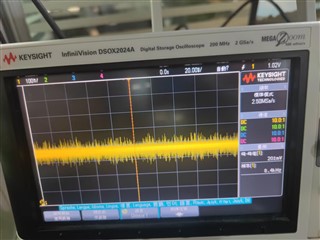
    Thank you for the support. I am Carl, a colleague of Paul. In the register table above, the value of the register with address 0x56 is 0x80, indicating that the AGC gain has been turned on, and the target level is -5.5dB. The value of the register with address 0x57 is 0x00, indicating that the AGC noise and silence detection is disabled. Therefore, it may not be due to the high noise threshold setting. Is there any other way of thinking? In addition, we measured the waveform of the input with a microphone connected to the audio input port and a computer directly connected to the audio input port, as shown below,


    The peak value when the microphone is connected is 200+, while the peak value when the computer is connected is 500+. We hope this can be helpful.

    Best regards,

    Carl

  • Hi Carl,

    If the noise threshold is disabled we can disregard that piece for now. Is the level from the computer (line) input satisfactory? If so the issue may be the microphone itself. What kind of polar pattern does it have? 

    Could you also check that the AGC gain is being applied (0x5D)? I also noticed that the value of the maximum gain 0x58 is 0x7f which is a reserved value. For the maximum allowable gain, this should be 0x77.

    Try those few things and let me know how it goes,
    Jeff McPherson

  • Hi Jeff,

    The level of computer input is satisfactory. We have tried various models of microphones and they all performed poorly, but they performed well when used for voice calls on a computer. Their directionality should be omnidirectional.


    I have tried various solutions for AGC gain, including the two examples in the document and some other attempts, but none of them have worked. Below is an example, the value of 0x5d is 0x09.

            0   1   2   3   4   5   6   7   8   9   a   b   c   d   e   f 0123456789abcdef
    00: 00 00 01 56 03 91 08 00 00 00 00 88 82 00 80 80 ..?V???....??.??
    10: 08 00 88 82 80 80 04 00 00 00 01 00 00 00 88 00 ?.?????...?...?.
    20: 00 00 00 00 60 22 00 0a 00 00 00 00 00 40 00 00 ....`".?.....@..
    30: 00 00 00 02 32 12 01 02 02 11 10 00 01 04 00 14 ...?2??????.??.?
    40: 0c 00 00 00 6f 38 00 00 00 00 00 ee 10 d8 7e e3 ?...o8.....???~?
    50: 00 80 00 15 00 00 a0 7e 50 08 32 00 06 09 00 00 .?.?..?~P?2.??..
    60: 00 00 00 00 00 00 00 00 00 00 00 00 00 00 00 00 ................
    70: 00 00 00 00 00 00 00 00 00 00 00 00 00 00 00 00 ................
    80: 00 00 00 00 00 00 00 00 00 00 00 00 00 00 00 00 ................
    90: 00 00 00 00 00 00 00 00 00 00 00 00 00 00 00 00 ................
    a0: 00 00 00 00 00 00 00 00 00 00 00 00 00 00 00 00 ................
    b0: 00 00 00 00 00 00 00 00 00 00 00 00 00 00 00 00 ................
    c0: 00 00 00 00 00 00 00 00 00 00 00 00 00 00 00 00 ................
    d0: 00 00 00 00 00 00 00 00 00 00 00 00 00 00 00 00 ................
    e0: 00 00 00 00 00 00 00 00 00 00 00 00 00 00 00 00 ................
    f0: 00 00 00 00 00 00 00 00 00 00 00 00 00 00 00 00 ................
    We found that unless we can hear satisfactory sound intensity when speaking next to the microphone, even if we are 5 centimeters away, the sound intensity will drop sharply to almost imperceptible. I guess this may not be related to AGC gain, but rather to other issues such as circuit structure. I look forward to receiving your opinion.

    Best regards,

    Carl

  • Hi Carl,

    Seems like the AGC is only applying a gain of about 4.5dB in that moment which is well within the max, so I don't think the AGC is necessarily the issue. There are other parameters like debounce and hysteresis but those are hard for me to advise what to set them to remotely in this forum, though I can give explanations of the parameters if needed. You could further experiment by increasing the attack time for example, if your test signal is going from loud to soft rapidly. 

    A quick check to see if the AGC is the issue is to turn off the AGC all together, and program the PGA manually to see if you can find a satisfactory gain level. Then you can use that information to determine how exactly the AGC needs to behave, assuming the issue goes away. If it remains then it probably has nothing to do with the AGC.

    When you're listening to the recorded signal, what's the signal path? Are you using the speaker outs of the codecs, are you using a PC, etc? I'm curious about finding an objective measurement of what's a satisfactory level vs the level that you're hearing now where the signal drops off rapidly.

    Best regards,
    Jeff McPherson

  • Hi Jeff,

    In yesterday's experiment, I also set parameters such as debounce and hysteresis, and the specific parameter settings are as follows,
    W 56 A0 # Enable AGC, set Target gain=-10 dB
    W 57 7E # set hysteresis=2 dB, Noise threshold=-90 dB
    W 58 50 # set Maximum gain=40 dB
    W 59 08 # set attack time=20 ms
    5A 32 # Decay time=500 ms
    W 5B 00 # Noise debounce time=0 ms
    W 5C 06 # signal debounce time=2 ms


    These have no effect. I followed your suggestion to turn off AGC and set some parameters of DRC, including PGA, for testing, but the results were not satisfactory. The specific parameter settings are as follows,
    W 41 18 # make gain of Left DAC=12 dB
    W 42 18 # make gain of right DAC=12 dB
    W 44 7F # Enable DRC for both DAC channels, set threshold=24dB, Hysteresis=3dB
    W 45 00 # Make DRC hold=0 ms
    W 46 E2 # Make DRC attack and Decay as required


    So the high probability is unrelated to AGC. Our input is the microphone connected to the audio input port through a 3.5mm interface, and the output is divided into two situations. One is that the earphones are connected to the audio loop port through a 3.5mm interface, and in this case, almost no sound can be heard, even if the microphone is close to the sound source. Another type is when audio data is encoded and transmitted through the network to another device, which is then decoded and output to headphones at the audio output port. This phenomenon is what I have been describing. When the microphone is close to the audio source, the sound is normal, but when it is far away, the sound drops sharply. This is also the actual usage scenario of our product.


    The audio data input by TI is transmitted to Rockchip for encoding, and the decoded data is transmitted to TI's output. The circuit diagram design for audio input and output has been provided when the problem was raised. The circuit connections for TI and Rockchip are as follows,

    If these are not sufficient to draw effective conclusions, we may need a technical personnel to provide on-site support.

    Best regards,

    Carl

  • Hi Carl,

    I doubt this is related to the circuit itself, as it looks quite simple and matches the typical application. 

    Since you mentioned that the I2S is being decoded, could you double check that the format is matching? It's possible that volume is being lost if the format is not matching. One way to check is to provide a line input sine wave at 0 or -1dBFS and verify that the value is being recorded by the I2S decoder. From there, the I2S decoder must be set with appropriate gain. I would also like to know how quickly the volume is dropping off in dB values. For example, when close you get -6dB but when more than 10cm away the volume is -64dB, or something like that.

    Could you also share the datasheet of the mic you are using?

    The audio loop in the codec (analog in -> loopback -> analog out) tends to lose a lot of volume and needs a lot of PGA gain/Line out gain to be audible.

    Best regards,
    Jeff McPherson

  • Hi Jeff,

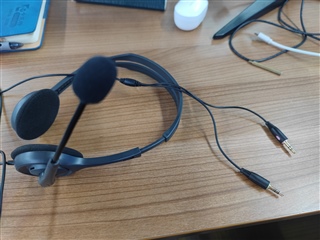
    What I mean by encoding and decoding is the conversion between PCM data and AAC data, not the conversion between analog and digital signals, so I don't understand what the format you are referring to and how it should be measured. Additionally, I am not sure where or how the volume value is obtained, but from an auditory perspective, there is a significant difference in sound intensity. I don't quite understand what the datasheet of the mic refers to. Below are the parameters of this earphone.

    Specification parameters

    Rated output power: 20mW

    frequency response: 20-20KHz

    Sound pressure level: 91dB

    Nominal impedance: 32Ω

    Line length: 2m

    connector: Dual 3.5mm stereo plug

    The microphone and headphones are two 3.5mm plugs,after this manner

    What else do we need to provide, but since we are not audio related professionals, we may not be able to test some things and may need some help, such as testing documentation.

    Best regards,

    Carl

  • Hi Carl,

    I understand better. Unfortunately TI doesn't support any AAC parts in our audio portfolio so I'm not knowledgeable in that area. However you mention that the audio is fine using a computer line source it's probably not the issue.

    If you could share the full datasheet of the headphone I can read through it and see if anything is helpful.

    As for testing, I'd like to understand better what is happening electrically when the mic loses volume rapidly. Similar to your scope shots from before, could you capture the input voltage difference between when you are right up against the microphone (say 5cm) vs far away (10 or 20cm).

    Thank you,
    Jeff McPherson

  • Hi Jeff,

    Do you mean the register table when you say the datasheet of the phone? If so, it is provided above.

            0   1   2   3   4   5   6   7   8   9   a   b   c   d   e   f 0123456789abcdef
    00: 00 00 01 56 03 91 08 00 00 00 00 88 82 00 80 80 ..?V???....??.??
    10: 08 00 88 82 80 80 04 00 00 00 01 00 00 00 88 00 ?.?????...?...?.
    20: 00 00 00 00 40 22 00 00 00 00 00 00 00 00 00 00 ....@"..........
    30: 00 00 00 02 32 12 01 02 02 11 10 00 01 04 00 14 ...?2??????.??.?
    40: 0c 00 00 00 6f 38 00 00 00 00 00 ee 10 d8 7e e3 ?...o8.....???~?
    50: 00 80 00 15 00 00 a0 7e 50 08 32 00 06 13 00 00 .?.?..?~P?2.??..
    60: 00 00 00 00 00 00 00 00 00 00 00 00 00 00 00 00 ................
    70: 00 00 00 00 00 00 00 00 00 00 00 00 00 00 00 00 ................
    80: 00 00 00 00 00 00 00 00 00 00 00 00 00 00 00 00 ................
    90: 00 00 00 00 00 00 00 00 00 00 00 00 00 00 00 00 ................
    a0: 00 00 00 00 00 00 00 00 00 00 00 00 00 00 00 00 ................
    b0: 00 00 00 00 00 00 00 00 00 00 00 00 00 00 00 00 ................
    c0: 00 00 00 00 00 00 00 00 00 00 00 00 00 00 00 00 ................
    d0: 00 00 00 00 00 00 00 00 00 00 00 00 00 00 00 00 ................
    e0: 00 00 00 00 00 00 00 00 00 00 00 00 00 00 00 00 ................
     f0: 00 00 00 00 00 00 00 00 00 00 00 00 00 00 00 00 ................

    If not, I don't understand what it is.


    The difference in input voltage between speaking next to the microphone and speaking further away is not significant, with peak values around 200+. We conducted such a comparative test last time. Even when not speaking to the microphone, the peak voltage difference of the input audio from the microphone is around 200. Only when speaking loudly next to the microphone can this peak reach 300+. The audio intensity collected through the microphone is always unsatisfactory, whether speaking up close or far, I think this is the key.

    Thank you,
    Carl

  • Hi Carl,

    How did you get the specs for the earphone that you shared earlier? That is the document I'm referring to.

    I agree that I think the microphone response is the issue. It seems like there may be a lot of noise that's preventing you from hearing the signal well? If the peak value when speaking or not speaking is the same, that may the issue. A few options you can experiment with are to change the input impedance as well as the input impedance from the common mode voltage.

    A couple things to confirm this would be to play a sine tone over the air through the microphone and measure the result (SNR). I also recommended earlier to turn off AGC and DRC and use a high PGA gain to see if the signal volume improves. What were the results from that?

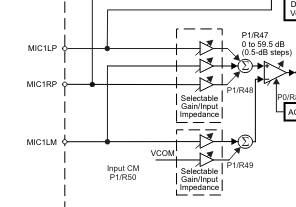
    As I'm looking at the schematic again, I see you have a left and a right channel connect but only one microphone? Are MIC1LP and MIC1RP being mixed using P1R47? How are the tip and ring of the connector connected to the microphone? That's another reason I need to see the headset datasheet.

    Best regards,
    Jeff McPherson