This thread has been locked.

If you have a related question, please click the "Ask a related question" button in the top right corner. The newly created question will be automatically linked to this question.

TLV320ADC6140: Audio cannot record

Part Number: TLV320ADC6140


Tool/software:

Hi Experts,
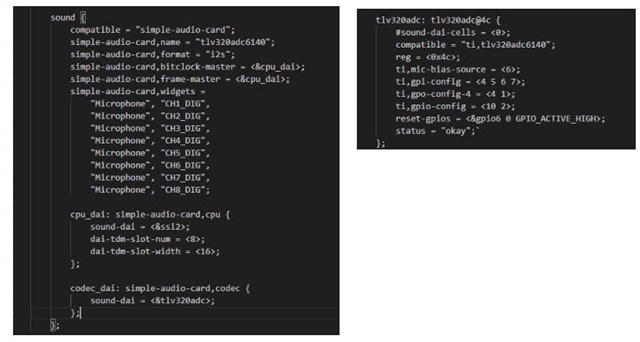
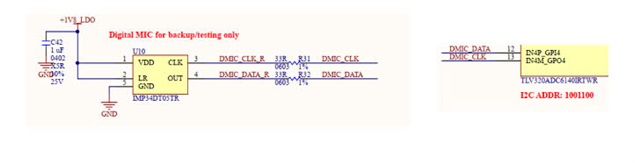
I'm using the TLV320ADC6140 with a custom i.MX6 platform. For testing purpose, I use one digital microphone on Channel 7/Channel 8 of ADC. The tlv320adcx140.c and simple-card.c drivers probe successfully, but no sounds recorded. Please help me check if any configuration needed. 

root:~# arecord -l
**** List of CAPTURE Hardware Devices ****
card 0: tlv320adc6140 [tlv320adc6140], device 0: 202c000.ssi-tlv320adcx140-codec tlv320adcx140-codec-0 [202c000.ssi-tlv320adcx140-codec tlv320adcx140-codec-0]
Subdevices: 1/1
Subdevice #0: subdevice #0
root:~# arecord -f S16_LE -r 48000 -d 10 out.wav
Recording WAVE 'out.wav' : Signed 16 bit Little Endian, Rate 48000 Hz, Mono
Thank you.

  • Hi,

    Can you share an i2c dump of the configured device registers?

    Thanks and Regards,

    Lakshmi Narasimhan

  • Hi Lak,

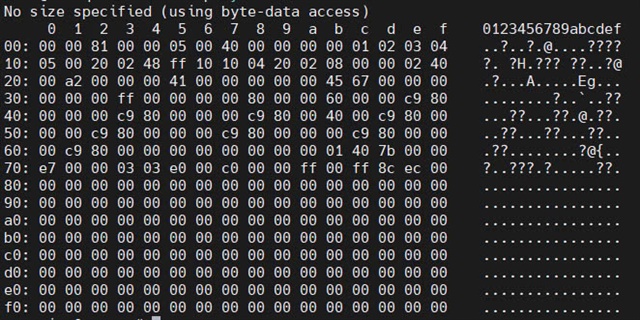
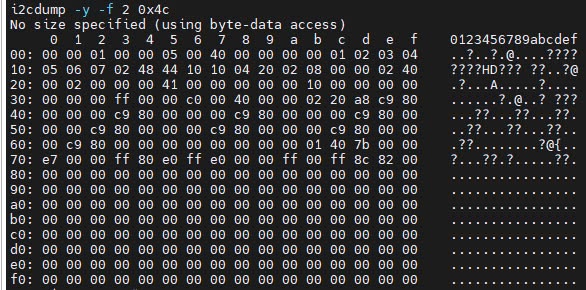
    Please check att file.

    root# cat /sys/kernel/debug/regmap/2-004c/registers
    000: 00
    001: 00
    002: 81
    003: 00
    004: 00
    005: 05
    006: 00
    007: 40
    008: 00
    009: 00
    00a: 00
    00b: 00
    00c: 01
    00d: 02
    00e: 03
    00f: 04
    010: 05
    011: 06
    012: 07
    013: 02
    014: 48
    015: ff
    016: 10
    017: 00
    018: 00
    019: 00
    01a: 00
    01b: 00
    01c: 00
    01d: 00
    01e: 00
    01f: 40
    020: 00
    021: a2
    022: 00
    023: 00
    024: 00
    025: 41
    026: 00
    027: 00
    028: 00
    029: 00
    02a: 00
    02b: 45
    02c: 67
    02d: 00
    02e: 00
    02f: 00
    030: 00
    031: 00
    032: 00
    033: ff
    034: 00
    035: 00
    036: 00
    037: 00
    038: 00
    039: 00
    03a: 00
    03b: 60
    03c: 00
    03d: 00
    03e: c9
    03f: 80
    040: 00
    041: 00
    042: 00
    043: c9
    044: 80
    045: 00
    046: 00
    047: 00
    048: c9
    049: 80
    04a: 00
    04b: 40
    04c: 00
    04d: c9
    04e: 80
    04f: 00
    050: 00
    051: 00
    052: c9
    053: 80
    054: 00
    055: 00
    056: 00
    057: c9
    058: 80
    059: 00
    05a: 00
    05b: 00
    05c: c9
    05d: 80
    05e: 00
    05f: 00
    060: 00
    061: c9
    062: 80
    063: 00
    064: 00
    065: 00
    066: 00
    067: 00
    068: 00
    069: 00
    06a: 00
    06b: 01
    06c: 40
    06d: 7b
    06e: 00
    06f: 00
    070: e7
    071: 00
    072: 00
    073: 00
    074: 03
    075: 00
    076: 00
    077: c0
    

    Thank you.

  • Hi Lak,

    Please help to check and advise.

    Thank you

  • Hi,

    Based on the above i2c dump, it looks like device is configured as pointed out below:

    1) CH4_CFG0 is configured for GPI and GPO functionality

    2) GPO4 is configured as 3.072MHz PDM clock

    3) GPI4 is configured for CH7/CH8 PDM input

    4) Audio protocol seems to be16-bit stereo I2S.

    5) The above regdump seems to be before recording, since ADC/PLL are not powered up (register 0x75), and the ASI_STS (register 0x15) register reads invalid sample rate and invalid BCLK-Fs ratio

    We need to configure a couple of things additionally for recording:

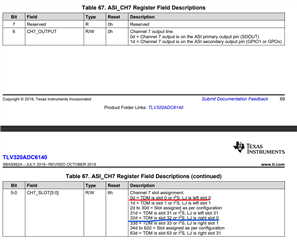
    1) If we are using stereo I2S, CH7 and CH8 TDM slots need to be configured for Left slot 0 and right slot 0, through registers 0x11 (set to 0x00 for left slot 0) and 0x12 (set to 0x20 for right slot 0) on Page 0.

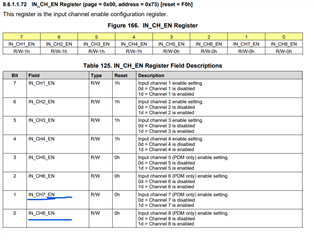
    2) ASI_OUT_EN is set to 0x3 for enabling ASI on CH7 and CH8. Additionally, IN_CH_EN also is to be set to 0x03 (for PDM only)

    Thanks and Regards,

    Lakshmi Narasimhan

  • Hi Lak,
    Thanks for the quick response.
    Could you please let me know the available commands to set those registers in Linux? Is it possible to configure them using alsa-utils?
    I see some registers can be configured using amixer through the tlv320adcx140.c codec driver, but I am unable to configure all the registers you mentioned.
    Thank you.

  • Hi,

    I will need to check if they can be configured using alsa utilities. We can also use i2cset to write into these registers,

    Thanks and Regards,

    Lakshmi Narasimhan

  • When using code driver, tlv320adc address (0x4c) is owned by driver, I can not use i2cset utility to change the register value of tlv320adc
    root@:~# i2cdetect -y 2
    0 1 2 3 4 5 6 7 8 9 a b c d e f
    00: -- -- -- -- -- -- -- --
    10: -- -- -- -- -- -- -- -- -- -- -- -- -- -- -- --
    20: -- -- -- -- -- -- -- -- -- -- -- -- -- -- -- --
    30: -- -- -- -- -- -- -- -- -- -- -- -- -- -- -- --
    40: -- -- -- -- -- -- -- -- -- -- -- -- UU -- -- --
    50: -- 51 -- -- -- -- -- -- -- -- -- -- -- -- -- --
    60: -- -- -- -- -- -- -- -- -- -- -- -- -- -- -- --
    70: -- -- -- -- -- -- -- --
    Could you please let me know your setup? Thank you

  • Hi,

    Even under this condition, we should be able to write into registers using " i2cset -y -f " syntax"

    Thanks and Regards,

    Lakshmi Narasimhan

  • I tried to change registers as your suggestion but ASI_STS register still invalid. If codec tlv320adc6140 is slave, do we need configure BLCK and FSYNC?

    Do I need to config anything of MPU side?

  • Hi,

    ASI_STS being 0xFF seems to indicate an issue with the BCLK and FSYNC that is provided from the host processor as device input.

    Can we confirm if the BCLK and FSYNC signals going to the device during recording are as expected?

    Thanks and Regards,

    Lakshmi Narasimhan

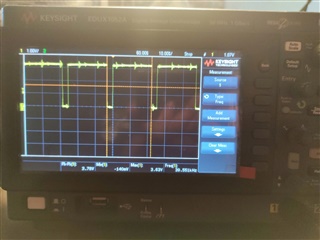
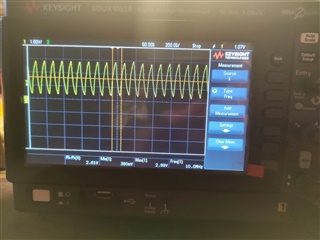
  • Hi Lak, please check the waveform input of audio ADC (DMIC output, BCLK and TXFS) and advise if it is normal or not.

    Thank you.TLV320_audio clock input image.zip

  • Hi,

    As per the attached scope shots, the FSYNC frequency seems to be ~39.5-40kHz, and the BCLK frequency seems to be ~10MHz.

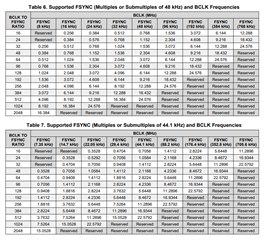
    Please refer to the below table from datasheet for the valid FSYNC and BCLK frequencies:

    Thanks and Regards,

    Lakshmi Narasimhan

  • Hi Lak,

    Do you mean 10MHz BCLK and 40kHz FS are invalid and incompatible with configurations of TI's audio ADC?

  • Hi,

    The supported sampling rates, as described in above table, are multiples and sub-multiples of 48kHz/44.1kHz.

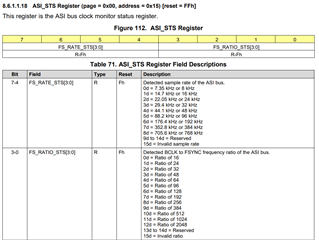
    Additionally, for 10MHz BCLK and 40kHz FSYNC, the BCLK-to-FSYNC ratio is 250, which is also not listed as a valid BCLK-to-FSYNC ratio.

    The ASI_STS register description in the datasheet also shows the sampling rates and BCLK-to-FSYNC ratios:

    Thanks and Regards,

    Lakshmi Narasimhan

  • Hi Lak,

    They can record now. 

    They are using an analog mic at a distance of 4 meters in CH1. The Channel 1 gain is configured at 42dB, but the output contains a lot of noise. Could you please guide them on how to change the configuration to reduce ground noise?

  • Hi Hieu,

    Lakshmi is out of office today so I will respond here.

    4 meters is quite far for most microphones. What microphone are you using?

    By turning up the gain to 42dB, your noise will also increase by 42dB. Such a large amount of gain will bring the noise to a level that will be nearly impossible to remove completely. This is why I ask what microphone you are using, because the microphone choice will impact the level the ADC receives.

    From your settings I see the Dynamic Range Enhancer is not being used. I recommend turning it on since that feature's primary use case is to record signals that are far away. It increases the dynamic range by ~6-7dB which means your SNR will improve.

    Best regards,
    Jeff McPherson