This thread has been locked.

If you have a related question, please click the "Ask a related question" button in the top right corner. The newly created question will be automatically linked to this question.

TAS2120EVM: How to successfully configure TAS2120 with PPC3

Part Number: TAS2120EVM
Other Parts Discussed in Thread: TAS2120, TAS2320

Tool/software:

I tested TAS2120 EVM, it can work when only connected USB supply with out open PPC3 and connected I2C, it seems that the chip comes with its original configuration and does not require PPC3. And when I try to configure it with PPC3, the output of the chip is going to have problems, clipping. Repowering the 5V DC power supply, output recovery. Why PPC3 is not successfully configured?

  • Hello,

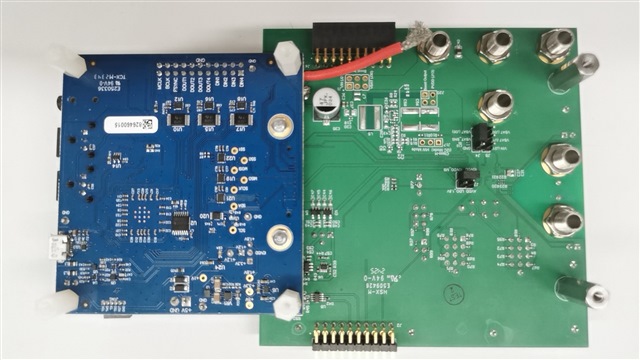
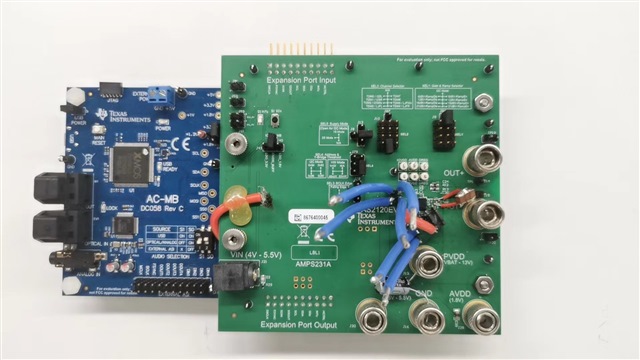
    Yes the EVM comes in HW mode by default. Can you share images of your EVM (front and back) so I can confirm you are switching to SW mode correctly?

    Also, with the current EVM configuration TAS2120 must be disabled before writing I2C commands. This ensures proper device configuration as well as prevents audio artifacts at the output due to changes on-the-fly. Follow the sequence below when using PPC3 to configure the device:

    • Set SW2 on AC-MB to OFF/OFF to stop the clocks and audio playback.

    • Make any required PPC3 adjustments.

    • Set SW2 on AC-MB back to ON/ON to resume the clocks and audio playback.

    Regards,
    Sydney Northcutt 

  • Hi Sydney,

    Below is my EVM, I think I have switched to SW mode when I tested.

  • Hello,

    Are you able to connect to PPC3? I am surprised if you were able to with J53 open. Anyways, please short J53 (allows PPC3 to properly connect) and J7 (supplies VDD to the IC). 

    Can you then set the AC-MB to external ASI, connect and initialize with PPC3, set the AC-MB to USB, and provide audio data via USB and let me know the results?

    Regards,
    Sydney Northcutt

  • Hi Sydney,

    Yes ,it is able to connect to PPC3. Anyway, I have connected J53,and J7 was also connected when tested.

    I provide audio data via external optical or I2S. I followed sequence below, but it doesn't work.

    • Set SW2 on AC-MB to OFF/OFF to stop the clocks and audio playback.

    • Make any required PPC3 adjustments.

    • Set SW2 on AC-MB back to OFF/ON to resume the clocks and audio playback.----the current of VIN became ~1.6A and with out output. If repower VIN ,IVIN recover and output recover but seems loss the configuration of PPC3 and just HW mode.

  • Hi,

    Ah, I see. Can you test with USB audio input settings and see if you observe the same behavior?

    Also please ensure your blue wires are not shorting to anything. I recommend removing these.

    Regards,
    Sydney Northcutt

  • Hello,

    When testing with optical / analog input, in PPC3 can you enable external input settings and set the receiver offset to 1? I believe this will fix your issue. 

    Regards,
    Sydney Northcutt

  • Hi,

    Is your issue resolved? Let us know if we can provide any further support. 

    Regards,
    Sydney Northcutt

  • Hi Sydney,

    Thanks for your support! I tested TAS2320 recently under guidance of Nayeem. I think TAS2120 is similar to TAS2320, I will try TAS2120 again then give the feedback to you~

  • Hi Evie, 

    Sounds good. Yes TAS2120 and TAS2320 are very similar. 

    I worked with Nayeem to gather the EVM pictures and script. The only difference in the script compared to the default setting is changing the offset for optical input as I mentioned above. If you need any guidance in how this is changed manually in PPC3 just let me know. :) 

    Regards,
    Sydney Northcutt