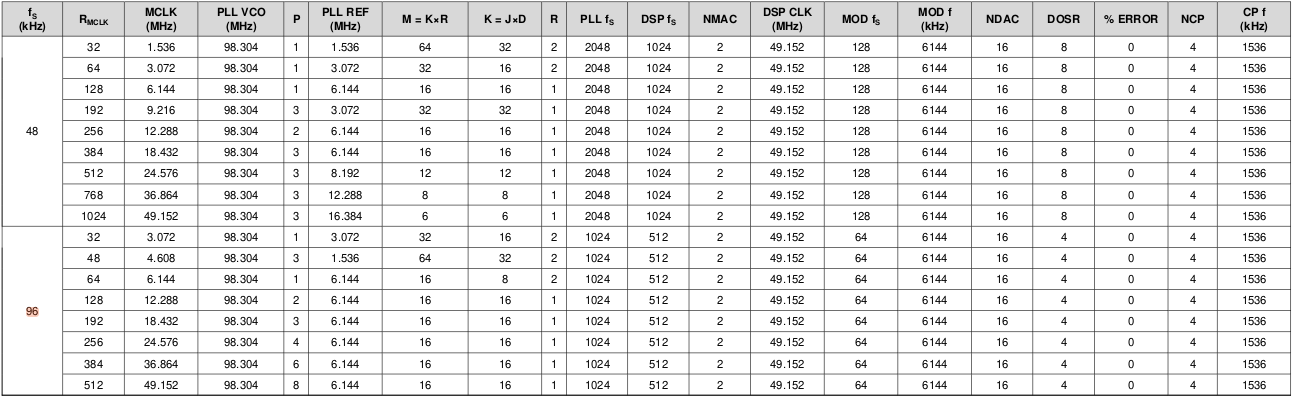
Part Number: TAS3251
Hello,
We are running 96 kHz audio through the TAS3251 using the internal DSP (a small number of filters: low-pass, peaking, and all-pass).
As per the datasheet (96KhZ, R=128), the recommended clocking for 96 kHz operation (see attached table) specifies a DSP clock of 49.152 MHz. However, with the DSP clock set to 49.152 MHz the audio sounds incoherent.
When we instead run the DSP clock at 98.304 MHz, the audio and DSP processing behave as expected. The DAC, OSR, and NCP clocks are derived from these clocks. With the clocks configured as prescribed, we observe audible aliasing artefacts.
Manipulating the clock configuration (changing divisors or base frequencies) changes the character of the artefacts, but does not eliminate them.
The only way we have found to fully remove the aliasing is to reset all clocks, which unfortunately reintroduces pops and clicks.
We are therefore looking for guidance on:
- The correct clocking strategy for 96 kHz audio with internal DSP enabled
- Whether the DSP clock is expected to run at 49.152 MHz or 98.304 MHz for this use case
- How to avoid aliasing while still maintaining pop-/click-free operation