This thread has been locked.

If you have a related question, please click the "Ask a related question" button in the top right corner. The newly created question will be automatically linked to this question.

TAS2770: Click and Pop Suppression

Part Number: TAS2770

Hello.
We're using the TAS2770 driver that ships with Linux kernel 6.6.101. Audio playback always starts with a pop. Are there controls in the driver to suppress the pop?
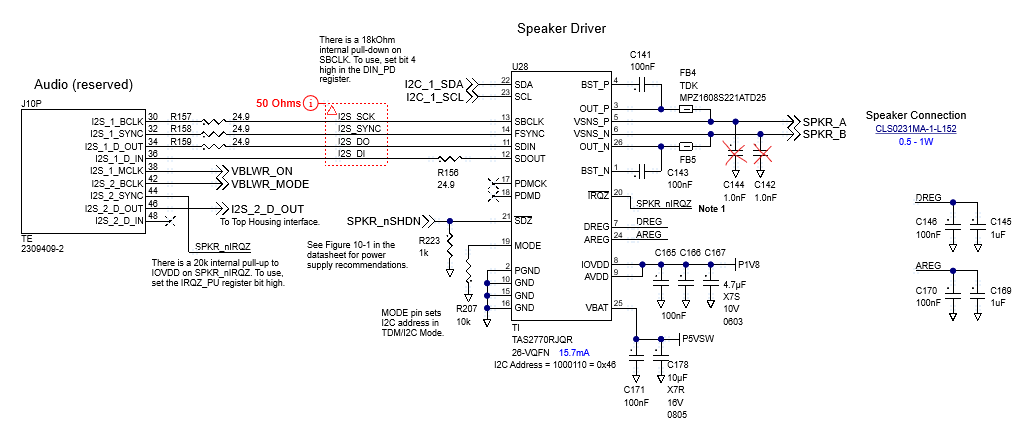
Thanks.TAS2770 Circuit.png
  • Hi Andy,

    The most fundamental method to eliminate pop noise is the amplifier's mute state must NOT be released until the I2S clocks (SCLK/BCLK) are stable by utilizing the SDZ (MUTE) Pin control as below:

    In the schematic, Pin 21 is the SDZ​ (Shutdown/Mute control, active-low). It should be connected to an MCU GPIO or a Codec GPIO.

    Operational Logic needs to be implemented in the driver to follow below steps:

    1.When the system prepares to play audio, pull SDZ low first​ (keep the amplifier muted).

    2.Start the I2S data transmission (ensure BCLK​ and LRCLK​ are already outputting stably).

    3.Wait for a short period​ (e.g., 50ms – 200ms) to allow the DC bias at the output to stabilize.

    4.Finally, pull SDZ high​ (release mute and start normal sound output).

  • Hi Peter,

    Thanks for your quick response.

    From the datasheet:
    The device enters Hardware Shutdown mode if the SDZ pin is asserted low. In Hardware Shutdown mode, the device consumes the minimum quiescent current from AVDD and VBAT supplies. All registers loose state in this mode and communication is disabled (through the I2C).

    Reprogramming the device with every playback would be awkward. Is there another way?

    Andy

  • Hi Andy,

    I understand your concern. Instead of cutting power or pulling the SDZ pin low, you simply write to the I2C register to mute the output digitally before starting the I2S clocks. Refer to the TAS2770 datasheet, Section 8.4.7.3 (Mute)​ and Section 9.3.6/9.3.7:

    To Mute:​ Set MODE[1:0]bits (in register 0x02) to 2'b01(0x01).

    To Unmute:​ Set MODE[1:0]bits to 2'b00(0x00). (Note: Ensure your Digital Volume Ramp rate is set appropriately so the mute/unmute ramps smoothly).

  • Hi Andy,

    Below are the recommended operational logic.

    1. Prepare:​ Ensure I2S clocks (BCLK/LRCLK) are OFF​ (or idle).

    2. Software Mute:​ Write to PWR_CTL register (0x02) to set the device to Mute​ (0x01). This ensures the Class-D output is silenced even if stray clocks appear.

    3. Start I2S:​ Enable your SoC's I2S controller to generate stable BCLK and LRCLK.

    4. Wait:​ Add a small delay (e.g., 50ms - 200ms) to allow the TAS2770's internal DC offset to settle completely.

    5. Software Unmute:​ Write to PWR_CTL register (0x02) to set the device to Active​ (0x00). The audio will fade in smoothly based on your ramp rate settings.

    6. Play Audio:​ Begin sending actual audio data. (Optional: If you want to save power when idle, you can put the chip into Software Shutdown​ (0x02) after muting and stopping I2S clocks, and wake it up (0x01) before unmuting. This retains all register values.)

  • Peter,
    Does the TAS2770 Linux driver provide a way to do this?
    Andy

  • I'm not sure, if our tas2770 do not support this, you can set them in the code.

    You can out tas2781-i2c.c code, all the register settings are stored in the bin file, you won't change any code.