This thread has been locked.

If you have a related question, please click the "Ask a related question" button in the top right corner. The newly created question will be automatically linked to this question.

AIC3254 EVM-U spectrum analyzer

We are evaluating AIC3254 using the EVM and are getting playback, Stereo AGC and equalizers working by connecting line-in 1 and headphone out.

How to get the mini spectrum analyzer in the EVM control software to work?

Shoud the input be line-in1 or can the on-board mic be used?

Also how long does it take to get the purepath studio after a fresh request now?

  • Hi, Murali,

    I have asked my colleague to help you with the mini spectrum analyzer.

    Of our official policy for requests is three business days. However, in most cases, requests are approved within 24 hours.

    -d2

  • Hi Murali,

    The spectrum spectrum analyzer needs to be loaded from the GUI software. After opening it through the EVM GUI a pop-up should appear if you want to program the device for this feature -> hit "OK" and then turn it on.

    Any of the inputs can be used.

    Regards,

    ~John

  • Hi,

    Thanks for the reply, but nothing happens even after we press the OK button... Only the loop back is working from IN1 to headphone... How to set the input to the spectrum analyzer?

    What we want to do is setup the on-board mic as input and see the spectrum analyzer... Can you kindly mention what must be done?

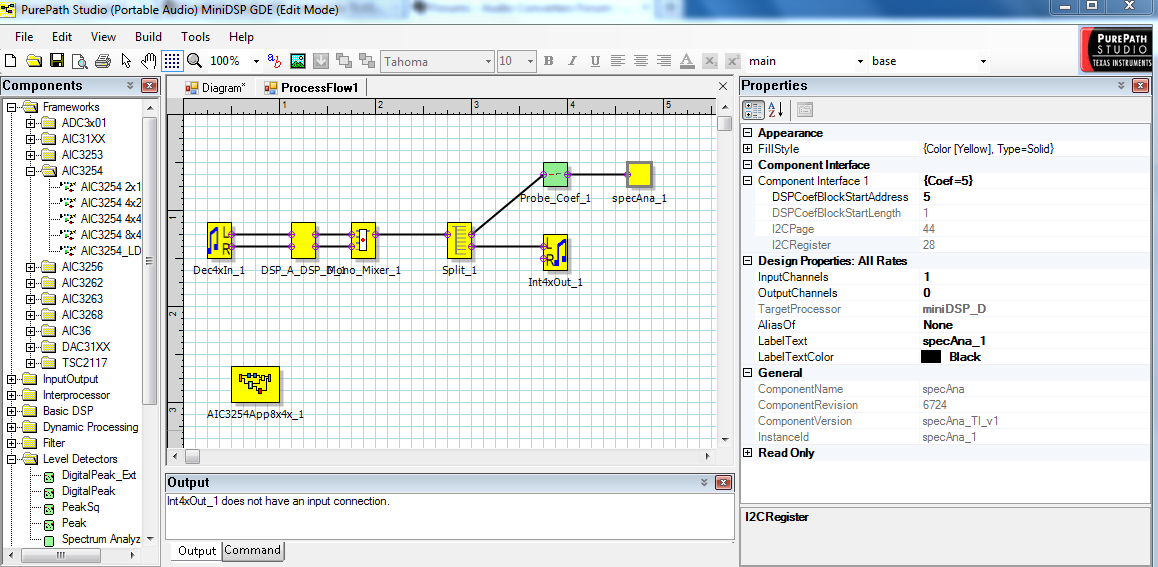
    Also, got the purepath studio, when spectrum analyzer component is dropped in the GDE, what type of probe can be used to see the value? The properties of the spectrum analyzer block shows start address as 5 and if we probe the location, it is a constant value. Can someone please suggest what is to be done if we want a vu-meter type output on the on-board mic of the EVM.

    2475.ProcessFlow1.rar

  • Hi Murali,

    The input into the spectrum analyzer will come from the DSP_D miniDSP. If you are looping the audio directly from IN1 to the headphone, the spectrum analyzer will not be able to see that.

    So in order to use the onboard mic,  you will have to turn on the ADC, DAC and have the that input (IN3) routed through the miniDSP (and have the correct jumpers installed). A good way to make sure this routing is working is by routing it all the way through to the LOL and LOR outputs.

    For use of the spectrum analyzer in PPS, I would look at this help document:

    6180.specAna_help.zip

    Regards,

    ~John


  • Thanks for the replies..Got it to work on the EVM. Now, how to use the PPS code in an application when the master is MSP430? The PPS driver document talks about using Linux or WinCE. How can the mini-DSP be programmed if we use a micro controller?

  • Hi, Murali,

    To which "PPS driver document" are you referring to?

    See this post for info about our drivers.

    -d2

  • Hi Murali,

    To get the code loaded on a MSP430. You will need to turn on the header file that the PurePath Studio Driver Support document - section 4.2 - talks about.

    To do that, go to Tools ->Options, you will get a pop-up window. Go to the Build tab and under the "Code Generation" section, check the "Generate Device Driver Interface" box. This will create the header file.

    This file will give you the values to write to the registers, from this, you can create I2C commands that a micro-controller can write to the AIC3254.

    Regards,

    ~John