This thread has been locked.

If you have a related question, please click the "Ask a related question" button in the top right corner. The newly created question will be automatically linked to this question.

TLV320AIC3254 PLL Settings

Other Parts Discussed in Thread: TLV320AIC3254

Dear All,

We have spent some time trying to understand the clocks on the TLV320AIC3254.

We know that the TLV320AIC3254-EVM uses a 12MHz MCLK.

Our near production test system needs an 8MHz clock.


Checking the PLL details we cannot make sense of the register settings (as generated by Pure Path) with respect to the datasheets.

Our system is working perfectly (at 12MHz), but it will not work at 8MHz as the tables show it should.

We have tried the calculators (FPLL and FMzPLL) without success.

We have now become totally lost and need help.

Thanks in advance.

  • Hello Howard,

    I apologize for the conusion. So if I understand correctly your 12.288 MHz Mclk works, but using an MClk of 8 Mhz does not work?

    What sampling rate are you trying to get? I'll assume 48 kHz for now.

    So to do this you will want to use the PLL. Using the AIC3254 Control software found on the evm product page: http://www.ti.com/tool/tlv320aic3254evm-k 

    Here we can see a visualization of the clock dividers (this window is found under digital settings ->clocks/interface) . If you use PLL settings of R = 1, J = 4, D = 6080, and P = 3 and you input an 8 Mhz clk you will get a 12.288 MHz clock out.

    Notice that the CODEC_CLKIN source is set to PLL_CLK. That feeds the PLL output to the input of the CODEC_CLKIN as opposed to directly from MCLK.

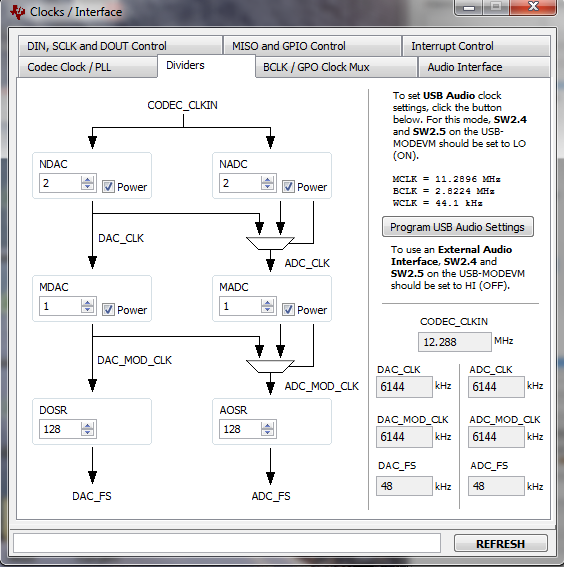
    Other than this all of the other settings should be the same, but just to help visualize here is the clk divid tab.

    Notice here that the CODEC_CLKIN is the input into this flow. So as long as the CODEC_CLKIN source is selected for the PLL_CLK. This configuration should work.

    Using the "record" function of the command line interface, these settings correlate to the following I2C writes:

    w 30 00 00 # select page zero
    w 30 04 03 # set CODEC_CLKIN source to PLL_CLK
    w 30 05 B1 # Set R = 1, J = 4, D = 6080 and P = 3, power on PLL.


    Other than that the other scripts should be the same.

    Please let me know if this doesn't help solve your problem! I'd be happy to continue assisting,

    Nate

  • Nathaniel,

    Sorry for the delay in answering, we have had a lot a problems with the local CPU.


    This dialog box, which I forgot about is perfect, we now have the CODEC running from the CPU clock at 8MHz.


    Thank you for your help.