This thread has been locked.

If you have a related question, please click the "Ask a related question" button in the top right corner. The newly created question will be automatically linked to this question.

PPC for TAS5731M

Other Parts Discussed in Thread: TAS5731, TAS5731M, TAS5721EVM

Dear Sirs,

My customer asked me to the content of the following.

It seems to correspond to the open and TAS5731 the PPC1.
Is this correct?
If this is correct, please tell me how to use the PPC1 and EVM of  TAS5731M.

I checked EVM and GUI  of  TAS5731M in TI WEB site, but  I couldn't  found them.

I need your help.

Best Regards,

Y.Hasebe

  • Hi, Hasebe-san,

    As Mike pointed out, you can find the TAS57x1 GUI for the TAS5731EVM in the EVM's product folder.

    The TAS5731EVM works with both TAS57x1GUI and PurePath Console 1 (PPC1).

    You need a different controller board for each software:

    • TAS57x1GUI requires the MC57xxPSIA controller board that is included when ordering the TAS5731EVM.
    • PPC1 uses the InputUsbBoard3 to interface the TAS5731EVM. 

    Unfortunately the InputUsbBoard3 can't be bought separately, you must purchase an EVM kit that includes it (TAS5614LDDVEVM).

    Best Regards,

      -Diego Meléndez López
       Audio Applications Engineer

  • Hello Diego-san,

    I apologize that question content was insufficient.

    We already have both of EVM.
    (I think the question whether there is a EVM for PPC1)

    We are currently using the TAS57xxGUI can not be the sampling rate setting of 44.1kHz.
    (There is a setting that allows the PPC1)

    But we do not have the userguide using PPC.
    Then we have to confirm whether it is to work with PPC1.
    But USB can not connect.
    So please tell me how to use the PPC in the current EVM.

    Best Regards,

    Y.Hasebe

  • Hi, Hasebe-san,

    As I mentioned, you need the InputUsbBoard3 and TAS5731EVM for using PPC1. If you have both boards, you will be able to control your amplifier using the GUI. The TAS5731 app on PPC1 is available when you install the software. You may refer to the TAS5721EVM User's Guide as a quick start, this EVM's GUI is similar to the one of the TAS5731.

    Best  Regards,

      -Diego Meléndez López
       Audio Applications Engineer

  • Hello Diego-san,

    Thank you for your reply.

    I have InputUsbBoard3 and TAS5731EVM and the TAS5731 app on PPC1.

    But  I couldn't  usb connection.

    Changing the USB firmware when the connection of another EVM was required.

    Do you think that it is necessary in this case?

    Or, do you have another information? 

    Best  Regards,

    Y.Hasebe

  • Hi, Hasebe-san,

    Is the GUI showing any class of error?, you should be able to just connect the boards and power them up with the required supplies to start evaluating the GUI. If the Firmware of the InputUsbBoard3 is corrupted, you can use the attached .zip files to fix it. Instructions are included as well. 

    InpuUsb3Board_Firmware.zip

    Best Regards,

      -Diego Meléndez López
       Audio Applications Engineer

  • Hello Diego-san,

    Thank you for your reply.

    I have tried to change Firmware of the InputUsbBoard3 as your advice.

    Then I have been able to  connect  to USB.

    Thank you for your advice.

    Best Regards,

    Y.Hasebe

  • Hello Diego-san,

    I have one more question.

    Now I have been able to control on the PPC1.

    My Customer asked how to return to operation at TAS57XX_GUI tools.

    Please tell me how to return to operation at TAS57XX_GUI tools.

    Best Regards,
    Y.Hasebe
  • Hi, Hasebe-san,

    The TAS57XX_GUI tool required for the TAS5731M is the TAS57x1 GUI. You need the MC57xxPSIA board to use this GUI. The user's guide for the TAS5731EVM showcases how to use this GUI. 

    Best Regards,

      -Diego Meléndez López
       Audio Applications Engineer

  • Hello Diego-san,

    Thank you for your reply.

    I understand you reply

    I will tell your reply to my customer .

    Best Regards,

    Y. Hasebe

  • Hello Diego-san,

    I confirm the operation by using the PPC1_GUI.

    The results were operating without problems.

    Then check the operation along the Userguide in TAS57xx_GUI.

    However, the following error message will be displayed.

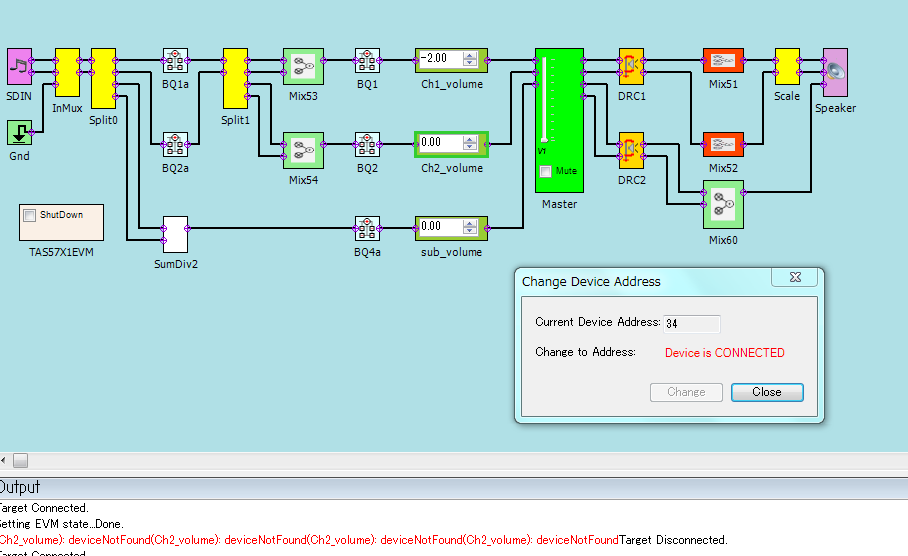
    (Master): deviceNotFound(Master): deviceNotFound(Master):

    My customer wants to both GUIs.

    Please tell me the advice of when to use both.


    Best Regards,

    Y.Hasebe

  • Hi, Hasebe-san,

    The message you are getting often is caused because the GUI can't find a device with the correct I2C address. Can you please verify that the GUI you are using is the TAS57x1 GUI?, the TAS57xx GUI is used for other devices that have a different I2C address, so maybe that is the issue. If you are using the correct TAS57x1 GUI and still have this issue, then you may need to change the I2C address on the I2C Memory Tool of the TAS57x1 GUI that can be found in tools section.

    Best Regards,

      -Diego Meléndez López
       Audio Applications Engineer

  • Hello Diego-san,

    Thank you for your reply.

    I'm sorry to mistake GUI name.

    I use TAS57x1 GUI.

    Then I check  Change Device Address.

    At first  address is  "34" ,then there was  indicated error message.

    Next I was confirmed by changing the address to 36.

    (I changed the system also "36" on the PC.)

    The result was the same error message.

    Do you have any other information?

    Best  Reagards,

    Y.Hasebe

  • Hi Hasebe-san,

    Thanks for the clarification. The address for the TAS5731 is 0x34, I verified in my EVM that the error message shows when a different address is selected and when 5V power supply of the MC57xxPSIA is not connected. Can you please verify both conditions on your setup?

    Regards,

      -Diego Meléndez López
       Audio Applications Engineer

  • Hello Diego-san,

    Thank you for your reply.

    I checked set up of EVM and GUI.

    1. 5V power supply  : OK

    2.address for the TAS5731M : 0x34

    However , still get an error .(below message)

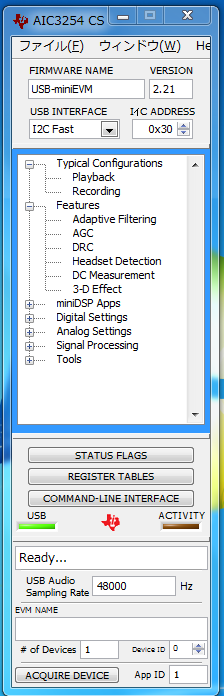
    Then I check the Status in the GUI of AIC3254 CS as another way. (See figure below)

    Do you have any information?

    Best Regards,

    Y.Hasebe

  • Hi, Hasebe-san,

    Thanks for the information. By looking at the AIC3254CS, I think that perhaps the MC57xxPSIA board  has a different FW programmed. Can you please refer to this post and re-program the MC57xxPSIA FW and verify if this fixes the issue?

    Have you tried using a different MC57xxPSIA board?

    Best Regards,

      -Diego Meléndez López
       Audio Applications Engineer

  • Hello Diego-san,

    Thank you for your replt.

    Can you please refer to this post and re-program the MC57xxPSIA FW and verify if this fixes the issue?

    ⇒ I have already done, but it was indicated same message.

    Have you tried using a different MC57xxPSIA board?

    ⇒No, I have only 1 EVM.

     I have used same EVM.

    Once again shown below the EVM setting as the operation check conditions.

    1. Implement the Firmware setting(DFU_TEST) I got from you.(use USB-miniEVM0221_441KHZ.BIN)

    2.Operation check in PPC1.16.

       ⇒OK

    3.Next, remove all connection.

    4.Start the USB and power connections to TAS57x1_GUI.

     ⇒Error Message

    TAS57x1_GUI  doesn't  have fs=44.1kHz.

    PPC1.16_GUI has 44.1kHz.

    Then my customer wants to use both fs(GUI).

    Could you please give me information.

    Best Regards,

    Y.Hasebe


  • Hi, Hasebe-san,

    Thanks for the explanation. If I understand correctly, you are programming the MC57xxPSIA  board with the USB-miniEVM0221_441KHZ.BIN file right?, this is not correct. You need to program the MC57xxPSIA with the files indicated in the Wiki page mentioned in the post I pointed before. 

    The interface between the TAS57x1 GUI and the MC57xxPSIA motherboard requires adequate firmware file (EEPROM.bin).

    Best Regards,

      -Diego Meléndez López
       Audio Applications Engineer

  • Hello Diego-san,

    Thank you for you reply.

    Probably, my customer and I used USB-miniEVM0221_441KHZ.BIN file.

    So we will try to use MC57xxPSIA with the files in the WIKI page.

    Best Regards,

    Y,Hasebe