This thread has been locked.

If you have a related question, please click the "Ask a related question" button in the top right corner. The newly created question will be automatically linked to this question.

Delay problem with AIC3254

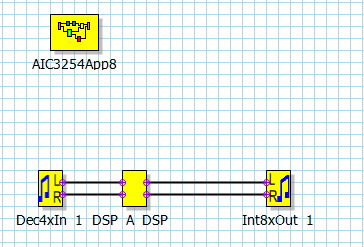
I have measured the delay between LINEIN and HPOUT as the PPS shows below. The delay between the input and out is about 0.96ms(fs=44100Hz), i.e. about 42/fs. The delay is obviously too large for my realtime active noise control(ANC) system. I guess maybe it results from the oversampling filter delay. I have read the Uses' Guide, and for decimation filter A, the ADC and DAC delay are 17/fs and 21/fs respectively, which may results in large delay between input and output. How can I disable the oversampling filter or how to decrease the delay between the input and output?
  • Hello, Zhen,

    The oversampling filter cannot be disabled on the AIC3254. However, the delay can be decreased changing the decimation and interpolation filter.

    • The decimation filter B is designed for sampling rates up to 96KHz and the filter delay is 11/fs.
    • The decimation filter C is designed for sampling rates of 192KHz and the filter delay is 11/fs.
    • The interpolation filter B is designed for a sampling rate of above 96KHz. The filter delay is 18/fs.
    • The interpolation filter C is designed for a sampling rate of 192KHz and the filter delay is 13/fs.

    I hope this helps you. Please let me know if you have more questions or comments.

    Best regards,
    Luis Fernando Rodríguez S.

  • Thank you for your reply.

    I use AIC3254EVM-U, does this EVM support for 192kHZ exactly? Can you tell me some specific detail about how to change the sampling rates to 192kHz and use it with PurePath Studio properly?

    Also, I have one more question. When I click "Download and Run" in PPS, the designed FIR filter to control my system will work, but when I "disconnect" it, the filter will stop. Everytime I use it, I have to open the PPS software and the corresponding GDE code, how can I fix this code in the AIC3254EVM-U, so that the EVM will automaticly execute with the designed filter when connect to USB (the code can also be erased)?

    Best regards.

  • Hi, Zhen,

    The AIC3254EVM-U only supports frequencies from 8kHz to 48kHz since an external clock cannot be connected. The AIC3254EVM-K supports external clock. So, it can be used for 192kHz.

    Regarding your question about the generated code, when the PPS code is generated (pressing "download and run"), there will be some files added in the main folder. Look for the base_main_ratexx file that will be generated. It includes all the code that programs the EVM with the PPS algorithm.

    Best regards,
    Luis Fernando Rodríguez S.
  • Thank you for your reply.

    (1) I have found DAC_copy component in GDE which may solve my delay problem, but I can't find ADC_copy. I have found the "ActiveNoiseCanceller" and "ADC_copy" which I want to use in the "ComponentLibrary" fold, but I can't find it in PPS GDE. I have tried to copy the "ADC_copy_TI_v1.zip" file to UserComponentLibrary fold, and when I open GDE, it shows "Loading component ADC_copy_TI_v1 from UserComponentLibrary", but I can still not find it. How can I use this component?

    (2) I have found base_main_ratexx fold and cfg file. What I exactly mean is to how to fix the code in EVM so that I need not to open PPS to run the code. Does this operation need other software?

    Best regards.

  • Hi, Zhen,

    (1) Unfortunately, there are few blocks that are not supported anymore by PPS. The Active Noise Canceller block is one of them and ADC_copy should be one of them too. These blocks were removed from the GDE and we are not giving support anymore.

    (2) The .cfg file has all the information about the register configuration of the codec. You should translate this code to an EVM script in order to use it without open PPS. Also, if you're interested in more information about the .c and .h files (used by an external processor), you may take a look at this wiki article: e2e.ti.com/.../2823.how-to-generate-a-header-h-file-with-pps. You may create an EVM script from this file too.

    Best regards,
    Luis Fernando Rodríguez S.