Part Number: TLV320AIC3254
Other Parts Discussed in Thread: LM49350, TLV320AIC3204, TLV320AIC3104
Tool/software: Code Composer Studio
Dear,
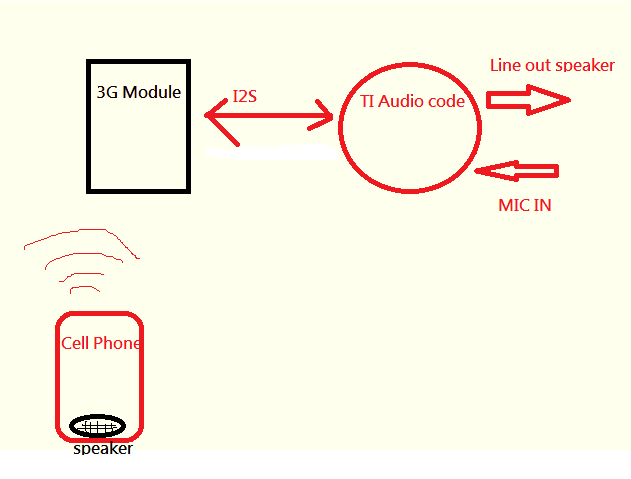
our client function block

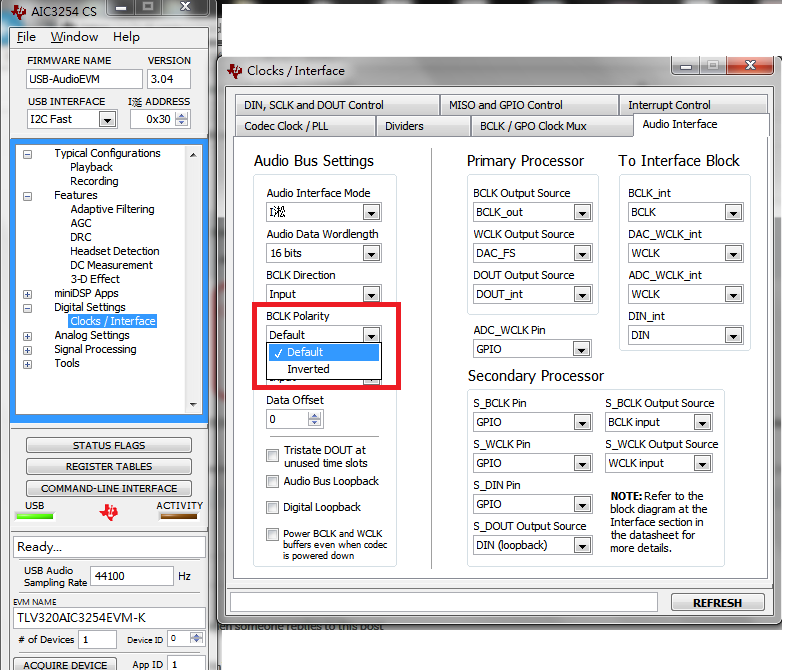
We find the TLV320AIC3254 application reference guide about offset and bit clock, is could possible playback and record to setting default and inverter at the same time?

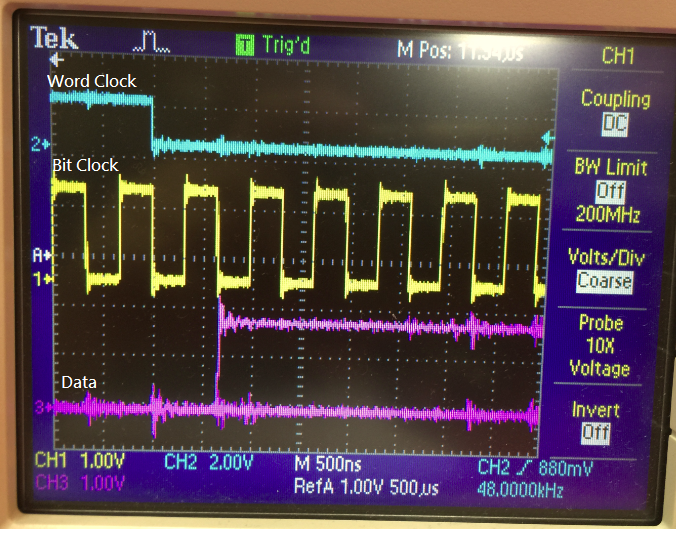
our client measurement 3G module I2S waveform as below chart: , it need our code device to setting inverter, but setting inverter, MIC to EVM go through Cell phone speaker will no sound.
Command line as below text,file.
###############################################
# Software Reset
###############################################
#
# Select Page 0
w 30 00 00
#
# Initialize the device through software reset
w 30 01 01
#
###############################################

###############################################
# Clock Settings
# ---------------------------------------------
# The codec receives:
# BLCK = 1.536MHz, WCLK = 48 kHz
###############################################
#
# Select Page 0
w 30 00 00
w 30 04 07
w 30 05 92
w 30 06 1C
w 30 07 00 00
w 30 0C 81
w 30 0B 8E
w 30 12 8E
w 30 13 81
w 30 1D 08
# INVERTER BCLK
###############################################


###############################################
# Signal Processing Settings
###############################################
#
# Select Page 0
w 30 00 00
#
# Set the ADC Mode to PRB_P1
w 30 3d 01
#
###############################################


###############################################
# Initialize Codec
###############################################
#
# Select Page 1
w 30 00 01
#
# Disable weak AVDD in presence of external
# AVDD supply
w 30 01 08
#
# Enable Master Analog Power Control
w 30 02 00
#
# Select ADC PTM_R4
w 30 3d 00
#
# Set the input powerup time to 3.1ms (for ADC)
w 30 47 32
#
# Set the REF charging time to 40ms
w 30 7b 01
#
###############################################


###############################################
# Recording Setup
###############################################
#
# Select Page 1
w 30 00 01
#
# Powerup MIC BIAS
w 30 33 40
#
# Route IN3L to LEFT_P with 10K input impedance
w 30 34 04
#
# Route IN3R to LEFT_M with 10K input impedance
w 30 36 04
#
# Route IN3L to LEFT_P with 10K input impedance
w 30 39 04
#
# Route IN3R to LEFT_M with 10K input impedance
w 30 37 04
# Unmute Left MICPGA 24DB
w 30 3b 30
#
# Unmute Right MICPGA 24DB
w 30 3c 30
#
# Select Page 0
w 30 00 00
#
# Power up LADC/RADC
w 30 51 c0
#
# Unmute LADC/RADC
w 30 52 00
#
###############################################

#
# High Performance Stereo Playback
# ---------------------------------------------


###############################################
# Signal Processing Settings
###############################################
#
# Select Page 0
w 30 00 00
#
# Set the DAC Mode to PRB_P8
w 30 3c 08
#
###############################################


###############################################
# Initialize Codec
###############################################
#
# Select Page 1
w 30 00 01
#
# Disable weak AVDD in presence of external
# AVDD supply
w 30 01 08
#
# Enable Master Analog Power Control
w 30 02 00
#
# Set the input powerup time to 3.1ms (for ADC)
# w 30 47 32
#
# Set the REF charging time to 40ms
w 30 7b 01
#
###############################################


###############################################
# Playback Setup
###############################################
#
# Select Page 1
w 30 00 01
#
# De-pop
w 30 14 25
#
# Route LDAC/RDAC to HPL/HPR
w 30 0c 08 08
#
# Route LDAC/RDAC to LOL/LOR
w 30 0e 08 08
#
# Power up HPL/HPR and LOL/LOR drivers
w 30 09 3C
#

#
# Unmute LOL/LOR driver, 6dB Gain
w 30 12 06 06
#
# Select Page 0
w 30 00 00
#
# DAC => 0dB
w 30 41 00 00
#
# Power up LDAC/RDAC
w 30 3f d6
#
# Unmute LDAC/RDAC
w 30 40 00
#
###############################################
If any suggestion, Please advise me.
Thanks,
Best regards,
Lawrence.