This thread has been locked.

If you have a related question, please click the "Ask a related question" button in the top right corner. The newly created question will be automatically linked to this question.

PCM2912A: Spec issue

Part Number: PCM2912A

Hi

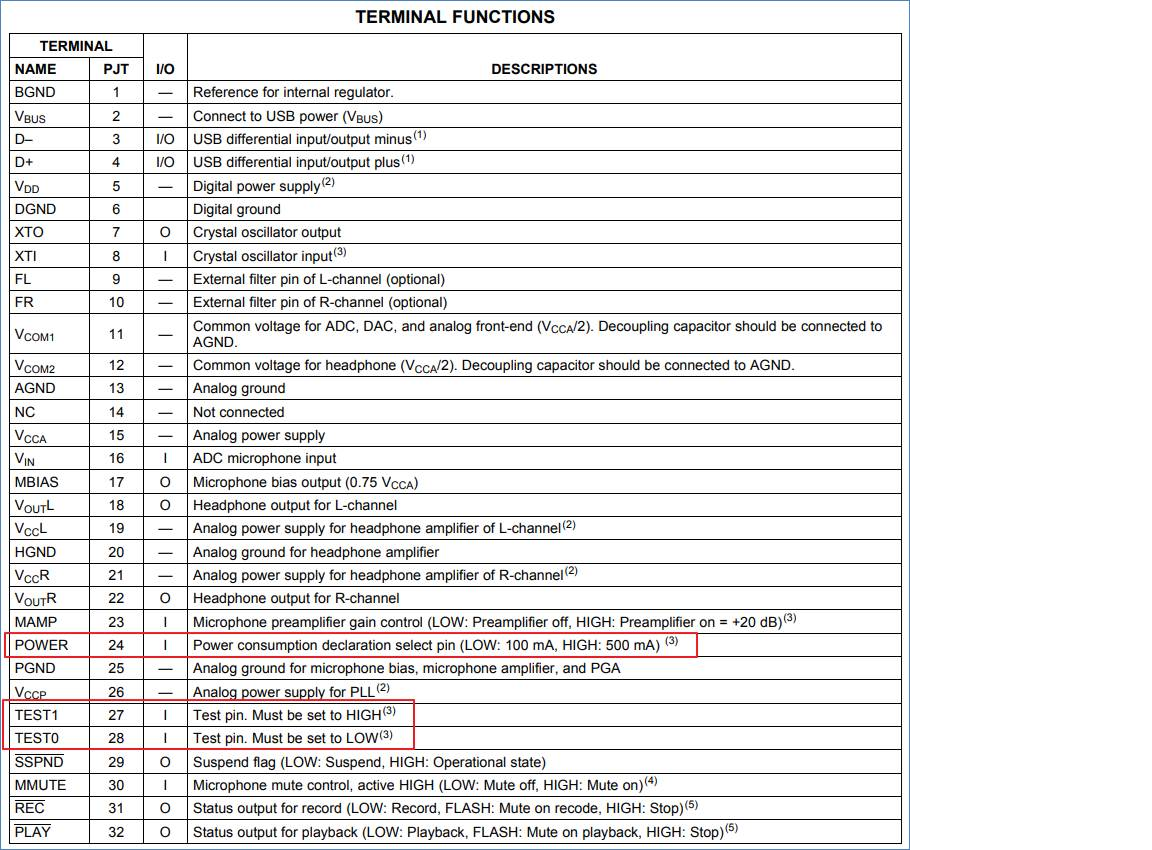
1. Set the power consumption of the POWER pin to 100mA or 500mA >>>  In what situation is it applied?


2. TEST 0, 1 >>>  Does the resistance test point need to be reserved?In what application situation is the measurement performed?
  • Hi Gareth,

    You set the power pin based on the maximum expected power consumption in your application. This largely depends on how you are using the headphone output and MBIAS of the device.

    You can consider the TEST pins to be reserved function pins. They should be set as shown in the pin table and will not typically be used in any application.

    Best,

    Zak

  • GARETH OU said:

    Part Number: PCM2912A

    Hi

    1. Set the power consumption of the POWER pin to 100mA or 500mA >>>  In what situation is it applied?

    The PCM2912A is a USB Device. At enumeration, a USB device tells the host (computer) how much current it draws from the bus in normal working operation. (Prior to enumeration, the device must not draw more than 100 mA from the bus.) This is so the computer can do proper power management.

    A computer's USB ports (called the "root hub") can provide, per the USB 2.0 spec, up to 500 mA to a downstream device. If that downstream device is a bus-powered hub, then that hub's ports cannot provide 500 mA to devices connected to it. If you try to connect two devices which each declare that they use 500 mA, then your computer will tell you that you plugged in devices which exceed the amount of current available and the device will be shut off.

    If, instead, you connect a self-powered hub (one which has its own power supply, say a wall wart) to your host port, then if you connect two 500 mA devices to that hub, they will enumerate because the ports on that hub [I]can[/I] provide the requested current.

    How does all of this matter for the PCM2912A?

    If, one one hand, your design is bus powered [I]and[/i] the entire design -- 2912A, other chips, all of it -- draws less than 100 mA, then you set the POWER pin to indicate that. What this means, then, is that your device will work fine on the bus-powered hub I describe above, which can provide only 100 mA to the downstream port.

    If, on the other hand, your design is bus powered [I]and[/I] it draws more than 100 mA, you must set the POWER pin to indicate that its draw is 500 mA. This means that your device will work only when connected to root hubs or self-powered hubs. And you can't fool the system by setting the pin to indicate 100 mA when the design draws more because you may damage your customer's computer. So don't do that.

    If, on the gripping hand, your device is self-powered -- meaning that you provide a wall-wart or other non-USB source of power -- then unfortunately the 2912 doesn't seem to have any way for the designer to select the "Self-Powered" bit in the USB configuration that tells the host of such. So in that case, you should probably set the POWER pin to indicate the lower 100 mA draw.

    By the way -- the USB 2.0 spec states that you are not allowed to draw more than 100 mA until the device gets a SET CONFIGURATION message from the host, indicating that it is OK to draw the device's full power. In this case, for a bus-powered high-current design, you should use a USB power switch to shut off power to the larger part of your design (not needed during enumeration) until the host gives you that OK. I've used the TPS2061D for this in the past.