Part Number: TLV320DAC3101
Hi sir,
Do you mean we need to set power up timing of VDD and rest by ourself?
What is the purpose for controlling the timing?
Thank you.
This thread has been locked.
If you have a related question, please click the "Ask a related question" button in the top right corner. The newly created question will be automatically linked to this question.
Part Number: TLV320DAC3101
Hi sir,
Do you mean we need to set power up timing of VDD and rest by ourself?
What is the purpose for controlling the timing?
Thank you.
Hello,
Yes, the timing of the power supplies needs to be controlled. If the power supply sequence is not done properly, there is chance that you could see some unexpected behavior from the part.
Best Regards,
Justin Beigel
Hi Ben,
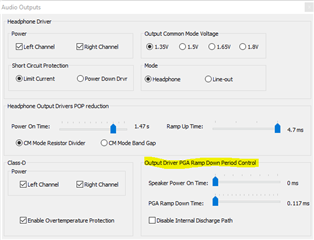
Register 0x22 from page 1 sets some power timings but only for the speaker driver portion of the device. This is not related to the supply rails:

Best regards,
-Ivan Salazar
Applications Engineer - Low Power Audio & Actuators
Hi Ben,
the recommended power sequence is;
1. Power up SPLVDD and SPRVDD
2. Power up IOVDD
3. Power up DVDD shortly after IOVDD
4. Power up AVDD and HPVDD
The data sheets only specifies that RESET should be held low while DVDD powers on. to be certain of no issues during initialization simply hold RESET low during the whole power sequence and then drive it high after the last supply is powered on.
(Section 6.3 of datasheet)
Regards,
Arthur Brown
Hi Arthur
Is there any problem if the power supply (SPVDD, AVDD, DVDD, IOVDD) to the TLV320DAC is always on?
Thanks
Ben
Hi Ben,
Do you mean all supplies are powered and only toggling reset pin? But how does the supplies initially power up?
Best regards,
-Ivan Salazar
Applications Engineer - Low Power Audio & Actuators
Hi Ivan,
I appreciate your feedback,
We want to know if we can keep the power supply (SPVDD, AVDD, DVDD, IOVDD) to the TLV320DAC is always on when our machine is turned on even if we don’t use audio related functions.
Ben
Hi Ben,
There should be no problem with this use case. You can use the device register configuration to set it into shutdown mode when not used, or use the reset and re-initialize when it is needed.
Best regards,
-Ivan Salazar
Applications Engineer - Low Power Audio & Actuators