This thread has been locked.

If you have a related question, please click the "Ask a related question" button in the top right corner. The newly created question will be automatically linked to this question.

TSW14J56EVM: external trigger behavior

Part Number: TSW14J56EVM
Other Parts Discussed in Thread: ADC12J4000

Hello,

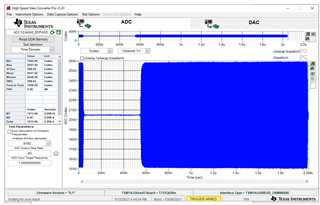
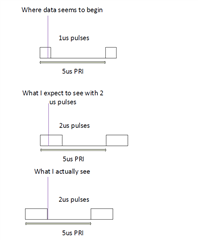
   I am using the TSW14j56EVM along with the ADC12j4000 EVM to capture RF pulses. I have a trigger that sends a 1.8V signal to the data capture EVM at the same exact time as the RF pulses, but the first pulse seems to be entirely missed no matter what pulse width I use. I've used 1us up to 10us with the same result. You can see from the HSDC snapshot below that the first pulse is barely showing, but as I increase the pulse width past 1us that first pulse completely disappears and the second pulse moves even close to time 0. I tried to illustrate this with the second diagram. The first is a representation of the HSDC pro capture. The second is what I expected to see, which was more of the first pulse, but instead I see the third part of the diagram which is that the first pulse is still completely missing and the second pulse has shifted to the left in time.

Could you clarify if the external trigger works off a rising or falling edge? If it is the rising edge, would there be so much delay between receiving the signal and reading the data that you would miss a 10us or longer pulse? I've verified the trigger and RF signals through an oscilloscope and they're rising edge is within nanoseconds of each other.
  • Kyle,

    Every time a trigger occurs, the TSW14J56EVM re-initializes the JESD204B link and there will be a delay before data is valid. Is this what you want to test? If you want valid data as soon as a trigger is received you would need to use a modified ini file that does not re-initialize the link when a trigger occurs. In this case you would capture data using the normal sequence to get the link running. Next, you would setup for the trigger mode, then select the modified ini file. The modified ini file will have one new line added that skips reconfiguration. See the attached document for more info regarding adding this command. If you still need help with the new ini file, let me know what ini file you are currently using and I can create this for you.

    Regards,

    Jim

    1488.TSW14J56revD ADC INI File Guide.doc  

  • Jim,

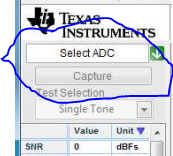
        Thanks for the response. Yes, I wanted valid data as soon as a trigger is received. We are trying to capture several pulses with the ADC and want to include the first pulse. I'm using the ADC12J4000_BYPASS.ini file. Could you please create the modified one for me? I am having a hard time attaching the file in the message. Is the button highlighted below in the software what changes the .ini file? I'm assuming it is.

         Would this also make the read DDR function any faster? It takes around 1.6 seconds in the automation software to capture a pulse and then rearm the trigger. We are sending a set of pulses every 60 milliseconds and wanted to save them off as they come through.

    Thanks,

    Kyle

  • Kyle,

    The ini file is attached. What is the sample size you are trying to capture? Can you lower this to see if the delay is reduced? Go to the "Capture Option" tab in the top left of the GUI then select "Capture Option". Change the capture size to 4096. Do the same with the Analysis Window samples on the main page as this number cannot be greater than the total captured samples. 

    I am checking with the software team regarding this.

    Regards,

    Jim

    https://e2e.ti.com/cfs-file/__key/communityserver-discussions-components-files/73/ADC12J4000_5F00_BYPASS_5F00_skip.ini

  • Jim,

    The .ini file did not seem to make a difference. I connected to the board as usual, took one data capture, and then selected the BYPASS_skip.ini you provided. The first pulse was still missed. Was that the correct order of operations for selecting the .ini file?

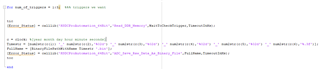
    I also reduced the sample size to 4096 and the time is still very long for reading the DDR memory. I pasted a snippet of the MATLAB code I used to try and take three different triggers. This is just an edited matlab example that is given with the HSDC Pro. It actually takes 2.5 seconds just to run the "read DDR memory" command, write the binary file, and try to arm the trigger again on a "read DDR memory" command. Is it expected to take this long? Is there any way to speed this up?

  • Kyle,

    Still waiting to hear from the software team. Can you send screen shots of the GUI showing how you are setting up for the trigger?

    Regards,

    Jim

  • Kyle,

    By default, the 14J56revD board captures the data at the falling edge of the trigger. To make it capture at the rising edge, we can add the following parameter to the INI.


    Trigger Input Polarity Selection = 1

    (Optional) Sets the Trigger input polarity (trigger edge) that has to be taken as trigger edge.

    1 – Rising Edge

    0 – Falling Edge //0 - default


    To capture the data without reconfiguring, we can use “Auto Re-arm Trigger” which will reduce the capture time. Auto re-arm trigger feature allows the user to capture multiple triggers without reading the data each time. Instead the captured data (of all the triggers) can be read after all the required triggers have been occurred. I have attached a reference document for “Auto Re-arm Trigger User Flow”. Refer to the same. I have also attached the modified INI to support Auto Re-arm Trigger. Place the INI at the following location and select the INI while trying to do a capture.


    C:\Program Files (x86)\Texas Instruments\High Speed Data Converter Pro\14J56revD Details\ADC files


    The attached INI also has the Trigger Input Polarity Selection parameter added and is set to 1, which means it captures at the rising edge.

    Regards,

    Jim

    https://e2e.ti.com/cfs-file/__key/communityserver-discussions-components-files/73/ADC12J4000_5F00_BYPASS_5F00_Auto-Re_2D00_arm.ini2262.HSDC Pro - ADC Auto Re-arm Trigger User Flow.pptx

  • Jim,

    Thanks for the help. The device is triggering off the rising edge and I can take much faster pulses.

    -Kyle