This thread has been locked.

If you have a related question, please click the "Ask a related question" button in the top right corner. The newly created question will be automatically linked to this question.

TSW1400EVM: HSDCPro Continuous Data Capture to data file.

Part Number: TSW1400EVM
Other Parts Discussed in Thread: AFE5818EVM, AFE5818

Hello.

I am using the HSDCPro software to interface with the TSW1400EVM which is connected to the AFE5818EVM module through the LVDS connector.

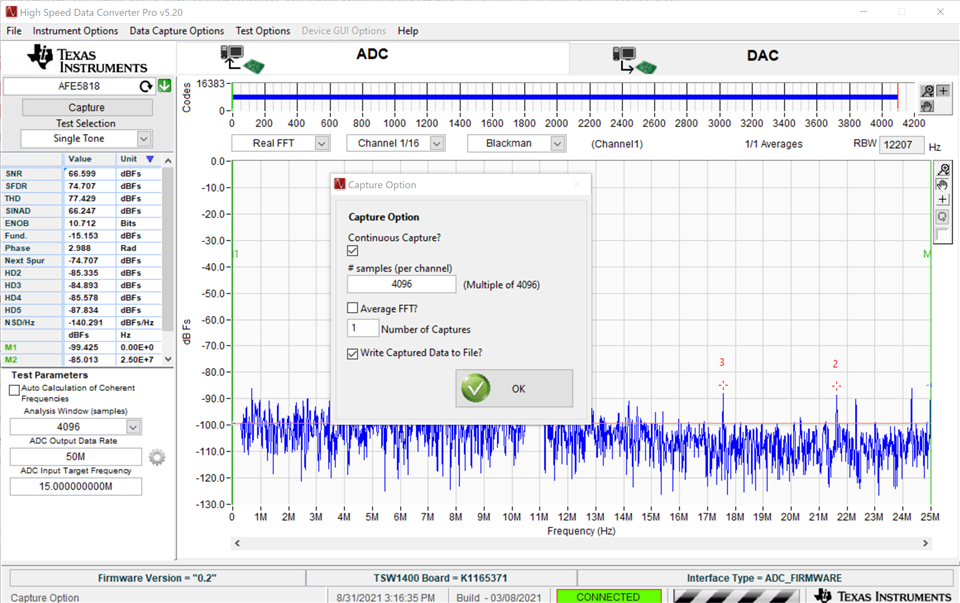
I am injecting a frequency swept sine wave into the AFE5818EVM module and am using the "Continuously Capture" option in the HSDCPro software to capture the swept sine wave. I am doing this on the "Single Tone" setting to capture the peaks of the swept sine wave over a range of frequency . This is to verify filter responses (high pass / low pass) in the signal chain (including the high pass and low passes created inside the AFE5818). The goal is to have a somewhat magnitude plot of the frequency response.

There is an option to "Write Captured Data to File" in the "Data Capture Options" tab in the GUI. I am wondering where this data file gets created and stored on my PC and what data it is storing? Will I be able to get my "Single Tone" data that I capture every time a continuous capture sample is taken? Or does it just log the latest capture and then get overwritten?

The only place I can see a file get created is under C:\Users\Public\Documents\Texas Instruments\High Speed Data Converter Pro\ where there is a "FFT Data.bin" file that gets created.

Any help with this would be greatly appreciated.

Thank you!
  • Hello Russell,

    There is also an other way of storing raw data into an external files. Please see below,

    In HSDC Pro Software, you can go to File -> Save Integer (I32) Codes as CSV File option. This will save all channel raw data into a CSV file into a desired location and you can use it for further processing.

    Regards,

    Kalyan

  • Hi Kalyan,

    Ah yes of course. The problem I have with this is that, the continuous captures are happening faster than it would take me to click File -> Save Integer (I32) Codes as CSV File and then specify a file name and all of that. I was hoping that after each continuous sample HSDC pro was logging the raw data to a file and that each capture was not overwriting the last capture. so, If I did 30 to 40 captures continuously, I would have all the data of the 30 to 40 captures in a file.

  • Hello Ti,

    Still wondering if there is anymore information about my issue. Once again, the continuous capture happens automatically over and over again and the option stats "Write Captured Data to a File?" the data that is being written to the file, is it for all automatically triggered captures, or will it just overwrite the previous capture? Also, where does the data get written too? The program never tells the user where the data is being written too.

    Any help greatly appreciated again.

    Thanks,

    Russell Homes

  • Hi Russell,

    Whenever data capture happens, the data will be written to files in below location-

    'C:\Users\Public\Documents\Texas Instruments\High Speed Data Converter Pro\HSDCPro Data'. You can find all channel data in ADCTemp0.bin to ADCTemp15.bin files present in this location.

    Regarding continuous capture, though triggers are automatically created, the new capture will overwrite the files created in the previous capture. So at any time you'll only have latest captured data.

    Since you mentioned your aim is to verify the filter response, I'm thinking of below idea-

    TSW1400 supports 32M sample depth. If you use 50M sampling, this would translate to 0.6s of continuous time data. If you could manage the sweep from minFin to maxFin for your input signal within 0.6s, then you can capture total freq swept wave with a single capture. Later you can export the data to excel or csv for further processing.

    Please let me know if the above idea sounds good.

    Regards,

    Kalyan

  • Hi Kalyan,

    Thank you for the suggestion. I am trying to do this, However I am not sure I am able to get it to work. When I take a sample. I am typically just getting a single fundamental frequency at a random frequency that changes every time I click the capture button. When I zoom in to the "time domain" data plot and scroll across to see if the frequency of the time domain signal changes, and it doesn't seem to do so. I have my function generator producing a swept sine wave in under 0.6s. But it seems that I can't manage to capture it.

    Thanks,

    Russell

  • Hi Russell,

    Can you please share a screen shot of your captured window ?