This thread has been locked.

If you have a related question, please click the "Ask a related question" button in the top right corner. The newly created question will be automatically linked to this question.

ADS7128: How to send Conversion Start frame & Conversion read frame

Part Number: ADS7128

I'm using an Arduino to test this ADS7128 with the I2C protocol. I am able to Read register, Write register, Set bit and Clear bit. 

In the datasheet there are a view modes discribed. Manual, Auto sequence and Autonomous Mode.

I want to use Manual or Auto sequence mode. Both modes require a "Conversion start frame and a Conversion read frame).
I am unable to understand how to send these frames.

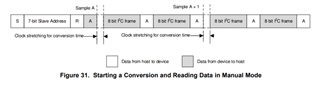
  • Hello,

    This devices, as you noted have three sampling modes. 

    When using manual mode, the next channel to be sampled needs to be selected by the writing to the MANUAL_CHID. Once that is done send two full frames to the device. These can be empty frames, ( no SDI data, no commands) and the data will get pushed out. Once you have this working you can then try to write to a new register during these frames. If these frames perform a register read, then this command will take priority will be outputted before the ADC measurement data.

    For auto sequence mode, once the desired channels are selected for the sequence, and the sequence start register is set, then the same as needs to be done as in manual mode. Send empty frames for the data to be pushed out. 

    Regards

    Cynthia