This thread has been locked.

If you have a related question, please click the "Ask a related question" button in the top right corner. The newly created question will be automatically linked to this question.

ADS1299EEGFE-PDK: SPI MISO Errors?

Part Number: ADS1299EEGFE-PDK
Other Parts Discussed in Thread: ADS1299

Hello,

We've been working with the ADS1299 demo board being controlled by a RaspberryPi 4. Essentially, the job of the RaspberryPi 4 is to setup the ADS1299 board and then to enable RDATAC and continuously read in the data from it using SPI. This data is then plotted and displayed using PyQtGraph like so.

The display looks good, except for that it very often gets these "spikes". The data being displayed is only using the internal Test Signal and should just depict a square wave.

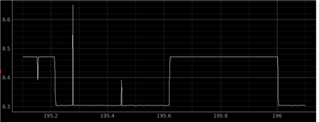
When we connect the demo board to the computer with the official software, the data is able to come through perfectly clear, but when connected to the Raspberry Pi it has a lot of incorrect data on the line. The ADS demo board usually is powered from the Raspberry Pi using the 5V, 3.3V and Gnd connections, but even when the board was powered through a power supply and the mmb0 board, and communicating with the raspberry pi the spikes issue persisted. 

Currently, I have all of the channels except for the first channel disabled, but through the oscilloscope we actually see data in channels 6, 7, and 8.

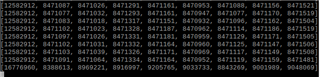
The corresponding data that the Raspberry Pi read in is below

The Raspberry Pi is reading exactly what it should be from the SPI, however the MISO line seems to have interference often which looks to cause these spikes

Zoomed in views of channels on oscilloscope:

Status Register

1100 0000 0000 0000 0000 0000 <-> 12,582,912

Channel 1

1111 1110 1011 0100 1011 1000 <-> 16,692,408

Channel 6

0000 0000 0000 1110 0000 0000 <-> 3,584

Channel 7

0000 0000 0000 0111 1111 0101 <-> 2,037

Channel 8

1010 0101 1110 0000 0000 0000 <-> 10,870,784

Register Values

        # --- Write to the Registers --- #
        # Global Settings Across Channels
        self.Reg_Write(REG_CONFIG1, 0xD6) # Was D4
        self.Reg_Write(REG_CONFIG2, 0xD0)
        self.Reg_Write(REG_CONFIG3, 0xE0)
        self.Reg_Write(REG_LOFF, 0x00)
        # Channel-Specific Settings
        self.Reg_Write(REG_CH1SET, 0x65)  # Test Signal
        self.Reg_Write(REG_CH2SET, 0xF1)  # Normal Electrode Input
        self.Reg_Write(REG_CH3SET, 0xF1)  # Input Shorted
        self.Reg_Write(REG_CH4SET, 0xF1)  # Power Supply Measurement
        self.Reg_Write(REG_CH5SET, 0xF1)
        self.Reg_Write(REG_CH6SET, 0xF1)
        self.Reg_Write(REG_CH7SET, 0xF1)
        self.Reg_Write(REG_CH8SET, 0xF1) #50
        self.Reg_Write(REG_BIAS_SENSP, 0x00)
        self.Reg_Write(REG_BIAS_SENSN, 0x00)
        self.Reg_Write(REG_LOFF_SENSP, 0x00)
        self.Reg_Write(REG_LOFF_SENSN, 0x00)
        self.Reg_Write(REG_LOFF_FLIP, 0x00)
        # GPIO and OTHER Registers
        self.Reg_Write(REG_GPIO, 0x0F) # Set this up 0Fh
        self.Reg_Write(REG_MISC1, 0x00)
        self.Reg_Write(REG_MISC2, 0x00)
        self.Reg_Write(REG_CONFIG4, 0x00) # Set this up 00h

Any help would be greatly appreciated, if any more information is needed/wanted just let me know!


  • Hi Branden,

    Welcome to the E2E forum !!!

    Sorry for the delay in the response.

    I do not see any issue with the device register setting. Is the RaspPi retrieving the SPI data based on the DRDYB signal? Are you getting the correct preamble for the 24 status bit (0b1100) for the spike data? It is also critical to have a proper signal and ground connection from your RaspPi to the ADS1299 EVM.

     Thanks

    -TC

  • Thank you!

    The RasPi retrieves data based on the DRDYB signal through the RPi.GPIO detector

    GPIO.add_event_detect(DRDY_PIN, GPIO.FALLING, callback=self.getData)

    This is the getData() function. It gets the 9 3-byte values from Read_Data() and appends them to different lists.

    def getData(self, pin):
            if not base.running:
                return
            curr_list = self.ads_device.Read_Data()
            #print(curr_list)
            base.sample += 1
            base.x.append(base.sample)
            base.ch1list.append(curr_list[1])
            base.ch2list.append(curr_list[2])
            base.ch3list.append(curr_list[3])
            base.ch4list.append(curr_list[4])

    For the status bit, most of the time it is correct but occasionally it'll be thrown off too. In the previous example, it is correct, but in the line directly below it, it is shown as 0.

    For signal connection, the demo board is being powered directly by the pi using a 5V, 3.3V and two GND connections

  • Hi Branden,

    Thanks for the information. 

    Since you do not see any issue using the ADS1299 EVM with the MMB0, the RaspPi data capture timing is the most likely cause. I suggest looking at the data capture timing on the oscilloscope using the DRDYB signal as the trigger source. Set the oscilloscope to persistence mode and observe the RaspPi SPI signals to the device. You should always see the correct preamble for the 24 status bit (0b1100) whenever you retrieve the data. For testing and debugging purposes, you can enable all eight channels.

    Thanks

    -TC

  • Okay. After using the DRDY as the trigger and looking at the data for a while, I've managed to get another trigger ran during an error. I have the code on the pi set to stop when the 24 status bit is wrong, and I re-enabled all of the 8 channels set to look at the internal test signal.

    The Read_Data() function from our ADS module converts the 27 bytes into the 9 3-byte channels and then converts it using this function

    def Read_Data(self):
    
            GPIO.output(CS_PIN, False)
    
            lst = self.spi.readbytes(27)
            
            GPIO.output(CS_PIN, True)
    
            recv_data = [0, 0, 0, 0, 0, 0, 0, 0, 0]
            for i in range(9):
                recv_data[i] = 0
                for j in range(3):
                    recv_data[i] += (lst[i * 3 + j] << ((2 - j) * 8))
                if i != 0:
                    if (recv_data[i] < 0x00800000):
                        recv_data[i] = recv_data[i] + 0x00800000
                    else:
                        recv_data[i] = recv_data[i] - 0x00800000
    
            # print(recv_data)
    
            return recv_data

    Later, for validation purposes, the true values read from the spi will then add or subtract 0x800000

    This is the first bug I noticed. It seems that the spi read 27 bytes without the DRDY pin going low previously. I'm not completely sure what the cause of this could be, but I only saw this once.

    This is the bug that I think is more likely the issue.

    The terminal output showing the typical values ending with the final value being the incorrect values

    This communication shows the 24 bit status as 0xFFFF00 when it should always be 0xC00000. 

    I used the cursor to define where the 24 bits are so that it's easier to follow along. It looks like the values are all shifted to the right by 14 bits. 

    0xFFFF00 << 14 = 0xC00000

    So I took this and tested it on channels 1 and 2 to see if their values were also shifted like this.

                             *** Channel 1 Read ***                                                             *** Channel 1 True ***

    Looking at *** Channel 1 Read ***, the measured value is 0x000005 + 0x800000 = 8,388,613 as seen in the terminal for Channel 1.

    However, the true value for it is seen in *** Channel 1 True ***, 0x14237 + 0x800000 = 8,471,095 which if you look one line above in the terminal view, it is very close to the value it should be. (Previous value for Ch1 was 8,471,091)

    This is also true for channel 2.

                           *** Channel 2 Read ***                                                                *** Channel 2 True ***

    *** Channel 2 Read ***, 0x8DC05 + 0x800000 = 8,969,221 as seen in the terminal for Channel 2.

    *** Channel 2 True ***, 0x14204 + 0x800000 = 8,471,044 (Previous value for Ch2 was 8,471,064)

    I'm not completely sure how/where this issue is coming from, because now it appears to be more from the ADS1299 chip? Any help / next steps will be greatly appreciated!

  • Hi Branden,


    This is the first bug I noticed. It seems that the spi read 27 bytes without the DRDY pin going low previously. I'm not completely sure what the cause of this could be, but I only saw this once.

    It will be helpful to figure out why the RaspPi is executing the data read without the DRDYB going low. If this is the case, the data will be corrupted as the device will populate the current conversion data to the shift register.

    Please label the digital waveform so it is easier for us to read the waveform.

    Thanks

    -TC

  • So it seems that the RPi.GPIO module doesn't check the interrupt pin when it is triggered, so I think just by adding that check when the interrupt is triggered solved that issue, but the spikes are still persisting on the display. I've also added a check for the status to ensure that the first byte is C0 like it should be in the documentation. I thought that putting the display onto another core of the RPi while having the main process running the SPI bus and communicating data through shared_memory would solve the problem but the spikes are still persisting and I'm very unsure of what to do next to solve this issue. I went back and labeled all the waveforms like you had asked, and will continue to do so for any future pictures

  • Hi Branden,

    Thanks for the update. I do not have experience interfacing the RaspPi to the ADS1299, so the help to identify the actual data capture issue will be limited. My suggestion is to reach out to the RaspPi community to find a more efficient way to implement the data capture.

    Thanks

    -TC