This thread has been locked.

If you have a related question, please click the "Ask a related question" button in the top right corner. The newly created question will be automatically linked to this question.

High Speed Data Converter Pro import .bin file

Hi @ all

I'm a bit confused using the file import in the High Speed Data Converter Pro Software.

For test purpose, the ADC is not connected and  I would like to use the function "Import binary file". 

Could you tell me in which order and format the tool is expecting the samples ?

Currently I'm receiving a bin file including all samples in correct order .. S0 S1 S2 S3 , due to the ADC configuration one sample consists of 12bit and 2's complement.

how do I need to fresh up the samples in order to use the High Speed Data Converter Pro tool properly? 

best 

Patrick

  • Hi Patrick,

    Simply open HSDC Pro, go to file, then import binary file. A dialogue box will open and ask you to specify the number of ADC channels, ADC resolution (no. of bits) and output data format.

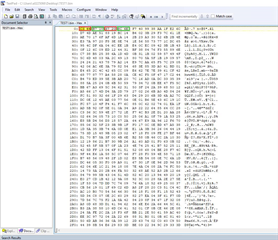
    Below is an example of how the data is saved, C3 44 is the first I sample where C3 is lower 8 bits of data(LSB) of I sample and 44 is upper 8 bit of first(MSB) I sample. Similarly B7 10 is first Q sample and B7 is LSB  of fist Q sample and 10 is MSB of first Q sample then 37 20, is second sample of I data and again 37 is LSB and 10 is MSB next 8C 6E, is second Q sample and  8C is LSB of second Q sample and 6E is MSB of second Q sample and so on….. 

  • Hi Rob

    thank you for your fast response, I will give it a try Slight smile