This thread has been locked.

If you have a related question, please click the "Ask a related question" button in the top right corner. The newly created question will be automatically linked to this question.

DAC12DL3200EVM: program chirp parameters

Part Number: DAC12DL3200EVM
Other Parts Discussed in Thread: TSW14DL3200EVM

Hi Team, 

My customer is evaluating the DAC12DL3200EVM. Everything is working fine and they are able to generate the frequency they want, but not the chirp. Can you explain how we can achieve this or point me in the right direction or right document? Does the GUI allow us to program chirp parameters? If yes, how?

Thank you, 
Delaney

  • Delaney,

    The GUI does not provide an option to generate a chirp file. This is normally done by the user with Matlab. The Matlab file then can be imported in to HSDC Pro using the "Load External Pattern File" button located near the top left of the GUI. This must be a .csv file with at least 8192 samples. 

    I have attached an example file that ramps up in frequency from 500MHz to 1GHz using 1024 samples and 0MHz for the remaining 8192 samples.

    Regards,

    Jim

    linchirp_6p4GSPS_500to1000MHz_16bits_8192pts.csv

  • Thanks Jim! Really appreciate the help!

    Best, 
    Delaney

  • Hey Jim, 

    Couple follow up questions:

    Do you have a MATLAB script to easily generate a chirp file at the desired frequency? 

    Customer is trying to use the third nyquist and the fourth nyquist zones to generate 7.4 GHz and 11.8 GHz respectively.

    They followed the steps mentioned in the EVM user guide(in the Dual-Channel 2xRF Mode 0 DAC Setup section), but for some reason it is not working. 

    They are using the on-board clocking solution. So, loaded LMK_100M_LMX_6400M_Mode0_2xRF_Dual_DAC.cfg as a configuration file. 

    Also tried this using external clocking, but couldn't see anything in the third and fourth nyquist zones - even though the steps seem to have been done correctly. All the clocks work properly and are locked.

    On the other hand, in the DDS mode, customer can observe the signals @ 7.4GHz and @11.8 GHz when the data rate is 6.4 GSPS and dacA_NCO0 is 1 GHz. 

    Any ideas on what the problem could be? 

    One more question: is it possible to generate 1GHz when the data rate is 1.6 GSPS? If so, how?

    Thanks so much, 
    Delaney

  • Delaney,

    There is a typo in the User's Guide. In section 4.4, the data rate should be set to 3.2GHz in HSDC Pro when using dual-channel 2xRF Mode 0 with the DAC sample rate at 6.4GHz. The output should look as shown in the attached document with a 1GHz tone coming from the TSW14DL3200EVM. Make sure to follow the steps in section 3.11 before clicking on the "Send" button in HSDC Pro GUI.

    The RF transformer on the EVM is limited to 8GHz. The output power will start to roll off as you exceed this frequency. 

    In section 4.3, there is another typo. The max frequency that can be used by the multitone generator with a 1.6Gsps data rate is 800MHz. The User's Guide mentions to create a tone at 1GHz which is out of this range. The max tone rate would be 800MHz.

    I am looking into getting a Matlab script for you.

    Regards,

    Jim

    https://e2e.ti.com/cfs-file/__key/communityserver-discussions-components-files/73/2xRF_5F00_Mode-0.WMF  

  • Thanks for the quick response Jim! 

    Best, 

    Delaney

  • Hi Jim, 

    Hope all is well, were you able to find a Matlab script?

    I also have another question: 

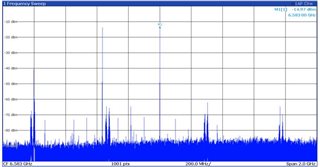
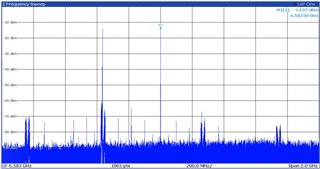
    In order to generate a frequency that is 6.5, 6.6, 6.7 or similar frequencies, have to decrease the value entered in the tone center block in HSDC GUI from 1GHz to relevant tone center(like 900M, 700M, 600Mz in order to have 7GHz, 6.8 GHz or similar frequencies). When decrease the frequency in the tone center block to lower than 1GHz, getting certain frequencies which are constantly shifting in the whole span. Attached are pictures for reference. 

    Could you please provide feedback on what could be the root cause?

    Thank you,
    Delaney

  • Delaney,

    Here is the code. What sample rate is your DAC running at? 

    Regards,

    Jim

    Fs = 6400; %MSPS

    res = 16; %resolution in bits

    chirp_length = 2^10; %length of chirp in samples

    fstart = 500; % MHz

    fstep = 500/chirp_length; %freq step in MHz/sample

    phasevalue = zeros(1,chirp_length);

    for pindex = 2:chirp_length

        phasevalue(pindex) = phasevalue(pindex-1)+2*pi*(fstart+pindex*fstep)/Fs;

    end

    chirp =real(round(0.95*cos(phasevalue)*2^(res-1)));

  • Hi Jim, 

    Thank you for the matlab script! 

    The data rate has been set 3.2 GHz in HSDC pro when it is in 2xRF mode with the sample rate at 6.4GHz. Please let me know if you need other information to help provide feedback on the previous question. 

    Thank you, 
    Delaney

  • Delaney,

    What you are seeing is images of the tone. If you need a tone at 6.5GHz, you will get an image at 6.3GHz. If you need a tone at 6.6GHz, you will see an image at 6.2GHz. This is based on the sample rate and mode you have selected. See attached plots. Not sure why you are seeing so much noise in your plots.

    Regards,

    Jim

    DAC12DL3200EVM On_board_LMX_6.4G_2xRF Mode 0.pptx