This thread has been locked.

If you have a related question, please click the "Ask a related question" button in the top right corner. The newly created question will be automatically linked to this question.

ADS131M08: PHI Controller not being detected

Part Number: ADS131M08

Hi team,

My customer is having issues with the PHI, see attached pic-

He plugs in the EVM and when he goes to run it this issue comes up. He can't disable his antivirus/firewall to install, are there any suggestions for workarounds? It appears to be being recognized by the computer, but it throws errors when he starts to run it.
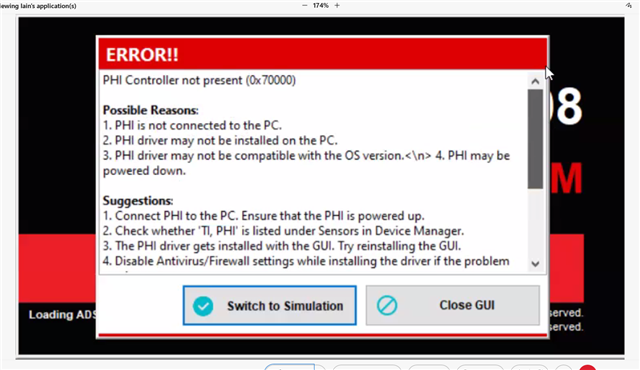
Any suggestions for workarounds?

  • Hi Lauren,

    Could you please check with the customer for the following questions?

    1. Downloaded the ADS131M08EVM GUI Installer (SBAC258A.ZIP)?
    2. Installed it as administrator?
    3. Did the installation wizard install any NI driver/software?
    4. Is their OS WIN10?
    5. Can the customer see it in Device Manager on his PC? it's shown as 'TI,PHI(Bulk Only)' under 'Sensors' on my laptop.
    6. What's the status of the LEDs(D1,D2 and D5) on the PHI controller card? Please refer to the Figure 10 in the M08EVM user guide.

    Thanks

    Regards,

    Dale

    1. Downloaded the ADS131M08EVM GUI Installer (SBAC258A.ZIP)? Yes
    2. Installed it as administrator? Yes
    3. Did the installation wizard install any NI driver/software? Yes
    4. Is their OS WIN10? Yes
    5. Can the customer see it in Device Manager on his PC? it's shown as 'TI,PHI(Bulk Only)' under 'Sensors' on my laptop. No
    6. What's the status of the LEDs(D1,D2 and D5) on the PHI controller card? Please refer to the Figure 10 in the M08EVM user guide. It looks like Figure 10

    He believes it was stopped by the firewall. Is this a common problem with this gui?

  • Hi Lauren,

    The firewall should not be the problem here because all necessary files needed for successful installation are included in the download.

    Please refer to the screenshot which shows the PHI driver folder after the GUI is installed, and then try the following steps:

    1. Manually install this driver using the ‘driverInstall.exe’ file. 
    2. Manually install the .inf and .cat files using the windows device manager driver installer. 

    Also, please disconnect the PHI and reconnect it to try and look for any “unknown” devices in Windows device manager (only when the PHI is connected). Refer to this [FAQ] How do I resolve PAMB EVM connectivity and/or driver installation issues - Data converters forum - Data converters - TI E2E support forums for step-by-step instructions on how to manually install the PAMB driver, except for the PHI driver the INF file path in step 8 should be “C:\Program Files (x86)\Texas Instruments\ADS131M08 EVM\PHI Driver\TI_USB_PHI.inf” instead of the paths shown in that FAQ.

    Lastly, please try another PC to see what will happen. 

    Best regards,

    Dale