This thread has been locked.

If you have a related question, please click the "Ask a related question" button in the top right corner. The newly created question will be automatically linked to this question.

RE: DAC63204EVM: DAC63204EVM Interface Initialization Error

Other Parts Discussed in Thread: DAC82002EVM

Same part, just received evaluation board, downloaded 63204 software, no install errors and several reboots later.  Same error.  I can  not actually talk to the part, just the simulator.  

  • Hi Garrett, 

    Are you getting the same error message as this: 

    Or a different one?

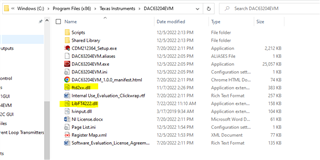
    Do you see the highlighted .dll files in your installation directory?

    The manufacturer does test them to verify communication before we stock them so I am leaning to it being a GUI installation issue, but I'll order an EVM from the current stock to make sure they are working as they should since you are reporting the same issue as the previous post. 

    Best,

    Katlynne Jones

  • Yes, same message, the dll are in the correct place.  -I have two eval boards DAC63204EVM and DAC82002EVM.  I tried clean installs and reboots and get the same error.  I also have a picoscope on the machine that uses NI interface.  It works before, during and after TI gui installs.  I am using the most current production distro of Windows 11.    

    Device name Plasma
    Processor Intel(R) Core(TM) i7-8550U CPU @ 1.80GHz 1.99 GHz
    Installed RAM 16.0 GB (15.8 GB usable)
    Device ID xxx
    Product ID 00325-96330-83546-AAOEM
    System type 64-bit operating system, x64-based processor

    Edition Windows 11 Home
    Version 22H2
    Installed on ‎2/‎20/‎2023
    OS build 22621.1778
    Experience Windows Feature Experience Pack 1000.22642.1000.0

    The popup window is particularly uninformative.

    I uninstalled are reinstalled the drive.

    windows reliably plays the usb device inserted happy sound and the device shows up on the USB monitor - actually three times as an A and B channel and as a composite device.  windows reliably plays the sad sound when the evm is removed.  

  • On a completely different windows 11 machine and install - I am getting the message below.  This started to appear after I got the previously described error on this new machine, then tried to uninstall and reinstall both the TI and NI code plus the FDTI driver.  

  • Hi Garrett,

    Can I email you at the email you used for you ti.com account?

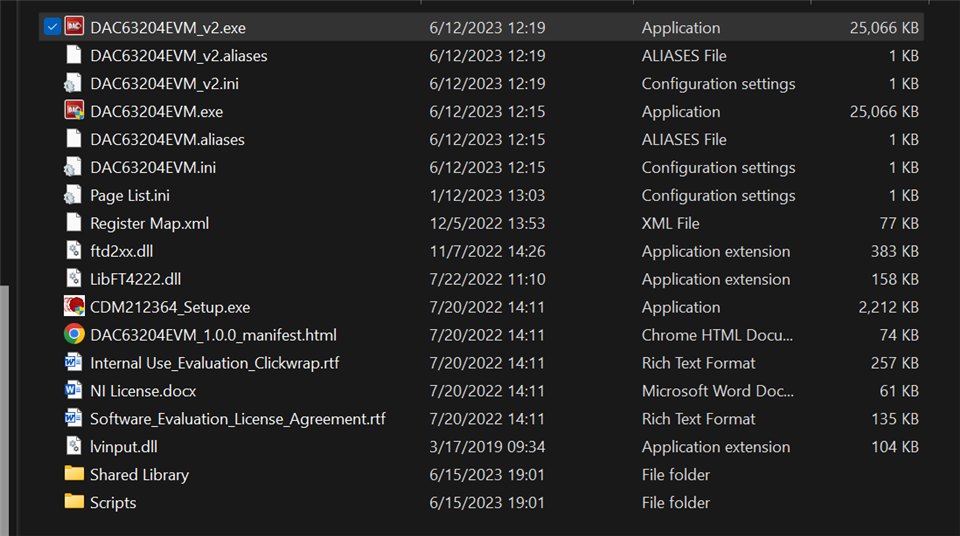
    I want to send you a version of the GUI that will (hopefully) give us more details on where the GUI is getting stuck. 

    Best,

    Katlynne Jones 

  • Here is the expanded error from your v2;

    The SDO enable issue was a short on a unrelated board.  That's been fixed.  

    jumpers set up as per the diagram at the beginning for I2C:  

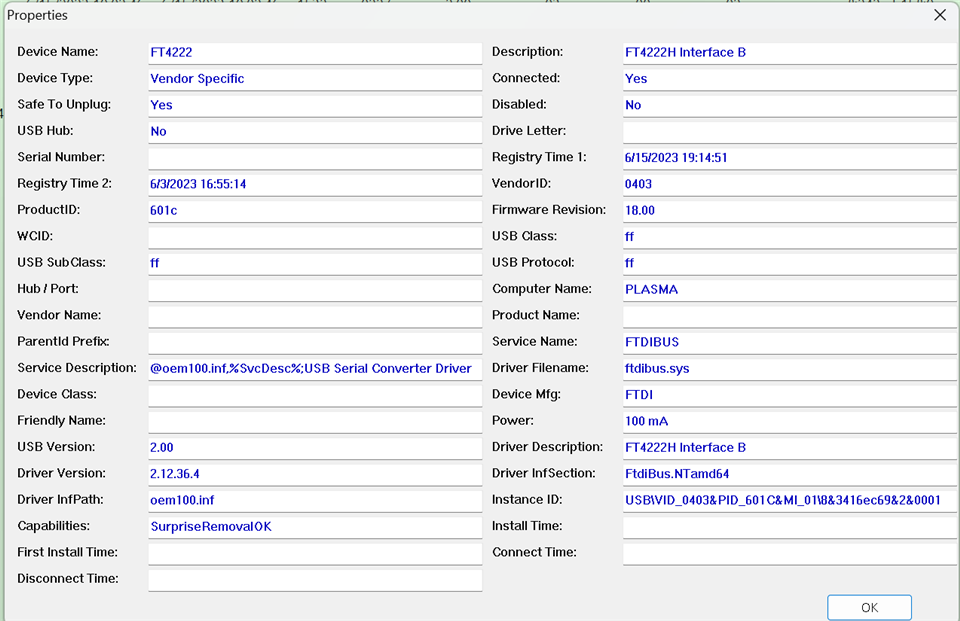
    USB Info

  • Hi Garrett, 

    Good to hear that the SDO issue was resolved. I'll close the other thread about that. 

    Based on the error, none of the initializations are happening because the GUI cannot find the FT4222 controller. Can you click continue on the error and see if anything else comes up? I expect you'll get the same error one more time and then the "interface not initialized" one that lets you go to demp mode. 

    It looks like you have the drivers installed, so I don't think there is any issue there. One thing you could try is to use the C examples provided by FTDI:

    https://ftdichip.com/wp-content/uploads/2022/06/LibFT4222-v1.4.5.zip  

    https://ftdichip.com/products/ft4222h/

    If you're able to at least get the example to return that it can read the device description then we'll know that the issue is a LabVIEW problem and not a device/driver problem. 

    Best,

    Katlynne Jones