This thread has been locked.

If you have a related question, please click the "Ask a related question" button in the top right corner. The newly created question will be automatically linked to this question.

DAC8820EVM: Unable to operate. Bad capacitor U1?

Part Number: DAC8820EVM
Other Parts Discussed in Thread: REF102, INA105, DAC8820

Tool/software:

I am not able to get this board working as expected. I suspect the board is malfunctioning

Datasheet /user guide here:

www.ti.com/.../slau190a.pdf

  • +VA =15V,
  • -VA= -15V
  • also supplied are +5V, and +3.3V. 
  • I am using the onboard reference
  • I am not using the reference inverter (jump W1 moved to +Ref position)
  • The Test point RefTest says ~+8.6V (not +10V)
  • Something on the board near the reference is heating up the board
    • i do not think it is ther reference itself as it doesn't feel as hot as the board near it if i touch it (after turning off)
  • The output reads ~ -8.6 V (Which would be consistent with 0-code DAC if the reference was ~8.6 V as measured)

I think maybe capacitor C1 is failing or broken. The user guide says capacitor C1 (C1608X5R1A105K) is only rated to 10V. However, this seems crazy since you obviously REF102 requires Vin between 11V and15V.

  • Hi Adam, 

    I checked the BOM that was sent to the EVM manufacturer, and you are right, C1 is listed as a 10V part even there. However, we have not had this issue reported before. 

    C1 failing should not be causing the REF output to not be 10V. The reference can operate without a bypass capacitor. Can you confirm that the VA supply is actually reading out at 15V and not hitting some current limit on your power supply? 

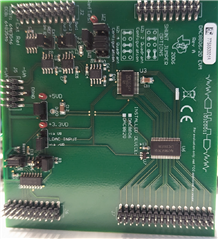
    U2 is also near the reference. Could this be the part that is heating up? Can you share a picture of how the VEM is configured so I can verify all of the other jumper settings? Please also label where on the EVM you are connecting the supplies & ground so I can double check the placement of those as well. 

    Best,

    Katlynne Jones

  • I confirm the VA+ is 15.0 V and VA- is -15.1V. It is not dropping out

    I did conduct an additional test just now which might indicate the problem.

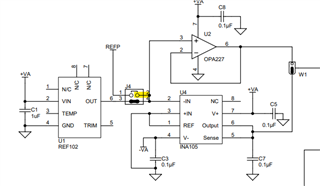
    I removed the jumper J4 and looked directly at the output of REF102 at J4_p3. It is +10V then. So Ref102 is operational. (at least at 0 current draw)

    Next, with W1 removed I can look at the outputs of U4 and U2 separately at W1_p1, W1_p3.

    U4 output is -10V.

    U2 output is ~9.3V (note this is without the DAC attached,w hich explain the 9.3 V vs 8.8 or so with the DAC attached when the jumper is restored) . So, I suspect U2 is malfunctioning (or something between Ref102 and U2 is causing enough of a curent draw for the ref to drop out)

    Data summary

    Photo of wide jumpers attached. Voltage are being supplied via wired on the back side. Let me know if you need this, (it is a bit messy to look at).

    ~WR is tied to LDAC via W4. I issue pulses to pull both together and this updates the DAC exactly as expected given the parallel bus bits set at the time of the pulse.

    • Pins (only top 3)

      (all other bits 0 unless noted)

      Output

      0b000

      -8.8

      0b001

      -6.6

      0b010

      -4.4

      0b100

      0

      0b101

      +2.2

      0b110

      +4.4

      0b111

      +6.6

      0b111…1 (all ones)

      +8.8

  • Adam,

    Katlynne is out of the office for much of this week. She has been keeping up with email and E2E postings, so she may be able to get back to this today. Regardless, she should be back soon.

    Joseph Wu

  • Hi Adam, 

    It does look like the DAC is operating fine based on the incorrect reference voltage. You can probe J4 pin 2 while the REF is connected to U2 to know if it's the REF dropping out or U2 that is the issue:

    Can you remove the jumper from W1 and apply an external 10V reference directly to the RefTest test point? Is the DAC reference pin drawing an excess amount of current?

    Do you see similar behavior if you use the INA105 buffer instead of the OPA? 

    Either way, it sounds like something on this EVM is damaged. We would be happy to sample you a new one. 

    Best,

    Katlynne 

  • Hi Katlynne,

    Thanks for your feedback/ideas. I don't have any more time to allocate to investigating this at the moment, and as you say its maybe just a bad component.

    I only got the EVM got it so I could be sure I understand the operation of the DAC8820 and this issue seems unrelated.  Id the DAC is working as expected that's all I need for now. No need to send a replacement

    Best,

    Adam

  • Sounds good Adam, let me know if you end up having additional questions in the future. 

    Best,

    Katlynne