This thread has been locked.

If you have a related question, please click the "Ask a related question" button in the top right corner. The newly created question will be automatically linked to this question.

ADS1232REF: Mode Setting Gain

Part Number: ADS1232REF
Other Parts Discussed in Thread: ADS1232

Tool/software:

Dear, Data converters Support team.

Our customers are currently using and evaluating the ADS1232REF.

[Console] Viewing/setting with P command.

<Scale mode>…When viewed with the P command, it responds with gain=1, but cannot be changed even if it is set.
When GAIN0,1 is checked with a tester, it is 3.3V, so it seems that it is actually fixed at gain=128.


<Analysis mode>…When viewed with the P command immediately after startup, it responds with gain=1,
but when viewed again after measurement (which starts automatically), it automatically becomes gain=128.

It can be set with the P command, and the setting value is retained after setting, even after measurement.
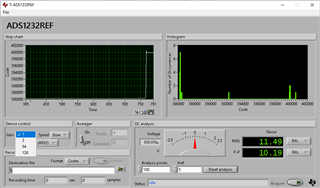


【Summary】 I think there is some rule for how Gain is set in Scale mode and Analysis mode, and I would like to know it.


Best Regards,
Hiroaki Yuyama
  • Hi Hiroaki Yuyama TED,

    Our ADS1232 apps expert is out of the office today, so we will review your post next week and respond to you then. Thanks for your patience.

    -Bryan

  • Hello Hiroaki Yuyama,

    In SCALE mode, the firmware automatically calculates the required gain setting based on the calibration weight.  After reset, the default values will be Gain=128.  Although you can use Console mode to read these values, the firmware will always overwrite the gain value based on the weight calibration coefficients.  Console mode should only be used to read parameter values and PC Software should not be used with SCALE mode as the results can be unpredictable.

    Analysis mode is the intended mode of operation when using either Console or PC Software.  When the firmware resets, it initially defaults to GAIN=1, and then sets the gain to the higher range before the beginning of readings.  After readings have started, you can use the console commands to change any of the parameters, including GAIN.

    Regards,
    Keith Nicholas
    Precision ADC Applications

  • Hello Keith-san.

    Thank you for your reply.

    We now understand the behavior of analysis mode in scale mode.

    Best Regards,
    Hiroaki Yuyama
  • Hello Keith-san.

    We have follow-up questions from last time..

    In SCALE mode, we understand that the gain is rounded to the range that can accommodate the heavier weight calibration: 5kg.

    In Analysis mode, can we understand that the higher range means that the initial reading is always x128?
    *This is the case when not linked to a console/PC software (standalone operation).
    Our Question intention is, "We want to see the performance at x128 this time,but we don't want to judge it based on the x64 result."

    For example, "We want other people with no knowledge to monitor only the P-P resolution without using a console or PC software."

    The above is the purpose of the evaluation with ADS1232REF.

    Best Regards,
    Hiroaki Yuyama
  • Hello Hiroaki Yuyama,

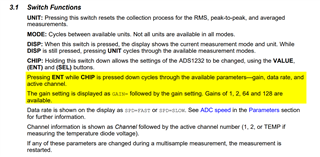
    When using Analysis mode, you can press the ENT button while holding down the CHIP button to cycle through the settings, including Gain.  You can then set the gain to any of the available values of 1, 2, 64, or 128.  After manually setting the Gain, you can then monitor any of the available measurements.

    Regards,
    Keith

  • Hello Keith-san.

    Thank you for your response regarding the analysis mode gain settings.

    We will have customers select the gain at 128x by pressing the ENT button while holding down the CHIP button.

    Best Regards,
    Hiroaki Yuyama


  • Hello Keith-san.

    The customer responded to your advice and said that they were able to set the gain successfully.

    That's all the questions, so I'll close this thread.

    Thanks and Best Regards,
    Hiroaki Yuyama