This thread has been locked.

If you have a related question, please click the "Ask a related question" button in the top right corner. The newly created question will be automatically linked to this question.

ADS1255: Spikes appearing when reading certain values

Part Number: ADS1255
Other Parts Discussed in Thread: ADS1219, ADS1235

Tool/software:

Hello everyone,

I need your help to figure out what is wrong with the ADC1255.

I use it to read a NTC ( 10kΩ at 25°C ) and convert it to temperature. The problem is that when the ADC is supposed to read certain value like 0V which translates to 10kΩ => 25°C. There are spikes occurring, so instead of reading 0, the ADC sends a value like 65530, -65555 and so on. Those spikes also appear to follow a pattern that I cannot explain.

First I thought it was due to the calibration values. So I disabled the auto calibration and set the OFCAL ( offset calibration ) register to 0. It did not change anything.

Then I thought it was a hardware issue, but the ADC seems to work pretty well almost all the time.

I tried those solution on 3 differents ADCs and nothing seems to work.

Here are the registers that I set, they aren't changed on runtime:

Differential channels are set; auto calibration is set; analog buffer is on; Sampling rate = 25 or 1 000; PGA = 1;

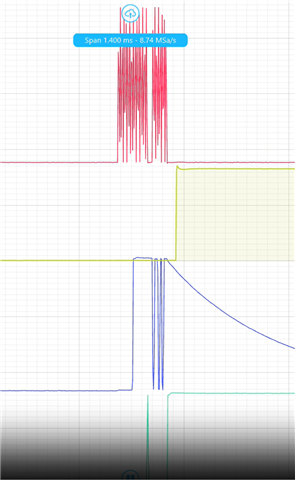
Here you can see how it looks like.

The spikes are due to the ADC reading being incorrect.

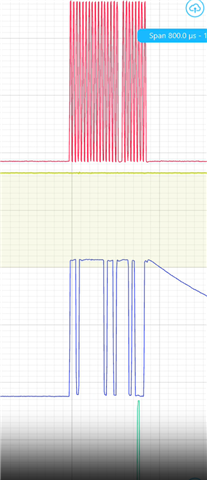
And here is another one, notice the patter.

Thanks for reading and for any guidance you can give.

Best regards,

  • Hi Halidi Noudjoumou,

    Can you try applying a simple DC source to see if the ADC can convert this signal correctly? A simple 1.5V AA battery should work

    Also please send the actual data codes you receive from the ADC in a table so we can review. This should be the ADC codes in decimal or hex.

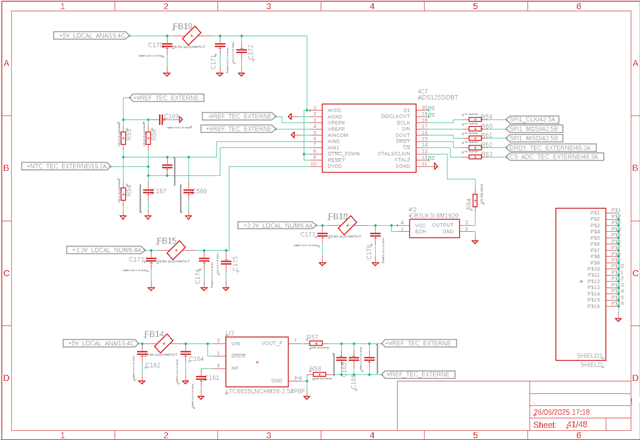
    Finally, please provide the schematic

    -Bryan

  • Hello Bryan,

    Thanks for the reply, I don't have access to the board right now but I will do that asap.

    Here is the schematic.

    ADS1255 Schematic

    In the CSV file you can find logs. The first column is the raw data from the ADC in decimal, the second column is their interpretation in temperature in °C.

    You can ommit the other columns.

    ads1255_logs_spikes.csv

    Best regards,

  • Hi Halidi Noudjoumou

    Can you provide the register settings you are using with the ADS1255?

    Can you also provide logic analyzer data of the communication? It would be great to see the data before, during, and after a "bad" conversion. Please include CS, DOUT, DIN, SCLK, and DRDY

    -Bryan

  • Hi Bryan,

    Here is the SPI peripheral setting:

    - 8bits

    - MSB first

    - 281.25 kbits/s

    - Polarity = 0 and Phase = 2 edges

    The ADS1255 setting:

    - NSEL = 1; PSEL = 0

    - auto calibration = 1; analog buffer = 1

    - PGA = 0

    - Data Rate = 0b10100001 or 0b01000011; it doesn't matter the problem persists

    That's it, that's the only register that modify, anything else is set to its default value. I tried to set the OFCAL to 0 but it doesn't work

    Below the ADS1255 reading 1.5V, it was fine.

    ADS1255 read 1.5V

    Red = Clock; Blue = MISO; Green = DRDY; Yellow = CS;

    The ADS1255 reading a "good" value, it is supposed to be close to 0.

    ADS1255 SPI read good value

    And then the same device reading a "bad' value, which is supposed to be close to 0.

    ADS1255 reading a bad value

    Hope this help.

    Best regards,

  • Hi Halidi Noudjoumou

    Keep in mind that the ADS1255 uses a binary twos complement format. So the code you are showing in the second image (looks like FFFF55h) is a very small negative number (e.g. if it is FFFF55h = -171d)

    So I don't think there is anything wrong here, maybe just a misunderstanding of the output data format

    -Bryan

  • Hi Bryan,

    Yes I did, I took great care to check that the conversion from 24 to 32 signed bits work perfectly, I use the same function as in all the others ADC and this is the first time I encounter this.

    I may have send the wrong figure in my last message because it is indeed a "small" negative number. I have added breakpoints and checked some of the "wrong" numbers in the software and here is what I got:

    first column = binary word from the ADC; second column = temperature representation

    -72 24.998193740844727
    -6 24.999849319458008
    122 25.003061294555664
    0 25.0
    86 25.00215721130371
    65480 26.6519718170166
    148 25.003711700439453
    65522 26.653038024902344
    -70 24.998245239257812
    65498 26.652427673339844
    -122 24.99694061279297
    -215 24.99460792541504
    13 25.00032615661621
    114 25.002859115600586

    Here you can see values nearing 0 in both positive and negative and then you can see jumps to around 65000 which translates to a wrong temperature reading.

    Additionally, the last graph in my initial post shows that this phenomenon occurs around values other than 0, and the amplitude of the jump is always on the order of 65000 in binary value.

  • Hi Halidi Noudjoumou,

    Can you send me the logic analyzer captures of the "bad" data so I can review. Similar to the images you showed before, but please include the data before and after the "bad" data in one capture, then a zoomed in capture of each of the three data ("good", then "bad", then "good" again). So four plots in total.

    For example, I'd like to see the logic analyzer captures for data "86", "65480", and "148". Of course you will have to take new data and captures, this is just an example of what I would like to see

    If you want to send more than 1x group that would help too

    -Bryan

  • Hello Bryan,

    Here are the captures.

    Red = Clock; Blue = Data line ( MISO ); Green = Chip Select;

    The maximum voltages are around 3.3V, I offsetted them to fit all three in one capture.

    This one is a "good" value right before the bad one. We can guess that it is a small positive number.

    ADS1255 good reading before bad one

    Now the "bad" value. When it does, a 0xFF appears on the middle byte for no apparent reasons.

    ADS1255 bad value

    Finally, a good value, this looks like a rather small negative number.

    ADS1255 good value after bad one

    All three captures comes right after the other, here is a 10 s video I took about the phenomenon on the SPI lines.

    I hope this will help.

    Thanks,

  • Hi Halidi Noudjoumou,

    Are you using the DRDY signal to indicate to your controller when to start clocking out data? If not, how are you choosing when to clock out data from the ADC?

    Can you also include the CS and DRDY pins your plots?

    I also asked to see a single capture that includes all three data so I can see the behavior of all of your signals before, during, and after the "bad" data.

    -Bryan

  • Hello,

    I use DRDY as an interruption which set a flag to notify for a new conversion ready. On the main loop I check if this flag has been set, clear it and process the data. Otherwise nothing happens, no data is being read

    Here is a video with the whole length of the communication.

    Red = Clock; Yellow = CS; Blue = MISO; Green = DRDY;

  • Hi Halidi Noudjoumou,

    Thanks for the video. I'd prefer to see screenshots to be honest because it is difficult to see the full picture in the video, but I think this should work

    I did notice that you don't see to be reading data consistently. I would expect that as soon as DRDY drops low you are clocking out data, and you are doing this every time DRDY drops low. But that is not what I am seeing in your scope captures. You can see in the screenshots below that there is a transition on DRDY (green trace) right in the middle of when you are clocking out data. This is going to result in bad data, and possibly the spikes you are seeing

    You must retrieve data from the ADC correctly by waiting for DRDY to drop low, then immediately sending your SCLKs to clock out data, ensuring that all data is clocked out before the next DRDY transition.

    -Bryan

  • Thank you, this solved the issue !

    I moved the ADC reading in the ISR and never encountered any spike for hours.

    There is one last thing that puzzle me. We have always used this way of processing our ADCs readings. By that I mean, set a flag on data ready interruption and read and process it on the main loop. Out of all the ADCs that we used namely the ADS1219, only the ADS1255 seems to cause this issue.

    Here is an extract of section 8.5.3.5 of the ADS1219 datasheet.

    It seems that the 1255 doesn't allow to read from the data register while a new data is being written while the 1219 does. So we have to be more careful when handling DRDY on the former.

    Thank you again.

  • Hi Halidi Noudjoumou,

    Yes this is correct, you cannot read during a DRDY transition with the ADS1255. This device was released in the early 2000s, so the interface requirements are different compared to something like ADS1219, which was released in 2018, or ADS1235, which was released in 2019

    I'm glad we could help resolve this issue

    -Bryan