This thread has been locked.

If you have a related question, please click the "Ask a related question" button in the top right corner. The newly created question will be automatically linked to this question.

AFE4490: Change the ambient light cancellation current value and obtain waveform above 1.2V, which exceed the input full scale of the ADC. why?

Part Number: AFE4490


Tool/software:

Hi Ti experts,

During parameter tuning, I swept the AMBDAC of its allowed values while kept rest register values unchanged.

 When the AMBDAC value equals 3μA, both the IR current  and the RED current exceed 1.2V(after the conversion of TIA), which is the full scale of internal ADC. 
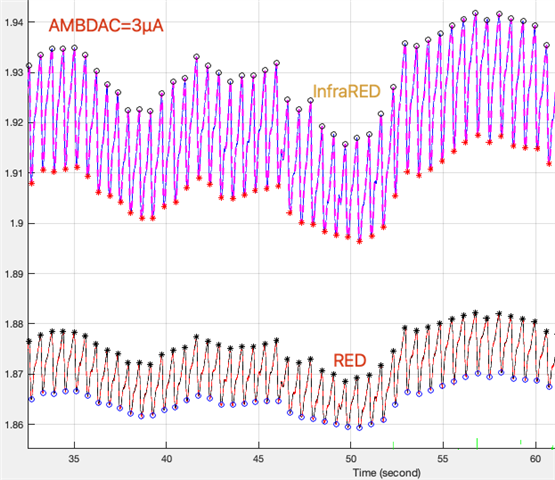
This is odd to be understood.

The off-line data are obtained with EVM GUI.

On the other hand, according to formula (2) on page 30 of the datasheet,

shall I expect  negative values of IR and RED waveform, since both TIA and ADC are differential type.

However, I don not see negative waveforms, but ADC overflow when AMBDAC equals 8μA.

Would you please explain these findings according to formula (2)?

Best Regards!

Wallace

  • Hello Wallace,

    I'm not sure what you mean by "expect negative values" for Red and IR waveforms -- in general, if the photodiode is connected to INN/INP correctly, I would expect positive currents. If your measured currents are causing the ADC to saturate at 1.2V, then VDIFF is too large to measured, and needs to be reduced.

    A few suggestions to avoid saturation:

    • Reduce the gain (RF/RI) to avoid saturating the ADC
    • Increase the cancellation current even further

    Regards,

    Payton

  • Hi Payton

    Thank you for your reply.

     According to formula (2) on page 30 of the datasheet,

    Let us suppose, Ipleth = 0.5μA and Iamb=0 in formula (2).

    A large Icanel set by AMBDAC can make VDIFF a negative value, can't it?

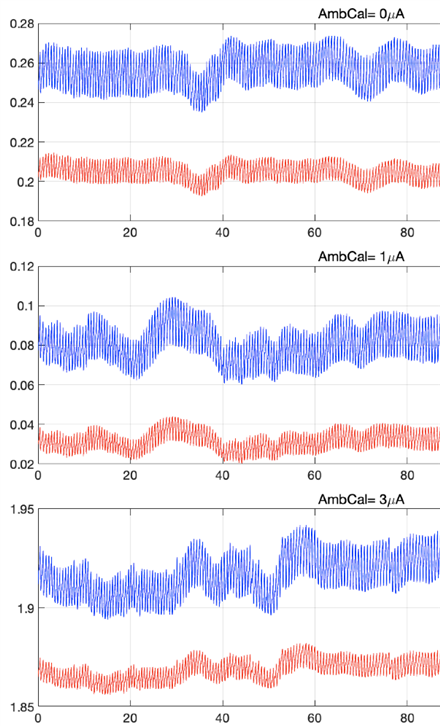
    In fact, the RED and InfraRED optical current waveforms were obtained with various AMBDEC values.  Please find those wavefroms below. The rest register values were kept unchanged during this AMBDAC value sweeping.

    However, I cannot link these waveform values to formula (2) and understand the impact of AMBDAC on waveform.

    Would you please help me?

    Best Regards!

    Wallace

    Above AMBDAC = 8μA, ADC overflow happens.

  • Hello Wallace,

    If you disconnect the photodiodes (so that you are only reading the current values of the DACs) what values do you receive?

    Regards,

    Payton

  • Hi Payton,

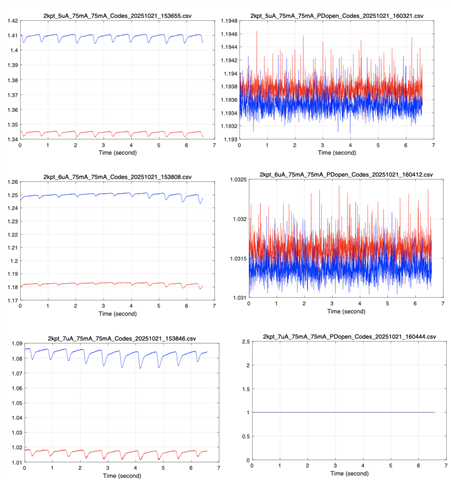
    Following your suggestion, I did experiment with/without a PD. Here are captured waveforms.

    please review these captured data and help me understand formula (2)

    Best Regards!

    Wallace

  • Hi Wallace,

    Can you plot the codes, instead of the calculated voltage values?

    Additionally, how are you calculating the voltages? Please make sure you are using the input voltage conversion provided in Table 7 of the datasheet.

    Table 7. Input Voltage Mapping of the ADC in the AFE4490

    Regards,

    Payton

  • Hi Payton,

    I review my codes of "two's Complement" conversion and found bugs, indeed!

    Thank you so much for guiding me to this depth!

    Now, after a new round of data post-processing, all data curves make sense to me. 

    The Icancel increases 1μA in each row from top to bottom, Vdiff increases -2*Icancel*Rg (in a negative way), according to formula (2). Rg=100kΩ was set in those experiments, so the increment of Vdiff= -2 *1μA *100kΩ= -0.2V

    However, I have still have one more question on the "two's Complement" conversion in the TI's EVM GUI.

    Each time the GUI save a "Codes.csv" file and a "Volts.csv" file, and with other 3 data files, when the "Save button" is pressed in the GUI. These data files share the same prefix and the same time-stamp-suffix in their  filenames.

    However, sometimes the values between the "Codes.csv" file and the "Volts.csv" file follow the definition of the  "two's Complement" conversion, like this screen shot.

    Sometimes they don't, like this screen shot. Why?

    Best Regards!

    Wallace