This thread has been locked.

If you have a related question, please click the "Ask a related question" button in the top right corner. The newly created question will be automatically linked to this question.

ADC3664EVM: Error 0 when opening ADC36xxEVM GUI

Part Number: ADC3664EVM
Other Parts Discussed in Thread: TSWDC155EVM

Hello,

I was following the EVM User's Guide, and when I got to step 10 (Open the ADC36xxEVM GUI. Allow a few seconds for the GUI to connect to the TSWDC155EVM FPGA Capture board) I ran into an error that stated "An error occured: 0"
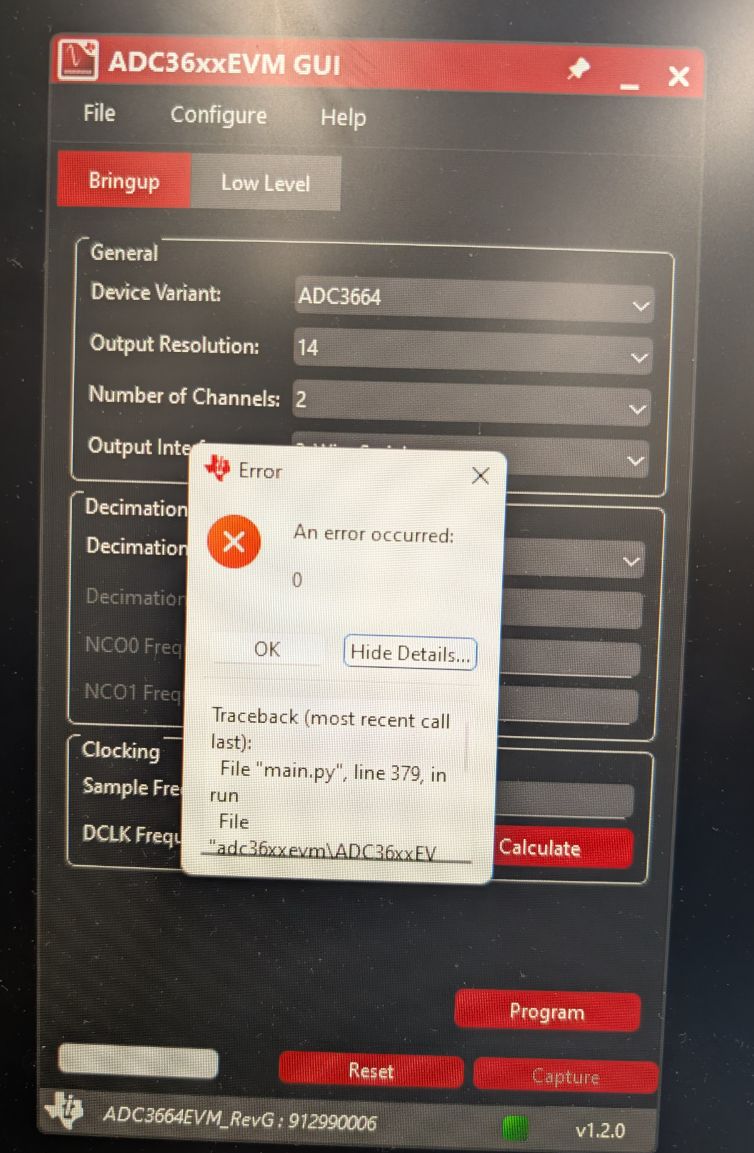
 gui_error_0.jpg

Clicking on more details showed:

Traceback (most recent call last):

File "main.py", line 379, in run

File "adc36xxevm\ADC36xxEVM_LVDS.py", line 157, in setup_handle

File "adc36xxevm\adc36xxapi_lvds\adc36xxapi_lvds.py", line 50, in __init__

KeyError: 0

I was wondering if there is any way to resolve this?


Thank you

  • Hi RC,

    The error you are encountering indicates that the PC was able to connect to the EVM, but was unable to communicate with the ADC. Please ensure that you are providing 12V power and a sample clock to the EVM, as these are both required to communicate with the ADC.

    Best,

    Luke Allen

  • Hi Luke,

    Thank you for the reply, that really helped narrow down the issue. For some reason the sample clock CLKn connector on my eval board had a "CLKp" sticker posted over it and vice versa on the CLKp connector, which led to me plugging in the sample clock wrong. It is now connected correctly and I not longer get that error.

    However, I now get a "[WinError 10061] No connection could be made because the target machine actively refused it" error. Do you know how to resolve that by any chance? Or would this be better answered in a new forum post?

    Best,

    RC

  • Hi RC,

    That error is a known bug with this GUI. Please try restarting the GUI, it should be able to connect to the EVM without erroring out after a retry. If this still does not work, please restart your PC and try again.

    Best,

    Luke Allen

  • Hi Luke,

    Thank you for the quick reply. I restarted the GUI and restarted my PC and am still getting the same error, unfortunately. I've also opened HSDC Pro before opening the ADC36xxEVM GUI, in case that matters. Are there any other ways to resolve this bug?

    Best,

    RC

  • Hi RC,

    This bug happens because the GUI is trying to connect to the FPGA server on port 50000. This server is opened in the background and bridges the data from the FPGA to be displayed in HSDC Pro.

    If this is still not working after closing/reopening the GUI multiple times, here are some suggestions:

    • Ensure you have installed Vivado Lab, and can connect to the TSWDC155EVM in the Vivado hardware manager.
    • See if there is something else on your PC running on port 50000. You can google how to do this. If so, you may need to kill this task before the GUI will work.
    • Check if your company's IT department block TCP communication between processes within your PC. If so, you will need to get permission to do this.

    Best,

    Luke Allen

  • Hi Luke,

    Thanks again for the help, that narrowed the issue down to Vivado Lab. We found it had issues verifying a digital signature, which was caused by our lab machine not being connected to the internet. Running it all on an internet connected PC resolved our issues.

    Best,

    RC