This thread has been locked.

If you have a related question, please click the "Ask a related question" button in the top right corner. The newly created question will be automatically linked to this question.

Facing problem with ADC1258EVM-PDK Plugin

Other Parts Discussed in Thread: ADS1258EVM-PDK, ADS1258, ADCPRO

Dear TI Employee and Community Members,

I have just received ADS1258EVM-PDK Evaluation Module with one extra ADS1258EVM board for evaluation purpose.

I have connected the ADS1258EVM Board with the MMB0 motherborad by following the instructions given in the user's guide provided in the CD.

I have set the jumpers and switches on the MMB0 as mentioned in the guide (figure 4) as follows:

-  Connected +5V and +5VA on jumper block J13 

- Left +5V and +VA disconnected on jumper block J13.

- As I intend to power up the MMB0 with the ac adapter (6V, 500mA) provided with the kit ,so I connected  J12.

- Connections for ADS1258 EVM board done according to figure 3 of user guide.

At next I have installed the latest version of ADCPro software from the TI website while the plugin file ads1258evm-pdk-plug-in-1.0.0.exe I have installed from the CD. I could not found the latest version of this file on the website.

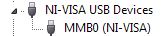
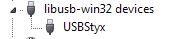
The NI-VISA USB Device Driver is successfully installed after connecting the MMB0 to computer (with windows XP) and I can see it in the device manager, but when I opened the ADCPro software to install  USBStyx Driver and wanted to load the ADS1258EVM-PDK Plugin, the software does not load the Plugin. I waited to see if the software load it but it doesnot. In the device manager the  NI-VISA USB Devices is not replaced with the LibUSB-Win32 driver according to the user guide.

I dont know what is the problem actually. Is it due to the wrong or outdated Plugin or it is due to power supply connections or may be some other?

Please help me fix out this problem.

Secondly I want to connect ALL of the 16 analog inputs (A0-A15) of the ADS1258EVM board to my sensor that gives output signal in the form of voltage signals.

Is it possible to see all of the 16 channels with ADCPro software.Or is their anyway to include or load the Labview VI that shows the 16 channels simultaneously?

I would be highly thankful for a quick reply.

Best Regards,

Faisal

  • Faisal,

    Lets start by getting all of your software up to date. You can find the most recent ADS1258EVM-PDK plug-in on the EVM-PDK product page here:

    http://www.ti.com/tool/ads1258evm-pdk

    Or here, for the direct link to the software:

    ftp://ftp.ti.com/pub/data_acquisition/ADCPro/Plugins/ads1258evm-pdk-plugin-1.2.3.exe

    Since version 1.0.0 of the plug-in is quite out of date I suggest you uninstall ADCPro, Reinstall ADCPro, then install the most recent version of the ADS1258EVM plug-in.

    Verify the below jumper settings:

    Ensure that J13B (+5VA to +5V) and J12 on the MMB0 are shunted.

    Faisal Rehman said:
    Is it possible to see all of the 16 channels with ADCPro software.Or is their anyway to include or load the Labview VI that shows the 16 channels simultaneously?

    Yes, this is possible in auto-scan mode. See section 9 of the ADS1258EVM-PDK User's Guide.

  • Dear Kevin,

    Thank you very much for your quick reply.

    I have checked all the jumper settings on the EVM borad and MMb0 motherborad.They seem Ok!

    I have also downloaded the latest version of ADCPro and intalled it. But I am unbale to access the FTP site

    ftp://ftp.ti.com/pub/data_acquisition/ADCPro/Plugins/ads1258evm-pdk-plugin-1.2.3.exe due to some unknown reason.


    Can you please share the Plugin file here or send it to me by email.

    faisal.rehman30@gmail.com

    Thanks!

    Best Regards

    Faisal

  • Thanks Kevin!!

    Everything is working now.

    Best Regards,

    faisal

  • Thanks for the feedback Faisal!  Let us know if there is anything else we can do to help.

  • Hi,

    I installed ADCPro version 2.0.1 build 4, with ADS1258EVM plugin version 2.0.0 downloaded from Ti website. I saw it located and read binary, then USB connection established, then firmware downloaded successfully, then DSP not ready, then TIMEOUT. I believe all software and firmware are latest version, I setup MMB0 exactly as the user's guide, and my OS is windows 7. Is this case an MMB0 hardware failure? Please help.

    Thanks,
    Peter

  • Hi Peter,

    There has been a common problem with the MMB0 driver not installing properly. I would try downloading and reinstalling the MMB0 driver from here:

    ftp://ftp.ti.com/pub/data_acquisition/ADCPro2/misc/drivers/64bit/mmb0_driver_install_x64-v1.0.0.0.msi

    Let me know if that solves the problem.

    Best Regards,
    Chris

  • Hi Christopher,

    I did try downloading and reinstalling the MMB0 driver from your link, but got the same problem. When loading ADS1258 plugin, after downloading firmware successfully, it says "DSP not ready ..." then timeout. The 8 segments LED show something like a letter S, but missing top segment.

    Regards,
    Peter

  • Hi Peter,

    You are indeed using the latest versions of ADCPro and the ADS1258EVM plugin; however, I still think there is a driver issue.
     

    Is your version of Windows 7 64-bit?

    I assumed it was; however, if not, then you may need to use the 32-bit MMB0 driver installer:
    ftp://ftp.ti.com/pub/data_acquisition/ADCPro2/misc/drivers/32bit/mmb0_driver_install_x86-v1.0.0.0.msi


    When you plug the MMB0 into the PC, do you see it enumerate in device manager as "MMB0 (NI-VISA)?

    ...If not, you may need to re-install ADCPro to get the NI-VISA driver. I would install it from this link:
    ftp://ftp.ti.com/pub/data_acquisition/ADCPro2/no_internet_version/adcpro-wlvrt-2.0.1.exe


    After attempting to load the ADS1258EVM plugin in ADCPro, does the MMB0 re-enumerate to "USBStyx"?

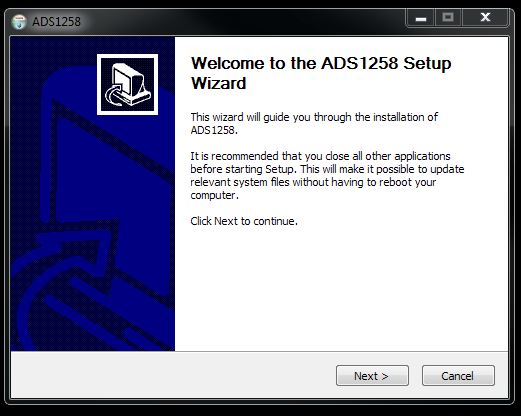
    ...If this is failing then the USBStyx driver many not have installed properly. Since it gets installed with the ADS1258EVM plugin, you may need to try re-installing the ADS1258EVM plugin. Here is the link:
    ftp://ftp.ti.com/pub/data_acquisition/ADCPro2/Plugins/ads1258-adcproplugin-2.0.0.exe

    You should see two setup wizards during installation:


    If re-installing the software doesn't fix the issue, I'll be glad to send you a replacement ADS1258EVM-PDK.

    Best Regards,
    Chris

  • Hi Chris,

    1. Yes, I used 32-bit version from your link for Windows 32 bit. Originally you send me 64-bit link, but I went up one level and saw 32-bit version.
    2. Yes, I saw NI-VISA (MMB0) USB device in Windows' Device Manager
    3. No, I didn't see USBStyx yet, because loading firmware and initializing MMB0 were not successfully due to "DSP not ready ..." and timeout.

    Please send me a replacement.

    Thanks,
    Peter