


Other Parts Discussed in Thread: AFE5809EVM, AFE5809, TUSB3410
Although AFE5809EVM is examined, starting of software does not go well.
Since a specification & situation is carried out below, if a cause is known, please let me know.
---------------------------------------------------------------------------------------------------------------------------------------------
1.PC
・PC:Dynabook R731/C Toshiba
・OS:windows7 32bit
・It is once and AFE5809 to the past. It operated in the combination of the evaluation board.
・Then, since some soft installations are carried out, the state may be changing.
・When carrying out defrosting & installation of sloc276b.zip and operating it, the following phenomenon occurred.
・Three were installed below.
・USB Driver : CDM20814_Setup.exe
・AFE5809EVM GUI Package\Installer Version\setup.exe
・TSW1250 to support AFE5809\Installer version\Volume\setup.exe
2.Installation of Soft
・Along with a manual, it installs sequentially from USB Driver and is PC re-start.
3.Turn on Power Supply of Evaluation Kit's Connection
・Each Evaluation Kit, and it is USB Connection.
=> at this time, "?" is attached to TUSB3410 by the attached file "device manager .png" which discovered a thing like abnormalities by the device driver.

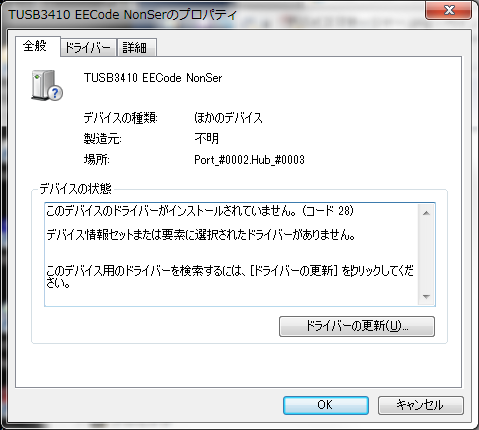
・A driver is not found even if it updates the driver displayed "There is no driver" by an attached file "TUSB3410 Propaty.png."
4.Starting of Operation Software
・Starting of AFE5809EVM
・When a setting change of the LNA gain was made, there is no generating of Error and the waveform of lower right Bus changed.
⇒The feel of which operation is likely to be done.
・Starting of TSW1250 GUI
・A push on Error5000 generating and attached file "Error5000.png" OK will generate the attached file "Error1073807346.png."


・When Continue is pushed, it is attached file "Error5007.png" generating.
⇒It settles down by above.
・It is attached file "Error1073807346.png" to push "Capture" generating

---------------------------------------------------------------------------------------------------------------------------------------------
If there is what should otherwise be checked, please let me know together.
Thank you for your consideration.


