Other Parts Discussed in Thread: AFE4400
Hi,
I am interfacing the AFE4400 to the Arduino and have a question to ask about the ADC_RDY signal from the AFE4400. According to the datasheet, it goes high every time the ADC finishes conversion of full samples- IR, Red, Ambient Red, and Ambient IR- and its frequency is the same as the pulse repetition frequency, i.e. 500 MHz by default. I am using the following code to detect the rising edge of the ADC_RDY pin (connected in this case to the Pin 2 of the Arduino Uno) and send data over serial once the four sample values are available.
#define ADC_RDY 2
bool lastValue = LOW;
String data = "blank";
void loop()
{
bool currentValue = digitalRead(ADC_RDY);
if ((currentValue != lastValue) && (currentValue == HIGH))
{
int IRLedValue = int(convert24To22Bits(SPIReadReg(LED1VAL)));
int RedLedValue = int(convert24To22Bits(SPIReadReg(LED2VAL)));
int ambientIR = int(convert24To22Bits(SPIReadReg(ALED1VAL)));
int ambientRed = int(convert24To22Bits(SPIReadReg(ALED2VAL)));
int netIR = int(convert24To22Bits(SPIReadReg(LED1_ALED1VAL)));
int netRed = int(convert24To22Bits(SPIReadReg(LED2_ALED2VAL)));
data = String(millis()) + "," + String(RedLedValue) + "," + String(ambientRed) + "," + String(IRLedValue) + "," + String(ambientIR) + "," + String(netRed) + "," + String(netIR);
Serial.println(data);
}
lastValue = currentValue;
}
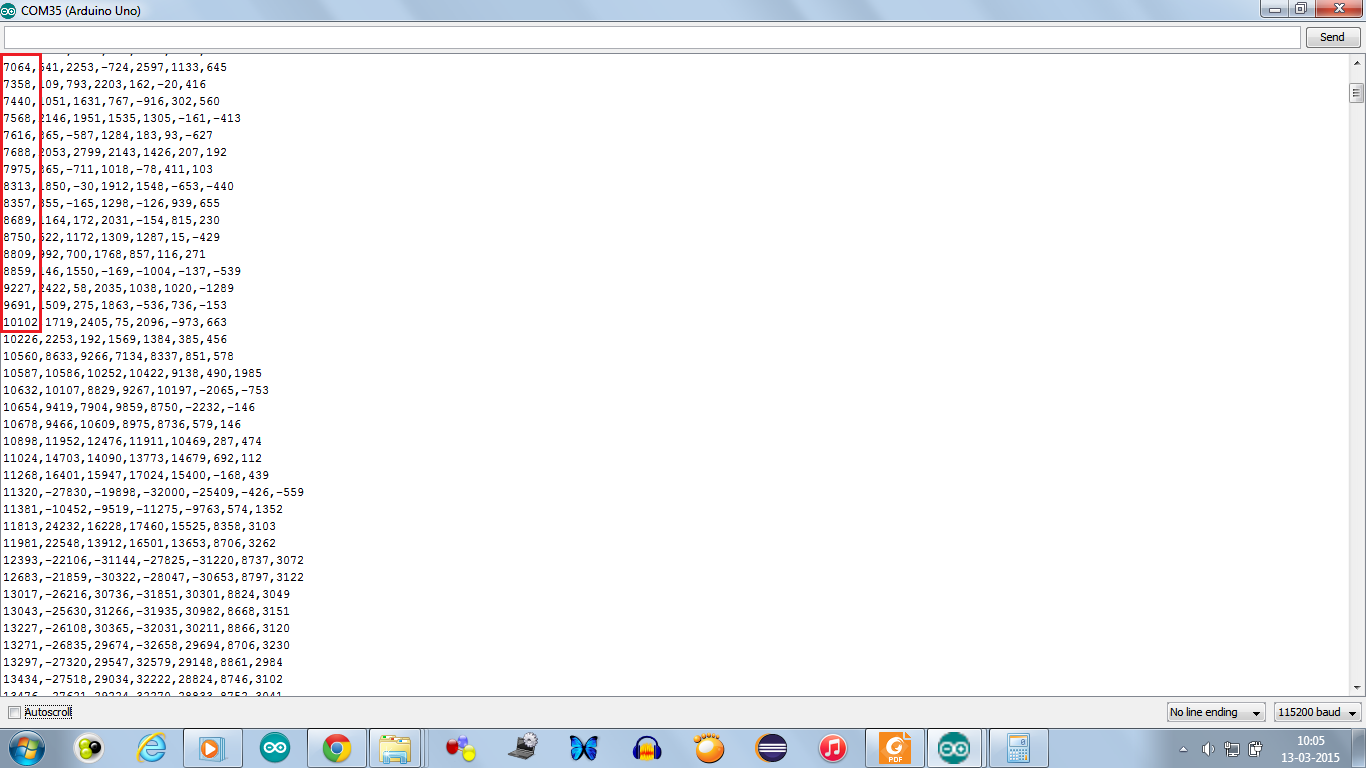
I have functions to convert the 24-bit value from the ADC to 22-bit resolution and a function called millis() to denote time since last run of the code in milliseconds. However in serial monitor, I do not see a 2ms separation between consecutive samples taken out of the ADC. Please help me understand why this is so. Is my detection of the rising edge in ADC_RDY correct?
Screenshot from the Arduino Serial Monitor below. The entries in red are the values indicated by the millis() function.